Simulate Variant Subsystem with Startup Activation Using parsim
R2026bThis example shows how you can simulate a Variant Subsystem with startup activation using parsim. You can simulate multiple configurations in parallel with the variant activation time set to startup using parsim. Each configuration will have one active variant.
Model
Open the model slexVariantSubsystemsWithParSim. The model contains a variant subsystem block Controller with two choices Linear Controller and Nonlinear Controller with the conditions VSS_MODE == 1 and VSS_MODE == 2 respectively. Set the Variant activation time to startup in the Block Parameters dialog box.
open_system('slexVariantSubsystemsWithParSim.slx');
Step 1 - Set up the active variant selection for each variant choice
Set up the active variant selection for each variant choice and set the number of simulation run equal to the variant selections. In this example model, we have two variant choices.
mdl = 'slexVariantSubsystemsWithParSim';
% open_system(mdl);
numSims = 2;
varControl = [1,2];
Step 2 - Create the SimulationInput object
Create the SimulationInput object for each simulation run and set the variant control value for each run.
in(1:numSims) = Simulink.SimulationInput(mdl);
for idx = 1:numSims
    in(idx) = in(idx).setModelParameter('SimulationMode', 'rapid', ...
                'RapidAcceleratorUpToDateCheck', 'on', ...
                'SaveTime', 'on', ...
                'SaveOutput', 'on');
    in(idx) = in(idx).setVariable('VSS_MODE',varControl(idx));
end
Step 3 - Use parsim to simulate the model
Use parsim to simulate the model in parallel for each variant control value.
out = parsim(in, 'ShowProgress', 'on');
[07-Aug-2026 04:44:53] Checking for availability of parallel pool...
[07-Aug-2026 04:44:53] Running simulations...
### Searching for referenced models in model 'slexVariantSubsystemsWithParSim'.
### Total of 1 models to build.
### Starting top model simulation target build for: slexVariantSubsystemsWithParSim
### Building the rapid accelerator target for model: slexVariantSubsystemsWithParSim
### Successfully built the rapid accelerator target for model: slexVariantSubsystemsWithParSim
[07-Aug-2026 04:45:04] Completed 1 of 2 simulation runs
### Searching for referenced models in model 'slexVariantSubsystemsWithParSim'.
### Total of 1 models to build.
### Starting top model simulation target build for: slexVariantSubsystemsWithParSim
[07-Aug-2026 04:45:06] Completed 2 of 2 simulation runs
You can simulate the model using parsim with SetupFcn. This is optional. If you run parsim without SetupFcn, set the RapidAcceleratorUpToDateCheck to on.
out = parsim(in,'ShowProgress','on', ...
 'SetupFcn',@() slexVariantSubsystemsWithParSim_script_setup(mdl));
The setup script, slexVariantSubsystemsWithParSim_script_setup.m builds the rapid acceleration target for the model.
Step 4 - Plot the output values
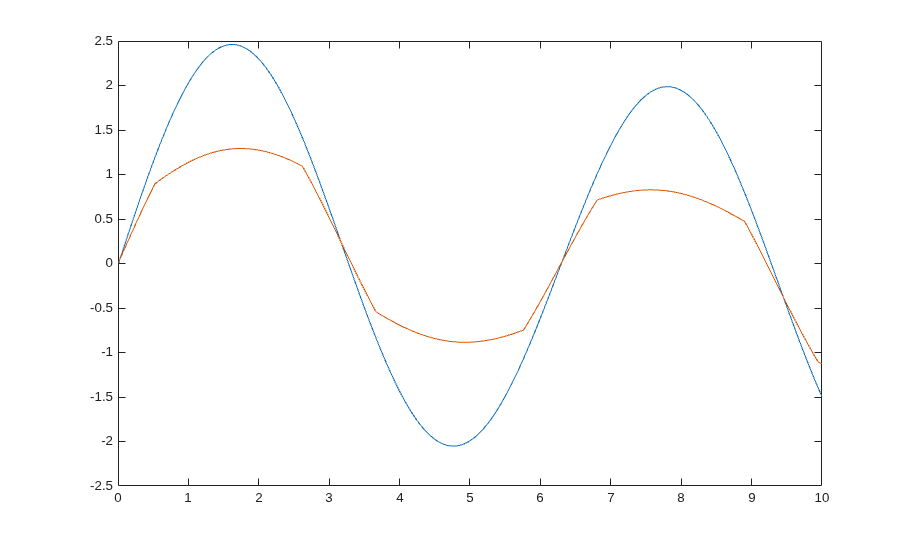
Now plot the results from each run.
for i = 1:numSims
    simOut = out(i);
    t = simOut.tout;
    y = simOut.yout;
    plot(t, y)
    hold on
end