NR Cell Performance Evaluation with Physical Layer Integration
R2026bThis example shows how to use full physical layer (PHY) processing in system-level simulation. The example models a 5G New Radio (NR) cell consisting of a set of user equipment (UE) nodes connected to a gNB node. The NR stack on the nodes includes radio link control (RLC), medium access control (MAC), and PHY layers. The example also models channel impairments that you can customize. You can also run the example with abstract PHY and compare its performance with that of full PHY.
Introduction
This example models:
Full PHY with perfect channel estimation. Use full PHY to model single-cell scenarios.
Downlink (DL) channel quality measurements performed by UE nodes based on the channel state information reference signal (CSI-RS) received from the gNB. All the UE nodes in the cell use the same CSI-RS resource.
Uplink (UL) channel quality measurement performed by the gNB node based on the sounding reference signals (SRS) received from the UE nodes.
Free space path loss (FSPL).
Propagation channel model for the each link using custom CDL delay profiles or 3GPP TR 38.901 channel models.
Multiple-input multiple-output (MIMO) antenna configuration.
The example assumes that the nodes send the control packets out-of-band. A source node sends an out-of-band packet directly to the destination node bypassing the channel and without consuming time-frequency resources. The type of control packets include buffer status report (BSR), DL assignment, UL grant, physical downlink shared channel (PDSCH) feedback, and CSI report.
Physical Layer
The example uses 5G Toolbox™ for PHY layer operations performed by a UE and a gNB. The transmitter-side operations involve the PHY processing of a transport block received from MAC and its transmission. The receiver-side operations include the processing of the received waveform and sending the decoded information to MAC. For more information about the PDSCH and physical uplink shared channel (PUSCH) processing chains, see the NR PDSCH Throughput and NR PUSCH Throughput examples, respectively.
Channel Measurement and Reporting
To perform the DL channel measurement, a UE node uses CSI-RS. The gNB, on the other hand, uses SRS to perform the UL channel measurement. For more information about channel measurement and reporting, see the section 'Channel measurement and reporting' in the example NR Cell Performance Evaluation with MIMO.
Scenario Configuration
Create the wireless network simulator.
rng("default") % Reset the random number generator numFrameSimulation =40; % Simulation time in terms of number of 10 ms frames networkSimulator = wirelessNetworkSimulator.init;
To enable full PHY processing, set the PHY type (phyType) to "full-phy". To use abstract PHY, set phyType to "abstract-phy". All nodes (gNB and UE nodes) must use the same PHY processing method.
phyType =  "full-phy";
Create a gNB node. Specify its name, position, carrier frequency, channel bandwidth, subcarrier spacing, PHY type, transmit power, number of transmit antennas and receive antennas. Set the SRS transmission periodicity (in slots) for all UEs connecting to this gNB.
gNB = nrGNB(Name="gNB",Position=[0 0 30],CarrierFrequency=2.6e9,ChannelBandwidth=5e6, ...
    SubcarrierSpacing=15e3,PHYModel=phyType,TransmitPower=34, ...
    NumTransmitAntennas=8,NumReceiveAntennas=8,SRSPeriodicityUE=10);
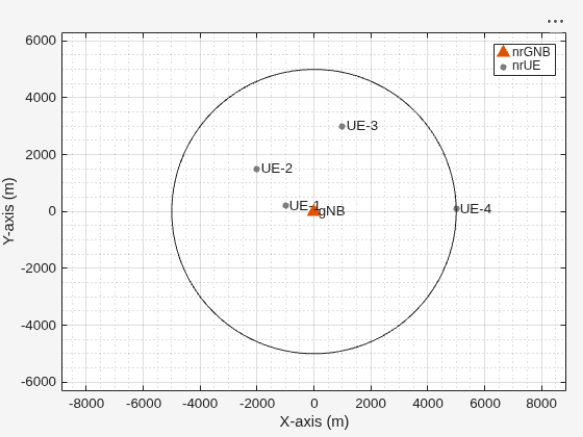
Create four UE nodes. Specify its name, position, transmit power, number of transmit antennas, receive antennas, and PHY type for each UE.
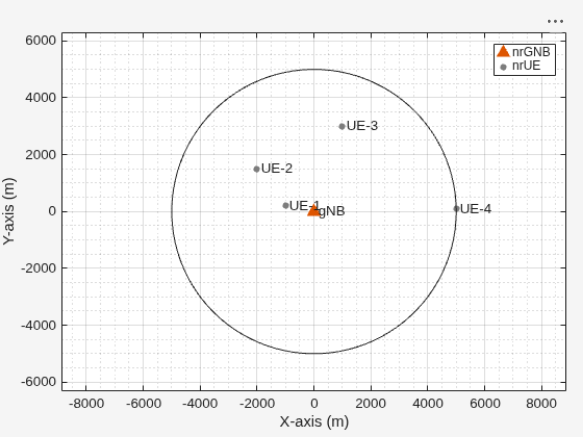
uePositions = [-1000 200 3; -2000 1500 3; 1000 3000 3; 5000 100 3];
ueNames = "UE-" + (1:size(uePositions,1));
UEs = nrUE(Name=ueNames,Position=uePositions,TransmitPower=23, ...
    NumTransmitAntennas=2,NumReceiveAntennas=2,PHYModel=phyType);
Create a cell by connecting the UE nodes to the gNB node. Install full buffer traffic in the DL and UL directions and specify the CSI report periodicity (in slots).
connectUE(gNB,UEs,FullBufferTraffic="on",CSIReportPeriodicity=10);Add the gNB node and UE nodes to the network simulator.
addNodes(networkSimulator,gNB)
addNodes(networkSimulator,UEs)
Use CDL channel model for all links. You can also run the example with a 3GPP TR 38.901 channel model.
channelModel ="CDL channel"; if strcmp(channelModel,"CDL channel") % Create an N-by-N array of link-level channels, where N represents the number % of nodes in the cell. An element at index (i,j) contains the channel instance % from node i to node j. If the element at index (i,j) is empty, it indicates % the absence of a channel from node i to node j. Here i and j represents the % node IDs. channelConfig = struct(DelayProfile="CDL-C", DelaySpread=300e-9); channels = hNRCreateCDLChannels(channelConfig, gNB, UEs); % Create a custom channel model using channels and install the custom channel on % the simulator. Network simulator applies the channel to a packet in transit % before passing it to the receiver. customChannelModel = hNRCustomChannelModel(channels,struct(PHYModel=phyType)); addChannelModel(networkSimulator,@customChannelModel.applyChannelModel) else % Model a rural macro scenario, as defined in the 3GPP TR 38.901 channel model, % using the h38901Channel object. % Define scenario boundaries pos = reshape([gNB.Position UEs.Position],3,[]); % X-coordinate of the left edge of the scenario in meters minX = min(pos(1,:)); % Y-coordinate of the bottom edge of the scenario in meters minY = min(pos(2,:)); % Width (right edge of the 2D scenario) in meters, given as maxX - minX width = max(pos(1,:)) - minX; % Height (top edge of the 2D scenario) in meters, given as maxY - minY height = max(pos(2,:)) - minY; % Create the channel model channel = h38901Channel(Scenario="RMa",ScenarioExtents=[minX minY width height]); % Add the channel model to the simulator addChannelModel(networkSimulator,@channel.channelFunction); connectNodes(channel,networkSimulator); end
Capture IQ Samples
To capture IQ samples for all the nodes in the simulation, enable the enableIQSampleCapture flag. A node only captures the IQ samples transmitted on the node's reception frequency at a time when the node expects a reception. In addition to the signal of interest to the node, the captured IQ samples may include interfering signals. The node captures the IQ samples after the waveform passes through the channel. In the captured output, zeros represent the reception inactivity duration of the node. The reception inactivity means the node did not receive any relevant IQ signal.
Capture the IQ samples of the nodes by using the wirelessIQLogger object. At the end of the simulation, the simulation stores the IQ samples of the corresponding nodes in a MAT file with the filename format NodeName_NodeID_CenterFrequency_Bandwidth_yyyyMMdd_HHmmss.mat, where:
NodeName— Name of the node.NodeID— Numeric ID of the node.CenterFrequency— Center frequency of the carrier in MHz.Bandwidth— Channel bandwidth in MHz.yyyyMMdd— Date of file creation, in the format year, month, day.HHmmss— Time of file creation, in the format hour, minute, second, using the 24-hour clock format.
When you enable the IQ sample capture, the simulation can consume significant memory if many nodes exist or you run the simulation for a long duration. In addition the simulation generates one MAT file per node, which can consume significant disk space. For example, the simulation that captures 100 million samples generates a MAT file of size approximately 1.5 GB. Also, the IQ sample capture can result in longer simulation runtime.
if strcmp(phyType,"full-phy") % IQ sample capture only applies to full PHY enableIQSampleCapture =false; if enableIQSampleCapture % Set up IQ sample capture on gNB iqSampleObj = wirelessIQLogger(gNB); % Uncomment this code to set up IQ sample capture on the UEs % uesToCapture = UEs(1:2); % Select the first 2 UEs for IQ sample capture % iqSampleObj = [iqSampleObj wirelessIQLogger(uesToCapture)]; end end
Log Traces
Logging of traces includes information that the example records for analysis after the simulation completes. To enable the logging of traces, set the 'enableTraces' flag to true. You can log this information periodically, like every slot, or in response to specific events. The example supports logging of these traces:
Periodic logs for the scheduler and PHY for each slot.
Logs of scheduling assignments, which are event-based and occur when the scheduler issues DL and UL grants to the UEs.
For information on the format of the logged information, see the NR Cell Performance Evaluation with MIMO example.
If you set the enableTraces flag to false, the simulation does not log any traces.
enableTraces =  true;
true;Set up the scheduling logger and the PHY logger.
if enableTraces
    % Create an object to log scheduler traces
    simSchedulingLogger = helperNRSchedulingLogger(numFrameSimulation,gNB,UEs);
    % Create an object to log PHY traces
    simPhyLogger = helperNRPhyLogger(numFrameSimulation,gNB,UEs);
end
Set the number of updates for the metrics plot per second, numMetricPlotUpdates, during the simulation. The example periodically updates the metrics plots.
numMetricPlotUpdates =  25;
25;Set up the metric visualizer.
metricsVisualizer = helperNRMetricsVisualizer(gNB,UEs, ...
    RefreshRate=numMetricPlotUpdates,PlotSchedulerMetrics=true, ...
    PlotPhyMetrics=true);
Write the logs to a MAT-file. You can use these logs for post-simulation analysis.
if enableTraces
    simulationLogFile = "simulationLogs"; % For logging the simulation traces
end
Display the network topology.
networkVisualizer = wirelessNetworkViewer;
addNodes(networkVisualizer,gNB)
addNodes(networkVisualizer,UEs)
cellRadius = 5000; % In meters
showBoundary(networkVisualizer,Position=gNB.Position,BoundaryShape="Circle",Bounds=cellRadius);
Simulation and Performance Analysis
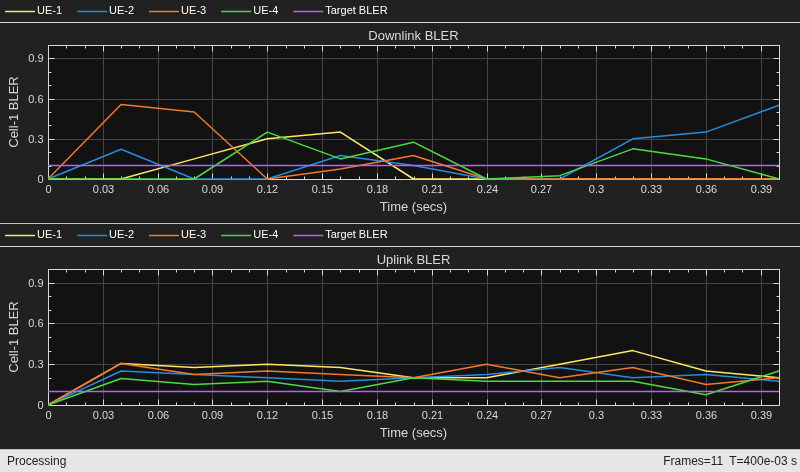
Run the simulation for the specified numFrameSimulation frames.
% Calculate the simulation duration (in seconds)
simulationTime = numFrameSimulation * 1e-2;

% Run the simulation
run(networkSimulator,simulationTime);
Retrieve per-node statistics.
gNBStats = statistics(gNB);
ueStats = statistics(UEs);
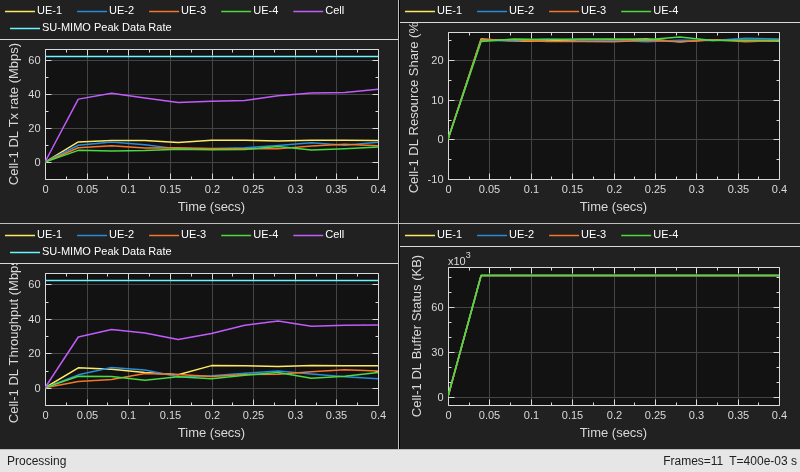
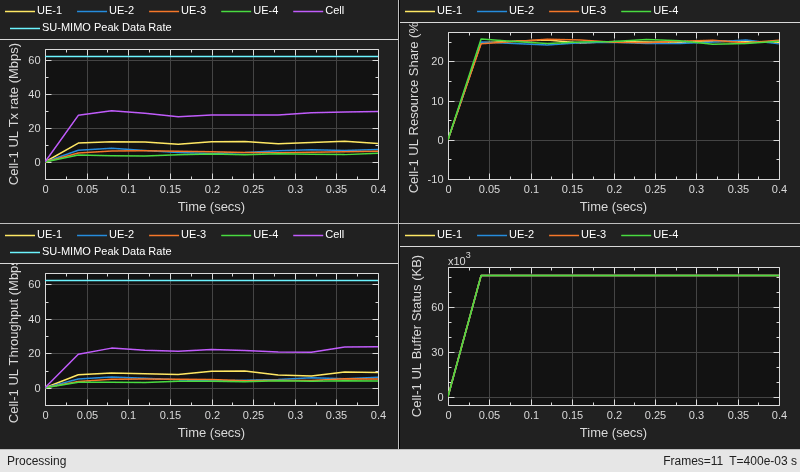
Compare the achieved values of the system performance indicators with their theoretical peak values, which assume zero overheads. The displayed performance indicators include the achieved data rate (UL and DL), spectral efficiency (UL and DL), and block error rate (UL and DL). This example calculates the theoretical peak value based on the specifications defined in the 3GPP TR 37.910. These specifications define the peak value as the total data bits a single mobile station can receive without errors, using all the radio resources available for either UL or DL. For additional details on peak data rate calculation, see Simulation Visualizations.
displayPerformanceIndicators(metricsVisualizer)
Peak UL throughput: 62.21 Mbps
Achieved cell UL throughput: 21.78 Mbps
Achieved UL throughput for each UE: [8.36        5.16        4.64        3.62]
Peak UL spectral efficiency: 12.44 bits/s/Hz
Achieved UL spectral efficiency for cell: 4.36 bits/s/Hz
Block error rate for each UE in the UL direction: [0.27       0.215       0.232       0.167]

Peak DL throughput: 62.21 Mbps
Achieved cell DL throughput: 33.79 Mbps
Achieved DL throughput for each UE: [11.51         8.06         7.59         6.64]
Peak DL spectral efficiency: 12.44 bits/s/Hz
Achieved DL spectral efficiency for cell: 6.76 bits/s/Hz
Block error rate for each UE in the DL direction: [0.081       0.169       0.126       0.119]
The simulation results show that the achieved throughput is significantly less than theoretical peak. This outcome is expected because the peak value assumes the use of the highest modulation-and-coding-scheme (MCS) for all the packets and no failures in packet reception. In contrast, the simulation selects an MCS that limits the packet error rate, based on channel quality measurements from reference signals (CSI-RS and SRS). In this scenario, the UEs are far from the gNB. Further, the example models the links with a CDL channel, leading to a dynamic selection of MCS.
Each UE receives about 25% of the resources, reflecting the behavior of a round-robin scheduling strategy with four UEs.
Simulation Visualization and Logs
To evaluate the performance of the cell, the example includes various runtime visualizations. For further details on the runtime visualizations presented, refer to Simulation Visualizations.
The example saves the simulation logs in a MAT-file for post-simulation analysis. For more information about the logged information, see the NR Cell Performance Evaluation with MIMO example.
if enableTraces
    simulationLogs = cell(1,1);
    if gNB.DuplexMode == "FDD"
        logInfo = struct(DLTimeStepLogs=[],ULTimeStepLogs=[], ...
            SchedulingAssignmentLogs=[],PhyReceptionLogs=[]);
        [logInfo.DLTimeStepLogs,logInfo.ULTimeStepLogs] = ...
            getSchedulingLogs(simSchedulingLogger);
    else % TDD
        logInfo = struct(TimeStepLogs=[],SchedulingAssignmentLogs=[], ...
            PhyReceptionLogs=[]);
        logInfo.TimeStepLogs = getSchedulingLogs(simSchedulingLogger);
    end
    % Get the scheduling assignments log
    logInfo.SchedulingAssignmentLogs = getGrantLogs(simSchedulingLogger);
    % Get the Phy reception logs
    logInfo.PhyReceptionLogs = getReceptionLogs(simPhyLogger);
    % Save simulation logs in a MAT-file
    simulationLogs{1} = logInfo;
    save(simulationLogFile,"simulationLogs")
end
Further Exploration
Try running the example with these modifications.
Use abstract PHY and compare its performance with that of full PHY.
Visualize the captured IQ samples. Capture the IQ samples by enabling the
enableIQSampleCaptureflag. To visualize the captured IQ samples, use thespectrumAnalyzerobject (DSP System Toolbox). For example, to visualize the IQ Samples captured at the gNB node, uncomment this code.
% if enableIQSampleCapture && strcmp(phyType, "full-phy")
%     gNBIQSamples = load(iqSampleObj(1).FileName);
%     scope = spectrumAnalyzer(SampleRate=gNBIQSamples.Fs);
%     scope(gNBIQSamples.Waveform);
% end
Supporting Functions
The example uses these helpers:
helperNRMetricsVisualizer: Implements metrics visualization functionalityhelperNRSchedulingLogger: Implements scheduling information logging functionalityhelperNRPhyLogger: Implements PHY packet reception information logging functionalityhNRCustomChannelModel: Implements channel modeling functionalityhNRCreateCDLChannels: Creates CDL channels for gNB-to-UE and UE-to-gNB linksh38901Channel: Implements the 3GPP TR 38.901 channel modelhNRKPIManager: Implements functionality for calculating key performance indicators
References
[1] 3GPP TS 38.104. “NR; Base Station (BS) radio transmission and reception.” 3rd Generation Partnership Project; Technical Specification Group Radio Access Network.
[2] 3GPP TS 38.214. “NR; Physical layer procedures for data.” 3rd Generation Partnership Project; Technical Specification Group Radio Access Network.
[3] 3GPP TS 38.321. “NR; Medium Access Control (MAC) protocol specification.” 3rd Generation Partnership Project; Technical Specification Group Radio Access Network.
[4] 3GPP TS 38.322. “NR; Radio Link Control (RLC) protocol specification.” 3rd Generation Partnership Project; Technical Specification Group Radio Access Network.
[5] 3GPP TS 38.331. “NR; Radio Resource Control (RRC) protocol specification.” 3rd Generation Partnership Project; Technical Specification Group Radio Access Network.
[6] 3GPP TR 37.910. “Study on self evaluation towards IMT-2020 submission.” 3rd Generation Partnership Project; Technical Specification Group Radio Access Network.

