Online CSI Feedback Training in Python with MATLAB Data Generation
R2026bThis example shows how to train a PyTorch® autoencoder for channel state information (CSI) feedback compression in Python® with new 5G NR channel data generated on demand in MATLAB® at each training iteration. You use the MATLAB Engine API for Python to call 5G Toolbox™ functions within an online training loop implemented in Python, enabling continual adaptation to evolving channel conditions.
Unlike offline training on a fixed data set, online training generates new data at each iteration, enabling the model to adapt as conditions change. Generating new data is important for two-sided architectures like CSI feedback compression, where encoder updates alter the decoder input distribution, and for adapting deployed networks to nonstationary channels.
In this example, you:
Connect Python to MATLAB using the MATLAB Engine API.
Configure realistic 5G NR channel data generation in MATLAB.
Train a CLNet autoencoder in PyTorch in serial mode or parallel mode using background data generation.
Evaluate the trained network and compute performance metrics (NMSE, correlation) in MATLAB.
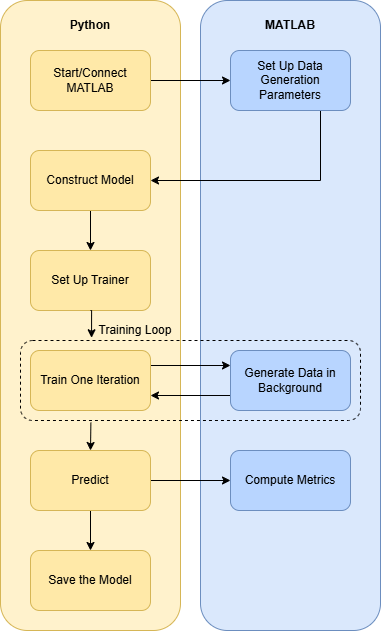
Before running this example, install the MATLAB Engine API for Python as described in Get Started with MATLAB Engine API for Python.
Share MATLAB Engine
You can connect to an existing MATLAB session or start a new one from Python. To make an existing MATLAB session available to Python, set shareMATLABSession to true, which calls the matlab.engine.shareEngine function.
shareMATLABSession =true; if shareMATLABSession if matlab.engine.isEngineShared fprintf('MATLAB session already shared: %s\n', matlab.engine.engineName); else matlab.engine.shareEngine; fprintf('MATLAB session is now shared\n'); end end
MATLAB session already shared: MATLAB_34688
In the Python script, use matlab.engine.connect_matlab to connect to the shared MATLAB session. Connecting to a shared session lets you analyze variables directly in the MATLAB workspace while the Python script runs. The shared session remains available until you close MATLAB.
The following workflow assumes you shared your MATLAB session. To launch a new MATLAB session from the Python script, see Get Started with MATLAB Engine API for Python.
Run Python Script
The csi_feedback_online_training.py script implements the complete workflow for online training of the CSI feedback compression model by calling MATLAB in Python. The sections that follow explain the steps in the workflow. Ensure the libraries listed in the requirements_csi_feedback.txt file are installed. For more information, see Install and Configure Python for Use in MATLAB.
After you start a shared session and configure Python, execute the Python script from the terminal where your Python environment is set up:
python csi_feedback_online_training.py
In each iteration of the training loop, the script calls MATLAB to generate new data and trains the PyTorch neural network.
Required Python Libraries
The Python script imports the libraries listed in requirements_csi_feedback.txt file and the following modules for MATLAB integration:
import matlab
import matlab.engine
import csi_feedback_wrapper
The imported libraries include:
matlab: A Python package installed as part of the MATLAB Engine API. It provides data types compatible with MATLAB (such asmatlab.double) that let you pass data between Python and MATLAB.matlab.engine: A submodule of the MATLAB package. It provides the MATLAB Engine API functions to start, connect, and communicate with MATLAB sessions from Python.csi_feedback_wrapper: A custom Python module that defines functions for constructing, training, and evaluating the CLNet model
Connection to MATLAB Engine
The Python script connects to the shared MATLAB session, if share_MATLAB_session is set to True, with the following code:
print("Connecting to MATLAB Engine...")
eng = matlab.engine.connect_matlab()
If you have not shared a MATLAB session, the Python script uses the following code to a launch a new MATLAB session:
print("Starting a MATLAB Engine...")
eng = matlab.engine.start_matlab("-nodesktop")
The current directory is added to MATLAB search path with the following code:
eng.addpath(os.getcwd())
Ensure the shareMATLABSession variable in MATLAB and the share_MATLAB_session variable in Python are both set to true for connecting Python to the shared MATLAB session.
5G NR Channel Data Parameters
The Python script calls the MATLAB helper function hCSISetupDataParameters to set up the carrier, channel model, and data generation parameters.
dataGenerationInfo, carrier, channel, normParams, inputLayerSize = eng.hCSISetupDataParameters(nargout=5)
eng.workspace['dataGenerationInfo'] = dataGenerationInfo
eng.workspace['carrier'] = carrier
eng.workspace['channel'] = channel
eng.workspace['inputLayerSize'] = inputLayerSize
You can customize these parameters by editing the values defined in the hCSISetupDataParameters function. The script also writes the NR channel data parameters to the MATLAB workspace so that you can analyze them in the shared MATLAB session while the Python script runs. For more information, see Use MATLAB Engine Workspace in Python in Python.
The hCSISetupDataParameters function performs the following operations to enable consistent channel data generation throughout the online training process:
Configures a 5G NR carrier with specified bandwidth and subcarrier spacing.
Sets up a CDL-C channel model with appropriate delay profile and Doppler parameters.
Computes input layer dimensions based on channel configuration.
Returns normalization parameters for data preprocessing.
Stores data generation information for iterative channel realization.
Neural Network Training Parameters
The script defines the model architecture and training hyperparameters. You can also customize the training parameters by editing the script:
input_layer_size = np.array(inputLayerSize, dtype=np.int64).squeeze()
autoencoder_network = "CLNet"
compression_factor = 16             # CSI compression ratio
max_train_iter = 15                 # Training iterations (set to 15 for
                                    # faster execution; increase to ensure
                                    # complete training of the network)
initial_learning_rate = 1e-4        # Learning rate
mini_batch_size = 1300              # Mini-batch size (channel realizations per batch)
use_parallel = True                 # Enable background data generation
Key parameters include:
compression_factor: CSI compression ratio (e.g., 16 means the data is compressed to 1/16th of the original size)max_train_iter: Number of online training iterationsmini_batch_size: Number of channel realizations generated per training batchinitial_learning_rate: Learning rate for the optimizer
Neural Network Architecture
The script initializes the neural network model based on the configured parameters by using the csi_feedback_wrapper.py file. For more details on the PyTorch wrapper file, see Online Training and Testing of PyTorch Model for CSI Feedback Compression example.
print(f"Constructing {autoencoder_network} model...")
model = csi_feedback_wrapper.construct_model(autoencoder_network,input_layer_size,int(compression_factor))
The model uses an autoencoder architecture with an encoder (at the user equipment) and decoder (at the base station) to compress and reconstruct the CSI.
Trainer Setup
The trainer is set up in the script with hyper-parameters such as optimizer and batch size settings:
print("Setting up trainer...")
trainer = csi_feedback_wrapper.setup_trainer(model,initial_learning_rate,mini_batch_size)
Online Training Loop
The online training loop generates new channel data at each iteration and immediately uses it for training.
Background Data Generation and Training
For improved efficiency, csi_feedback_online_training.py sets use_parallel to True by default, so that the example overlaps background data generation. In this mode, data generation overlaps with model training.
# Parallel data generation and training loop
print("Initializing BackgroundRunner in MATLAB...")
runner = eng.hCSIDataGenRunner(dataGenerationInfo, carrier, channel, normParams, mini_batch_size, nargout=1)

for i in range(1, max_train_iter + 1):
    ht_real, hv_real = eng.feval(runner, nargout=2)
    loss = csi_feedback_wrapper.train_one_iteration(trainer, ht_real, hv_real)
    print(f"Iteration {i}/{max_train_iter} (Parallel) - Loss: {loss}")
The hCSIDataGenRunner function uses a helperBackgroundRunner System object™ to invoke hCSIPrepareSplits asynchronously. This setup generates channel state estimations on demand rather than pausing the training loop to wait for new samples. At each iteration, eng.feval(runner, nargout=2) fetches the next batch of preprocessed training and validation data. For details on the data generation and preprocessing steps, see Preprocess Data for AI-Based CSI Feedback Compression. For more information on helperBackgroundRunner, see Background Data Generation.
Serial Training
For training the model in serial mode, where data generation and training occur one after the other in the training loop, in the Python script set use_parallel to False so that the example uses serial data generation.
# Serial data generation and training loop
for i in range(1, max_train_iter + 1):
    ht_real, hv_real = eng.hCSIPrepareSplits(
        mini_batch_size, [10, 3], dataGenerationInfo, carrier,
        channel, normParams, nargout=2
    )
    loss = csi_feedback_wrapper.train_one_iteration(trainer, ht_real, hv_real)
    print(f"Iteration {i}/{max_train_iter} (Serial) - Loss: {loss}")
The hCSIPrepareSplits function, used in both training modes, takes mini_batch_size, splitRatio, dataGenerationInfo, carrier, channel and normParams as input and performs the following operations:
Generates a batch of channel realizations
Computes perfect channel estimates
Preprocesses the data (truncation, normalization)
Splits data into training and validation subsets
Returns data ready for immediate training
Inference
The Python script generates a dedicated test set to generate inference from the trained model.
print("Generating and preprocessing test data...")
num_frames = 500
HTest = eng.hCSIPrepareSplits(
    num_frames, [], dataGenerationInfo, carrier,
    channel, normParams, nargout=1
)

print("Running inference...")
t0 = time.perf_counter()
HPred = np.asarray(csi_feedback_wrapper.predict(trained_net, HTest), dtype=np.float32)
inference_time = time.perf_counter() - t0
The hCSIPrepareSplits function generates independent test data using the same NR channel data configuration as above but different random seeds, ensuring unbiased evaluation. This function returns a single data set when splitRatio is set to empty.
Performance Metrics Evaluation
The Python script calls the hCSIComputeMetrics helper function to evaluate the correlation and normalized mean squared error (NMSE) between the input and output of the autoencoder network.
mean_nmse, mean_rho = eng.hCSIComputeMetrics(
    HTest,
    HPred,
    nargout=2
)
eng.workspace['meanNMSE'] = mean_nmse
eng.workspace['meanRho'] = mean_rho
For more details on the computation of correlation and NMSE, see the Online Training and Testing of PyTorch Model for CSI Feedback Compression example.
Saving The Trained Network
The Python script saves the trained model in a .pt file with configuration metadata for future use.
checkpoint_name = f"{autoencoder_network}{compression_factor}"
print(f"Saving network to {checkpoint_name}...")

csi_feedback_wrapper.save(trained_net,checkpoint_name,autoencoder_network,input_layer_size,int(compression_factor))
The checkpoint includes the model state dictionary (all learned weights and biases) and configuration metadata for reproducibility.
Helper Functions and PyTorch Wrapper Template
helper3GPPChannelRealizations.mhelperBackgroundRunner.mhCSIDataGenRunner.mhelperComplexCosineSimilarity.mhCSIComputeMetrics.mhelperCSINMSELossdB.mhelperCSISplitData.mhelperPreprocess3GPPChannelData.mhCSIPrepareSplits.mhCSISetupDataParameters.mhelperNMSE.mrequirements_csi_feedback.txtCSIFeedback.pyclnet.pycsi_feedback_wrapper.pycsi_feedback_online_training.py
For details on the PyTorch wrapper template, see the Online Training and Testing of PyTorch Model for CSI Feedback Compression example.
Further Exploration
For the inverse workflow (calling Python from MATLAB), see:
For more information about CSI feedback compression and AI in wireless communications, see:
References
[1] Ji, Sijie, and Mo Li. "CLNet: Complex Input Lightweight Neural Network Designed for Massive MIMO CSI Feedback." IEEE Wireless Communications Letters, 10(10), 2318–2322. doi:10.1109/lwc.2021.3100493.

