6G Link-Level Simulation
R2026bThis reference simulation shows how to measure the throughput of a pre-6G link. It is based on 5G but allows you to explore larger bandwidths and subcarrier spacings than those in 5G systems. It also uses parallel processing to accelerate the simulation through multiple workers on the desktop or in the cloud.
Introduction
This example simulates a pre-6G physical link based on 5G. The transmitter encodes a transport block using CRC attachment, LDPC coding, and rate matching, then generates the physical channel through scrambling, QAM modulation, and layer mapping. It applies SVD-based precoding to both the physical channel and the reference signals. It then OFDM-modulates the result and sends it through a clustered delay line (CDL) MIMO propagation channel. The receiver performs timing synchronization, OFDM-demodulates the signal, estimates the channel, applies MMSE equalization, and decodes the transport channel. The simulation also supports HARQ. The example measures the link throughput and pre forward error correction bit error rate (BER) across a range of SNR points.
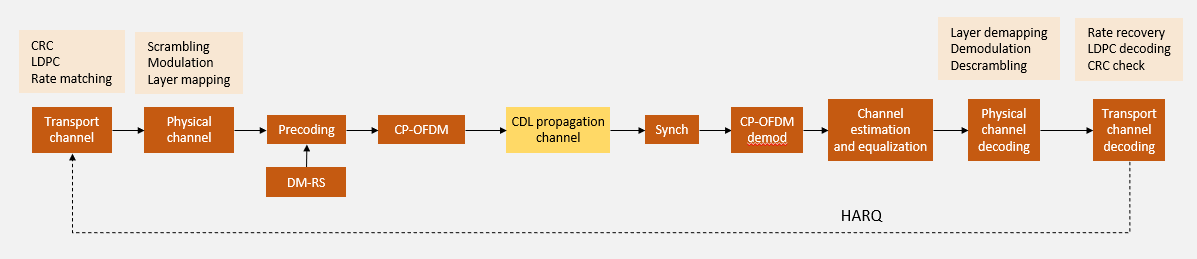
To reduce simulation time, this example implements the following acceleration techniques:
Optional GPU support
Parallel execution using a
parfor-loop: work is distributed across multiple CPUs or GPUsBatch processing: Group multiple independent transmissions into a single slot iteration, exploiting vectorized array operations
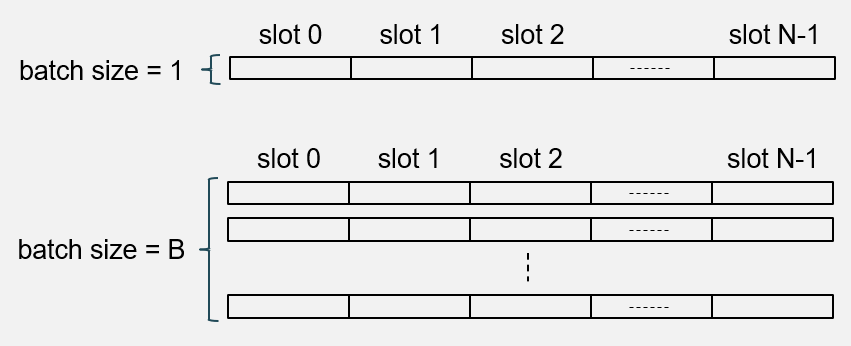
The diagram shows the concept of batching. When the batch size is one, only one slot is processed at a time. When the batch size is larger than one, multiple independent versions of the same slot are processed simultaneously. This technique can provide simulation speedups, particularly when using GPUs.
Set Simulation Parameters
Specify the SNR range to simulate.
simParameters = struct();                       % Simulation parameters structure
simParameters.SNRdB = 0:5;                      % SNR range (dB)
To achieve statistical richness this example simulates a number of independent trials per SNR point. A trial is an independent simulation of a number of consecutive slots, characterized by independent realizations of information bits, additive noise, and propagation channel.
simParameters.NumTrialsPerSNRPoint = 100; % Number of trials per SNR pointConfigure physical layer parameters: number of resource blocks, subcarrier spacing, modulation and coding scheme (MCS), and number of MIMO layers.
simParameters.NSizeGrid = 52;                   % Number of resource blocks
simParameters.SubcarrierSpacing = 30;           % kHz
mcsTables = nrPDSCHMCSTables();
simParameters.MCSTable = mcsTables.QAM64Table;  % MCS table
simParameters.MCS = 18;                         % MCS
simParameters.NumLayers = 1;                    % Number of transmission layers
% PRB bundling
simParameters.PRGBundleSize = 4;                % Any positive power of 2, or [] to signify "wideband"
Configure channel coding and HARQ. The number of slots per trial is set to NHARQProcesses*numel(rvSeq) so that every HARQ process can cycle through the full RV sequence at least once.
% HARQ configuration
simParameters.NHARQProcesses = 16;
simParameters.EnableHARQ = true;
simParameters.rvSeq = [0 2 3 1];
% Number of slots per trial
simParameters.NumSlotsPerTrial = simParameters.NHARQProcesses*numel(simParameters.rvSeq);
Set the number of transmit and receive antennas, and the channel parameters.
% Number of transmit and receive antennas
simParameters.NTxAnts = 4;
simParameters.NRxAnts = 2;

% CDL propagation channel parameters
simParameters.DelayProfile = "CDL-C";
simParameters.DelaySpread = 300e-9;
simParameters.MaximumDopplerShift = 5;
Specify the type of channel estimation: practical or perfect.
simParameters.PerfectChannelEstimator = false; % Channel estimator configurationSimulation Acceleration
Configure simulation acceleration options. This example supports three acceleration strategies. Enable parallel execution to distribute processing across the workers of a parallel pool. When you enable GPU computation and multiple GPUs are available, MATLAB automatically assigns a different GPU to each worker.
Set EnableParallelExecution to false to run sequentially, for example when debugging.
simParameters.EnableParallelExecution = true;
simParameters.UseGPU = "off";              % Computation on GPU or CPU ("on"/"off"/"auto")
The batch size determines how many independent transmissions are processed simultaneously using vectorized operations. For example, if the batch size is 10, the example simulates 10 independent trials simultaneously, each consisting of NumSlotsPerTrial consecutive slots. For more information about the batch size and its relationship with a trial, see the Accelerate 6G Link-Level Simulation with Batch Processing and GPU Execution example.
simParameters.BatchSize = 1; % Batch sizeInitialize MATLAB's global random number stream. This controls the random number generator outside the parfor-loop.
rng("default")Create a separate Threefry stream with substream support. Each worker will use an independent substream to ensure reproducible results in the parfor-loop. For more information, see Control Random Number Streams on Workers (Parallel Computing Toolbox) and Repeat Random Numbers in parfor-Loops (Parallel Computing Toolbox).
randStr = RandStream("Threefry",Seed=0);Create a parallel pool and get the number of workers if parallel execution is enabled. This example uses the CPU parallel computing approach introduced in the Accelerate Link-Level Simulations with Parallel Processing example.
[maxNumWorkers,constantStream] = createParallelPool(simParameters.EnableParallelExecution,randStr);
Display Simulation Length
The length of the simulation depends on the following parameters:
NumTrialsPerSNRPoint— Number of independent trials simulated per SNR point. More trials provide better statistical coverage.NumSlotsPerTrial— Number of consecutive slots in a trial. When you enable HARQ, each trial needs enough slots for all HARQ processes to complete their RV sequence at least once. This requirement prevents initial transient before steady-state operation from skewing the throughput statistics. While additional RV cycles per trial improve accuracy, they also increase simulation time and reduce parallel efficiency. For high parallel efficiency, keep trials as short as possible so that work is evenly distributed across workers.
Display the overall number of slots to simulate.
carrier = pre6GCarrierConfig(SubcarrierSpacing=simParameters.SubcarrierSpacing,NSizeGrid=simParameters.NSizeGrid);
totalNumSlots = ceil(simParameters.NumTrialsPerSNRPoint/simParameters.BatchSize)*simParameters.BatchSize*simParameters.NumSlotsPerTrial;
disp("Simulating "+totalNumSlots+" slots ("+(totalNumSlots)/carrier.SlotsPerFrame+" frames) per SNR point");
Simulating 6400 slots (320 frames) per SNR point
Create Parameter Combinations
Generate the channel seeds.
chSeeds = randi([0 2^32-1],ceil(simParameters.NumTrialsPerSNRPoint/simParameters.BatchSize),1);
Create the combination of all channel seeds for all SNR points in the matrix parameterCombinations. The table parameterCombinationsTable represents the parameter combinations in table form for easier inspection.
[parameterCombinations,parameterCombinationsTable] = allCombinations(simParameters.SNRdB(:), chSeeds);
Simulate Throughput
The simulation is based on a parallel loop that uses the workers from the parallel pool. If parallel execution is disabled, maxNumWorkers is set to 0, which converts the parfor-loop into a regular for-loop.
To debug the simulation code, disable parallel execution by setting EnableParallelExecution to false. Note that you cannot set breakpoints in the body of a parfor-loop, but you can set them in functions called from within it.
% Create empty results table
resultTable = table(Size=[size(parameterCombinations,1) 10], ...
    VariableNames=["SNR","chSeed","numSlotsPerTrial","batchSize", ...
        "numCodedBits","numCodedBitErrors","numBits","numCorrectBits","numBlkErrors","numTrBlks"], ...
    VariableTypes=["double","uint32","uint32","uint32","uint32","uint32","uint32","uint32","uint32","uint32"]);

allSNRdB = parameterCombinations(:,1);
allChSeed = parameterCombinations(:,2);

% Parallel processing. simulate link for all parameter combinations
parfor (pforIdx = 1:size(parameterCombinations,1), maxNumWorkers)
    % Set random streams to ensure repeatability
    % Use substreams in the generator so each worker uses mutually independent streams
    stream = constantStream.Value;      % Extract the stream from the Constant
    stream.Substream = pforIdx;         % Set substream value = parfor index
    RandStream.setGlobalStream(stream); % Set global stream per worker

    % Per worker processing: pre-6G link
    snrdB = allSNRdB(pforIdx);
    chSeed = allChSeed(pforIdx);
    trialResults = hRunPre6GLink(simParameters, snrdB, chSeed);

    % Per worker results
    resultTable(pforIdx,:) = table(snrdB, chSeed, ...
        trialResults.NumSlotsPerTrial, trialResults.BatchSize, ...
        trialResults.NumCodedBits, trialResults.NumCodedBitErrors, ...
        trialResults.NumBits, trialResults.NumCorrectBits, trialResults.NumBlkErrors, trialResults.NumTrBlks);
end
Summarize Throughput Simulation Results
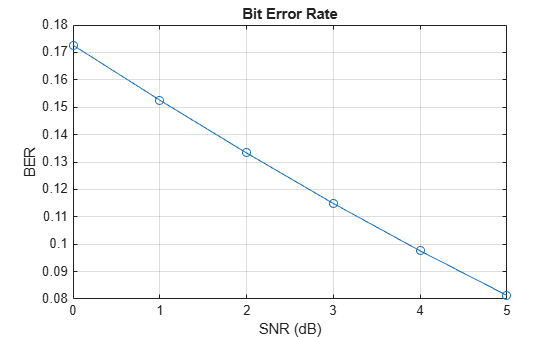
Aggregate per-trial results by SNR point and compute throughput metrics. The bit error rate (BER) is measured after equalization and before forward error correction.
simThPut = processResults(resultTable,carrier.SlotsPerFrame);
disp(simThPut)
    SNR (dB)    NumSlots    NumTrBlks      BER       Throughput (Mbps)    Throughput (%)
    ________    ________    _________    ________    _________________    ______________

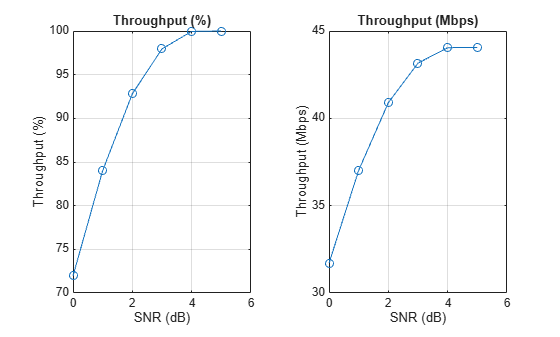
       0          6400        6400        0.17264         31.705              71.953
       1          6400        6400        0.15256         37.021              84.016
       2          6400        6400        0.13329         40.897              92.812
       3          6400        6400        0.11486         43.162              97.953
       4          6400        6400       0.097567         44.043              99.953
       5          6400        6400       0.081293         44.064                 100
Plot the throughput against the SNR.
figure; tiledlayout(1,2); nexttile
plot(simThPut.("SNR (dB)"),simThPut.("Throughput (%)"),"o-"); grid on
title("Throughput (%)"); xlabel("SNR (dB)"); ylabel("Throughput (%)")
nexttile
plot(simThPut.("SNR (dB)"),simThPut.("Throughput (Mbps)"),"o-"); grid on
title("Throughput (Mbps)"); xlabel("SNR (dB)"); ylabel("Throughput (Mbps)")
Plot the BER.
figure
plot(simThPut.("SNR (dB)"),simThPut.("BER"),"o-"); grid on
title("Bit Error Rate"); xlabel("SNR (dB)"); ylabel("BER")
Local Functions
function [maxNumWorkers,constantStream] = createParallelPool(enableParallelExecution,randStr)
%CREATEPARALLELPOOL Set up parallel pool and shared random stream.
%
%   [MAXNUMWORKERS,CONSTANTSTREAM] = CREATEPARALLELPOOL(ENABLEPARALLELEXECUTION,RANDSTR)
%   creates or reuses a parallel pool if ENABLEPARALLELEXECUTION is true
%   and the Parallel Computing Toolbox(TM) is available. Otherwise, falls
%   back to serial execution.
%
%   Inputs:
%       ENABLEPARALLELEXECUTION - Logical flag to enable parallel execution.
%       RANDSTR                 - RandStream object to share across workers.
%
%   Outputs:
%       MAXNUMWORKERS  - Number of workers (0 if running in serial).
%       CONSTANTSTREAM - parallel.pool.Constant wrapping RANDSTR, or a struct
%                     with field 'Value' when running in serial mode.

    if (enableParallelExecution && canUseParallelPool)
        pool = gcp; % create parallel pool, requires Parallel Computing Toolbox
        maxNumWorkers = pool.NumWorkers;
        constantStream = parallel.pool.Constant(randStr); %create a constant random stream to avoid unnecessary copying of the random stream multiple times to each worker
    else
        if (~canUseParallelPool && enableParallelExecution)
            warning("Ignoring the value of enableParallelExecution ("+enableParallelExecution+")"+newline+ ...
                "The simulation will run using serial execution."+newline+"You need a license of Parallel Computing Toolbox to use parallelism.")
        end
        maxNumWorkers = 0; % Used to convert the parfor-loop into a for-loop
        constantStream = struct("Value", randStr);
    end
end

function [combos,combosTable] = allCombinations(varargin)
%ALLCOMBINATIONS Cartesian product of parameter vectors.
%
%   [COMBOS,COMBOSTABLE] = ALLCOMBINATIONS(P1,P2,...,PN) returns every
%   combination of elements from the input vectors P1 through PN.
%
%   Inputs:
%       P1,...,PN - Numeric or logical vectors (row or column).
%
%   Outputs:
%       COMBOS      - M-by-N matrix where M = prod(numel(P1),...,numel(PN)).
%                     Each row is one combination of input values.
%       COMBOSTABLE - Table representation of COMBOS.

    n = nargin;
    assert(n >= 1, "Provide at least one parameter vector.");

    % Ensure each input is a column vector
    params = cellfun(@(v) v(:), varargin, "UniformOutput", false);

    % Create N-D grids
    grids = cell(1, n);
    [grids{:}] = ndgrid(params{:});

    % Flatten each grid to a column and concatenate into final matrix
    cols = cellfun(@(g) g(:), grids, "UniformOutput", false);
    combos = [cols{:}];
    combosTable = table(cols{:});
end

function simThPut = processResults(resultTable,slotsPerFrame)
%PROCESSRESULTS Aggregate per-trial results by SNR and compute metrics.
%
%   SIMTHPUT = PROCESSRESULTS(RESULTTABLE,SLOTSPERFRAME)
%   groups the per-trial results in RESULTTABLE by SNR, then computes
%   pre-FEC BER, throughput in Mbps, and throughput as a percentage.
%
%   Inputs:
%       RESULTTABLE   - Table with columns: SNR, numSlotsPerTrial, batchSize,
%                       numCodedBits, numCodedBitErrors, numBits,
%                       numCorrectBits, numBlkErrors, numTrBlks.
%       SLOTSPERFRAME - Number of slots per 10 ms frame.
%
%   Output:
%       SIMTHPUT - Table with columns: SNR (dB), NumSlots, NumTrBlks,
%                  BER, Throughput (Mbps), Throughput (%).

    frameDurS = 0.01; % 10 ms frame duration

    G = groupsummary(resultTable, "SNR", "sum", ...
        ["numSlotsPerTrial","numCodedBits","numCodedBitErrors","numBits","numCorrectBits","numBlkErrors","numTrBlks"]);

    batchSize = double(resultTable.batchSize(1));
    totSlots = G.sum_numSlotsPerTrial .* batchSize;

    % BER (pre-FEC)
    BER = double(G.sum_numCodedBitErrors) ./ double(G.sum_numCodedBits);

    % Simulation time
    numFrames = double(totSlots) ./ slotsPerFrame;
    simTimeS = numFrames .* frameDurS;

    % Throughput % = block success rate
    totBlks = totSlots;  % 1 trBlk per slot
    throughputPct = 100 .* (1 - double(G.sum_numBlkErrors) ./ double(totBlks));

    % Throughput Mbps = correctly decoded information bits / time
    throughputMbps = 1e-6 .* double(G.sum_numCorrectBits) ./ simTimeS;

    totTrBlks  = G.sum_numTrBlks;

    simThPut = table(G.SNR, uint32(totSlots), uint32(totTrBlks), BER, throughputMbps, throughputPct, ...
        VariableNames=["SNR (dB)","NumSlots","NumTrBlks","BER","Throughput (Mbps)","Throughput (%)"]);

    simThPut = sortrows(simThPut, "SNR (dB)", "ascend");
end
See Also
pre6GCarrierConfig | pre6GPDSCHConfig

