Train PyTorch Channel Prediction Models with Online Training
R2026bThis example shows how to train a PyTorch® gated recurrent unit (GRU) channel prediction network online by generating each training batch in MATLAB® on the fly, enabling real‐time adaptation to time‐varying wireless channels.
Introduction
Wireless channel prediction plays a crucial role in modern communications systems by enabling more efficient and reliable data transmission. If historical data is available, neural networks can learn channel characteristics directly by using data-driven techniques. Training from historical channel data is particularly beneficial in complex interference environments that are difficult to accurately model parametrically.
Recurrent neural networks, such as long short-term memory (LSTM) and GRUs, are excellent candidates for forecasting future channel states based on past measurements. In this online training example, a GRU-based channel prediction model defined in PyTorch is trained with fresh data that is generated in MATLAB within the training loop. This workflow contrasts with offline training—where training and validation data are pre-generated—and instead emphasizes generating fresh data per iteration. For details on offline training workflow, see the Train PyTorch Channel Prediction Models example.
In this example, you train a GRU network defined in PyTorch. The nr_channel_predictor.py file contains the neural network definition, training routines, and other functionality. The nr_channel_predictor_wrapper.py file contains the interface functions. For guidance on implementing similar wrapper functions, see PyTorch Wrapper Template.
You generate data in MATLAB as described in the Preprocess Data for AI-Based CSI Prediction example and train the network in PyTorch using the Python® interface in MATLAB.
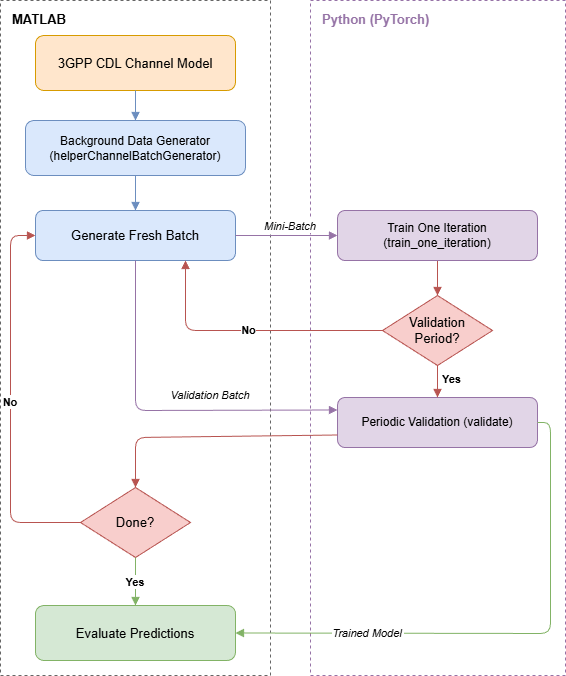
The diagram shows the online training workflow. MATLAB generates fresh channel data on the fly using a background data generator, sends each mini-batch to Python for a single GRU weight update, and periodically validates the model before looping back for the next iteration.
Set Up Python Environment
Before running this example, set up the Python environment as explained in Call Python from MATLAB for Wireless. Specify the full path of the Python executable to use in the pythonPath field below. The helperSetupPyenv function sets the Python environment in MATLAB according to the selected options and checks that the libraries listed in the requirements_chanpre.txt file are installed. This example is tested with Python version 3.11.
if ispc pythonPath =".\.venv\Scripts\pythonw.exe"; else pythonPath =
"./venv/bin/python3"; end requirementsFile = "requirements_chanpre.txt"; executionMode =
"OutOfProcess"; currentPyenv = helperSetupPyenv(pythonPath,executionMode,requirementsFile);
Setting up Python environment
Parsing requirements_chanpre.txt
Checking required package 'numpy'
Checking required package 'torch'
Required Python libraries are installed.
You can use the following process ID and name to attach a debugger to the Python interface and debug the example code.
fprintf("Process ID for '%s' is %s.\n",...
currentPyenv.ProcessName,currentPyenv.ProcessID)
Process ID for 'MATLABPyHost' is 37316.
Preload the Python module to reduce start time.
module = py.importlib.import_module("nr_channel_predictor_wrapper");Initialize Data Generation
The Preprocess Data for AI-Based CSI Feedback Compression example shows data generation details for channel prediction. This example uses the following parameters for system and channel configuration.
nSizeGrid = 52;              % Number resource blocks (RB)
subcarrierSpacing = 15;      % 15,30,60,120 kHz

carrier = nrCarrierConfig;
carrier.NSizeGrid = nSizeGrid;
carrier.SubcarrierSpacing = subcarrierSpacing;

systemParams.SubcarrierSpacing = subcarrierSpacing;
systemParams.DelayProfile = "CDL-C";
systemParams.DelaySpread = 300e-9;          % s
systemParams.TxAntennaSize = [2 2 2 1 1];   % [M N P Mg Ng]
systemParams.RxAntennaSize = [2 1 1 1 1];
systemParams.MaximumDopplerShift = 5;       % Hz
systemParams.Carrier = carrier;
channel = helper3GPPChannel(systemParams);

% Channel prediction horizon
horizon = 10;
In this type of online training, the channel data gets generated on demand rather than being pre-generated beforehand. The helperChannelBatchGenerator function uses a helperBackgroundRunner System object™ to invoke helperChanPreBatchData asynchronously. This setup avoids pausing the training loop to wait for new samples. For more information on helperBackgroundRunner, see Background Data Generation.
Each call to helperChanPreBatchData generates multiple frames of channel realizations using helper3GPPChannelRealizations, preprocesses them with helperPreprocess3GPPChannelData, and returns interleaved real-imaginary feature sequences of size 2-by-. The batch generator buffers these samples, shuffles them in the batch dimension, and on each call returns exactly BatchSize samples for training or validation. Because BatchSize is a tunable property, you can change it between calls to seamlessly switch between smaller training batches and larger validation batches without regenerating data.
maxBatchSize = 10000;   % Maximum number of samples in a batch
dataMin = -2.5;         % Minimum value of generated data for normalization
dataMax = 2.5;          % Maximum value of generated data for normalization
Tc = 0.423/systemParams.MaximumDopplerShift;
numerology = (subcarrierSpacing/15)-1;
Tslot = 1e-3 / 2^numerology;
coherenceTimeInSlots = Tc / Tslot;
sequenceLength = ceil(coherenceTimeInSlots*0.8);
SNR_dB = 20;

dataGen = helperChannelBatchGenerator( ...
    Channel=channel, ...
    Carrier=carrier, ...
    MaxBatchSize=maxBatchSize, ...
    SequenceLength=sequenceLength, ...
    DataMin=dataMin, ...
    DataMax=dataMax, ...
    SNRdB=SNR_dB, ...
    Horizon=horizon);
Initialize Neural Network
Initialize the channel predictor neural network. Set the GRU hidden size to 128 and the number of hidden GRUs to 2. The chanPredictor variable is the PyTorch model for the GRU-based channel predictor.
gruHiddenSize = 128;
gruNumLayers  = 2;
channelInfo = info(channel);
Ntx = channelInfo.NumTransmitAntennas;
chanPredictor = py.nr_channel_predictor_wrapper.construct_model(...
    Ntx, ...
    gruHiddenSize, ...
    gruNumLayers);

py.nr_channel_predictor_wrapper.info(chanPredictor)
Model architecture:
ChannelPredictorGRU(
  (gru): GRU(16, 128, num_layers=2, batch_first=True, dropout=0.3)
  (layer_norm): LayerNorm((128,), eps=1e-05, elementwise_affine=True)
  (fc): Linear(in_features=128, out_features=16, bias=True)
)

Total number of parameters: 157456
Train Neural Network
The nr_channel_predictor_wrapper.py file contains the MATLAB interface functions to train the channel predictor neural network. Set values for the hyperparameters: number of iterations, batch size, initial learning rate, and validation frequency in iterations.
In the online training loop, a new data batch is generated and then the trainer performs a weight update for each iteration. In addition, periodic validation is performed.
The train_one_iteration Python function returns the training loss for the current iteration. The current learning rate can be accessed separately via the trainer object. Accessing these values triggers a data transfer from Python to MATLAB. To minimize training time, the code accesses these values only during periodic validation.
Set the progressPlot variable to true to plot the training progress using the trainingProgressMonitor function, which requires Deep Learning Toolbox®. To print the metrics, set the verbose variable to true.
Training for 50,000 iterations takes about 20 minutes on a PC that has NVIDIA® RTX A5000 GPU with a compute capability of 8.6 and 24 GB memory. To train the network, set trainNow to true.
trainNow =false; if trainNow dltAvailable = checkDeepLearningToolbox(); numIterations = 50000; trainingBatchSize = 512; validationBatchSize = 1000; initialLearningRate = 1e-3; learningRateUpdatePeriod = 175; validationFrequency = 1000; progressPlot =
false; % Set to true if you want progress plot verbose =
true; if dltAvailable && progressPlot monitor = trainingProgressMonitor( ... Metrics=["TrainingLoss","ValidationLoss"], ... Info=["LearningRate","Iteration"], ... XLabel="Iteration"); groupSubPlot(monitor,"Loss",["TrainingLoss","ValidationLoss"]); yscale(monitor,"Loss","log") monitor.Status = "Running"; end tStartLoop = tic; dataGen.BatchSize = trainingBatchSize; % Set up the trainer for online training using the Python wrapper. trainer = py.nr_channel_predictor_wrapper.setup_trainer( ... Ntx, ... % number of transmit antennas gruHiddenSize, ... % hidden size gruNumLayers, ... % number of layers initialLearningRate, ... % learning rate trainingBatchSize, ... % batch size verbose); % Training loop numOutputs = floor(numIterations/validationFrequency); trainingLoss = nan(1,numOutputs); validationLoss = nan(1,numOutputs); iterations = nan(1,numOutputs); outCount = 1; tStart = tic; fprintf("Starting online training...\n"); for iteration = 1:numIterations % Get the next batch from the data generator [inputData,targetData] = dataGen(); % Perform one training update trainLoss = py.nr_channel_predictor_wrapper.train_one_iteration(trainer,inputData,targetData, ... ~mod(iteration,learningRateUpdatePeriod)); % Every validationFrequency iterations, perform validation if mod(iteration,validationFrequency) == 0 % Access data from Python learningRate = trainer.get_current_learning_rate(); % Generate validation batch dataGen.BatchSize = validationBatchSize; [inputData,targetData] = dataGen(); dataGen.BatchSize = trainingBatchSize; % Perform validation valLoss = py.nr_channel_predictor_wrapper.validate(trainer,inputData,targetData); % Report metrics valLoss = double(valLoss); if verbose et = seconds(toc(tStartLoop)); et.Format = "hh:mm:ss.SSS"; fprintf("%s : [%d/%d] Training Loss: %1.2e, Validation Loss: %1.2e, Learning Rate: %1.3e\n",... et,iteration,numIterations,trainLoss,valLoss,learningRate); end if dltAvailable && progressPlot recordMetrics(monitor, ... iteration, ... TrainingLoss=trainLoss, ... ValidationLoss=valLoss); updateInfo(monitor, ... LearningRate=learningRate, ... Iteration=sprintf("%d of %d",iteration,numIterations)); monitor.Progress = 100*iteration/numIterations; if monitor.Stop monitor.Status = "Stopped by user"; break end else trainingLoss(outCount) = trainLoss; validationLoss(outCount) = valLoss; iterations(outCount) = iteration; outCount = outCount + 1; end end end if dltAvailable && progressPlot monitor.Status = "Training complete"; trainingLoss = monitor.MetricData.TrainingLoss(:,2); validationLoss = monitor.MetricData.ValidationLoss(:,2); iterationNum = monitor.MetricData.ValidationLoss(:,1); iterations = str2double(extractBefore(monitor.InfoData.Iteration," of")); end et = seconds(toc(tStart)); et.Format = "hh:mm:ss.SSS"; fprintf('%s : Training complete.\n',et);
Release dataGen to stop background data generation.
release(dataGen)
Get the trained network and final validation loss.
    chanPredictor = trainer.model;
    finalValidationLoss = validationLoss(end);
Save the network for future use together with the training information.
    modelFileName = sprintf("channel_predictor_gru_horizon%d_iters%d",horizon,numIterations);
    fileName = py.nr_channel_predictor_wrapper.save( ...
        chanPredictor, ...
        modelFileName, ...
        Ntx, ...
        gruHiddenSize, ...
        gruNumLayers, ...
        initialLearningRate, ...
        trainingBatchSize, ...
        numIterations, ...
        validationFrequency);
    infoFileName = modelFileName+"_info";
    save(infoFileName,"dataMax","dataMin","trainingLoss","validationLoss", ...
        "et","initialLearningRate","trainingBatchSize","numIterations","validationFrequency", ...
        "Ntx","gruHiddenSize","gruNumLayers");
    fprintf("Saved network in '%s' file and\nnetwork info in '%s.mat' file.\n", ...
        string(fileName),infoFileName)
else
    load("channel_predictor_gru_horizon10_iters50000_info.mat","dataMax","dataMin","trainingLoss","validationLoss",...
        "et","initialLearningRate","trainingBatchSize","numIterations","validationFrequency",...
        "Ntx","gruHiddenSize","gruNumLayers");
    finalValidationLoss = validationLoss(end);
    iterations = validationFrequency:validationFrequency:validationFrequency*length(validationLoss);
chanPredictor = py.nr_channel_predictor_wrapper.construct_model(...
Ntx,...
gruHiddenSize,...
gruNumLayers, ...
"channel_predictor_gru_horizon10_iters50000.pth")
end
chanPredictor =
  Python ChannelPredictorGRU with properties:

    training: 1

    ChannelPredictorGRU(
      (gru): GRU(16, 128, num_layers=2, batch_first=True, dropout=0.3)
      (layer_norm): LayerNorm((128,), eps=1e-05, elementwise_affine=True)
      (fc): Linear(in_features=128, out_features=16, bias=True)
    )
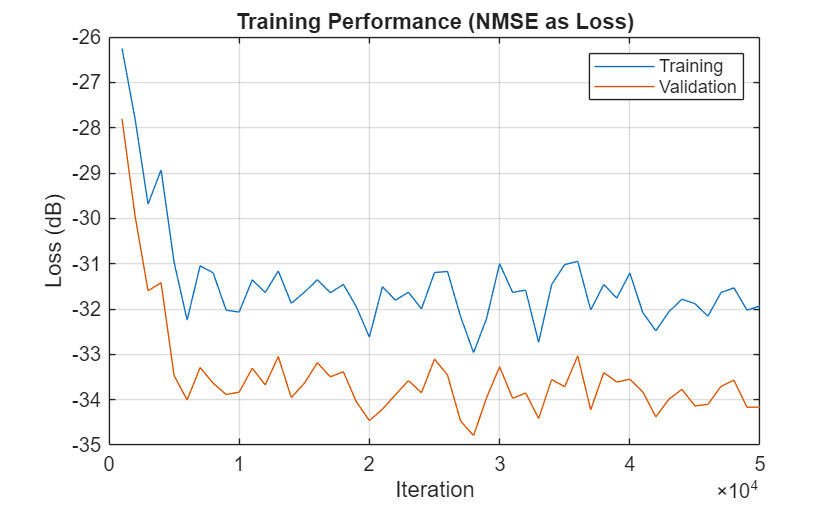
fprintf("Validation Loss: %f dB",10*log10(finalValidationLoss))Validation Loss: -34.163244 dB
Plot the training and validation loss. As the number of iterations increases, the loss value converges to about -34 dB. The training loss is higher than the validation loss because the GRU uses dropout regularization (p=0.3), which is active only during training. Dropout randomly disables neurons during training, inflating the measured loss, while validation uses the full network.
figure()
plot(iterations,10*log10(trainingLoss));
hold("on")
plot(iterations,10*log10(validationLoss));
hold("off")
legend("Training","Validation")
xlabel("Iteration")
ylabel("Loss (dB)")
title("Training Performance (NMSE as Loss)")
grid("on")
References
[1] W. Jiang and H. D. Schotten, "Recurrent Neural Network-Based Frequency-Domain Channel Prediction for Wideband Communications," 2019 IEEE 89th Vehicular Technology Conference (VTC2019-Spring), Kuala Lumpur, Malaysia, 2019, pp. 1–6, doi: 10.1109/VTCSpring.2019.8746352.
[2] O. Stenhammar,G. Fodor and C. Fischione, "A Comparison of Neural Networks for Wireless Channel Prediction," in IEEE Wireless Communications, vol. 31, no. 3, pp. 235–241, June 2024, doi: 10.1109/MWC.006.2300140.

