Dynamic Inflow (3-State)
R2026bDynamic Inflow (3-State) block
To add a block to a model, double-click the canvas and start typing the block name. Then, select the block from the list.
Libraries:
Aerospace Blockset /
Rotor Systems /
Inflow Models
Description
The Dynamic Inflow (3-State) block computes the normal induced velocity through the rotor disc by solving three ordinary differential equations with mean, lateral, and longitudinal inflow as the state variables. The model used in the Dynamic Inflow (3-State) block is developed from incompressible flow Euler equations with the rotor modeled as an actuator disc.
The Dynamic Inflow (3-State) block captures first harmonic variation of inflow in the azimuthal direction and linear variation of inflow along the blade span. The block enables the computation of the induced velocity required for computation of blade forces and moments at a low computational cost.
Note
Use this inflow model when potential flow equations apply and incompressible flow assumptions are valid. The Dynamic Inflow (3-State) block does not monitor local Mach numbers or enforce incompressibility limits, so you can apply a wide range of input parameters. Verify that your operating conditions remain within the typical range for incompressible flow to achieve the best results.
Ports
Input
Output
Parameters
To edit block parameters interactively, use the Property Inspector. From the Simulink® Toolstrip, on the Simulation tab, in the Prepare gallery, select Property Inspector.
Input and output ports and parameter units, specified as Metric
(MKS) or English.
| Units | Radius | Elemental Force Distribution | Density |
|---|---|---|---|
Metric
                (MKS)
| Meters | N/m | kg/m3 |
English (Velocity in ft/s)
| Feet | lbf/ft | slug/ft3 |
Programmatic Use
Block Parameter:
units |
| Type: character vector |
Values:
Metric (MKS) | English |
Default:
Metric (MKS) |
Source of the angular velocity of the rotor, specified as one of
Dialog or Port.
Programmatic Use
Block Parameter:
omegaSrc |
| Type: character vector |
Values:
Dialog | Port |
Default:
Dialog |
Rotational speed of rotor, specified as a real scalar in radians per second.
Dependencies
This parameter is visible when the Rotational Speed Source parameter is set to
Dialog.
Programmatic Use
Block Parameter:
omega |
| Type: double |
Values:
41.2596 | real scalar |
Default:
41.2596 |
Rotor radius, specified as a nonzero scalar in m or ft. This is the distance from the center of the rotor hub to the tip of the rotor blades.
Dependencies
The unit of Blade radius depends on the value of the Units parameter.
Programmatic Use
Block Parameter:
radius |
| Type: double |
Values:
5.08 m | real positive scalar |
Default:
5.08 m |
Source of radial locations, specified as one of Uniform distribution based on force input or Custom distribution. This parameter determines how the radial positions along the rotor blade are specified for aerodynamic computations.
Uniform distribution based on force input- The entire length of the rotor blade is divided into equal segments based on the number of radial locations Nr specified in the force input. For example, if the number of columns in force input is 10, the blade span will be divided into 10 equal segments, as shown in the figure.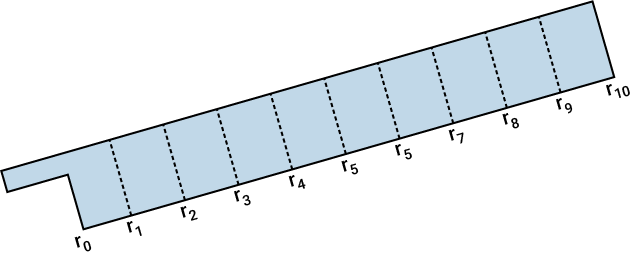
Custom distribution- You can specify non-uniform radial positions along the blade, using the parameter Non-dimensional radial element edges (default: -1 for uniform distribution).
Programmatic Use
Block Parameter:
radSrc |
| Type: char vector |
Values:
Uniform distribution based on force input |
Custom distribution |
Default:
Uniform distribution based on force input |
Custom radial segment limits (non-dimensional), specified as the sentinel value -1 (default) to use uniform distribution, or as a real nonnegative strictly increasing vector with values in [0 1] for custom distribution. The length of the vector should be one greater than Nr, the number of columns in the force input. It is expected that the input force values are computed or obtained at the mid-points of the radial segments specified through the parameter. For example, if the user inputs the parameter as, [r0 r1 r2 r3 r4 r5 r6 r7 r8 r9 r10], with r0>=0, and r10<=1, a sample blade segment distribution is as shown in the figure and Nr will be 10. It is expected that the range r0 to r10 is the aerodynamically effective region of the blade and the integration to compute force is done only in this region. The accuracy of the computed inflow distribution can be influenced by the radial discretization, including the number and spacing of blade elements, as well as the portion of the aerodynamically effective blade span represented by the specified radial segments.
Dependencies
This parameter is visible when Radial locations source
is set to Custom distribution.
Programmatic Use
Block Parameter:
radDistr |
| Type: double |
| Values: real scalar | real nonnegative strictly increasing vector with values in [0 1] |
Default:
-1 |
Algorithms
The Dynamic Inflow (3-State) block implements the three‑state dynamic inflow model using the coupled first‑order system
where M is the apparent mass matrix, V is the mass-flow matrix, and L is the influence coefficient matrix. All the matrices have closed form representations as shown in [2]. The aerodynamic coefficients CT, CMx, and CMy are computed from the elemental force distribution input.
The induced-velocity field is reconstructed from the three inflow states using , with r̅ as the nondimensional radial location and ψ as the azimuth angle. The block evaluates r̅ from either a uniform or custom radial distribution.
This formula captures the mean inflow and the first harmonic variation in the azimuthal direction, with linear variation in the radial direction. The model is a simplified approach that is suitable for real-time simulation and stability analysis [2].
References
[1] Peters, David A., and Ha Quang Ninh. “Dynamic Inflow for Practical Applications.” Journal of the American Helicopter Society 33, no. 4 (1988): 64–68.
[2] Peters, David A. “How Dynamic Inflow Survives in the Competitive World of Rotorcraft Aerodynamics.” Journal of the American Helicopter Society 54, no. 1 (2009): 11001–11001.
Version History
Introduced in R2026a

