Model Ear Canal
R2026bYou model the physical human ear canal using two cascaded cylindrical tubes with thermoviscous losses, connected in series with the Ear Drum Impedance component. The Ear Drum Impedance is a composite block that models the response of an averaged human ear drum.
Ear Canal Equivalent Circuit
Open the ear canal model.
model = "EarCanal";
open_system(model);

sim(model,1);
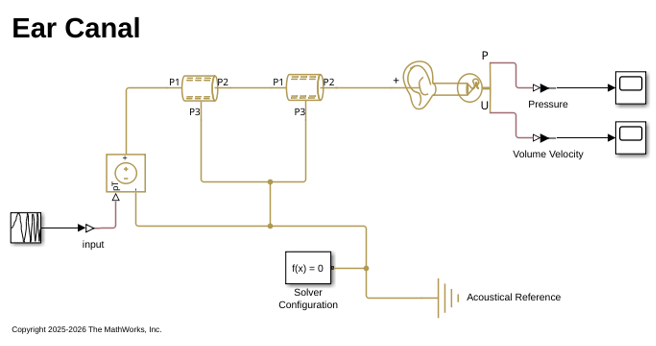
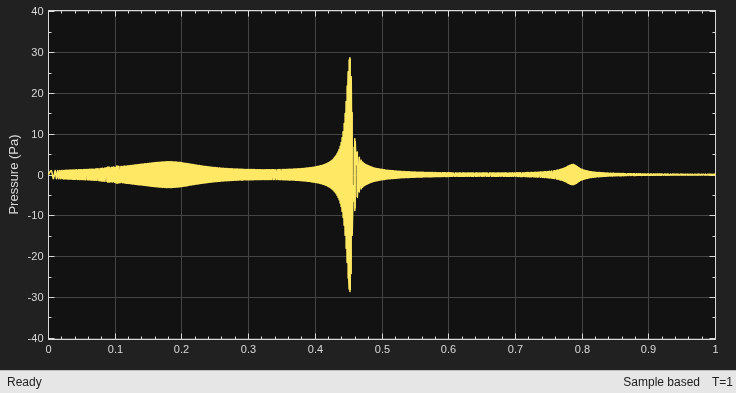
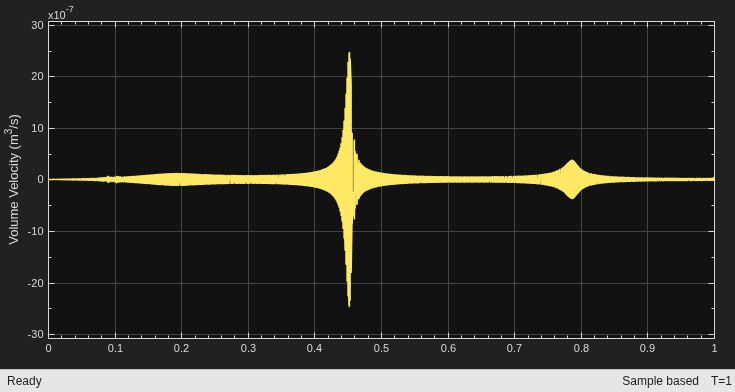
The human ear canal is not a uniform cylindrical tube. The model simulates the system using two cylindrical tubes with different dimensions. The dimensions are provided as follows:
Tube #1 (Concha): radius = 0.005 m, length = 0.003 m.
Tube #2 (Canal): radius = 0.0035 m, length = 0.0095 m.
Tube #1 corresponds to the opening at the outer ear. Tube #2 is connected to the ear drum impedance.
Ear Canal Block Model
The Ear Canal with Ear Drum block from the Simscape (TM) Acoustics library encapsulates the entire equivalent circuit shown above into a single block. This simplifies the model while providing the same functionality, including the two cascaded cylindrical tubes and the ear drum impedance.
bdclose(model);
model = "EarCanalBlock";
open_system(model);

sim(model,1);
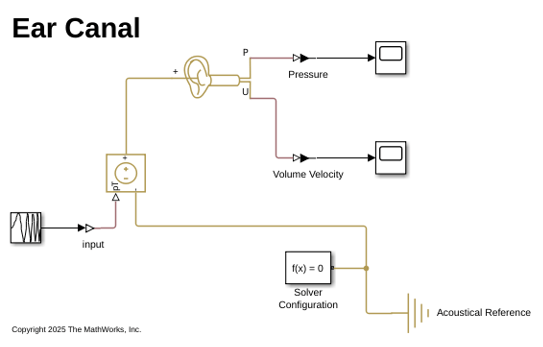
The block accepts parameters for the tube dimensions (length and radius of each tube section) as well as all the ear drum impedance parameters. It also provides parameters to enable or disable the optional damping resistances (R1, R3, R5) without needing to modify individual blocks.
Linearize Model
This example sets the input perturbation point and output measurement point for analysis in the frequency domain instead of the time domain. Extracting the real-time simulation outputs and performing Fourier Transform also returns similar results. The block enables both pressure and volume velocity measurements at the termination.
In this example, you analyze the pressure response.
Set the model linearizing points.
io(1) = linio(model + "/Chirp Signal", 1, "input");
io(2) = linio(model + "/Pressure", 1, "output");
Use the linearize function to linearize the model and the bode function to extract the magnitude, phase, and frequency information.
linsys = linearize(model, io);
[mag, ~, wout] = bode(linsys);
freq = wout./(2*pi);
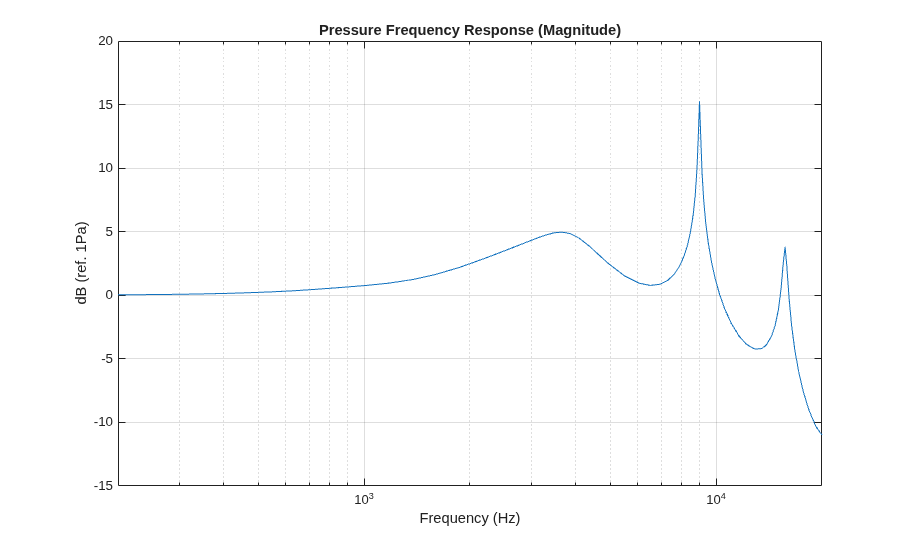
Plot the results.
figure(1)
semilogx(freq, 10*log10(mag(:)));
xlim([200 20e3]);
title("Pressure Frequency Response (Magnitude)");
xlabel("Frequency (Hz)");
ylabel("dB (ref. 1Pa)");
grid on
hold on
Include Damping
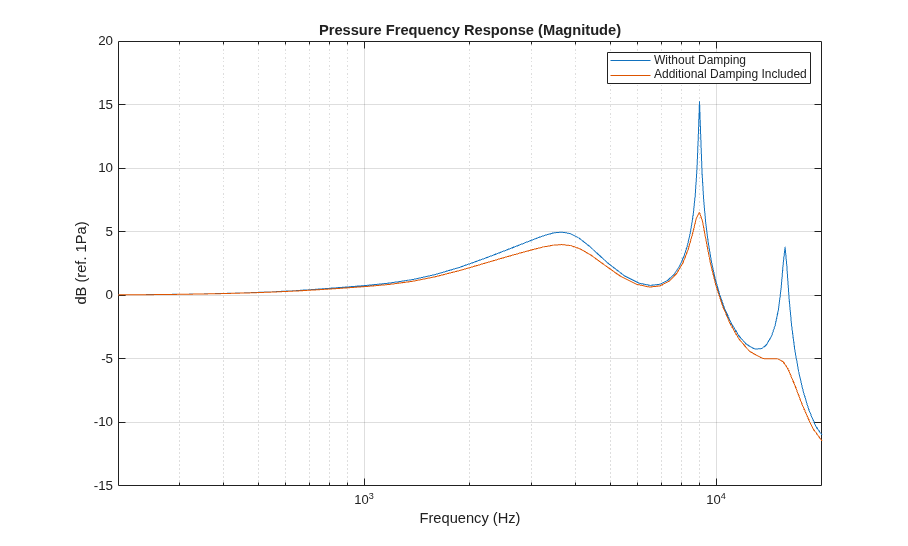
In this section, you add additional damping, namely R1, R3, and R5, to the model and verify the change in the pressure response. The Ear Canal with Ear Drum block allows enabling these resistances by setting the damping parameters to true.
earCanal = model + "/Ear Canal with Ear Drum";
set_param(earCanal, "damping1", "true");
set_param(earCanal, "damping3", "true");
set_param(earCanal, "damping5", "true");
Linearize the model and extract the results.
linsys = linearize(model, io);
[mag, ~, wout] = bode(linsys);
freq = wout./(2*pi);
Plot the new results.
semilogx(freq, 10*log10(mag(:)));
legend("Without Damping", "Additional Damping Included");
Modify Tube Length
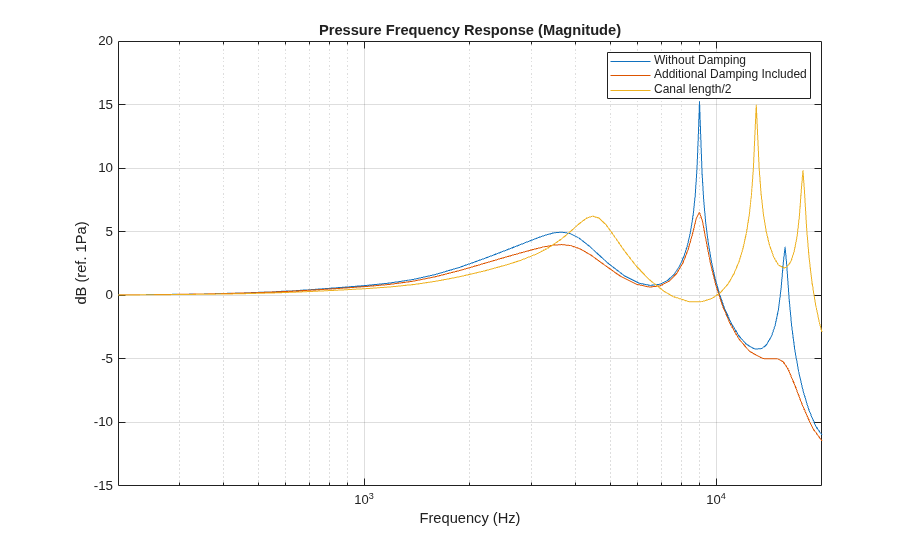
Analyze the effect of modifying the tube length.
First, reset the damping parameters to their original state.
set_param(earCanal, "damping1", "false");
set_param(earCanal, "damping3", "false");
set_param(earCanal, "damping5", "false");
Decrease the length of the canal tube by a factor of 0.5.
set_param(earCanal, "L_Canal", ".0095*0.5");
Linearize the modified model.
linsys = linearize(model, io);
[mag, ~, wout] = bode(linsys);
freq = wout./(2*pi);
Plot the new results.
semilogx(freq, 10*log10(mag(:)));
legend("Without Damping", "Additional Damping Included", "Canal length/2");
Modify Tube Radius
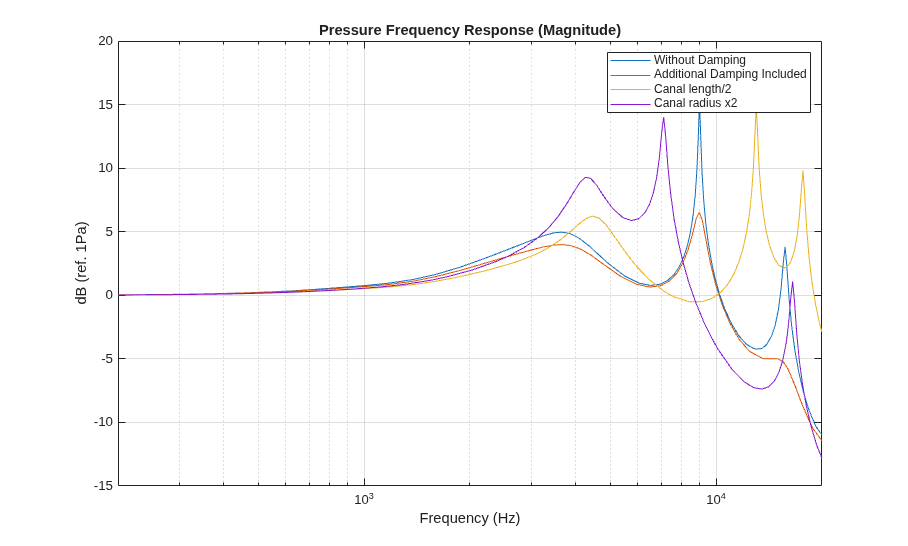
Analyze the effect of modifying the tube radius.
First, revert the tube length to its original value.
set_param(earCanal, "L_Canal", ".0095");
Next, double the canal tube radius.
set_param(earCanal, "R_Canal", ".0035*2");
Linearize the modified system.
linsys = linearize(model, io);
[mag, ~, wout] = bode(linsys);
freq = wout./(2*pi);
Plot the new results.
semilogx(freq, 10*log10(mag(:)));
legend("Without Damping", "Additional Damping Included", "Canal length/2", "Canal radius x2");
Close the system.
bdclose(model)
References
[1] S. Thompson, T. Gabrielson, and D. Warren, "Analog model for thermoviscous propagation in a cylindrical tube," Journal of the Acoustical Society of America, vol. 135, 2014, doi:10.1121/1.4861237.
[2] C. Gazzola, V. Zega, A. Corigliano, P. Lotton, and M. Melon, "Lumped-parameters equivalent circuit for piezoelectric MEMS speakers modeling," 2023, doi:10.61782/fa.2023.0485.
[3] C. Gazzola, V. Zega, A. Corigliano, P. Lotton, and M. Melon, "A reduced-order-model-based equivalent circuit for piezoelectric micro-electro-mechanical-system loudspeakers modeling," Journal of the Acoustical Society of America, vol. 155, pp. 1503-1514, 2024, doi:10.1121/10.0024939.
[4] C.-H. Huang, S. Pawar, Z.-J. Hong, and J. Huang, "Earbud-type earphone modeling and measurement by head and torso simulator," Applied Acoustics, vol. 73, 2012, doi:10.1016/j.apacoust.2011.10.007.
Copyright 2025-2026 The MathWorks, Inc.
See Also
Ear Canal with Ear Drum | Ear Drum Impedance | bodelinearize

