Contenido principal

Sequence Alignment

R2026b

Visualize multiple sequence alignments

Description

The Sequence Alignment app lets you visualize multiple sequence alignments.

You can:

  • Inspect sequence alignments.

  • View the consensus sequence information.

  • Export consensus or alignments to a file or MATLAB® workspace.

  • Generate a phylogenetic tree from aligned sequences.

Sequence Alignment app

Open the Sequence Alignment App

  • MATLAB Toolstrip: On the Apps tab, under Computational Biology, click the app icon.

  • MATLAB command prompt: Enter seqalignviewer.

Examples

expand all

Load and view a multiple sequence alignment file.

seqalignviewer('aagag.aln')
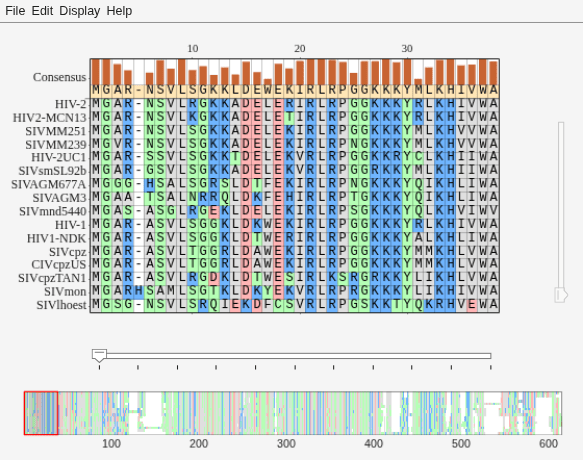
Figure Biological Sequence Alignment - 1 contains 2 axes objects and other objects of type uigridlayout, uimenu. Axes object 1 contains 6 objects of type image, patch, line. Axes object 2 contains 3 objects of type image, patch.

Alternatively, you can click Sequence Alignment on the Apps tab to open the app, and view the alignment data.

You can also generate a phylogenetic tree from aligned sequences from within the app. Select Display > View Tree.

Related Examples

Programmatic Use

seqalignviewer opens the Sequence Alignment app.

seqalignviewer(Alignment) loads multiple sequence alignment data Alignment into the app. Alignment can be one of the following:

  • A MATLAB structure containing a Sequence field, such as returned by fastaread, gethmmalignment, multialign, or multialignread

  • A MATLAB character array containing MSA data, such as returned by multialign

  • A string specifying a file or URL that contains MSA data

  • A 3-by-N character array showing the pairwise alignment of two sequences, such as the array returned by nwalign or swalign.

seqalignviewer('close') closes the app.

Version History

Introduced in R2012b

expand all

See Also

Apps

Functions