Discover Clusters
After you create clusters in Cloud Center, you can let MATLAB® discover them for you. You need a working network connection between the client and the Cloud Center web services running in mathworks.com. Alternatively, you can access the clusters you created in MATLAB using the command line. For details , see Access Cloud Clusters Using the Command Line. To access clusters created by others, see Import Cluster Profiles and Access Cloud Clusters.
To discover clusters, follow these steps.
On the Home tab in the Environment section, use either of these options.
Select Parallel > Discover Clusters.
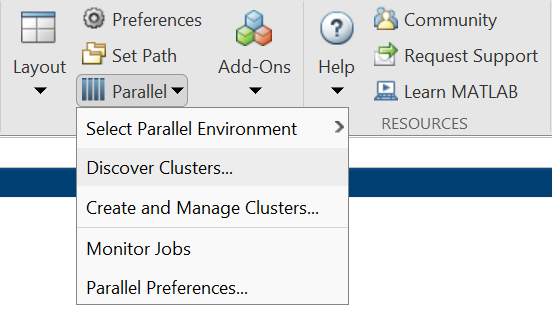
Select Parallel > Create and Manage Clusters to open the Cluster Profile Manager. In the Cluster Profile Manager, select Discover Clusters
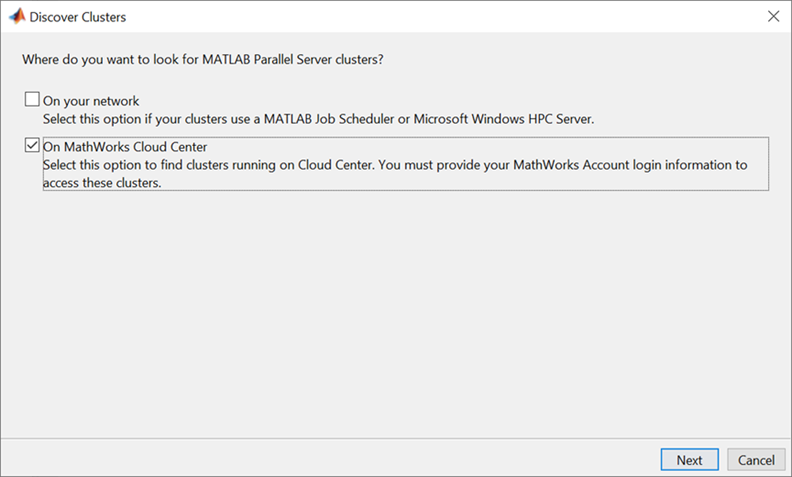
In the Discover Clusters wizard, select On MathWorks Cloud Center and click Next. MATLAB searches for clusters running on MathWorks® Cloud Center. To access these clusters, you must provide your MathWorks Account login information. Clusters appear in the list as they are discovered.
Select the name of the cluster you want to use, and click Next. On the next page, click Finish. If you do not want to set the new cluster profile as your default cluster, you can clear the check box. You can set the default cluster at any time later using the Parallel menu. Parallel applications in your MATLAB session can use this cluster by default.

