Determination of Program Stack Usage
R2026bA Polyspace® Code Prover™ analysis can estimate the stack usage of your entire program and each function in your program. The analysis uses the function call hierarchy of your program to estimate stack usage:
The stack usage of an individual function is the sum of local variable sizes in the function plus the maximum stack usage from function callees.
The stack usage of the entire program is the stack usage of the function at the top of the call hierarchy. Typically, the
main()function is at the top of the call hierarchy.
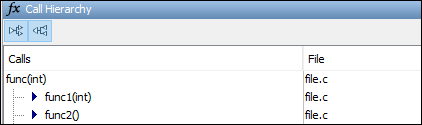
For instance, in this call hierarchy, the stack usage of func is the size of the local variables in func plus the maximum stack usage from func1 and func2 (unless they are called in mutually exclusive branches of a conditional statement).
For details, see:
Function metrics —
Maximum Stack UsageandMinimum Stack UsageProject metrics —
Program Maximum Stack UsageandProgram Minimum Stack Usage
Calculate Stack Usage
To calculate stack usage, enable the necessary option before starting a Code Prover analysis:
In the Polyspace Platform user interface, open your project configuration. On the Static Analysis tab, select Run Time Errors > Check Behavior. Then select the option Calculate stack usage.
At the command line, use the option
Calculate stack usage (-stack-usage).
After you run an analysis, Code Prover reports the stack usage metrics along with other results.
If you open the results in the Dashboard perspective, to see the stack usage metrics, select Code Metrics on the toolstrip. The program maximum stack usage and minimum stack usage are reported in the Project Metrics section, and the range of function-by-function stack usage is reported in the Function Metrics section.
If you open the results in the Review perspective, you see all stack usage metrics (program stack usage as well as function-by-function stack usage) in a flat list. To see only these metrics, select the Code Metrics filter on the toolstrip.
For more information on how to open results, see Open Polyspace Results in Polyspace Platform User Interface.
Investigate Possible Stack Overflow
If your stack usage exceeds available stack space, you can identify which functions contribute most to the stack usage:
Open Code Prover results containing stack usage metrics in the Review perspective of the Polyspace Platform user interface.
In the Show only text box, enter
Size of Local Variables. The Results List pane is filtered to display only the metrics for sizes of local variables.Select the Information column header on the Results List pane to sort the results by the sizes of local variables.

Select the result with the highest value of size of local variables to navigate to the corresponding function on the Source pane.
Stack Usage Not Computed
For Code Prover to compute function stack usage, the analysis must be able to reach the end of the function. The following can prevent the computation of function stack usage:
Red checks.
Because Code Prover does not analyze code following a red check, stack usage of a function is not computed if a definite run-time error occurs in the function or one of its callees. If the unanalyzed code contains function calls, any stack usage estimate for the caller function is inaccurate.
In this example, the function
func()contains a red overflow. Code Prover does not analyze the code following the run-time error and does not compute the stack usage offunc. If the stack usage was computed, function calls in the unanalyzed code, such as the call tofunc2, would not be part of the computation.#include <limits.h> void func(void) { int val=INT_MAX; val++; func2(); }Infinite loops.
Loops that are definitely infinite are typically shown through a red
Non-terminating loopcheck. If the loop is trivially infinite, for instance,while(1), instead of a red check, a dashed red underlining appears on the loop keyword. The tooltip on the keyword shows that the loop has been detected as infinite.Recursive functions.
If a function calls itself directly or indirectly, Code Prover does not compute the stack usage of the function or the stack usage of all functions that call the function.
If a program contains recursive functions, the program minimum stack usage might be computed even if the maximum stack usage is not. In this case, the program minimum stack usage computation uses an execution path that bypasses the call to the recursive function and might not be an accurate representation of the stack usage.
If the program stack usage is not computed, make sure that the stack usage values of all functions are computed. In the Information column on the Results List pane, check if a function stack usage result shows the value Not computed.
Stack Usage Assumptions
If a function is called but not defined in the code that you provide to Polyspace, the stack usage determination does not take the function call into account. In other words, the contribution to stack size from stubbed functions is assumed to be zero. You can explicitly specify a stack size contribution from such stubbed functions using the option -code-behavior-specifications.
This assumption applies to:
Implicit C++ constructors.
For instance, in this example,
func()calls the constructor of classmyClasswhenmyObjis defined. Stack usage determination does not consider the constructor as a callee offunc().class myClass {std::string str;}; void func() { myClass myObj; }Standard library functions or other functions whose definitions are missing from the code in your Polyspace project.
For instance, in this example,
funccalls the standard library functioncos(). Unless you provide the definition ofcos(), stack usage determination does not considercos()as a callee offunc().#include <math.h> double func(double arg) { return cos(arg); }
See Also
Calculate stack usage (-stack-usage) | Higher Estimate of Size of Local Variables | Lower Estimate of Size of Local Variables | Maximum Stack Usage | Minimum Stack Usage | Program Maximum Stack Usage | Program Minimum Stack Usage

