-xml-annotations-description
R2026bApply custom code annotations to Polyspace analysis results
Syntax
-xml-annotations-description file_path
Description
-xml-annotations-description
uses the annotation syntax defined in the XML file located in
file_pathfile_path to interpret code annotations in your source
files. You can use the XML file to specify an annotation syntax and map it to the
Polyspace® annotation syntax. When you run an analysis by using this option, you can
justify and hide results with annotations that use your syntax. If you run Polyspace at the command line, file_path is the absolute
path or path relative to the folder from which you run the command. If you run
Polyspace through the user interface, file_path is the
absolute path.
In the user interface (Polyspace desktop products only), on the Configuration pane, enter this
option in the Other field. See Other.
If you use Polyspace as You Code™ as You Code extensions in IDEs, enter this option in an analysis options file. See options file.
Why Use This Option
If you have existing annotations from previous code reviews, you can import these annotations to Polyspace. You do not have to review and justify results that you have already annotated. Similarly, if your code comments must adhere to a specific format, you can map and import that format to Polyspace.
Examples
Import Existing Annotations for Coding Rule Violations
Suppose that you have previously reviewed source file
zero_div.c containing the following code, and justified
certain MISRA C™: 2023 violations by using custom
annotations.
#include <stdio.h>

/* Violation of Misra C:2023
rules 8.4 and 8.7 on the next
line of code. */

int func(int p) //My_rule 50, 51
{
    int i;
    int j = 1;

    i = 1024 / (j - p);
    return i;
}

/* Violation of Misra C:2023
rule 8.4 on the next line of
code */

int func2(void){ //My_rule 50
	int x=func(2);
	return x;
}My_rule 50, 51 and My_rule 50 do not use the Polyspace annotation syntax. Instead, you use a convention where you place all
MISRA™ rules in a single numbered list. In this list, rules 8.4 and 8.7
correspond to the numbers 50 and 51.You can check this code for MISRA C: 2023 violations by typing the command:
Bug Finder:
polyspace-bug-finder -sources source_path -misra-c-2023 all
Bug Finder Server:
polyspace-bug-finder-server -sources source_path -misra-c-2023 all
source_path is the path to
zero_div.c.
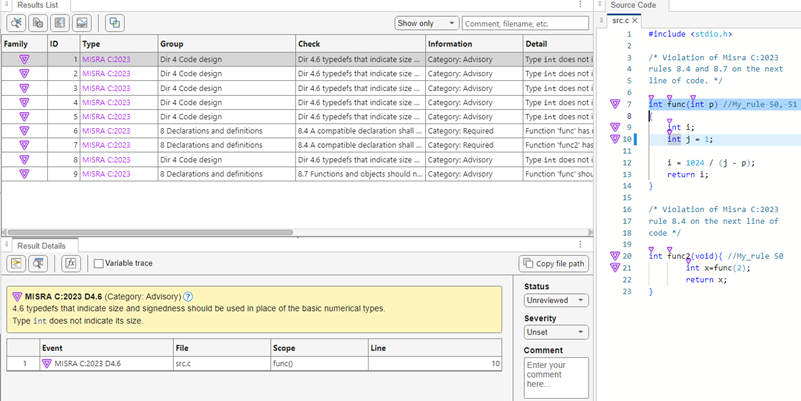
The annotated violations appear in the Results List pane. You must review and justify them again.
This XML example defines the annotation format used in
zero_div.c and maps it to the Polyspace annotation syntax:
The format of the annotation is the keyword
My_rule, followed by a space and one or more comma-separated alphanumeric rule identifiers.Rule identifiers 50 and 51 are mapped to MISRA C: 2012 rules 8.4 and 8.7 respectively. The mapping uses the Polyspace annotation syntax.
<?xml version="1.0" encoding="UTF-8"?>

<Annotations xmlns:xsi="http://www.w3.org/2001/XMLSchema-instance"
             xsi:noNamespaceSchemaLocation="annotations_xml_schema.xsd"
             Group="exampleCustomAnnotation">

  <Expressions Search_For_Keywords="My_rule"
			  Separator_Result_Name="," >


	<!-- This section defines the annotation syntax format -->
   <Expression Mode="SAME_LINE"
               Regex="My_rule\s(\w+(\s*,\s*\w+)*)"
               Rule_Identifier_Position="1"
               />

 </Expressions>
  <!-- This section maps the user annotation to the Polyspace
  annotation syntax -->
 <Mapping>
    <Result_Name_Mapping  Rule_Identifier="50" Family="MISRA-C3" Result_Name="8.4"/>
	<Result_Name_Mapping  Rule_Identifier="51" Family="MISRA-C3" Result_Name="8.7"/>
   </Mapping>
</Annotations>
To import the existing annotations and apply them to the corresponding Polyspace results:
Copy the preceding code example to a text editor and save it on your machine as
annotations_description.xml, for instance inC:\Polyspace_workspace\annotations\.Rerun the analysis on
zero_div.cusing the option-xml-annotations-description. For example, to run a Bug Finder analysis using this option, use this command:polyspace-bug-finder -sources source_path -misra3 all ^ -xml-annotations-description ^ C:\Polyspace_workspace\annotations\annotations_description.xml
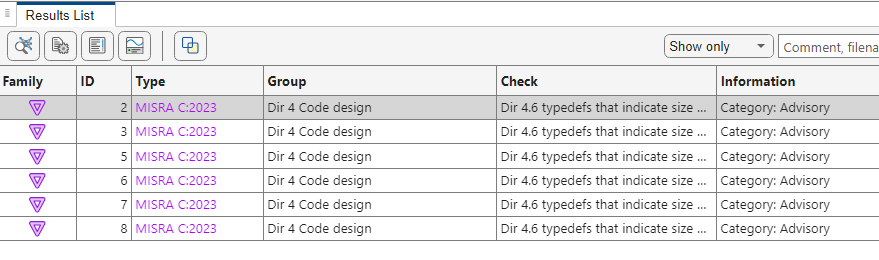
Polyspace considers the annotated results justified and hides them in the Results List pane.
Import Existing Annotations for Runtime Errors
Suppose that you have previously reviewed source file
zero_div.c containing the following code, and justified the
runtime error Division by
zero:
#include <stdio.h>

int func(int p)
{
  int i;
  int j = 1;
  volatile int random;

  if (random)
    i = 1024 / (j - p); // My_rule 10

  return i;
}


int main(void){
  int x=func(1);
  return x;
}
My_rule 10 does not use the
Polyspace annotation syntax. Instead, you use a convention where you place
runtime errors in a single numbered list. In this list, rule Division by zero corresponds
to 10.You can check this code for runtime errors by typing the command:
Code Prover:
polyspace-code-prover -sources source_path
Code Prover Server:
polyspace-code-prover-server -sources source_path
source_path is the path to
zero_div.c.
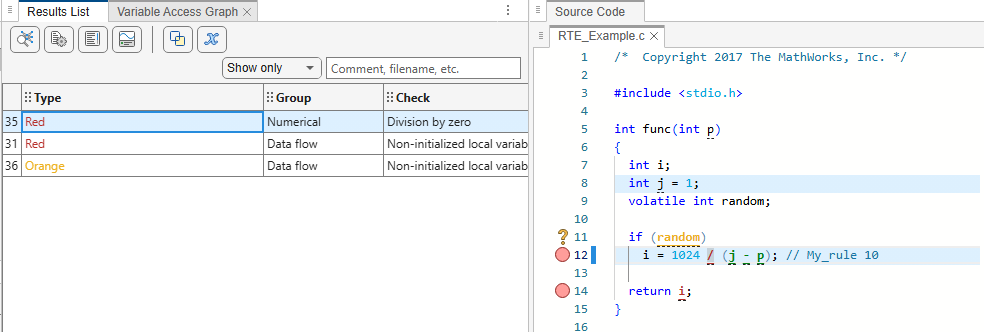
The annotated violations appear in the Results List pane. You must review and justify these again.
This XML example defines the annotation format used in
zero_div.c and maps it to the Polyspace annotation syntax:
The format of the annotation is the keyword
My_rule, followed by a space and one or more comma-separated alphanumeric rule identifiers.Rule identifier
10is mapped toDivision by zero. The mapping uses the Polyspace annotation syntax.
<?xml version="1.0" encoding="UTF-8"?>

<Annotations xmlns:xsi="http://www.w3.org/2001/XMLSchema-instance"
             xsi:noNamespaceSchemaLocation="annotations_xml_schema.xsd"
             Group="example annotation">

  <Expressions Search_For_Keywords="My_rule"
               Separator_Result_Name="," >


    <!-- This section defines the annotation syntax format -->
    <Expression Mode="SAME_LINE"
                Regex="My_rule\s(\w+)"
                Rule_Identifier_Position="1"
                />

  </Expressions>
  <!-- This section maps the user annotation to the Polyspace
       annotation syntax -->
  <Mapping>
    <Result_Name_Mapping Rule_Identifier="10" Family="RTE" Result_Name="ZDV"/>
  </Mapping>
</Annotations>
To import the existing annotations and apply them to the corresponding Polyspace results:
Copy the preceding code example to a text editor and save it on your machine as
annotations_description.xml, for instance inC:\Polyspace_workspace\annotations\.Rerun the analysis on
zero_div.cusing the option-xml-annotations-description. For example, to run a Code Prover analysis using this option, use this command:polyspace-code-prover -sources source_path ^ -xml-annotations-description ^ C:\Polyspace_workspace\annotations\annotations_description.xml
Polyspace considers the annotated results justified and hides them in the Results List pane.

Version History
Introduced in R2017b

