Code Generation for Recursive Functions
R2026bYou can generate code for recursive MATLAB® functions. The code generator uses different strategies for recursive functions in the MATLAB code depending on whether it can infer the recursion depth during code generation.
If the code generator can infer the recursion depth, it produces multiple versions of the function in the generated code. Each version corresponds to a recursive call. These versions are called function specializations.
If the code generator cannot infer the recursion depth, it produces a recursive C or C++ function. This is called run-time recursion.
To see whether the code generator produced function specializations or a recursive function in the generated code, inspect the MATLAB Coder™ code generation report or the Simulink® MATLAB function report. See Code Generation Reports or MATLAB Function Reports (Simulink).
If you do not want the code generator to produce function specializations, you can try to force it to use run-time recursion. Conversely, if you do not want the generated code to include recursive functions, you can disallow run-time recursion.
When you generate code for recursive MATLAB functions, certain restrictions apply.
Function Specializations in Generated Code
When the code generator can infer the recursion depth, it produces function specializations. Each specialization corresponds to a specific recursive call and uses input values or sizes that match that call.
The Call Tree pane of the code generation or MATLAB function report shows how the function specializations call one another.
For example, this image shows that the generated code contains five specializations of
the function recursion_example.
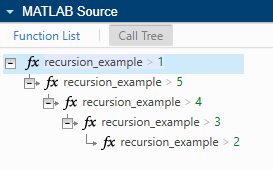
In some cases, later optimizations reduce a recursive call to a constant. When this happens, function specializations can appear in the report even though they do not appear in the generated code.
Run-Time Recursion in Generated Code
When the code generator cannot infer the recursion depth, it generates C or C++ code that uses run-time recursion. This means that it produces a recursive function in the C or C++ code.
The Call Tree pane of the code generation or MATLAB function report shows that the generated function calls itself
recursively. For example, this image shows that the function
recursion_example calls itself five times.
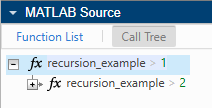
Controlling Recursive Code Generation
The code generator chooses between function specializations and run-time recursion based on whether it can infer recursion depth. You can influence this behavior by rewriting your MATLAB code or by using configuration settings.
Force Run-Time Recursion
When the code generator infers the recursion depth, it generates a function specialization for each recursive call. If the code generator produces too many function specializations, or if you prefer to use run-time recursion, you can try to force the code generator to use run-time recursion by using one of these approaches:
Treat the recursion depth as nonconstant. If the recursive function is called a constant number of times, use
coder.ignoreConstto instruct the code generator to treat the constant value as nonconstant. For a detailed example, see Force Run-Time Recursion by Specifying Depth Variable as Nonconstant.Specify variable-size inputs. If the recursive function operates on fixed-size inputs, use
coder.varsizeto explicitly specify that the input is variable size. For a detailed example, see Force Run-Time Recursion by Specifying Input Array as Variable Size.Assign output values before the recursive call. For detailed examples showing direct and indirect recursion, see Resolve Error: Output Variable Must Be Assigned Before Run-Time Recursive Call.
Disable Run-Time Recursion
Some coding standards, such as MISRA C™, do not allow recursion. To increase the likelihood that the code generator produces MISRA™-compliant code, disable run-time recursion by using one of these approaches:
In a MATLAB Coder code configuration object, set the
EnableRuntimeRecursionproperty tofalse.In the MATLAB Coder Code Generation Settings dialog box, clear the Enable run-time recursion check box.
In the Simulink Model Configuration dialog box, clear the Enable run-time recursion for MATLAB functions (Simulink) check box.
If you disable run-time recursion, code generation fails if the code generator cannot infer recursion depth or if the number of function specializations exceeds the recursion limit. See Resolve Error: Compile-Time Recursion Limit Reached.
Disallow Recursion
If you want to prevent the code generator from producing both function specializations and run-time recursion, you can disallow recursive function support entirely by using one of these approaches:
In a MATLAB Coder code configuration object, set the
CompileTimeRecursionLimitproperty to0.In the MATLAB Coder Code Generation Settings dialog box, set the value of the Compile-time recursion limit parameter to
0.In the Simulink Model Configuration dialog box, set the value of the Compile-time recursion limit for MATLAB functions (Simulink) parameter to
0.
If you disallow recursion entirely, code generation fails if the code generator encounters a recursive function in the MATLAB code.
Limitations
When you use recursive functions in MATLAB code intended for code generation, these limitations apply:
In a MATLAB Function (Simulink) block, the top-level function cannot be recursive. The top-level function can call recursive functions.
Assign values to all output variables of a run-time recursive function before the first recursive call.
If a recursive function outputs a cell array, assign values to all of the elements of the cell array.
The inputs and outputs of run-time recursive functions cannot be MATLAB classes.
See Also
codegen | coder.ignoreConst | coder.varsize

