N-Ratio Buffer
R2026bN-Ratio Buffer block

To add a block to a model, double-click the canvas and start typing the block name. Then, select the block from the list.
Libraries:
DSP System Toolbox /
Signal Management /
Buffers
Description
The N-Ratio Buffer block buffers data into blocks of length equal to integer N multiples of the input frame length. The integer ratio N between the output frame length and input frame length is given by the Output-to-input frame length ratio parameter.
Here is an illustration that shows how the block buffers the data. By default, the buffer is initialized with zeros. As new data comes in, the block groups this data into lengths of the specified size. When sufficient data is not available, the block outputs zeros.
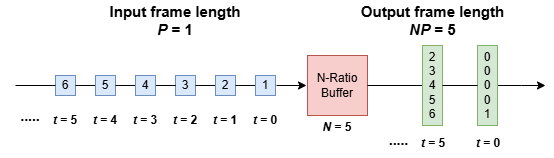
The N-Ratio Buffer block optimizes the memory used in the generated code for P- to NP-frame conversion.
Examples
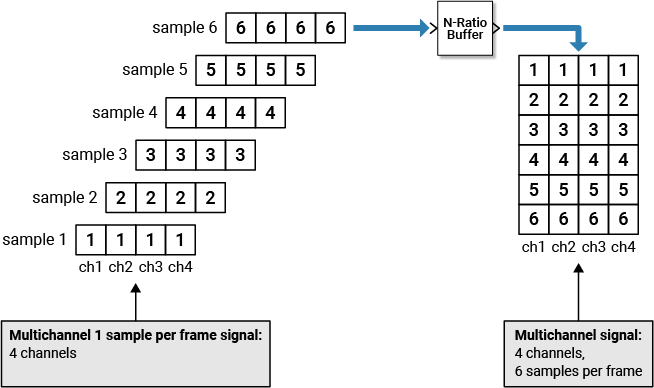
Use the N-Ratio Buffer block to buffer multichannel signals of frame length 1 into multichannel signals of frame length N, where N is a positive integer greater than 1.
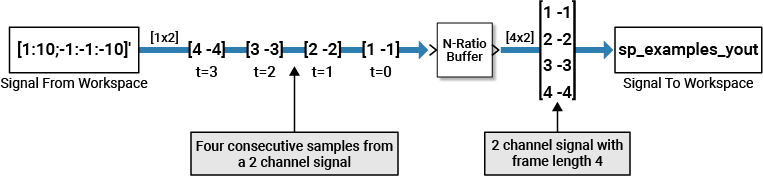
This figure is a graphical representation of a signal with frame length 1 converted into a signal of frame length N by the N-Ratio Buffer block.
In this example, a two-channel 1-sample-per-frame signal is buffered into a two-channel 4-samples-per-frame signal using an N-Ratio Buffer block.
Open the ex_nratiobuffer_tut model. The Signal From Workspace block has these parameters set:
Signal = [1:10;-1:-1:-10]'
Sample time = 1
Samples per frame = 1
Form output after final data value =
Setting to zero
Based on these parameters, the Signal from Workspace block outputs a signal with a frame length of 1 and a sample period of 1 second. Because you set the Samples per frame parameter to 1, the Signal From Workspace block outputs one two-channel sample at each sample time.
Save these parameters and close the dialog box by clicking OK.
Double-click the N-Ratio Buffer block and set Output-to-input frame length ratio to 4. The N-Ratio Buffer block outputs a signal with a frame length of 4.
Run the model.
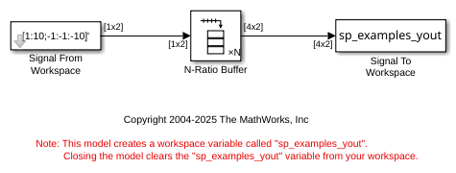
This figure shows the model behavior during simulation.
Ports
Input
Output
Parameters
Block Characteristics
Data Types |
|
Direct Feedthrough |
|
Multidimensional Signals |
|
Variable-Size Signals |
|
Zero-Crossing Detection |
|
More About
When you generate code from a model that contains an N-Ratio Buffer block, you can configure the block to optimize memory usage or enable concurrent execution.
In the Simulink model, in the Solver pane under model settings, clear
the Allow tasks to execute concurrently on target parameter. To
enable this parameter, you must set the solver type to
Fixed-step. (since R2026a)
Generate code from the model. The N-Ratio Buffer block optimizes the memory used in the generated code and has the lowest possible latency for the P- to NP-frame conversion. (since R2026a)
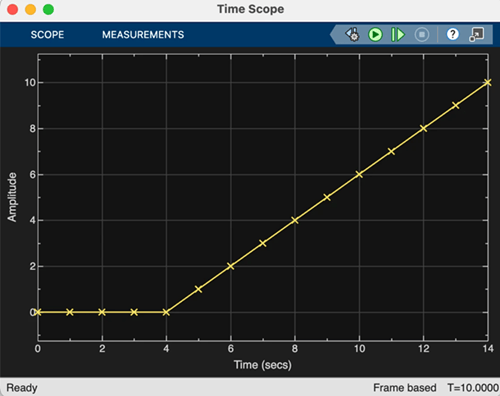
The following image illustrates how the input and output signals of the N-Ratio Buffer block look when you clear the Allow tasks to execute concurrently on target parameter.
Consider a ramp signal that produces one sample every 1 second starting at an initial value of 1. The goal is to buffer this signal to a frame of 5 samples using the N-Ratio Buffer block.
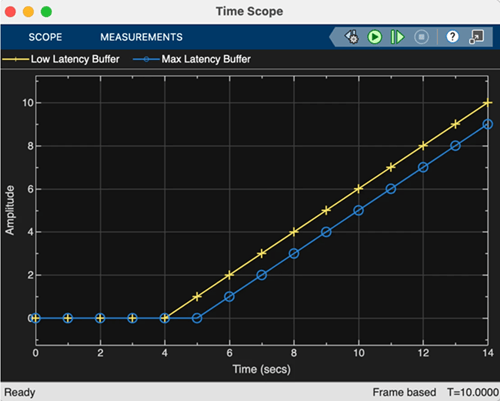
Plot the output signal in a time scope. In this mode, the memory occupied by the generated code is optimized and the latency is very low.
Select the Allow tasks to execute concurrently on target parameter. The N-Ratio Buffer block supports multicore concurrent execution for code generated from a model containing this block. In this mode, the block uses twice the memory for the internal buffer and introduces additional latency to ensure thread safety. (since R2026b)
The following is an illustration of how the input and output signals of the N-Ratio Buffer block look when you select the Allow tasks to execute concurrently on target parameter.
Consider a ramp signal that produces one sample every 1 second starting at an initial value of 1. Again, the goal is to buffer this signal to a frame of 5 samples using the N-Ratio Buffer block.
In this mode, the block initializes the buffer with a frame of 2N zeros, and the block begins buffering this frame at the start of the simulation. The internal buffer uses twice the memory to ensure thready safety. Inputs to the block are delayed by one buffer length or 5 samples. The block outputs the first frame of data at t = 0, the next at t = 5, and so on. The output rate matches the rate at which the block operates.
Plot the output signal in a time scope. In this mode, the latency equals the input frame size.
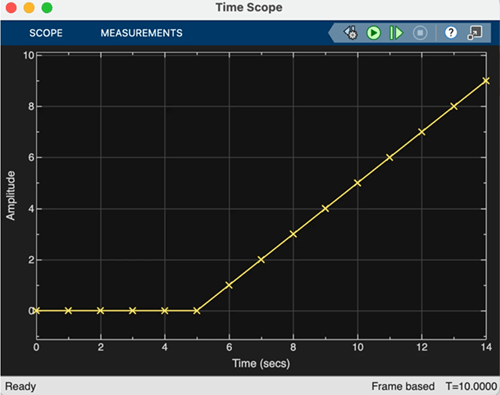
Compare both the signals in the time scope. The signal generated with concurrency disabled has lower latency and the signal generated with concurrency enabled has higher latency.