Improve Code Efficiency and Integration of Inlined S-Functions
R2026bThe Target Language Compiler (TLC) block interface is a key component of the Simulink® code generation infrastructure. It is a set of functions and records that are
used by the code generation implementation of S-Function blocks. You can
generate code for S-Function blocks by using .tlc files.
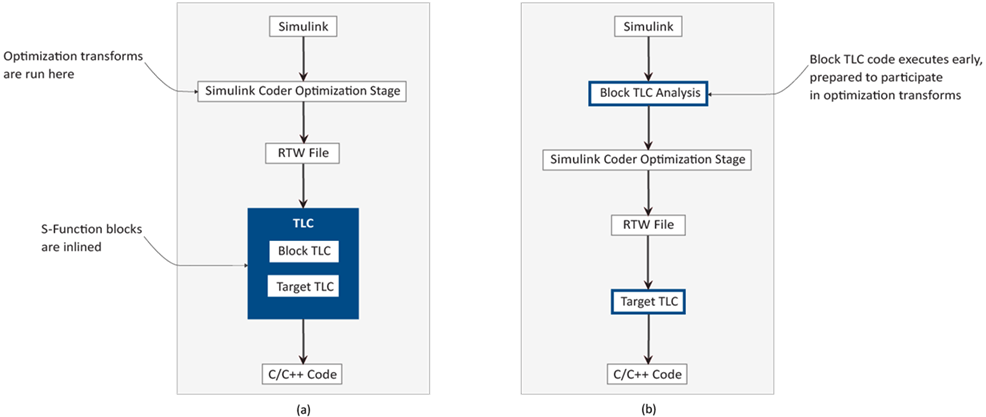
This top-level diagram shows how the TLC block interface fits in the code generation process.
For detailed information on the translation of block diagrams into high-quality code, refer to
Target Language Compiler Basics.
The TLC block interface is integrated into the back end of Simulink Coder™. Being positioned at the back end delays its execution, introducing several constraints. Its effectiveness is also limited by the fact that many of the Simulink Coder optimization transforms are carried out in the middle end.
Enhanced TLC Block Interface
The enhanced TLC block interface introduces S-Function block TLC implementation in the Simulink Coder Optimization Stage. This infrastructure change enables the S-Function block code to integrate more effectively into the generated code of the model, resulting in improved code efficiency with enhanced optimization and customization capabilities.
This illustration shows the Simulink Coder architecture with (a) the TLC block interface and (b) the enhanced TLC block interface.
The compatibility of the S-Function block with the Simulink Coder Optimization Stage
must be specified by the .tlc file. This enhanced TLC block interface
offers these benefits:
Improved buffer allocation for the inputs and outputs of S-Function blocks in the generated code
Improved inlining of the code generated for the S-Function block
Reuse of local variables used in
for-loop iterationsA more explicit set of cross-release compatible TLC library functions
The enhanced TLC block interface makes use of optimizations, including better loop generation and improved buffer allocation for S-Function blocks with TLC implementation inside of Function-Call Subsystem blocks and for Simulink Functions blocks inside Stateflow®.
Enable the Enhanced TLC Block Interface
To enable the enhanced TLC block interface, make the necessary changes to the block and the target TLC files.
Block TLC Files
Call LibEnableBlockFcnOptimizations from
BlockInstanceSetup (see Block Target File Methods) to
enable the enhanced TLC block interface for an S-Function.
%function BlockInstanceSetup(block, system) void
%<LibEnableBlockFcnOptimizations(block)>
%endfunction
Conditionally Enable the Interface for Release Compatibility
If you need to use the same inlined S-Function block TLC file in a release earlier
than the one in which you enabled the enhanced TLC block interface, guard the call to
LibEnableBlockFcnOptimizations(block) in
BlockInstanceSetup. Using this guard avoids build errors and
potential code generation failures in releases that do not support the enhanced TLC block
interface. When you use the guard, TLC invokes the call only in supported releases and
skips it in earlier releases, allowing the block to use the legacy TLC block interface. As
a result, you can maintain a single block TLC file across the MATLAB® releases you support without requiring separate TLC versions for
enhanced-interface enablement.
To implement this version check from TLC, use FEVAL function with the MATLAB verLessThan function.
FEVAL("verLessThan","matlab","version")1 (true) when the MATLAB version is earlier than version or
0 (false) otherwise. Negate the result with ! so
that TLC invokes LibEnableBlockFcnOptimizations(block) only when the
MATLAB version is version or later.%function BlockInstanceSetup(block, system) void
%if !FEVAL("verLessThan","matlab","version")
%<LibEnableBlockFcnOptimizations(block)>
%endif
%endfunction
Replace version with the MATLAB numeric version string for the first release that supports the enhanced TLC
block interface for the S-Function. The numeric version string is the value that the
verLessThan function uses to identify a release. For example, if
the first supported release is R2026b, specify 26.2 as the version
string. For R2025a, specify 25.1.
Target TLC Files
In target TLC files, define the PreCodeGenExecCompliant variable as
part of the global variable declarations early in the system target file, and before
%include statements. This placement ensures that the variable is read
and evaluated by TLC before it initializes build settings for code generation. Not
defining PreCodeGenExecCompliant early excludes it from
rtwgensettings. For information on rtwgensettings,
see rtwgensettings Structure.
Next, determine if the target includes codegenentry.tlc.
Case 1 – The target includes
codegenentry.tlcand does not contain custom TLC code:Define the global variable
PreCodeGenExecCompliant, as in this example fromrtw/c/tlc/grt/grt.tlc.%assign TargetRegistSynchroOp = 1 %assign PreCodeGenExecCompliant = 1 %include "codegenentry.tlc"
Case 2 – The target includes
codegenentry.tlcand contains custom TLC code:This shows the structure of a custom target TLC file that includes
codegenentry.tlcand custom TLC code:%%% START global TLC variable declaration ... %%% END global TLC variable declaration %%% START custom TLC target code ... %include "codegenentry.tlc" ... %%% END custom TLC target code
In this code, you can observe the modifications required to support the execution of the target TLC file before the Simulink Coder Optimization Stage, as shown in the example from
matlab/rtw/c/raccel/raccel.tlc.%%% START global TLC variable declaration %assign PreCodeGenExecCompliant = 1 ... %%% END global TLC variable declaration %if EXISTS("::CompiledModel") %include "codegenentrylib.tlc" %if LibIsPreCodeGenPhase() %include "codegenentry.tlc" %else %%% START custom TLC target code ... %include "codegenentry.tlc" ... %%% END custom TLC target code %endif %% LibIsPreCodeGenPhase() %endif %% EXISTS("::CompiledModel")Case 3 – The target does not include
codegenentry.tlc:Include code to switch between the TLC program executed before and after the Simulink Coder Optimization Stage. This example shows the contents of a target TLC file without
codegenentry.tlc.%%% START global TLC variable declaration ... %%% END global TLC variable declaration %%% START custom TLC target code ... %%% END custom TLC target code
In this code, you can observe the modifications required to support the execution of the target TLC file before the Simulink Coder Optimization Stage, as shown in the example from
rtw/c/rsim/rsim.tlc.%%% START global TLC variable declaration %assign PreCodeGenExecCompliant = 1 ... %%% END global TLC variable declaration %if EXISTS("::CompiledModel") %include "codegenentrylib.tlc" %if LibIsPreCodeGenPhase() %include "codegenentry.tlc" %else %%% START custom TLC target code ... %%% END custom TLC target code %endif %% LibIsPreCodeGenPhase() %endif %% EXISTS("::CompiledModel")
Note
To avoid build errors, update system target files to support the enhanced TLC block interface for code generation.
Supported Functions
Use documented TLC functions from rtw/c/tlc/public_api in custom TLC
code to provide cross-release compatibility. Avoid using undocumented APIs in
rtw/c/tlc/private_api, as these may not be supported in the
future.
Debugging and Error Handling
The enhanced TLC block interface includes support for debugging options such as the TLC
debugger, TLC coverage, TLC assertion and TLC profiler; for TLC error handling; and for
retaining the generated model.rtw
The TLC block analysis phase, in the Simulink Coder Optimization Stage, functions as a separate TLC process. By enabling the specified TLC debugging options, you can independently debug the block TLC code that is executed within the TLC block analysis phase. In the Configuration Parameters dialog box, enable these parameters in the Code Generation pane under Advanced parameters:
Start TLC coverage when generating code – Track code execution frequency and combine coverage data from the TLC block analysis phase with the target TLC in a single report. This report provides a comprehensive view of code test coverage.
Retain .rtw file – Create a new file
modelName_reduced.rtwmodelName_reduced.rtwProfile TLC – Collect timing statistics for TLC code and produce the files
modelName_frontend.htmlmodelName.htmlStart TLC debugger when generating code – Set breakpoints, inspect variables, navigate TLC code, and correct errors in the generated code without disrupting the workflow.
Enable TLC assertion – Halt the build process upon failed conditions within TLC code and produce a TLC stack trace that identifies errors within
.tlcfiles.

