Real Burst Matrix Solve Using QR Decomposition
R2026bCompute the value of x in the equation Ax = B for real-valued matrices using QR decomposition
Real Burst Matrix Solve Using QR Decomposition block

To add a block to a model, double-click the canvas and start typing the block name. Then, select the block from the list.
Libraries:
Fixed-Point Designer HDL Support /
Matrices and Linear Algebra /
Linear System Solvers
Description
The Real Burst Matrix Solve Using QR Decomposition block solves the system of linear equations Ax = B using QR decomposition, where A and B are real-valued matrices. To compute x = A-1, set B to be the identity matrix.
When Regularization parameter is nonzero, the
Real Burst Matrix Solve Using QR Decomposition block computes the matrix
solution of real-valued where λ is the regularization parameter,
A is an m-by-n matrix,
p is the number of columns in B,
In =
eye(n), and
0n,p =
zeros(n,p).
Examples
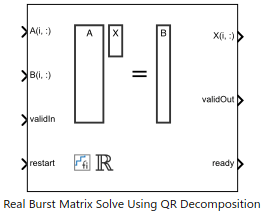
Implement Hardware-Efficient Real Burst Matrix Solve Using QR Decomposition
How to use the Real Burst Matrix Solve Using QR Decomposition block.
Implement Hardware-Efficient Real Burst Matrix Solve Using QR Decomposition with Tikhonov Regularization
Use the Real Burst Matrix Solve Using QR Decomposition block to solve the regularized least-squares matrix equation
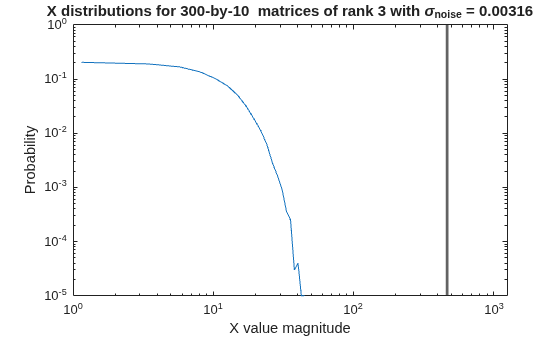
Algorithms to Determine Fixed-Point Types for Real Least-Squares Matrix Solve AX=B
Derivation of algorithms for determining fixed-point types for real least-squares matrix solve.
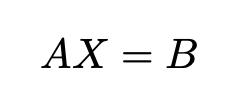
Determine Fixed-Point Types for Real Least-Squares Matrix Solve AX=B
Use fixed.realQRMatrixSolveFixedpointTypes to determine fixed-point
types for computation of the real least-squares matrix equation.
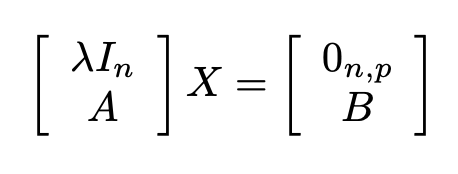
Determine Fixed-Point Types for Real Least-Squares Matrix Solve with Tikhonov Regularization
Use the fixed.realQRMatrixSolveFixedpointTypes function to analytically determine fixed-point types for the solution of the real least-squares matrix equation
Ports
Input
Rows of real matrix A, specified as a vector. A is an m-by-n matrix where m ≥ 2 and m ≥ n. If B is single or double, A must be the same data type as B. If A is a fixed-point data type, A must be signed, use binary-point scaling, and have the same word length as B. Slope-bias representation is not supported for fixed-point data types.
Data Types: single | double | fixed point
Rows of real matrix B, specified as a vector. B is an m-by-p matrix where m ≥ 2. If A is single or double, B must be the same data type as A. If B is a fixed-point data type, B must be signed, use binary-point scaling, and have the same word length as A. Slope-bias representation is not supported for fixed-point data types.
Data Types: single | double | fixed point
Whether inputs are valid, specified as a Boolean scalar. This control signal
indicates when the data from the A(i,:) and
B(i,:) input ports are valid. When this value is 1
(true) and the value at ready is 1
(true), the block captures the values on the
A(i,:) and B(i,:) input ports. When this
value is 0 (false), the block ignores the input samples.
After sending a true
validIn signal, there may be some delay before
ready is set to false. To ensure all data is
processed, you must wait until ready is set to
false before sending another true
validIn signal.
Data Types: Boolean
Whether to clear internal states, specified as a Boolean scalar. When this value
is 1 (true), the block stops the current calculation and clears all
internal states. When this value is 0 (false) and the
validIn value is 1 (true), the block begins
a new subframe.
Data Types: Boolean
Output
Rows of the matrix X, returned as a scalar or vector.
Data Types: single | double | fixed point
Whether the output data is valid, returned as a Boolean scalar. This control
signal indicates when the data at the output port X(i,:) is
valid. When this value is 1 (true), the block has successfully
computed a row of matrix X. When this value is 0
(false), the output data is not valid.
Data Types: Boolean
Whether the block is ready, returned as a Boolean scalar. This control signal
indicates when the block is ready for new input data. When this value is 1
(true) and the validIn value is 1
(true), the block accepts input data in the next time step. When
this value is 0 (false), the block ignores input data in the next
time step.
After sending a true
validIn signal, there may be some delay before
ready is set to false. To ensure all data is
processed, you must wait until ready is set to
false before sending another true
validIn signal.
Data Types: Boolean
Parameters
Main
Number of rows in input matrices A and B, specified as a positive integer-valued scalar.
Programmatic Use
Block Parameter:
m |
| Type: character vector |
| Values: positive integer-valued scalar |
Default:
4 |
Number of columns in input matrix A, specified as a positive integer-valued scalar.
Programmatic Use
Block Parameter:
n |
| Type: character vector |
| Values: positive integer-valued scalar |
Default:
4 |
Number of columns in input matrix B, specified as a positive integer-valued scalar.
Programmatic Use
Block Parameter:
p |
| Type: character vector |
| Values: positive integer-valued scalar |
Default:
1 |
Regularization parameter, specified as a nonnegative scalar. Small, positive values of the regularization parameter can improve the conditioning of the problem and reduce the variance of the estimates. While biased, the reduced variance of the estimate often results in a smaller mean squared error when compared to least-squares estimates.
Programmatic Use
Block Parameter:
regularizationParameter |
| Type: character vector |
| Values: positive integer-valued scalar |
Default:
0 |
Data type of the output matrix X, specified as
fixdt(1,18,14), double,
single, fixdt(1,16,0), or as a user-specified
data type expression. The type can be specified directly, or expressed as a data type
object such as Simulink.NumericType.
Programmatic Use
Block Parameter:
OutputType |
| Type: character vector |
Values:
'fixdt(1,18,14)' | 'double' |
'single' | 'fixdt(1,16,0)' |
'<data type expression>' |
Default:
'fixdt(1,18,14)' |
Implementation
Since R2026b
Constant multiplication implementation, specified as one of these values:
CSD— Canonical Signed Digit (CSD) technique, which uses only shift-add operations.Multiplier— Multiplication operation,*.
Tips
Use this parameter to help balance use of different resources on hardware.
For more information on the CSD technique, see Constant Multiplier Optimization to Reduce Area (HDL Coder).
Programmatic Use
To set the block parameter value programmatically, use
the set_param function.
To get the block parameter value
programmatically, use the get_param function.
| Parameter: | ConstMultiplier |
| Values: | CSD (default) | Multiplier |
| Data Types: | string | char |
Since R2026b
Data type of inverse CORDIC gain, specified as Inherit: Same word length
as input, fixdt(0,16), or as a user-specified data type
expression.
Tips
Use this parameter to fine-tune the quantization of the internal gain value and trade off between hardware resource utilization and numeric precision.
Programmatic Use
To set the block parameter value programmatically, use
the set_param function.
To get the block parameter value
programmatically, use the get_param function.
| Parameter: | MultiplierDataTypeStr |
| Values: | Inherit: Same word length as
input (default) | fixdt(0,16) | <data type expression> |
| Data Types: | string | char |
Command-Line Only
Since R2026b
Latency mode, specified as one of these values:
Default— Default block behavior since R2026b. Choose this setting for reduced block latency.Legacy— Legacy latency behavior that matches the latency of the block prior to R2026b. Choose this setting if your model was created prior to R2026b and depends on exact legacy latency numbers.
Note
The Latency Mode parameter will be removed in a future release.
Tips
If you load a model created in a release prior to R2026b, the software warns and sets the Latency Mode parameter to
Legacy.The software warns if the Latency Mode parameter is set to
Legacy. The Latency Mode parameter will be removed in a future release. Update your model to be compatible with theDefaultlatency mode.The software warns if you export a model containing this block from R2026b to a prior release. The behavior of the model and generated code may change on export.
Programmatic Use
To set the block parameter value programmatically, use
the set_param function.
To get the block parameter value
programmatically, use the get_param function.
| Parameter: | Latency Mode |
| Values: | Default (default) | Legacy |
| Data Types: | string | char |
Tips
Use fixed.getMatrixSolveModel(A,B) to generate a template model
containing a Real Burst Matrix Solve Using QR Decomposition block for
real-valued input matrices A and B.
Algorithms
Systolic implementations prioritize speed of computations over space constraints, while burst implementations prioritize space constraints at the expense of speed of the operations. The following table illustrates the tradeoffs between the implementations available for matrix decompositions and solving systems of linear equations.
| Implementation | Throughput | Latency | Area |
|---|---|---|---|
| Systolic | High | O(nlog2(m)) | O(mn2) |
| Partial-Systolic | Medium | O(mn) | O(n2) |
| Burst | Low | O(mn) | O(n) |
Where m is the number of rows in matrix A and n is the number of columns in matrix A. Regardless of architecture, a larger word length results in lower throughput, larger latency, and larger area.
For additional considerations in selecting a block for your application, see Choose a Block for HDL-Optimized Fixed-Point Matrix Operations.
The Matrix Solve Using QR Decomposition blocks operate synchronously. These blocks first decompose the input A and B matrices into R and C matrices using a QR decomposition block. Then, a back substitute block computes RX = C. The input A and B matrices propagate through the system in parallel, in a synchronized way.

The Matrix Solve Using Q-less QR Decomposition blocks operate asynchronously. First, Q-less QR decomposition is performed on the input A matrix and the resulting R matrix is put into a buffer. Then, a forward backward substitution block uses the input B matrix and the buffered R matrix to compute R'RX = B. Because the R and B matrices are stored separately in buffers, the upstream Q-less QR decomposition block and the downstream Forward Backward Substitute block can run independently. The Forward Backward Substitute block starts processing when the first R and B matrices are available. Then it runs continuously using the latest buffered R and B matrices, regardless of the status of the Q-less QR Decomposition block. For example, if the upstream block stops providing A and B matrices, the Forward Backward Substitute block continues to generate the same output using the last pair of R and B matrices.

The Burst (Asynchronous) Matrix Solve Using Q-less QR Decomposition blocks are available in both synchronous and asynchronous operation variants, as denoted by the block name.
This block uses the AMBA AXI handshake protocol [1]. The valid/ready handshake process is used to transfer data and control information. This two-way control mechanism allows both the manager and subordinate to control the rate at which information moves between manager and subordinate. A valid signal indicates when data is available. The ready signal indicates that the block can accept the data. Transfer of data occurs only when both the valid and ready signals are high.
The Burst Matrix Solve Using QR Decomposition blocks accept and process A and B matrices row by row synchronously. After accepting m rows, the block outputs the X matrix row by row continuously. The matrix is output from the first row to the last row.
For example, assume that the input A and B
matrices are 3-by-3. Additionally assume that validIn asserts before
ready, meaning that the upstream data source is faster than the QR
decomposition.

In the figure,
A1r1is the first row of the first A matrix,X1r3is the third row of the first X matrix, and so on.validIntoready— From a successful row input to the block being ready to accept the next row within one matrix.Last row
validIntovalidOut— From the last row input to the block starting to output the solution.Last row
validInto new matrix ready — From the block starting to output the solution to the block ready to accept the next matrix input.
The following tables provide details of the timing for the Real Burst Matrix Solve Using QR Decomposition block, before and since R2026b, using default parameter settings. Latency depends on the size of matrix A and the data types of the A and B matrices. In the table:
n is the number of columns in matrix A.
wl represents the word length of the input data. If the data types of A and B are fixed point or scaled double
fi, then wl is given bymax(A.WordLength + ~issigned(A), B.WordLength + ~issigned(B)).
| Input Data Type | validIn to ready (cycles) | Last Row validIn to validOut
(cycles) | Last row validIn to new matrix ready (cycles) |
|---|---|---|---|
Fixed point fi | (wl + 5)*n + 2 | 0.5*n2 + (wl + 12.5)*n + nextpow2(wl) + wl - 2 | (wl + 6)*n + 3 |
Scaled double fi | (wl + 5)*n + 2 | 0.5*n2 + (wl + 12.5)*n + nextpow2(wl) + wl - 2 | (wl + 6)*n + 3 |
double | 58*n + 2 | 0.5*n2 + 65.5*n | 59*n + 3 |
single | 29*n + 2 | 0.5*n2 + 36.5*n | 30*n + 3 |
| Input Data Type | validIn to ready (cycles) | Last Row validIn to validOut
(cycles) | Last row validIn to new matrix ready (cycles) |
|---|---|---|---|
Fixed point fi | (wl + 5)*n + 2 | (wl + 5)*n + 3.5*n2 + n*(nextpow2(wl) + wl + 8.5) + 3 | (wl + 5)*n + 3.5*(n - 1)2 + (n - 1)(nextpow2(wl) + wl + 8.5) + 3 |
Scaled double fi | (wl + 5)*n + 2 | 3.5*n2 + (2*wl + 12.5)*n + 3 | (wl + 5)*n + 3.5*(n - 1)2 + (n - 1)*(7.5 + wl) + 3 |
double | 58*n + 2 | 3.5*n2 + 64.5*n + 3 | 3.5*n2 + 57.5*n |
single | 29*n + 2 | 3.5*n2 + 35.5*n + 3 | 3.5*n2 + 28.5*n |
This block supports HDL code generation using the Simulink® HDL Workflow Advisor. For an example, see HDL Code Generation and FPGA Synthesis from Simulink Model (HDL Coder) and Implement Digital Downconverter for FPGA (DSP HDL Toolbox).
This example data was generated by synthesizing the block on a Xilinx® Zynq® UltraScale™ + RFSoC ZCU111 evaluation board. The synthesis tool was Vivado® v.2025.1 (glnx64).
The following parameters were used for synthesis.
Block parameters:
m = 16n = 16p = 1Matrix A dimension: 16-by-16
Matrix B dimension: 16-by-1
Input data type:
sfix16_En14CORDIC inverse gain data type:
Inherit: Same word length as input
Hardware resource utilization results are provided for both CSD and
Multiplier implementations for comparison.
The following tables show the post-synthesis resource utilization results and timing summary, respectively.
CSD| Resource | Usage | Available | Utilization (%) |
|---|---|---|---|
| CLB LUTs | 8938 | 425280 | 2.10 |
| CLB Registers | 5213 | 850560 | 0.61 |
| DSPs | 2 | 4272 | 0.05 |
| Block RAM Tile | 0 | 1080 | 0.00 |
| URAM | 0 | 80 | 0.00 |
| Value | |
|---|---|
| Requirement | 3.3333 ns (300 MHz) |
| Data Path Delay | 2.022 ns |
| Slack | 1.293 ns |
| Clock Frequency | 490.12 MHz |
Multiplier| Resource | Usage | Available | Utilization (%) |
|---|---|---|---|
| CLB LUTs | 6595 | 425280 | 1.55 |
| CLB Registers | 3551 | 850560 | 0.42 |
| DSPs | 36 | 4272 | 0.84 |
| Block RAM Tile | 0 | 1080 | 0.00 |
| URAM | 0 | 80 | 0.00 |
| Value | |
|---|---|
| Requirement | 3.3333 ns (300 MHz) |
| Data Path Delay | 2.015 ns |
| Slack | 1.3 ns |
| Clock Frequency | 490.80 MHz |
References
[1] "AMBA AXI and ACE Protocol Specification Version E." https://developer.arm.com/documentation/ihi0022/e/
Extended Capabilities
Slope-bias representation is not supported for fixed-point data types.
HDL Coder™ provides additional configuration options that affect HDL implementation and synthesized logic.
This block has one default HDL architecture.
| General | |
|---|---|
| ConstrainedOutputPipeline | Number of registers to place at
the outputs by moving existing delays in the design. Distributed pipelining
does not redistribute these registers. The default value is
|
| InputPipeline | Number of input pipeline stages
to insert in the generated code. Distributed pipelining and constrained
output pipelining can move these registers. The default value is
|
| OutputPipeline | Number of output pipeline stages
to insert in the generated code. Distributed pipelining and constrained
output pipelining can move these registers. The default value is
|
Supports fixed-point data types only.
Version History
Introduced in R2019bThe latency of the Real Burst Matrix Solve Using QR Decomposition and Complex Burst Matrix Solve Using QR Decomposition blocks have been reduced from prior releases.
If you load a model created in a previous release, the software automatically sets the
Latency Mode parameter of the block to Legacy in
order to match the latency behavior of the block prior to this update.
The Latency Mode parameter will be removed in a future release.
Several improvements have been made to the Real Burst QR Decomposition, Complex Burst QR Decomposition, Real Burst Matrix Solve Using QR Decomposition, and Complex Burst Matrix Solve Using QR Decomposition blocks:
HDL resource utilization has been further optimized to require fewer hardware resources. The reduction in resource utilization includes changes to both the algorithm and the implementation. Numeric outputs are not bit-exact with previous releases, but have the same noise floor.
These blocks now allow you to choose the implementation of the constant multiplication between a multiplication operation or the previously existing canonical signed digit (CSD) technique, which uses only shift-add operations.
The Real Burst Matrix Solve Using QR Decomposition block now supports the Tikhonov Regularization parameter.
MATLAB Command
You clicked a link that corresponds to this MATLAB command:
Run the command by entering it in the MATLAB Command Window. Web browsers do not support MATLAB commands.
Seleccione un país/idioma
Seleccione un país/idioma para obtener contenido traducido, si está disponible, y ver eventos y ofertas de productos y servicios locales. Según su ubicación geográfica, recomendamos que seleccione: .
También puede seleccionar uno de estos países/idiomas:
Cómo obtener el mejor rendimiento
Seleccione China (en idioma chino o inglés) para obtener el mejor rendimiento. Los sitios web de otros países no están optimizados para ser accedidos desde su ubicación geográfica.
América
- América Latina (Español)
- Canada (English)
- United States (English)
Europa
- Belgium (English)
- Denmark (English)
- Deutschland (Deutsch)
- España (Español)
- Finland (English)
- France (Français)
- Ireland (English)
- Italia (Italiano)
- Luxembourg (English)
- Netherlands (English)
- Norway (English)
- Österreich (Deutsch)
- Portugal (English)
- Sweden (English)
- Switzerland
- United Kingdom (English)
