PR Controller
R2026bPR Controller block
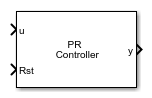
To add a block to a model, double-click the canvas and start typing the block name. Then, select the block from the list.
Libraries:
Power Converter Control with Motor Control Blockset /
Control /
Renewables
Description
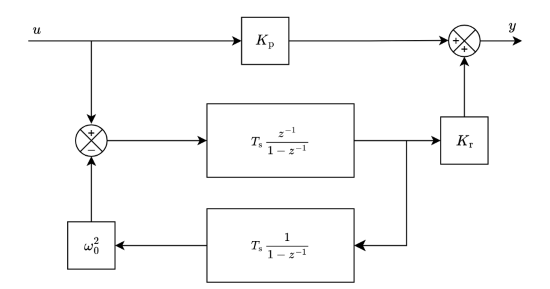
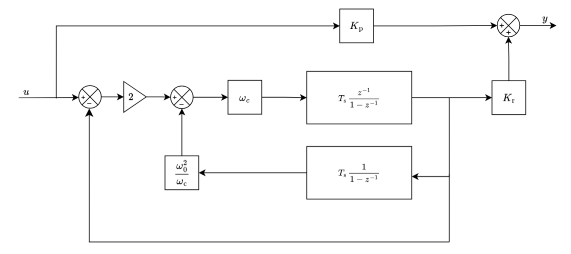
The PR Controller block implements a discrete proportional-resonant (PR) controller for tracking AC reference signals at a specific resonant frequency. Use this block in grid-connected renewable energy applications where you need to achieve zero steady-state error for sinusoidal signals. You can configure the controller in ideal or damped mode, specify gains and resonant frequency through dialog parameters or input ports, and apply output saturation with optional anti-windup.
Ideal Form
Damped Form
Ports
Input
Error signal (reference minus feedback) for the PR controller, specified as a scalar. The block applies proportional and resonant action to this signal to produce the control output. Compute this value externally by subtracting the measured AC quantity from its reference before connecting to this port.
Data Types: double | single
Proportional gain for the PR controller, specified as a positive scalar. The block uses this value to scale the wideband proportional response. Increasing proportional gain improves transient response speed but may reduce stability margins.
Dependencies
To enable this port, set Source (gains) to Input port.
Data Types: double | single
Resonant gain for the PR controller, specified as a positive scalar. The block uses this value to set the magnitude of the resonant peak at the configured resonant frequency. Increasing the resonant gain reduces steady-state AC tracking error but very large values can cause oscillation near the resonant frequency.
Dependencies
To enable this port, set Source (gains) to Input port.
Data Types: double | single
Resonant frequency of the PR controller in hertz, specified as a positive scalar. The block uses this value to tune its internal resonant element. Set this to the fundamental grid frequency (50 Hz or 60 Hz) to track sinusoidal AC currents or voltages at that frequency.
Dependencies
To enable this port, set Resonant frequency source to Input port.
Data Types: double | single
Discrete sample time of the controller in seconds, specified as a positive scalar. The block uses this value to parameterize the discrete resonant element at run time. This port allows runtime configuration of the sample time without recompiling the model.
Dependencies
To enable this port, select the Use Discrete step size as input port parameter.
Data Types: double | single
Boolean signal that resets the controller integrator states when asserted (nonzero), specified as a scalar. When asserted, the block resets both the forward-path integrator and the feedback integrator to zero. Use this port to initialize the controller at startup or after a fault condition to avoid transient spikes.
Data Types: double | single
Output
PR controller output combining the proportional and resonant components, output as a scalar. The block sums both components and applies output saturation if enabled. Connect this signal to the modulator or the input of a PWM generation block.
Data Types: double | single
Parameters
To edit block parameters interactively, use the Property Inspector. From the Simulink® Toolstrip, on the Simulation tab, in the Prepare gallery, select Property Inspector.
Controller Tab
Select Ideal for an ideal PR controller with
theoretically infinite gain at the resonant frequency. This mode achieves
zero steady-state error for sinusoidal signals at the resonant frequency but
is more sensitive to frequency deviations.
Select Damped for a non-ideal PR controller
with a finite gain peak whose width is determined by the Cutoff
frequency (Hz), fс parameter. Use this mode when the grid
frequency fluctuates and you need a broader tracking bandwidth around the
resonant frequency.
Programmatic Use
To set the block parameter value programmatically, use
the set_param function.
To get the block parameter value
programmatically, use the get_param function.
| Parameter: | Controller |
| Values: | "Ideal" (default) | "Damped" |
Example: set_param(gcb,"Controller","Damped")
Option to specify the discrete step size through an input port instead of a dialog parameter. Select this parameter to enable the Ts input port, which allows the sample time to vary at run time. When cleared, the block uses the fixed value from the Discrete step size (s) parameter.
Programmatic Use
To set the block parameter value programmatically, use
the set_param function.
To get the block parameter value
programmatically, use the get_param function.
| Parameter: | BlkSampleTimeInport |
| Values: | "off" (default) | "on" |
Example: set_param(gcb,"BlkSampleTimeInport","on")
Discrete step size for the controller, specified in seconds, as a positive scalar. The block uses this value to parameterize the resonant element and determine the execution rate. This value must be small enough relative to the resonant frequency to avoid discretization errors. Set this to match the PWM switching period or inverter control sample time.
Dependencies
This parameter is visible when Use Discrete step size as input port is cleared.
Programmatic Use
To set the block parameter value programmatically, use
the set_param function.
To get the block parameter value
programmatically, use the get_param function.
| Parameter: | BlkSampleTime |
| Values: | "50e-6" (default) | positive scalar in quotes |
| Data Types: | char | string |
Example: set_param(gcb,"BlkSampleTime","100e-6")
Select Specify via dialog to enter the
proportional and resonant gain values in the block parameters dialog box.
The Proportional (Kp) and Resonant
(Kr) parameters become visible.
Select Input port to provide gains at run time
through the Kp and
Kr input ports. Use this
mode for adaptive gain scheduling or hardware-in-the-loop tests where gains
change during simulation.
Programmatic Use
To set the block parameter value programmatically, use
the set_param function.
To get the block parameter value
programmatically, use the get_param function.
| Parameter: | MainSource |
| Values: | "Specify via
dialog" (default) | "Input port" |
Example: set_param(gcb,"MainSource","Input
port")
Proportional gain of the PR controller, specified as a positive scalar. The block uses this value to scale the wideband proportional response. This gain determines the wideband response and affects disturbance rejection at all frequencies. Increasing it improves transient response but can reduce stability margin.
Dependencies
This parameter is visible when Source is set to
Specify via
							dialog
.
Programmatic Use
To set the block parameter value programmatically, use
the set_param function.
To get the block parameter value
programmatically, use the get_param function.
| Parameter: | Proportional |
| Values: | "1" (default) | positive scalar in quotes |
| Data Types: | char | string |
Example: set_param(gcb,"Proportional","2")
Resonant gain of the PR controller, specified as a positive scalar. The block uses this value to set the magnitude of the resonant peak at the configured resonant frequency. Increasing it reduces steady-state tracking error for sinusoidal signals but a very large value can cause oscillation near the resonant frequency.
Dependencies
This parameter is visible when Source is set to
Specify via dialog.
Programmatic Use
To set the block parameter value programmatically, use
the set_param function.
To get the block parameter value
programmatically, use the get_param function.
| Parameter: | Integral |
| Values: | "1" (default) | positive scalar in quotes |
| Data Types: | char | string |
Example: set_param(gcb,"Integral","5")
Select Specify via dialog to enter the resonant
frequency in the block parameters dialog box. The Resonant
frequency (Hz), f₀ parameter becomes visible.
Select Input port to provide the frequency at
run time through the f0 input
port. Use this mode when the grid frequency varies and you need the
controller to track frequency in real time.
Programmatic Use
To set the block parameter value programmatically, use
the set_param function.
To get the block parameter value
programmatically, use the get_param function.
| Parameter: | InputFrequencyType |
| Values: | "Specify via
dialog" (default) | "Input port" |
Example: set_param(gcb,"InputFrequencyType","Input
port")
Resonant frequency of the controller, specified in hertz as a positive scalar. The block uses this value to tune the resonant element so it provides high gain at this frequency for zero steady-state error tracking. Set this to the fundamental grid frequency (50 or 60 Hz) or a harmonic frequency you want to track or reject.
Dependencies
This parameter is visible when Resonant frequency
source is set to Specify via
dialog.
Programmatic Use
To set the block parameter value programmatically, use
the set_param function.
To get the block parameter value
programmatically, use the get_param function.
| Parameter: | FundamentalFrequency |
| Values: | "50" (default) | positive scalar in quotes |
| Data Types: | char | string |
Example: set_param(gcb,"FundamentalFrequency","60")
Cutoff frequency for the damped PR controller, specified in hertz as a positive scalar. The block uses this value to set the half-bandwidth of the resonant peak. A smaller value produces a narrower, sharper peak that is more selective but less robust to frequency variations. Increase this value if the grid frequency fluctuates significantly.
Dependencies
This parameter is visible when Control type is
set to Damped.
Programmatic Use
To set the block parameter value programmatically, use
the set_param function.
To get the block parameter value
programmatically, use the get_param function.
| Parameter: | CutoffFrequency |
| Values: | "2.5" (default) | positive scalar in quotes |
| Data Types: | char | string |
Example: set_param(gcb,"CutoffFrequency","5")
Data type of the controller output signal. Select
single (32-bit floating-point) for deployment on
embedded targets where memory is constrained and single-precision arithmetic
is hardware-accelerated. Select double (64-bit
floating-point) for high-fidelity desktop simulation or when numerical
precision is critical for loop analysis.
Programmatic Use
To set the block parameter value programmatically, use
the set_param function.
To get the block parameter value
programmatically, use the get_param function.
| Parameter: | OutputDataType |
| Values: | "single" (default) | "double" |
| Data Types: | char | string |
Example: set_param(gcb,"OutputDataType","double")
Initial Conditions Tab
Select Internal to specify initial values for
the forward-path and feedback integrators in the block parameters. The
Forward path integrator and Feedback
integrator parameters become visible.
Select External to provide initial conditions
through signals connected directly to the integrator states. Use this mode
for seamless controller handoff or bumpless transfer between operating
modes.
Programmatic Use
To set the block parameter value programmatically, use
the set_param function.
To get the block parameter value
programmatically, use the get_param function.
| Parameter: | InitializationSource |
| Values: | "Internal" (default) | "External" |
Example: set_param(gcb,"InitializationSource","External")
Initial condition for the forward path integrator, specified as a nonnegative scalar. The block loads this value into the forward-path integrator state at simulation start. Set this to zero for a typical cold start or to a nonzero value to match a known operating state when initializing mid-simulation.
Dependencies
This parameter is visible when Source (initial
conditions) is set to Internal.
Programmatic Use
To set the block parameter value programmatically, use
the set_param function.
To get the block parameter value
programmatically, use the get_param function.
| Parameter: | ForwardIntegratorInitial |
| Values: | "0" (default) | nonnegative scalar in quotes |
| Data Types: | char | string |
Example: set_param(gcb,"ForwardIntegratorInitial","0.1")
Initial condition for the feedback integrator, specified as a nonnegative scalar. The block loads this value into the feedback integrator state at simulation start. Set this to zero for a typical cold start or to a nonzero value to match a known operating state when initializing mid-simulation.
Dependencies
This parameter is visible when Source (initial
conditions) is set to Internal.
Programmatic Use
To set the block parameter value programmatically, use
the set_param function.
| Parameter: | FeedbackIntegratorInitial |
| Values: | "0" (default) | nonnegative scalar in quotes |
| Data Types: | char | string |
Example: set_param(gcb,"FeedbackIntegratorInitial","0.1")
Option to enable output saturation. Select this parameter to limit the controller output to a specified value. When enabled, the output is clamped symmetrically and anti-windup logic can prevent integrator accumulation during saturation.
Programmatic Use
To set the block parameter value programmatically, use
the set_param function.
To get the block parameter value
programmatically, use the get_param function.
| Parameter: | LimitOutput |
| Values: | "on" (default) | "off" |
Example: set_param(gcb,"LimitOutput","off")
Select Internal to specify the saturation limit
in the block parameters using the Output limit
parameter.
Select External to provide the saturation limit
through an input signal. Use this mode when the saturation limit changes at
run time, such as in applications with variable modulation index
constraints.
Dependencies
This parameter is visible when Limit output is selected.
Programmatic Use
To set the block parameter value programmatically, use
the set_param function.
To get the block parameter value
programmatically, use the get_param function.
| Parameter: | SaturationSource |
| Values: | "Internal" (default) | "External" |
Example: set_param(gcb,"SaturationSource","External")
Maximum absolute value of the controller output, specified as a nonnegative scalar. The block clamps the output to the range [−OutputLimit, +OutputLimit]. Set this to match the maximum modulation index or voltage limit of your inverter.
Dependencies
This parameter is visible when Limit output is selected.
This parameter is visible when Source (saturation) is set to
Internal.
Programmatic Use
To set the block parameter value programmatically, use
the set_param function.
To get the block parameter value
programmatically, use the get_param function.
| Parameter: | OutputLimit |
| Values: | "0" (default) | nonnegative scalar in quotes |
| Data Types: | char | string |
Example: set_param(gcb,"OutputLimit","10")
Select none for no anti-windup protection. Use
this option when the output rarely saturates or when the resonant controller
dynamics are fast enough that windup does not occur during normal
operation.
Select Conventional to stop integrating when
the output is saturated. This prevents the integrators from accumulating
error during sustained saturation events, reducing recovery time after a
large transient.
Dependencies
This parameter is visible when Limit output is selected.
Programmatic Use
To set the block parameter value programmatically, use
the set_param function.
To get the block parameter value
programmatically, use the get_param function.
| Parameter: | AntiWindupMethod |
| Values: | "none" (default) | "Conventional" |
Example: set_param(gcb,"AntiWindupMethod","Conventional")
Extended Capabilities
C/C++ Code Generation
Generate C and C++ code using Simulink® Coder™.
HDL Code Generation
Generate VHDL, Verilog and SystemVerilog code for FPGA and ASIC designs using HDL Coder™.
Fixed-Point Conversion
Design and simulate fixed-point systems using Fixed-Point Designer™.
Version History
Introduced in R2026b
MATLAB Command
You clicked a link that corresponds to this MATLAB command:
Run the command by entering it in the MATLAB Command Window. Web browsers do not support MATLAB commands.


Seleccione un país/idioma
Seleccione un país/idioma para obtener contenido traducido, si está disponible, y ver eventos y ofertas de productos y servicios locales. Según su ubicación geográfica, recomendamos que seleccione: .
También puede seleccionar uno de estos países/idiomas:
Cómo obtener el mejor rendimiento
Seleccione China (en idioma chino o inglés) para obtener el mejor rendimiento. Los sitios web de otros países no están optimizados para ser accedidos desde su ubicación geográfica.
América
- América Latina (Español)
- Canada (English)
- United States (English)
Europa
- Belgium (English)
- Denmark (English)
- Deutschland (Deutsch)
- España (Español)
- Finland (English)
- France (Français)
- Ireland (English)
- Italia (Italiano)
- Luxembourg (English)
- Netherlands (English)
- Norway (English)
- Österreich (Deutsch)
- Portugal (English)
- Sweden (English)
- Switzerland
- United Kingdom (English)