initmesh
R2026bCreate initial 2-D mesh
This page describes the legacy workflow. New features might not be compatible with the
legacy workflow. For the corresponding step in the recommended workflow, see generateMesh.
Description
Examples
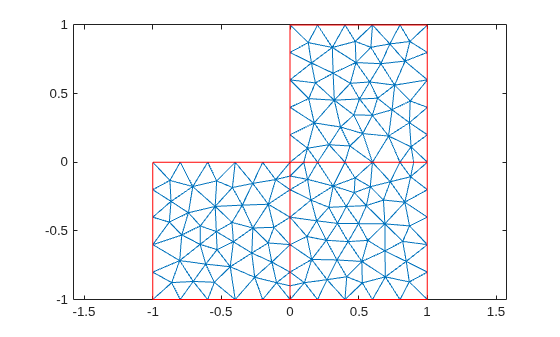
Generate a triangular mesh of the L-shaped membrane.
[p,e,t] = initmesh("lshapeg");Plot the mesh.
pdemesh(p,e,t)
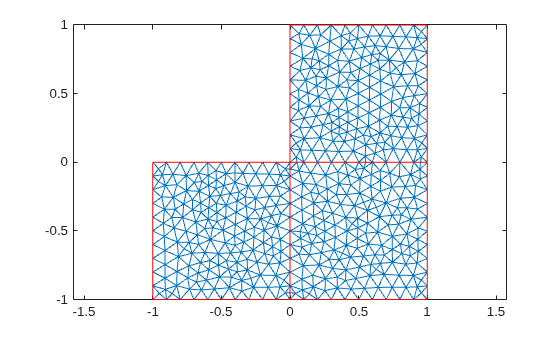
Generate a triangular mesh of the L-shaped membrane with the target maximum mesh edge length of 0.1.
[p,e,t] = initmesh("lshapeg",Hmax=0.1);Plot the mesh.
pdemesh(p,e,t)
Input Arguments
Geometry description, specified as a decomposed geometry matrix, a geometry
function, or a handle to the geometry function. For details about a decomposed geometry
matrix, see decsg. For details about a geometry function,
see Parameterized Function for 2-D Geometry Creation.
A geometry function must return the same result for the same input arguments in every function call. Thus, it must not contain functions and expressions designed to return a variety of results, such as random number generators.
Data Types: double | char | string | function_handle
Name-Value Arguments
Specify optional pairs of arguments as
Name1=Value1,...,NameN=ValueN, where Name is
the argument name and Value is the corresponding value.
Name-value arguments must appear after other arguments, but the order of the
pairs does not matter.
Example: [p,e,t] = initmesh("lshapeg",Hmax=0.1);
Target maximum mesh edge length, specified as a positive real number.
Hmax is an approximate upper bound on the mesh edge lengths.
initmesh estimates the default value of Hmax
from overall dimensions of the geometry.
Small Hmax values let you create finer meshes, but mesh
generation can take a very long time in this case. You can interrupt mesh generation
by using Ctrl+C. Note that initmesh can take
additional time to respond to the interrupt.
Example: [p,e,t] = initmesh(g,Hmax=0.25);
Data Types: double
Mesh growth rate, specified as a number strictly greater than 1 and less than 2.
Example: [p,e,t] = initmesh(g,Hgrad=1.5);
Data Types: double
Toggle to preserve bounding box, specified as "on" or
"off". By turning on "Box" you can get a good
idea of how the mesh generation algorithm works within the bounding box.
Example: [p,e,t] = initmesh(g,Box="on");
Data Types: char | string
Toggle to use edge triangulation, specified as "on" or
"off". By turning on Init you can see the
initial triangulation of the boundaries. For example, use these commands to determine
the subdomain number n of the point xy.
[p,e,t] = initmesh(g,Hmax=Inf,Init=,"on"); [uxy,tn,a2,a3] = tri2grid(p,t,zeros(size(p,2)),x,y); n = t(4,tn);
If the point is outside the geometry, tn is
NaN, and the command n = t(4,tn) results in a
failure.
Data Types: char | string
Toggle to call jigglemesh after creating the mesh, specified
as "mean", "minimum", "on",
or "off".
"mean"— calljigglemeshwith the argument"Opt"set to"mean"."minimum"— calljigglemeshwith the argument"Opt"set to"minimum"."on"— calljigglemeshwith the argument"Opt"set to"off"."off"— do not calljigglemesh.
Example: [p,e,t] = initmesh(g,Jiggle="minimum");
Data Types: char | string
Maximum number of iterations for jigglemesh, specified as a
positive integer.
Example: [p,e,t] =
initmesh(g,Jiggle="on",JiggleIter=50);
Data Types: double
Algorithm for generating initial mesh, specified as "R2013a" or
"preR2013a". The "R2013a" algorithm runs
faster, and can triangulate more geometries than the "preR2013a"
algorithm. Both algorithms use Delaunay triangulation.
Data Types: char | string
Output Arguments
Mesh points, returned as a 2-by-Np matrix. Np
is the number of points (nodes) in the mesh. Column k of
p consists of the x-coordinate of point
k in p(1,k) and the
y-coordinate of point k in
p(2,k). For details, see Mesh Data as [p,e,t] Triples.
Mesh edges, returned as a 7-by-Ne matrix, where
Ne is the number of boundary edges in the mesh. An edge is a pair
of points in p containing a boundary between subdomains, or
containing an outer boundary. For details, see Mesh Data as [p,e,t] Triples.
Mesh elements, returned as a 4-by-Nt matrix.
Nt is the number of triangles in the mesh.
The t(i,k), with i ranging from 1 through
end - 1, contain indices to the corner points of element
k. For details, see Mesh Data as [p,e,t] Triples. The last row,
t(end,k), contains the subdomain number of the element.
References
[1] George, P. L. Automatic Mesh Generation — Application to Finite Element Methods. Wiley, 1991.
Version History
Introduced before R2006ainitmesh provides an enhancement option for increased meshing speed
and robustness. Choose the enhanced algorithm by setting the
MesherVersion name-value pair to "R2013a". The
default MesherVersion value of "preR2013a" gives the
same mesh as previous toolbox versions.
The enhancement is available inpdeModeler from the Mesh
> Parameters > Mesher version menu.
MATLAB Command
You clicked a link that corresponds to this MATLAB command:
Run the command by entering it in the MATLAB Command Window. Web browsers do not support MATLAB commands.
Seleccione un país/idioma
Seleccione un país/idioma para obtener contenido traducido, si está disponible, y ver eventos y ofertas de productos y servicios locales. Según su ubicación geográfica, recomendamos que seleccione: .
También puede seleccionar uno de estos países/idiomas:
Cómo obtener el mejor rendimiento
Seleccione China (en idioma chino o inglés) para obtener el mejor rendimiento. Los sitios web de otros países no están optimizados para ser accedidos desde su ubicación geográfica.
América
- América Latina (Español)
- Canada (English)
- United States (English)
Europa
- Belgium (English)
- Denmark (English)
- Deutschland (Deutsch)
- España (Español)
- Finland (English)
- France (Français)
- Ireland (English)
- Italia (Italiano)
- Luxembourg (English)
- Netherlands (English)
- Norway (English)
- Österreich (Deutsch)
- Portugal (English)
- Sweden (English)
- Switzerland
- United Kingdom (English)