findCoefficients
R2026bLocate active PDE coefficients
Description
CA = findCoefficients(coeffs,RegionType=RegionID)CA for the coefficients
in the specified region.
Examples
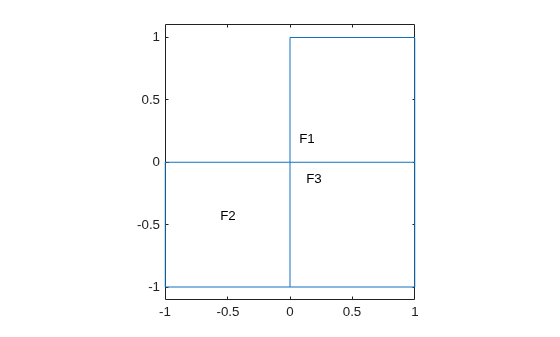
Create a PDE model that has a few subdomains.
model = createpde;
geometryFromEdges(model,@lshapeg);
pdegplot(model,FaceLabels="on")
ylim([-1.1,1.1])
axis equal
Set coefficients on each pair of regions.
specifyCoefficients(model,m=0,d=0,c=12,a=0,f=1,Face=[1,2]);
specifyCoefficients(model,m=0,d=0,c=13,a=0,f=2,Face=[1,3]);
specifyCoefficients(model,m=0,d=0,c=23,a=0,f=3,Face=[2,3]);
Check the coefficient specification for region 1.
coeffs = model.EquationCoefficients;
ca = findCoefficients(coeffs,Face=1)
ca =
  CoefficientAssignment with properties:

    RegionType: 'face'
      RegionID: [1 3]
             m: 0
             d: 0
             c: 13
             a: 0
             f: 2
Input Arguments
Output Arguments
Version History
Introduced in R2016a

