Contenido principal

findNodes

Find mesh nodes in specified region

Description

nodes = findNodes(mesh,"region",RegionType,RegionID) returns the IDs of the mesh nodes that belong to the specified geometric region.

example

nodes = findNodes(mesh,"box",xlim,ylim) returns the IDs of the mesh nodes within a bounding box specified by xlim and ylim. Use this syntax for 2-D meshes.

example

nodes = findNodes(mesh,"box",xlim,ylim,zlim) returns the IDs of the mesh nodes located within a bounding box specified by xlim, ylim, and zlim. Use this syntax for 3-D meshes.

nodes = findNodes(mesh,"radius",center,radius) returns the IDs of mesh nodes located within a circle (for 2-D meshes) or sphere (for 3-D meshes) specified by center and radius.

example

nodes = findNodes(mesh,"nearest",point) returns the IDs of mesh nodes closest to a query point or multiple query points with Cartesian coordinates specified by point.

example

Examples

collapse all

Find the nodes associated with a geometric region.

Create a PDE model.

model = createpde;

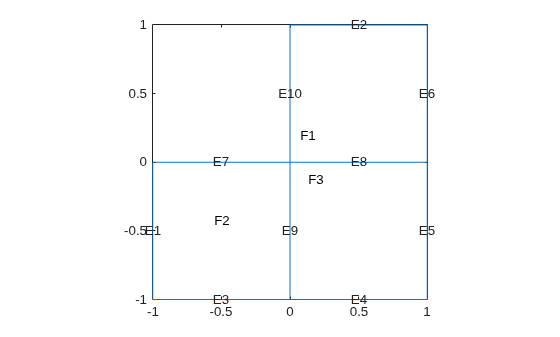
Include the geometry of the built-in function lshapeg. Plot the geometry.

geometryFromEdges(model,@lshapeg);
pdegplot(model,"FaceLabels","on","EdgeLabels","on")

Figure contains an axes object. The axes object contains 14 objects of type line, text.

Generate a mesh.

mesh = generateMesh(model,"Hmax",0.5);

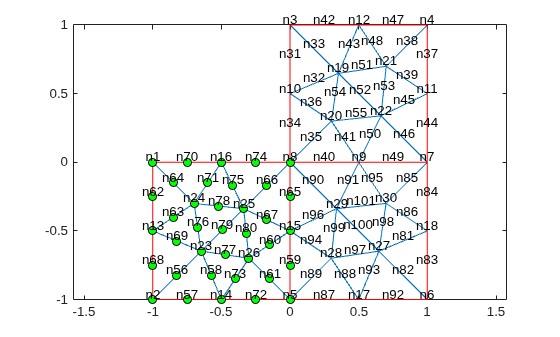
Find the nodes associated with face 2.

Nf2 = findNodes(mesh,"region","Face",2);

Highlight these nodes in green on the mesh plot.

figure
pdemesh(model,"NodeLabels","on")
hold on
plot(mesh.Nodes(1,Nf2),mesh.Nodes(2,Nf2),"ok","MarkerFaceColor","g")  

Figure contains an axes object. The axes object contains 3 objects of type line. One or more of the lines displays its values using only markers

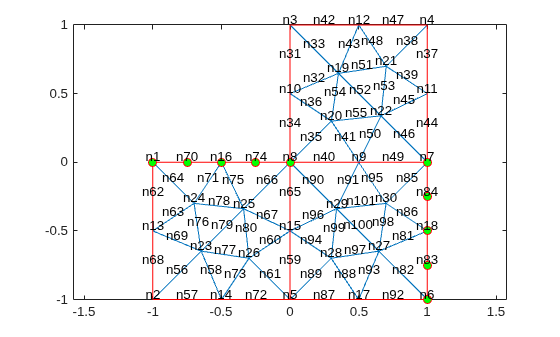
Find the nodes associated with edges 5 and 7.

Ne57 = findNodes(mesh,"region","Edge",[5 7]);

Highlight these nodes in green on the mesh plot.

figure
pdemesh(model,"NodeLabels","on")
hold on
plot(mesh.Nodes(1,Ne57),mesh.Nodes(2,Ne57),"or","MarkerFaceColor","g")

Figure contains an axes object. The axes object contains 3 objects of type line. One or more of the lines displays its values using only markers

Find the nodes located within a specified box.

Create a PDE model.

model = createpde;

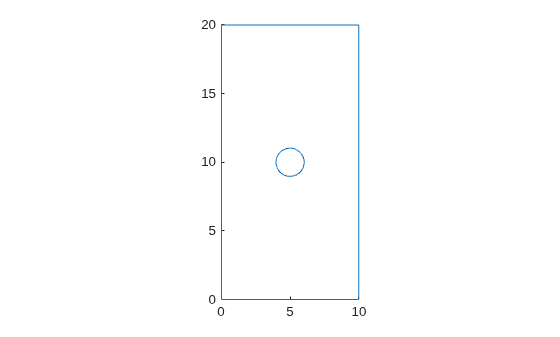
Import and plot the geometry.

importGeometry(model,"PlateHolePlanar.stl");
pdegplot(model)

Figure contains an axes object. The axes object contains an object of type line.

Generate a mesh.

mesh = generateMesh(model,"Hmax",2,"Hmin",0.4, ...
                          "GeometricOrder","linear");

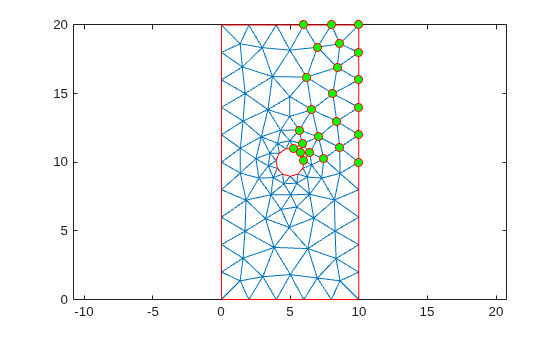
Find the nodes located within the following box.

Nb = findNodes(mesh,"box",[5 10],[10 20]);

Highlight these nodes in green on the mesh plot.

figure
pdemesh(model)
hold on
plot(mesh.Nodes(1,Nb),mesh.Nodes(2,Nb),"or","MarkerFaceColor","g")

Figure contains an axes object. The axes object contains 3 objects of type line. One or more of the lines displays its values using only markers

Find the nodes located within a specified disk.

Create a PDE model.

model = createpde;

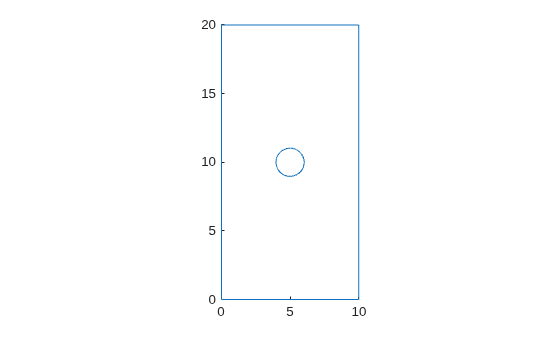
Import and plot the geometry.

importGeometry(model,"PlateHolePlanar.stl");
pdegplot(model)

Figure contains an axes object. The axes object contains an object of type line.

Generate a mesh.

mesh = generateMesh(model,"Hmax",2,"Hmin",0.4, ...
                          "GeometricOrder","linear");

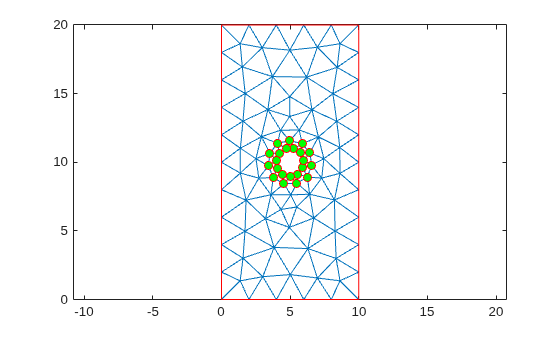
Find the nodes located within radius 2 from the center [5 10].

Nb = findNodes(mesh,"radius",[5 10],2);

Highlight these nodes in green on the mesh plot.

figure
pdemesh(model)
hold on
plot(mesh.Nodes(1,Nb),mesh.Nodes(2,Nb),"or","MarkerFaceColor","g")

Figure contains an axes object. The axes object contains 3 objects of type line. One or more of the lines displays its values using only markers

Find the node closest to a specified point and highlight it on the mesh plot.

Create a PDE model.

model = createpde;

Import and plot the geometry.

importGeometry(model,"PlateHolePlanar.stl");
pdegplot(model)

Figure contains an axes object. The axes object contains an object of type line.

Generate a mesh.

mesh = generateMesh(model,"Hmax",2,"Hmin",0.4);

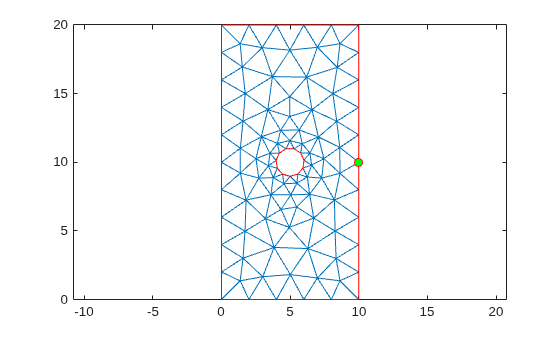
Find the node closest to the point [15;10].

N_ID = findNodes(mesh,"nearest",[15;10])
N_ID = 
10

Highlight this node in green on the mesh plot.

figure
pdemesh(model)
hold on
plot(mesh.Nodes(1,N_ID),mesh.Nodes(2,N_ID),"or","MarkerFaceColor","g")

Figure contains an axes object. The axes object contains 3 objects of type line. One or more of the lines displays its values using only markers

Input Arguments

collapse all

Mesh description, specified as an FEMesh object.

Geometric region type, specified as "Cell", "Face", "Edge", or "Vertex".

Example: findNodes(mesh,"region","Face",1:3)

Data Types: char

Geometric region ID, specified as a vector of positive integers. Find the region IDs by using pdegplot.

Example: findNodes(mesh,"region","Face",1:3)

Data Types: double

x-limits of the bounding box, specified as a two-element row vector. The first element of xlim is the lower x-bound, and the second element is the upper x-bound.

Example: findNodes(mesh,"box",[5 10],[10 20])

Data Types: double

y-limits of the bounding box, specified as a two-element row vector. The first element of ylim is the lower y-bound, and the second element is the upper y-bound.

Example: findNodes(mesh,"box",[5 10],[10 20])

Data Types: double

z-limits of the bounding box, specified as a two-element row vector. The first element of zlim is the lower z-bound, and the second element is the upper z-bound. You can specify zlim only for 3-D meshes.

Example: findNodes(mesh,"box",[5 10],[10 20],[1 2])

Data Types: double

Center of the bounding circle or sphere, specified as a two-element row vector for a 2-D mesh or three-element row vector for a 3-D mesh. The elements of these vectors contain the coordinates of the center of a circle or a sphere.

Example: findNodes(mesh,"radius",[0 0 0],0.5)

Data Types: double

Radius of the bounding circle or sphere, specified as a positive number.

Example: findNodes(mesh,"radius",[0 0 0],0.5)

Data Types: double

Cartesian coordinates of query points, specified as a 2-by-N or 3-by-N matrix. These matrices contain the coordinates of the query points. Here, N is the number of query points.

Example: findNodes(mesh,"nearest",[15 10.5 1; 12 10 1.2])

Data Types: double

Output Arguments

collapse all

Node IDs, returned as a positive integer or a row vector of positive integers.

Version History

Introduced in R2018a