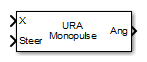
URA Sum and Difference Monopulse
Sum-and-difference monopulse for URA
Libraries:
Phased Array System Toolbox /
Direction of Arrival
Description
The URA Sum-and-Difference Monopulse block estimates the direction of arrival of a narrowband signal on a uniform rectangular array (URA) based on an initial guess using a sum-and-difference monopulse algorithm. The block obtains the difference steering vector by phase-reversing the latter half of the sum steering vector.
Ports
Input
Input signal, specified as a length-N row vector whose number of columns corresponds to number of channels.
Data Types: single | double
Complex Number Support: Yes
Steering angle, specified as a real-valued 2-by-1 vector in the form
[AzimuthAngle ElevationAngle]. The steering angle serves as
initial guess of the direction arrival direction. A typical initial guess is the
current steering angle. Azimuth angles must be between –180 and 180 degrees. Elevation
angles must be between –90 and 90 degrees. Angles are measured in the local coordinate
system of the array. For details regarding the local coordinate system of the URA,
type phased.URA.coordinateSystemInfo Units are in degrees.
Example: [-45 20]
Data Types: single | double
Output
Estimate of incoming direction, returned as a 2-by-1 vector in the form
[AzimuthAngle; ElevationAngle]. Azimuth angles are between –180
and 180. Elevation angles are between –90 and 90. Angles are measured in the local
coordinate system of the array. Units are in degrees.
Data Types: single | double
Parameters
To edit block parameters interactively, use the Property Inspector. From the Simulink® Toolstrip, on the Simulation tab, in the Prepare gallery, select Property Inspector.
Signal propagation speed, specified as a real-valued positive scalar. The default
value of the speed of light is the value returned by
physconst("LightSpeed"). Units are in meters per second.
Example: 3e8
Data Types: double
System operating frequency, specified as a positive scalar. Units are in Hz.
Data Types: single | double
The number of bits used to quantize the phase shift component of beamformer or steering vector weights. Specify the number of bits as a non-negative integer. A value of zero indicates that no quantization is performed.
Block simulation, specified as Interpreted Execution or
Code Generation. If you want your block to use the
MATLAB® interpreter, choose Interpreted Execution. If
you want your block to run as compiled code, choose Code
Generation. Compiled code requires time to compile but usually runs
faster.
Interpreted execution is useful when you are developing and tuning a model. The block
runs the underlying System object™ in MATLAB. You can change and execute your model quickly. When you are satisfied
with your results, you can then run the block using Code
Generation. Long simulations run faster with generated code than in
interpreted execution. You can run repeated executions without recompiling, but if you
change any block parameters, then the block automatically recompiles before
execution.
This table shows how the Simulate using parameter affects the overall simulation behavior.
When the Simulink model is in Accelerator mode, the block mode specified
using Simulate using overrides the simulation mode.
Acceleration Modes
| Block Simulation | Simulation Behavior | ||
Normal | Accelerator | Rapid Accelerator | |
Interpreted Execution | The block executes using the MATLAB interpreter. | The block executes using the MATLAB interpreter. | Creates a standalone executable from the model. |
Code Generation | The block is compiled. | All blocks in the model are compiled. | |
For more information, see Choosing a Simulation Mode (Simulink).
Programmatic Use
Block Parameter:
SimulateUsing |
| Type: enum |
Values:
Interpreted Execution, Code
Generation |
Default:
Interpreted Execution |
Array Parameters
Method to specify URA array, specified as Array (no subarrays)
or MATLAB expression.
Data Types: char | string
Size of a URA array, specified as a positive integer or 1-by-2 vector of positive integers.
If Array size is a 1-by-2 vector, the vector has the form
[NumberOfArrayRows,NumberOfArrayColumns].If Array size is an integer, the array has the same number of elements in each row and column.
For a URA, array elements are indexed from top to bottom along the
leftmost array column, and continued to the next columns from left to right. In this
figure, the Array size value of [3,2] creates an
array having three rows and two columns.

Dependencies
To enable this parameter, set Geometry to
URA.
Spacing between adjacent array elements:
URA — specify the spacing as a positive scalar or a 1-by-2 vector of positive values. If Element spacing (m) is a scalar, the row and column spacings are equal. If Element spacing (m) is a vector, the vector has the form
[SpacingBetweenArrayRows,SpacingBetweenArrayColumns].
Dependencies
To enable this parameter, set Geometry to
URA.
Array normal direction, specified as x,
y, or z.
Elements of planar arrays lie in a plane orthogonal to the selected array normal direction. Element boresight directions point along the array normal direction.
| Array Normal Parameter Value | Element Positions and Boresight Directions |
|---|---|
x | Array elements lie in the yz-plane. All element boresight vectors point along the x-axis. |
y | Array elements lie in the zx-plane. All element boresight vectors point along the y-axis. |
z | Array elements lie in the xy-plane. All element boresight vectors point along the z-axis. |
Dependencies
To enable this parameter, set Geometry to
URA or UCA.
Specify element tapering as a complex-valued scalar or a complex-valued 1-by-N row vector. In this vector, N represents the number of elements in the array.
Also known as element weights, tapers multiply the array element responses. Tapers modify both amplitude and phase of the response to reduce side lobes or steer the main response axis.
If Taper is a scalar, the same weight is applied to each element. If Taper is a vector, a weight from the vector is applied to the corresponding sensor element. The number of weights must match the number of elements of the array.
Data Types: double
MATLAB expression for creating an array, specified as a character vector or string.
Example: phased.URA(Size=[15,10])
Data Types: char | string
Sensor Array Tab: Element Parameters
Element Parameters
Antenna or microphone type, specified as one of the following:
Isotropic AntennaCardioid AntennaCosine AntennaCustom AntennaGaussian AntennaSinc AntennaOmni MicrophoneCustom Microphone
Specify the operating frequency range of the antenna or microphone element as a 1-by-2
row vector in the form [LowerBound,UpperBound]. The element has no
response outside this frequency range. Frequency units are in Hz.
Dependencies
To enable this parameter, set the Element type parameter to one of these types:
Isotropic AntennaCardioid AntennaCosine AntennaOmni MicrophoneGaussian AntennaSinc AntennaOmni Microphone
Select this check box to baffle the back response of the element. When back baffled, the responses at all azimuth angles beyond ±90° from broadside are set to zero. The broadside direction is defined as 0° azimuth angle and 0° elevation angle.
Dependencies
To enable this check box, set
Element type to
Isotropic Antenna or
Omni Microphone.
Dependencies
To enable this parameter, set Element type to Cardioid Antenna.
Specify the exponents of the cosine pattern as a nonnegative scalar or a real-valued 1-by-2 matrix of nonnegative values. When Exponent of cosine pattern is a 1-by-2 vector, the first element is the exponent in the azimuth direction and the second element is the exponent in the elevation direction. When you set this parameter to a scalar, both the azimuth direction and elevation direction cosine patterns are raised to the same power.
Dependencies
To enable this parameter, set Element
type to Cosine
Antenna.
Specify the frequencies at which to microphone frequency responses as a 1-by-L row vector of increasing real values. The microphone element has no response outside the frequency range specified by the minimum and maximum elements of this vector. Frequency units are in Hz.
Dependencies
To enable this parameter, set Element type to Custom
Microphone. Use Frequency responses (dB) to set
the responses at these frequencies.
Frequency responses of custom microphone for the frequencies defined by the Operating frequencies parameter. The dimensions of Frequency responses must match the dimensions of the vector specified by the Operating frequencies parameter.
Dependencies
To enable this parameter, set Element type
to Custom Microphone.
Coordinate system of custom antenna pattern, specified
az-el or phi-theta. When you
specify az-el, use the Azimuth angles
(deg) and Elevations angles (deg) parameters to
specify the coordinates of the pattern points. When you specify
phi-theta, use the Phi angles (deg)
and Theta angles (deg) parameters to specify the coordinates of the
pattern points.
Dependencies
To enable this parameter, set Element type to
Custom Antenna.
Specify the azimuth angles at which to calculate the antenna radiation pattern as a 1-by-P row vector. P must be greater than 2. Azimuth angles must lie between –180° and 180°, inclusive, and be in strictly increasing order.
Dependencies
To enable this parameter, set the Element type
parameter to Custom Antenna and the
Coordinate system of custom antenna
pattern parameter to
az-el.
Specify the elevation angles at which to compute the radiation pattern as a 1-by-Q vector. Q must be greater than 2. Angle units are in degrees. Elevation angles must lie between –90° and 90°, inclusive, and be in strictly increasing order.
Dependencies
To enable this parameter, set the Element type
parameter to Custom Antenna and the
Coordinate system of custom antenna
pattern parameter to
az-el.
Phi angles of points at which to specify the antenna radiation pattern, specify as a real-valued 1-by-P row vector. P must be greater than 2. Angle units are in degrees. Phi angles must lie between 0° and 360° and be in strictly increasing order.
Dependencies
To enable this parameter, set the Element type parameter to
Custom Antenna and the Coordinate system of custom
antenna pattern parameter to
phi-theta.
Theta angles of points at which to specify the antenna radiation pattern, specify as a real-valued 1-by-Q row vector. Q must be greater than 2. Angle units are in degrees. Theta angles must lie between 0° and 360° and be in strictly increasing order.
Dependencies
To enable this parameter, set the Element type parameter to
Custom Antenna and the Coordinate system of custom
antenna pattern parameter to
phi-theta.
Magnitude of the combined antenna radiation pattern, specified as a Q-by-P matrix or a Q-by-P-by-L array.
When the Coordinate system of custom antenna pattern parameter is set to
az-el, Q equals the length of the vector specified by the Elevation angles (deg) parameter and P equals the length of the vector specified by the Azimuth angles (deg) parameter.When the Coordinate system of custom antenna pattern parameter is set to
phi-theta, Q equals the length of the vector specified by the Theta Angles (deg) parameter and P equals the length of the vector specified by the Phi Angles (deg) parameter.
The quantity L equals the length of the Operating frequency vector (Hz).
If this parameter is a Q-by-P matrix, the same pattern is applied to all frequencies specified in the Operating frequency vector (Hz) parameter.
If the value is a Q-by-P-by-L array, each Q-by-P page of the array specifies a pattern for the corresponding frequency specified in the Operating frequency vector (Hz) parameter.
Dependencies
To enable this parameter, set Element type to
Custom Antenna.
Phase of the combined antenna radiation pattern, specified as a Q-by-P matrix or a Q-by-P-by-L array.
When the Coordinate system of custom antenna pattern parameter is set to
az-el, Q equals the length of the vector specified by the Elevation angles (deg) parameter and P equals the length of the vector specified by the Azimuth angles (deg) parameter.When the Coordinate system of custom antenna pattern parameter is set to
phi-theta, Q equals the length of the vector specified by the Theta Angles (deg) parameter and P equals the length of the vector specified by the Phi Angles (deg) parameter.
The quantity L equals the length of the Operating frequency vector (Hz).
If this parameter is a Q-by-P matrix, the same pattern is applied to all frequencies specified in the Operating frequency vector (Hz) parameter.
If the value is a Q-by-P-by-L array, each Q-by-P page of the array specifies a pattern for the corresponding frequency specified in the Operating frequency vector (Hz) parameter.
Dependencies
To enable this parameter, set Element type to
Custom Antenna.
Align directions of the element normals to the direction of the array normal.
Dependencies
This parameter is enabled when Element type is set to
Custom Antenna.
Beamwidth of antenna pattern, specified as a 1-by-2 real-valued vector.
Dependencies
This parameter is enabled when Element type is set to
Gaussian Antenna.
Polar pattern microphone measuring frequencies, specified as a real scalar, or a real-valued, 1-by-L vector. The measuring frequencies must lie within the frequency range specified by the Operating frequencies vector.
Dependencies
To enable this parameter, set Element type set to
Custom Microphone.
Specify the polar pattern measuring angles, as a 1-by-P vector. The angles are measured from the central pickup axis of the microphone and must lie between –180° and 180°, inclusive.
Dependencies
To enable this parameter, set Element type to
Custom Microphone.
Specify the magnitude of the custom microphone element polar patterns as an L-by-P matrix. L is the number of frequencies specified in Polar pattern measuring frequencies. P is the number of angles specified in Polar pattern measuring angles. Each row of the matrix represents the magnitude of the polar pattern measured at the corresponding frequency specified in Polar pattern measuring frequencies and all angles specified in Polar pattern measuring angles. The pattern is measured in the azimuth plane. In the azimuth plane, the elevation angle is 0° and the central pickup axis is 0° azimuth and 0° elevation. The polar pattern is symmetric around the central axis. You can construct the microphone response pattern in 3-D space from the polar pattern.
Dependencies
To enable this parameter, set Element type to
Custom Microphone.
Version History
Introduced in R2014b
MATLAB Command
You clicked a link that corresponds to this MATLAB command:
Run the command by entering it in the MATLAB Command Window. Web browsers do not support MATLAB commands.
Seleccione un país/idioma
Seleccione un país/idioma para obtener contenido traducido, si está disponible, y ver eventos y ofertas de productos y servicios locales. Según su ubicación geográfica, recomendamos que seleccione: .
También puede seleccionar uno de estos países/idiomas:
Cómo obtener el mejor rendimiento
Seleccione China (en idioma chino o inglés) para obtener el mejor rendimiento. Los sitios web de otros países no están optimizados para ser accedidos desde su ubicación geográfica.
América
- América Latina (Español)
- Canada (English)
- United States (English)
Europa
- Belgium (English)
- Denmark (English)
- Deutschland (Deutsch)
- España (Español)
- Finland (English)
- France (Français)
- Ireland (English)
- Italia (Italiano)
- Luxembourg (English)
- Netherlands (English)
- Norway (English)
- Österreich (Deutsch)
- Portugal (English)
- Sweden (English)
- Switzerland
- United Kingdom (English)