Test C++ Member Functions of Classes with Non-Default Initialization
R2026bThis example shows how to author graphical tests for C++ member functions when the class default constructor does not initialize all data members. For instance, you might want to test member functions of classes that require one or more of the following initialization strategies:
A non-default constructor might be used for initialization.
Some
publicdata members might be initialized after the constructor call.
Prerequisites
The example assumes that you are familiar with the basics of graphical test authoring in the Polyspace® Platform user interface. For more information on:
The basics of graphical test authoring, see Write C/C++ Unit Tests in Polyspace Platform User Interface.
The basics of authoring tests for C++ member functions, see Test C++ Member Functions in Polyspace Platform User Interface.
Example Files
This tutorial uses the files in the folder <polyspaceroot>\polyspace\examples\doc_pstest\cpp_tabular_tests\src. Here, <polyspaceroot> is the Polyspace installation folder, for instance, C:\Program Files\Polyspace\R2026b. To continue with this tutorial:
Create a new Polyspace Platform project and add the folder to the project.
Select Parse Code on the toolstrip to analyze the files in the folder.
This folder contains source code defining a class Sensor with member functions readData() and checkStatus():
Sensor.hpp:#ifndef SENSOR_H #define SENSOR_H #include <string> class Sensor { public: bool calibrated; double minThreshold; double maxThreshold; std::string sensorID; std::string sensorType; // Constructor Sensor(); Sensor(const std::string& id, const std::string& type); // Method to read current sensor value void readData(double data); // Method to check status bool checkStatus(void); private: double currentVal; }; #endif // SENSOR_HSensor.cpp:#include "Sensor.hpp" // Default constructor Sensor::Sensor() {} // Constructor that initializes mandatory fields Sensor::Sensor(const std::string& id, const std::string& type) : sensorID(id), sensorType(type), currentVal(0.0), calibrated(false), minThreshold(0.0), maxThreshold(0.0) {} // Simulate reading data from the sensor void Sensor::readData(double data) { currentVal = data; } // Check status before proceeding bool Sensor::checkStatus(void) { if(!calibrated || currentVal < minThreshold || currentVal > maxThreshold) { return false; } return true; }
Note that the constructor Sensor::Sensor(const std::string&, const std::string&) requires some arguments to set the values of some data members but default-initializes the other members. Since some of the class members are public, you can also initialize them directly after object construction.
Write Test with Non-Default Initialization of Object
Write a test that initializes an object of the Sensor class using the constructor Sensor::Sensor(const std::string&, const std::string&).
On the Projects pane, right-click the function
Sensor::checkStatus()and select Add Test Case.Set the inputs and assessments in the newly created test.
In the Inputs section of the test, set the value of the object containing the member function
Sensor::checkStatus()as follows:pst_obj (Sensor) = Sensor("TS-1001", "Temperature")calibrated (bool) = trueminThreshold (double) = -10maxThreshold (double) = 50sensorID (std::string) = <<default>>sensorType (std::string) = <<default>>
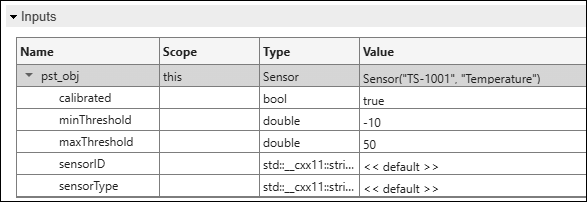
These inputs imply that an object of class
Sensoris created with a call to the constructor:with valuesSensor::Sensor(const std::string&, const std::string&)"TS-1001"and"Temperature". The public memberscalibrated,minThresholdandmaxThresholdare then set to the valuestrue, -10 and 50 respectively, while the memberssensorIDandsensorTypeare left at the default values set by the constructor call.In the Assessments section of the test, set the following assessment value:
pst_call_out(bool)== true
Build and run the tests in the project to see passing test results.

