Train Reinforcement Learning Agent in MDP Environment
R2026bThis example shows how to train a Q-learning agent to solve a generic Markov decision process (MDP) environment. For more information on these agents, see Q-Learning Agent.
The MDP environment has the following graph.
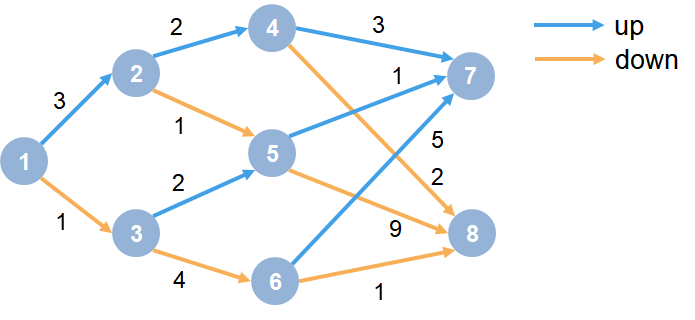
Here:
Each circle represents a state.
At each state there is a decision to go up or down.
The agent begins from state 1.
The agent receives a reward equal to the value on each transition in the graph.
The training goal is to collect the maximum cumulative reward.
Specify Random Number Stream Seed and Algorithm for Reproducibility
The example code might involve computation of random numbers at several stages. Fixing the random number stream at the beginning of some sections in the example code preserves the random number sequence in the section every time you run it, which is a necessary condition to reproduce the results. For more information, see Results Reproducibility.
Specify the random number stream with seed 0 and random number algorithm Mersenne Twister. For more information on controlling the seed used for random number generation, see rng.
previousRngState = rng(0,"twister");The output previousRngState is a structure that contains information about the previous state of the stream. You will restore the state at the end of the example.
Create MDP Environment
Create an MDP model with eight states and two actions ("up" and "down").
mdp = createMDP(8,["up";"down"]);
To model the transitions from the above graph, modify the state transition matrix and reward matrix of the MDP. By default, these matrices contain zeros. For more information on creating an MDP model and the properties of an MDP object, see createMDP.
Specify the state transition and reward matrices for mdp. For example, in the following commands:
The first two lines specify the transition from state 1 to state 2 by taking action
1("up") and a reward of +3 for this transition.The next two lines specify the transition from state 1 to state 3 by taking action
2("down") and a reward of +1 for this transition.
mdp.T(1,2,1) = 1;
mdp.R(1,2,1) = 3;
mdp.T(1,3,2) = 1;
mdp.R(1,3,2) = 1;
Similarly, specify the state transitions and rewards for the remaining rules in the graph.
% State 2 transition and reward
mdp.T(2,4,1) = 1;
mdp.R(2,4,1) = 2;
mdp.T(2,5,2) = 1;
mdp.R(2,5,2) = 1;
% State 3 transition and reward
mdp.T(3,5,1) = 1;
mdp.R(3,5,1) = 2;
mdp.T(3,6,2) = 1;
mdp.R(3,6,2) = 4;
% State 4 transition and reward
mdp.T(4,7,1) = 1;
mdp.R(4,7,1) = 3;
mdp.T(4,8,2) = 1;
mdp.R(4,8,2) = 2;
% State 5 transition and reward
mdp.T(5,7,1) = 1;
mdp.R(5,7,1) = 1;
mdp.T(5,8,2) = 1;
mdp.R(5,8,2) = 9;
% State 6 transition and reward
mdp.T(6,7,1) = 1;
mdp.R(6,7,1) = 5;
mdp.T(6,8,2) = 1;
mdp.R(6,8,2) = 1;
% State 7 transition and reward
mdp.T(7,7,1) = 1;
mdp.R(7,7,1) = 0;
mdp.T(7,7,2) = 1;
mdp.R(7,7,2) = 0;
% State 8 transition and reward
mdp.T(8,8,1) = 1;
mdp.R(8,8,1) = 0;
mdp.T(8,8,2) = 1;
mdp.R(8,8,2) = 0;
Specify states "s7" and "s8" as terminal states of the MDP.
mdp.TerminalStates = ["s7";"s8"];
Create the reinforcement learning environment env from mdp.
env = rlMDPEnv(mdp);
To specify that the initial state of the agent is always state 1, specify a reset function that returns the initial agent state. This function is called at the start of each training or simulation episode. Create an anonymous function handle that sets the initial state to 1.
env.ResetFcn = @() 1;
Create Default Q-Learning Agent
To create a Q-learning agent, first extract the observation and action specifications from the MDP environment.
obsInfo = getObservationInfo(env);
actInfo = getActionInfo(env);
Then, create a default Q-learning agent using the observation and action specifications.
agent = rlQAgent(obsInfo,actInfo);
Specify Agent Options
Specify the following agent options.
A discount factor of one, to promote undiscounted long term rewards.
An initial epsilon value
0.9for the agent's epsilon greedy exploration model.A decay rate of
1e-3and the minimum value of0.1for the epsilon parameter. Decaying the exploration gradually enables the agent to exploit its greedy policy toward the latter stages of training.Use the stochastic gradient descent with momentum (sgdm) algorithm to update the table model with the learning rate of 0.1.
Use the L2 regularization factor
0. For this example disabling regularization helps in better estimating the long term undiscounted rewards.
agent.AgentOptions.DiscountFactor = 1;
agent.AgentOptions.EpsilonGreedyExploration.Epsilon = 0.9;
agent.AgentOptions.EpsilonGreedyExploration.EpsilonDecay = 1e-3;
agent.AgentOptions.EpsilonGreedyExploration.EpsilonMin = 0.1;
agent.AgentOptions.CriticOptimizerOptions = rlOptimizerOptions( ...
    Algorithm="sgdm", ...
    LearnRate=0.1, ...
    L2RegularizationFactor=0);
For more information on creating Q-learning agents, see rlQAgent and rlQAgentOptions.
Specify Training Options
For this example, use the following training options:
Train for 400 episodes, with each episode lasting a maximum of 50 time steps.
Specify a window length of
30for averaging the episode rewards.
trainOpts = rlTrainingOptions;
trainOpts.MaxStepsPerEpisode = 50;
trainOpts.MaxEpisodes = 400;
trainOpts.ScoreAveragingWindowLength = 30;
trainOpts.StopTrainingCriteria = "none";
For more information on training options, see rlTrainingOptions.
Train Agent
To reproduce the results of this section, specify the seed and algorithm used for random number generation.
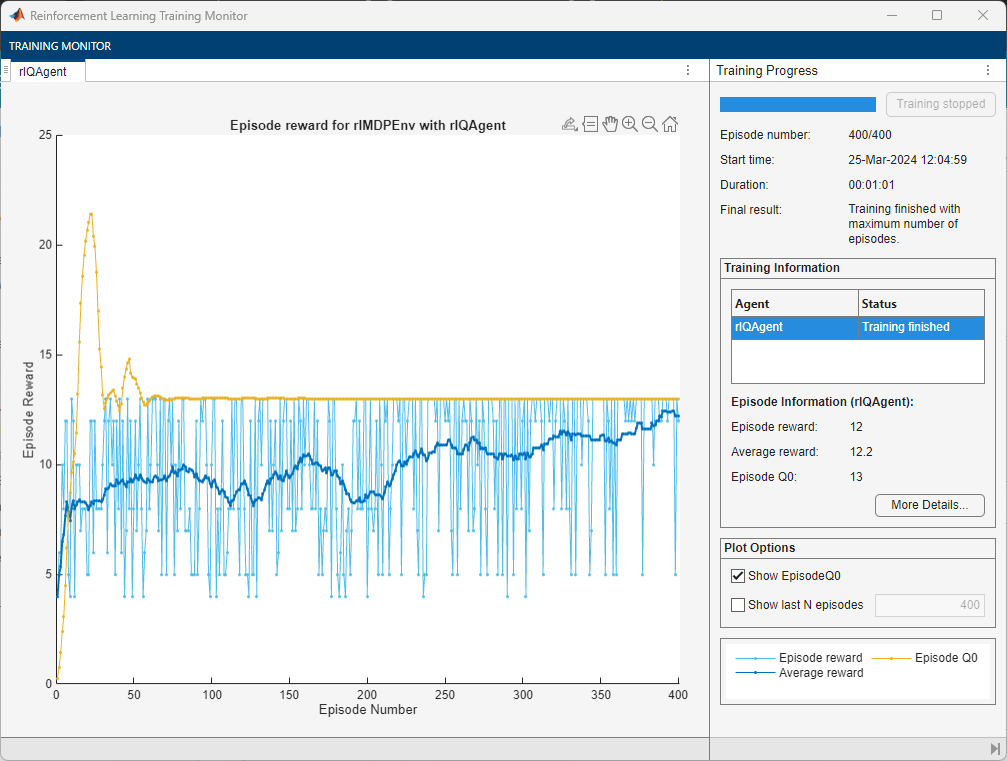
rng(0,"twister");Train the agent using the train function. This might take several minutes to complete. To save time, load a pretrained agent by setting doTraining to false. To train the agent yourself, set doTraining to true.
doTraining =false; if doTraining % Train the agent. trainingStats = train(agent,env,trainOpts); %#ok<UNRCH> else % Load pretrained agent for the example. load("genericMDPQAgent.mat","agent"); end
Simulate Trained Agent
To validate the training results, simulate the agent in the training environment using the sim function.
To reproduce the results of this section, specify the seed and algorithm used for random number generation.
rng(0,"twister");
experience = sim(agent,env);
Display the cumulative reward
cumulativeReward = sum(experience.Reward)
cumulativeReward =
13
The agent successfully finds the optimal path which results in cumulative reward of 13.
Because the discount factor is set to 1, the values in the Q table of the trained agent are consistent with the undiscounted returns of the environment.
QTable = getLearnableParameters(getCritic(agent));
QTable{1}
ans = 8×2 single matrix
13.0000 12.0000
5.0000 10.0000
11.0000 9.0000
3.0000 2.0000
1.0000 9.0000
5.0000 1.0000
0 0
0 0
For comparison, display the table that represents the true value function.
TrueValueFunctionTableValues = [13,12;5,10;11,9;3,2;1,9;5,1;0,0;0,0]
TrueValueFunctionTableValues = 8×2

    13    12
     5    10
    11     9
     3     2
     1     9
     5     1
     0     0
     0     0
The Q table learned by the agent (QTable{1}) contains the true value function (TrueValueFunctionTableValues). This shows that the Q-Learning agent has learned the correct value function for the problem.

