Frequently Asked Questions About ASAP2 File Generation
R2026bThe ASAP2 standard defines the description format of the internal electronic control unit (ECU) variables used in measurement and calibration. The ASAM CDF standard defines the data for storing the ECU parameter values and the associated metadata. For more information about ASAP2 file generation, see Generate ASAP2 and CDF Calibration Files.
This page covers frequently asked questions, useful tips, and limitations related to ASAP2 file generation.
Why can't the 'GenerateASAP2' configuration parameter be modified?
Starting from R2025a, the GenerateASAP2 configuration parameter
is set to off and cannot be set to on because
ASAP2 file generation as part of code generation is no longer supported. You can
generate an ASAP2 file post code generation by using the Generate Calibration
Files tool or coder.asap2.export function.
For more information about how to generate an ASAP2 file, see Generate ASAP2 and CDF Calibration Files (Embedded Coder).
How do you exclude a specific data element from an ASAP2 file?
Use the Export property of a data element to include or exclude
it from an ASAP2 file. When you build a Simulink® model and export an ASAP2 file, by default the file includes the data
elements such as measurements, characteristics, and computation methods present in
the model.
For an example that shows how to exclude a data element from the ASAP2 file, see Exclude Data Elements from ASAP2 File.
How do you exclude all inports and outports from an ASAP2 file?
Use the Export property of a data element to exclude it from an
ASAP2 file. To exclude all inports and outports, use the find
function to locate all inports and outports and then set the
Export property of each data element to
0.
For example:
cm = coder.mapping.utils.create(modelName);
inports = find(cm,'Inports');
outports = find(cm,'Outports');
for i = 1:numel(inports)
    setInport(cm,inports(i),Export=0);
end
for i = 1:numel(outports)
    setOutport(cm,outports(i),Export=0);
end
After setting the Export property to 0,
build the model and generate the ASAP2 file.
For more information, see coder.mapping.api.CodeMapping (Embedded Coder).
How do you export data elements with custom storage classes to ASAP2 files?
To export data elements with custom storage classes, create a custom attributes
class for the custom storage class and associate it with a boolean property,
SupportSILPIL, set to true. For
example:
classdef myCustomAttribs< Simulink.CustomStorageClassAttributes
properties(PropertyType = 'logical scalar')
    SupportSILPIL = true;
  end
end
Add the custom storage class to the csc_registration
file:
set(h, 'CSCTypeAttributesClassName', 'myPackage.myCustomAttribs');
For more information about SIL and PIL simulations, see SIL and PIL Simulations (Embedded Coder).
For more information about custom storage class definitions, see Create Storage Classes by Using the Custom Storage Class Designer (Embedded Coder).
How do you export calibration properties for data stores and states to an ASAP2 file?
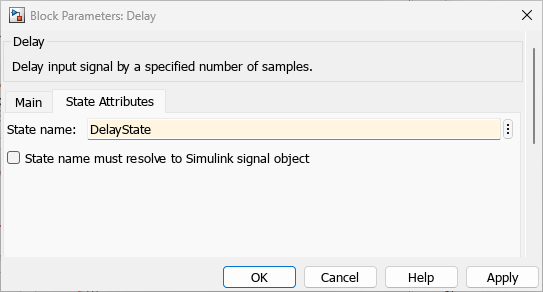
To export calibration properties for data stores and states, you must provide a name for each data store and state, and set the calibration properties through code mappings. For example:
How do you change the newline format in an ASAP2 file?
Use the Newline style configuration parameter under the Code Generation > Code Style pane, in the Advanced parameters section,
to change the newline format in an ASAP2 file.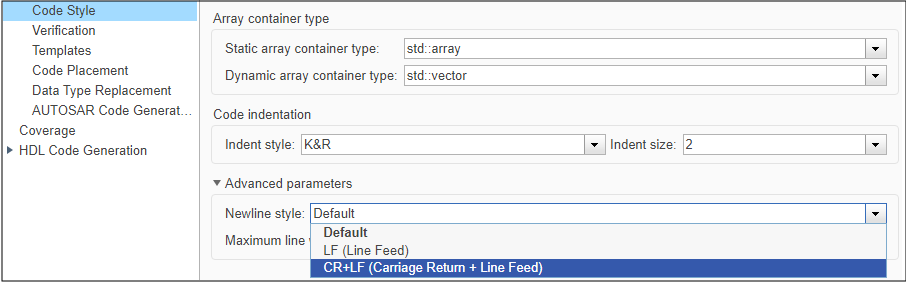
How do you export module-owned elements to an ASAP2 file?
To export elements owned by a module to an ASAP2 file, in the model configuration parameters, in theCode Generation > Code Placement pane, in the Global data placement (custom storage classes only) section:
From the Data definition list, select
Data defined in a single separate source file.In the Data definition filename field, specify a file name.
Select Use owner from data object for data definition placement.
In the code generation parameters of the elements, specify the C file name added for Data definition filename from configuration parameters in the DefinitionFile field and Owner field.
How do you avoid grouping elements in an ASAP2 file?
To export an ASAP2 file without element grouping, use these commands:
descObj = coder.asap2.getEcuDescriptions(modelName);
groups = find(descObj,"Group");
for group = groups
    delete(descObj,'Group',group)
end
coder.asap2.export(<modelName>,'CustomEcuDescriptions',descObj);
Why are lookup table blocks not exported to an ASAP2 file?
If your Simulink model uses legacy lookup table blocks, the code generator exports them to an ASAP2 file as flat arrays. To export the lookup table blocks as a map or curve, use n-D lookup table blocks. Alternatively, use Upgrade Advisor and select Check model for block upgrade issues requiring compile time information to upgrade legacy blocks.
Why is the input quantity parameter empty in a lookup table object?
The input quantity parameter value of a lookup table object refers to a valid
measurement object present with in the ASAP2 file. But, the ASAP2 file generation
does not capture the input quantity data for a lookup table block and sets the input
quantity parameter value to NO_INPUT_QUANTITY, when:
The lookup table block is in a Function-Call Subsystem, which is inside a Stateflow® chart.
The lookup table block is inside an S-Function block.
To set a valid measurement object for the input quantity data, move the lookup
table block outside the S-Function or Stateflow chart. Alternatively, use the set
function of the ECU descriptions object to update the input quantity value.
Limitations
Pointer variables are not generated in an ASAP2 file.
coder.asap2.mergeis not supported on the macOS operating system.Lookup table blocks configured with Simulink bus elements or structure elements are exported as individual elements for table values and breakpoints to the ASAP2 file. To avoid this, use
Simulink.LookupTableobjects.Address replacement is not supported on the macOS operating system.
See Also
coder.asap2.export | coder.asap2.getEcuDescriptions | Generate Calibration Files | coder.asap2.merge

