Programmatically Configure Model Code Generation Parameters
R2026bYou can modify code generation parameters of your model from the Configuration Parameters dialog box or from the MATLAB® Command Window. Use the command-line approach for creating a script that automates the process for an established model configuration set. In this example, you modify the configuration parameters to support the Code Generation Advisor application objective Execution efficiency. To learn more about which configuration parameters affect the execution efficiency, see Recommended Settings Summary for Model Configuration Parameters.
Load Model
Load the model executionEfficiency.
modelName = "executionEfficiency";
load_system(modelName)
Save Active Configuration Set
Use the function Simulink.BlockDiagram.saveActiveConfigSet to save the active configuration set of the model in the file OriginalConfigSet.m.
Simulink.BlockDiagram.saveActiveConfigSet(modelName,"OriginalConfigSet")Get Active Configuration Set and Modify Parameters to Optimize Execution Speed
Use the function getActiveConfigSet to get a handle to the active configuration set of the model and store it in the variable activeCS.
activeCS = getActiveConfigSet(modelName);
Use the function set_param to modify the configuration parameters to achieve the Execution efficiency objective.
set_param(activeCS,MatFileLogging=false)
set_param(activeCS,SupportNonFinite=false)
set_param(activeCS,RTWCompilerOptimization="on")
set_param(activeCS,OptimizeBlockIOStorage=true)
set_param(activeCS,ConditionallyExecuteInputs=true)
set_param(activeCS,DefaultParameterBehavior="Inlined")
set_param(activeCS,BooleanDataType=true)
set_param(activeCS,BlockReduction=true)
set_param(activeCS,ExpressionFolding=true)
set_param(activeCS,LocalBlockOutputs=true)
set_param(activeCS,EfficientFloat2IntCast=true)
set_param(activeCS,BufferReuse=true)
Save and Compare Configuration Set
Save the revised configuration set of the model in the file RevisedConfigSet.m.
Simulink.BlockDiagram.saveActiveConfigSet(modelName,"RevisedConfigSet");Use the function visdiff to compare between the original and the revised configuration sets.
visdiff("OriginalConfigSet.m","RevisedConfigSet.m")
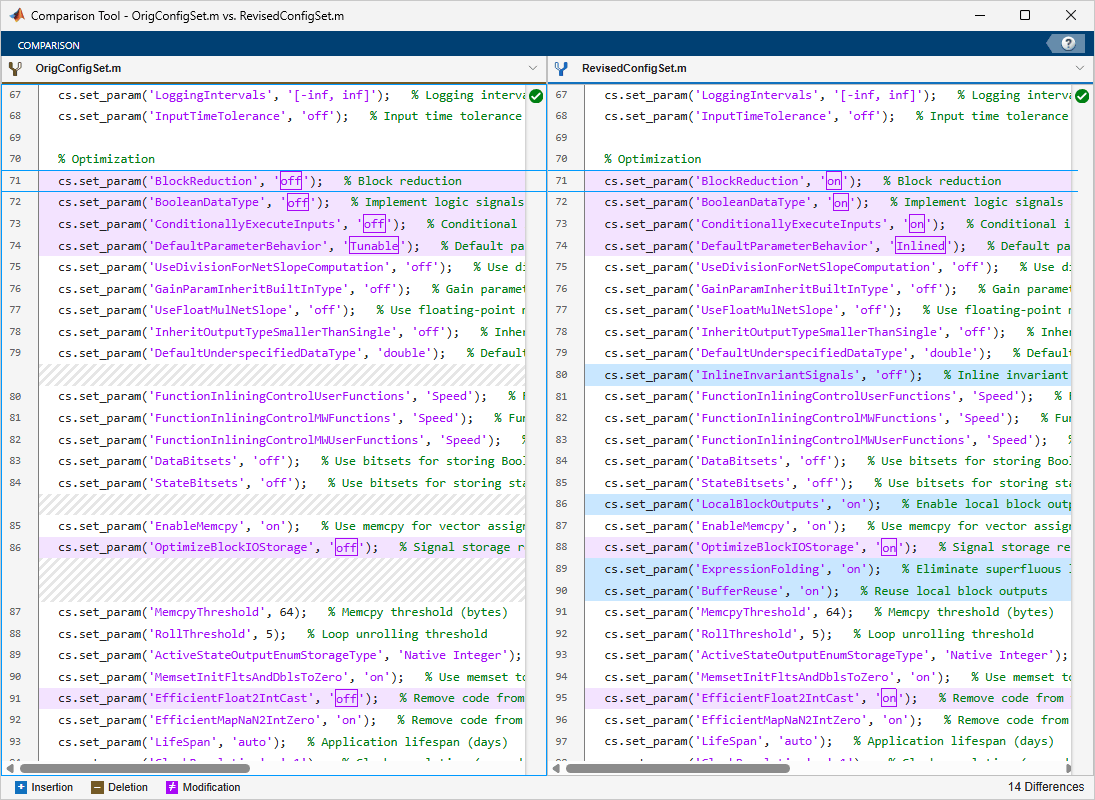
Examine the differences between the two saved configuration sets to see how the programmatic commands updated the parameters.
Tip: The code generated from the model outputs the elapsed running time. You can build and run the generated model code before and after revising the configuration set parameters to see that after the revision, the execution is faster.
See Also
load_system | getActiveConfigSet | set_param | Simulink.BlockDiagram.saveActiveConfigSet | visdiff

