Detect precision loss
R2026bDiagnostic action to take if the software detects parameter precision loss
Model Configuration Pane: Diagnostics / Data Validity
Description
The Detect precision loss parameter specifies the diagnostic action to take if the software detects parameter precision loss. Precision loss occurs when the data type of a parameter does not have enough precision to represent the parameter value exactly. As a result, the value of the parameter in the model differs from the ideal value.
Both parameter precision loss and parameter overflow are quantization errors. While parameter precision loss differs from parameter overflow, the distinction can be nuanced. Parameter precision loss occurs when the ideal parameter value is within the range of the data type and scaling, but the data type does not have an exact representation of the parameter value.
The Detect overflow diagnostic reports all
quantization errors greater than the specified Bits of error
threshold, which has a default setting of one bit. For very small parameter
quantization errors and when the Bits of error threshold is set to
One bit, precision loss is reported rather than an overflow when:
where:
Max is the maximum value the parameter data type can represent.
Min is the minimum value the parameter data type can represent.
Slope is the slope of the parameter data type. For integers, the slope is 1.
Videal is the ideal value of the parameter.
Settings
warning (default) | error | nonewarningThe software issues a warning if the software detects parameter precision loss.
errorThe software issues an error and terminates the simulation if the software detects parameter precision loss.
noneThe software does not issue a diagnostic if the software detects precision loss.
Examples
Troubleshoot when an expected parameter precision loss is not reported by the software.
In this model, the Constant blocks x and
y are each set to a value of pi using an
unsigned 16-bit integer data type.
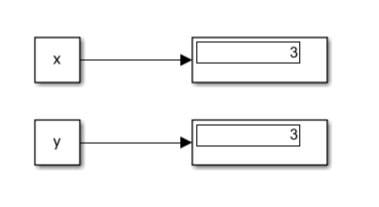
With the Detect precision loss parameter set to
"warning", the software reports precision loss only for the
Constant block
y.
Warning: Precision loss occurred for Value (3.1415926535897931) of 'y'. The value cannot be
represented exactly using the run-time data type 'uint16'. A small quantization error has
occurred. To disable this warning or error, in the Configuration Parameters > Diagnostics >
Data Validity pane, set the 'Detect precision loss' option
in the Parameters group to 'none'.
To understand why the Constant block x does not
report a precision loss warning, examine the definitions of these constant values in the
base workspace.
x = fi(pi,0,16,0)
y = Simulink.Parameter(pi);
y.DataType = 'uint16'
x =
3
DataTypeMode: Fixed-point: binary point scaling
Signedness: Unsigned
WordLength: 16
FractionLength: 0
y =
Parameter with properties:
Value: 3.141592653589793
Complexity: 'real'
Dimensions: [1 1]
CoderInfo: [1×1 Simulink.CoderInfo]
Description: ''
DataType: 'uint16'
Min: []
Max: []
Unit: ''x and y both specify a value of
pi using an unsigned 16-bit integer data type. However,
x is specified as a fi object while
y is specified as a Simulink.Parameter
object.
The fi and Simulink.Parameter object constructors
treat the constant differently. The fi constructor quantizes the
constant value before storing it. The Simulink.Parameter constructor
first stores the constant value using double-precision then casts to the fixed-point
data type, causing a precision loss warning to be reported when the model diagram is
updated.
Recommended Settings
| Application | Setting |
|---|---|
| Debugging | No impact |
| Traceability | No impact |
| Efficiency | No impact |
| Safety precaution | error |
Programmatic Use
Parameter:
ParameterPrecisionLossMsg |
| Type: string | character vector |
Value: "none" | "warning" | "error" |
Default: "warning" |
Version History
Introduced before R2006a

