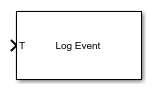
Log Event
Log an execution profiling event
Libraries:
Simulink Real-Time /
Profiling
Description
The Log Event block inserts a user-defined event into the execution profiling event stream when triggered. The user-defined event includes a channel ID, a code number, and a value number.
Examples
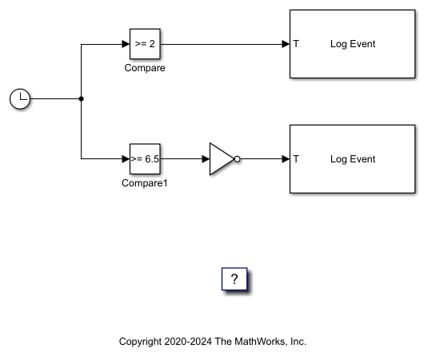
Insert Event into Execution Profiling Stream
Use the Log Event block to insert a user-defined event into the execution profiling event stream.
Ports
Input
When the T (trigger input) changes from 0 to 1 (Rising) or from 1 to 0 (Falling), the block inserts a user-defined simple event defined by the parameters Channel, Code, and Value into the execution profiling event stream.
Parameters
To edit block parameters interactively, use the Property Inspector. From the Simulink® Toolstrip, on the Simulation tab, in the Prepare gallery, select Property Inspector.
Specify the event channel ID. The channel ID ranges from 0 to 1023.
Programmatic Use
To set the block parameter value programmatically, use
the set_param function.
To get the block parameter value
programmatically, use the get_param function.
| Parameter: | channel |
| Values: | 0 (default) | int |
Example: set_param(gcb,'channel','500')
Select the type of signal change that triggers the block. When the input T changes from 0 to 1 (Rising) or from 1 to 9 (Falling), the block inserts a user-defined simple event defined by the parameters Channel, Code, and Value into the execution profiling event stream.
Programmatic Use
To set the block parameter value programmatically, use
the set_param function.
To get the block parameter value
programmatically, use the get_param function.
| Parameter: | trigger |
| Values: | Rising edge (default) | Falling edge | Either edge |
Example: set_param(gcb,'trigger','Falling
edge')
Extended Capabilities
C/C++ Code Generation
Generate C and C++ code using Simulink® Coder™.
Version History
Introduced in R2020b
MATLAB Command
You clicked a link that corresponds to this MATLAB command:
Run the command by entering it in the MATLAB Command Window. Web browsers do not support MATLAB commands.
Seleccione un país/idioma
Seleccione un país/idioma para obtener contenido traducido, si está disponible, y ver eventos y ofertas de productos y servicios locales. Según su ubicación geográfica, recomendamos que seleccione: .
También puede seleccionar uno de estos países/idiomas:
Cómo obtener el mejor rendimiento
Seleccione China (en idioma chino o inglés) para obtener el mejor rendimiento. Los sitios web de otros países no están optimizados para ser accedidos desde su ubicación geográfica.
América
- América Latina (Español)
- Canada (English)
- United States (English)
Europa
- Belgium (English)
- Denmark (English)
- Deutschland (Deutsch)
- España (Español)
- Finland (English)
- France (Français)
- Ireland (English)
- Italia (Italiano)
- Luxembourg (English)
- Netherlands (English)
- Norway (English)
- Österreich (Deutsch)
- Portugal (English)
- Sweden (English)
- Switzerland
- United Kingdom (English)