Simulation 3D Motorcycle
R2026bImplement motorcycle in 3D environment
Simulation 3D Motorcycle block

To add a block to a model, double-click the canvas and start typing the block name. Then, select the block from the list.
Libraries:
Vehicle Dynamics Blockset /
Vehicle Scenarios /
Sim3D /
Sim3D Vehicle /
Components
Description
Note
Simulating models with the Simulation 3D Motorcycle block requires Simulink® 3D Animation™.
The Simulation 3D Motorcycle block implements a motorcycle with two wheels in the 3D simulation environment.
To use this block, ensure that the Simulation 3D Scene Configuration block
is in your model. If you set the Sample time parameter of this block to
-1, the block uses the sample time specified in the Simulation 3D
Scene Configuration block.
The block input uses the vehicle Z-down right-handed (RH) Cartesian coordinate system defined in SAE J6701. The coordinate system is inertial and initially aligned with the vehicle geometric center:
X-axis — Along vehicle longitudinal axis, points forward
Y-axis — Along vehicle lateral axis, points to the right
Z-axis — Points downward
Tip
Verify that the Simulation 3D Motorcycle
block executes before the Simulation 3D Scene Configuration block. That way,
Simulation 3D Motorcycle prepares the signal data before the Unreal Engine® 3D visualization environment receives it. To check the block execution order,
right-click the blocks and then click the Properties button  . On the General tab, confirm these
Priority settings:
. On the General tab, confirm these
Priority settings:
Simulation 3D Scene Configuration —
0Simulation 3D Motorcycle —
-1
For more information about execution order, see Control and Display Execution Order.
Examples
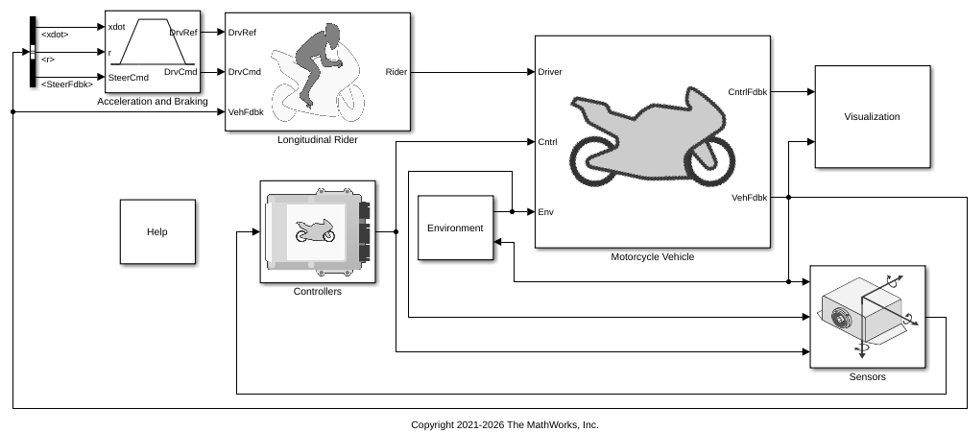
Longitudinal Motorcycle Braking Test Reference Application
Simulate an in-plane motorcycle model undergoing a braking test. Use for motorcycle dynamics ride and handling analysis and chassis controls development.
Ports
Input
Motorcycle and component translation, in m. Array dimensions are
4-by-3.
Translation(1,1),Translation(1,2), andTranslation(1,3)— Motorcycle translation along the inertial vehicle Z-down X-, Y-, and Z- axes, respectively.Translation(...,1),Translation(...,2), andTranslation(...,3)— Motorcycle component translation relative to vehicle, along the vehicle Z-down X-, Y-, and Z- axes, respectively.
The signal contains translation information according to the locations.
| Translation | Array Element | Translation Axis |
|---|---|---|
Motorcycle, Xv | Translation(1,1) | Inertial vehicle Z-down X-axis |
Motorcycle, Yv | Translation(1,2) | Inertial vehicle Z-down Y-axis |
Motorcycle, Zv | Translation(1,3) | Inertial vehicle Z-down Z-axis |
Handlebars, XH | Translation(2,1) | Vehicle Z-down X-axis |
Handlebars, YH | Translation(2,2) | Vehicle Z-down Y-axis |
Handlebars, ZH | Translation(2,3) | Vehicle Z-down Z-axis |
Front wheel, XF | Translation(3,1) | Vehicle Z-down X-axis |
Front wheel, YF | Translation(3,2) | Vehicle Z-down Y-axis |
Front wheel, ZF | Translation(3,3) | Vehicle Z-down Z-axis |
Rear wheel, XR | Translation(4,1) | Vehicle Z-down X-axis |
Rear wheel, YR | Translation(4,2) | Vehicle Z-down Y-axis |
Rear wheel, ZR | Translation(4,3) | Vehicle Z-down Z-axis |
Vehicle and component rotation, in rad. Array dimensions are
4-by-3.
Rotation(1,1),Rotation(1,2), andRotation(1,3)— Motorcycle rotation about the inertial vehicle Z-down X-, Y-, and Z- axes, respectively.Rotation(...,1),Rotation(...,2), andRotation(...,3)— Motorcycle component rotation relative to vehicle, about the vehicle Z-down X-, Y-, and Z- axes, respectively.
The signal contains rotation information according to the locations.
| Rotation | Array Element | Rotation Axis |
|---|---|---|
Vehicle, Rollv | Rotation(1,1) | Inertial vehicle Z-down X-axis |
Vehicle, Pitchv | Rotation(1,2) | Inertial vehicle Z-down Y-axis |
Vehicle, Yawv | Rotation(1,3) | Inertial vehicle Z-down Z-axis |
Handlebar, RollH | Rotation(2,1) | Vehicle Z-down X-axis |
Handlebar, PitchH | Rotation(2,2) | Vehicle Z-down Y-axis |
Handlebar, YawH | Rotation(2,3) | Vehicle Z-down Z-axis |
Front wheel, RollF | Rotation(3,1) | Vehicle Z-down X-axis |
Front wheel, PitchF | Rotation(3,2) | Vehicle Z-down Y-axis |
Front wheel, YawF | Rotation(3,3) | Vehicle Z-down Z-axis |
Rear wheel, RollR | Rotation(4,1) | Vehicle Z-down X-axis |
Rear wheel, PitchR | Rotation(4,2) | Vehicle Z-down Y-axis |
Rear wheel, YawR | Rotation(4,3) | Vehicle Z-down Z-axis |
Light controls input signal, specified as a 1-by-5 Boolean vector. Each element of the vector turns a specific vehicle light on or off, as indicated in this table. A value of 1 turns the light on; a value of 0 turns the light off.
| Vector Element | Vehicle Light |
|---|---|
(1,1) | Headlight high beam |
(1,2) | Headlight low beam |
(1,3) | Brake |
(1,4) | Left signal |
(1,5) | Right signal |
Dependencies
To create this port, on the Light Controls tab, select Enable light controls.
Data Types: Boolean
Parameters
Vehicle Parameters
Use the Type parameter to specify the motorcycle type. This table provides links to the motorcycle dimensions.
| Setting | Vehicle Dimensions |
|---|---|
Sports bike | |
Motor bike | |
Scooter |
Programmatic Use
To set the block parameter value
programmatically, use the set_param function.
To get the block parameter value
programmatically, use the get_param function.
| Parameter: | Mesh |
| Values: | Sports bike (default) | Motor bike | Scooter |
| Data Types: | character vector |
Select the color of the vehicle.
Programmatic Use
To set the block parameter value
programmatically, use the set_param function.
To get the block parameter value
programmatically, use the get_param function.
| Parameter: | MotorcycleColor |
| Values: | Red (default) | Orange | Yellow | Green | Blue | Black | White | Silver | Dazzle Camouflage |
| Data Types: | character vector |
Name of motorcycle. By default, when you use the block in your model, the block
sets the Name parameter to
SimulinkVehicle. The value of
XX
Programmatic Use
To set the block parameter value
programmatically, use the set_param function.
To get the block parameter value
programmatically, use the get_param function.
| Parameter: | ActorName |
| Values: | SimulinkVehicle1 (default) | character vector |
| Data Types: | character vector |
Sample time, Ts. The graphics frame rate is the inverse of the sample time.
Programmatic Use
To set the block parameter value
programmatically, use the set_param function.
To get the block parameter value
programmatically, use the get_param function.
| Parameter: | SampleTime |
| Values: | -1 (default) | scalar |
| Data Types: | double |
Light Controls
Select whether to control the vehicle headlights. Use the enabled parameters to set the light parameters, including headlight intensity.
Dependencies
Selecting this parameter:
Creates the input port
Light controlsEnables these light parameters.
Lights Light Parameters Headlights Headlight color
High beam intensity
Low beam intensity
High beam cone half angle
Low beam cone half angle
Left headlight beam orientation
Right headlight beam orientation
Brake lights Brake light intensity
Turn signal lights Turn signal light intensity
Period
Pulse width
Programmatic Use
To set the block parameter value
programmatically, use the set_param function.
To get the block parameter value
programmatically, use the get_param function.
| Parameter: | MotorcycleLightsControl |
| Values: | Off (default) | On |
| Data Types: | character vector |
Headlights
Headlight color, specified as a normalized 1-by-3 vector of RGB triplet values.
Dependencies
To enable this parameter, select Enable light controls.
Programmatic Use
To set the block parameter value
programmatically, use the set_param function.
To get the block parameter value
programmatically, use the get_param function.
| Parameter: | HeadlightColor |
| Values: | [1,1,1] (default) | vector |
| Data Types: | double |
High beam intensity, in cd.
Dependencies
To enable this parameter, select Enable light controls.
Programmatic Use
To set the block parameter value
programmatically, use the set_param function.
To get the block parameter value
programmatically, use the get_param function.
| Parameter: | HighBeamIntensity |
| Values: | 100000 (default) | scalar |
| Data Types: | double |
Low beam intensity, in cd.
Dependencies
To enable this parameter, select Enable light controls.
Programmatic Use
To set the block parameter value
programmatically, use the set_param function.
To get the block parameter value
programmatically, use the get_param function.
| Parameter: | LowBeamIntensity |
| Values: | 60000 (default) | scalar |
| Data Types: | double |
High beam cone half angle, in rad.
Dependencies
To enable this parameter, select Enable light controls.
Programmatic Use
To set the block parameter value
programmatically, use the set_param function.
To get the block parameter value
programmatically, use the get_param function.
| Parameter: | HighBeamConeAngle |
| Values: | 1.22 (default) | scalar |
| Data Types: | double |
Low beam cone half angle, in rad.
Dependencies
To enable this parameter, select Enable light controls.
Programmatic Use
To set the block parameter value
programmatically, use the set_param function.
To get the block parameter value
programmatically, use the get_param function.
| Parameter: | LowBeamConeAngle |
| Values: | 1.22 (default) | scalar |
| Data Types: | double |
Pitch and yaw orientation of the headlight beam orientation in the
Z-down coordinate system, specified as a 1-by-2 vector, in rad.
The first element of the vector, [1,1], is the pitch angle. The
second element of the vector, [1,2] is the yaw angle.
Dependencies
To enable this parameter, select Enable light controls.
Programmatic Use
To set the block parameter value
programmatically, use the set_param function.
To get the block parameter value
programmatically, use the get_param function.
| Parameter: | HeadlightOrientation |
| Values: | [0,0] (default) | vector |
| Data Types: | double |
Brake Lights
Brake light intensity, in cd/m^2.
Dependencies
To enable this parameter, select Enable light controls.
Programmatic Use
To set the block parameter value
programmatically, use the set_param function.
To get the block parameter value
programmatically, use the get_param function.
| Parameter: | BrakelightIntensity |
| Values: | 500 (default) | scalar |
| Data Types: | double |
Turn Signal Lights
Turn signal light intensity, in cd/m^2.
Dependencies
To enable this parameter, select Enable light controls.
Programmatic Use
To set the block parameter value
programmatically, use the set_param function.
To get the block parameter value
programmatically, use the get_param function.
| Parameter: | SignallightIntensity |
| Values: | 500 (default) | scalar |
| Data Types: | double |
Turn signal light period, in s.
Dependencies
To enable this parameter, select Enable light controls.
Programmatic Use
To set the block parameter value
programmatically, use the set_param function.
To get the block parameter value
programmatically, use the get_param function.
| Parameter: | SignallightPeriod |
| Values: | 1 (default) | scalar |
| Data Types: | double |
Turn signal light pulse width, as a percent of the period.
Dependencies
To enable this parameter, select Enable light controls.
Programmatic Use
To set the block parameter value
programmatically, use the set_param function.
To get the block parameter value
programmatically, use the get_param function.
| Parameter: | SignalPulseWidth |
| Values: | 50 (default) | scalar |
| Data Types: | double |
Initial Values
Initial motorcycle and component translation, in m. Array dimensions are
5-by-3.
Translation(1,1),Translation(1,2), andTranslation(1,3)— Initial vehicle translation along the inertial vehicle Z-down coordinate system X-, Y-, and Z- axes, respectively.Translation(...,1),Translation(...,2), andTranslation(...,3)— Initial motorcycle component translation relative to vehicle, along the vehicle Z-down X-, Y-, and Z- axes, respectively.
The parameter contains translation information according to the locations.
| Translation | Array Element | Translation Axis |
|---|---|---|
Motorcycle, Xv | Translation(1,1) | Inertial vehicle Z-down X-axis |
Motorcycle, Yv | Translation(1,2) | Inertial vehicle Z-down Y-axis |
Motorcycle, Zv | Translation(1,3) | Inertial vehicle Z-down Z-axis |
Handlebars, XH | Translation(2,1) | Vehicle Z-down X-axis |
Handlebars, YH | Translation(2,2) | Vehicle Z-down Y-axis |
Handlebars, ZH | Translation(2,3) | Vehicle Z-down Z-axis |
Front wheel, XF | Translation(3,1) | Vehicle Z-down X-axis |
Front wheel, YF | Translation(3,2) | Vehicle Z-down Y-axis |
Front wheel, ZF | Translation(3,3) | Vehicle Z-down Z-axis |
Rear wheel, XR | Translation(4,1) | Vehicle Z-down X-axis |
Rear wheel, YR | Translation(4,2) | Vehicle Z-down Y-axis |
Rear wheel, ZR | Translation(4,3) | Vehicle Z-down Z-axis |
Programmatic Use
To set the block parameter value
programmatically, use the set_param function.
To get the block parameter value
programmatically, use the get_param function.
| Parameter: | Translation |
| Values: | zeros(4,3) (default) | 4-by-3 array |
| Data Types: | double |
Initial motorcycle and component rotation, about the vehicle Z-down X-, Y-, and Z- axes.
Array dimensions are 5-by-3.
Rotation(1,1),Rotation(1,2), andRotation(1,3)— Initial motorcycle rotation about the inertial vehicle Z-down coordinate systemX-, Y-, and Z- axes, respectively.Rotation(...,1),Rotation(...,2), andRotation(...,3)— Initial motorcycle component rotation relative to vehicle, about the vehicle Z-down X-, Y-, and Z- axes, respectively.
The parameter contains rotation information according to the location.
| Rotation | Array Element | Rotation Axis |
|---|---|---|
Vehicle, Rollv | Rotation(1,1) | Inertial vehicle Z-down X-axis |
Vehicle, Pitchv | Rotation(1,2) | Inertial vehicle Z-down Y-axis |
Vehicle, Yawv | Rotation(1,3) | Inertial vehicle Z-down Z-axis |
Handlebar, RollH | Rotation(2,1) | Vehicle Z-down X-axis |
Handlebar, PitchH | Rotation(2,2) | Vehicle Z-down Y-axis |
Handlebar, YawH | Rotation(2,3) | Vehicle Z-down Z-axis |
Front wheel, RollF | Rotation(3,1) | Vehicle Z-down X-axis |
Front wheel, PitchF | Rotation(3,2) | Vehicle Z-down Y-axis |
Front wheel, YawF | Rotation(3,3) | Vehicle Z-down Z-axis |
Rear wheel, RollR | Rotation(4,1) | Vehicle Z-down X-axis |
Rear wheel, PitchR | Rotation(4,2) | Vehicle Z-down Y-axis |
Rear wheel, YawR | Rotation(4,3) | Vehicle Z-down Z-axis |
Programmatic Use
To set the block parameter value
programmatically, use the set_param function.
To get the block parameter value
programmatically, use the get_param function.
| Parameter: | Rotation |
| Values: | zeros(4,3) (default) | 4-by-3 array |
| Data Types: | double |
References
[1] Vehicle Dynamics Standards Committee. Vehicle Dynamics Terminology J670. Warrendale, PA: SAE International, 2008.
Version History
Introduced in R2021bStarting in R2024b, you can specify Color, VehColor as
Dazzle Camouflage for the Simulation 3D
Motorcycle block.
Simulating models with the Simulation 3D Motorcycle block requires Simulink 3D Animation.
MATLAB Command
You clicked a link that corresponds to this MATLAB command:
Run the command by entering it in the MATLAB Command Window. Web browsers do not support MATLAB commands.


Seleccione un país/idioma
Seleccione un país/idioma para obtener contenido traducido, si está disponible, y ver eventos y ofertas de productos y servicios locales. Según su ubicación geográfica, recomendamos que seleccione: .
También puede seleccionar uno de estos países/idiomas:
Cómo obtener el mejor rendimiento
Seleccione China (en idioma chino o inglés) para obtener el mejor rendimiento. Los sitios web de otros países no están optimizados para ser accedidos desde su ubicación geográfica.
América
- América Latina (Español)
- Canada (English)
- United States (English)
Europa
- Belgium (English)
- Denmark (English)
- Deutschland (Deutsch)
- España (Español)
- Finland (English)
- France (Français)
- Ireland (English)
- Italia (Italiano)
- Luxembourg (English)
- Netherlands (English)
- Norway (English)
- Österreich (Deutsch)
- Portugal (English)
- Sweden (English)
- Switzerland
- United Kingdom (English)