Ahora está siguiendo esta publicación
- Verá actualizaciones en las notificaciones de contenido en seguimiento.
- Podrá recibir correos electrónicos, en función de las preferencias de comunicación que haya establecido.
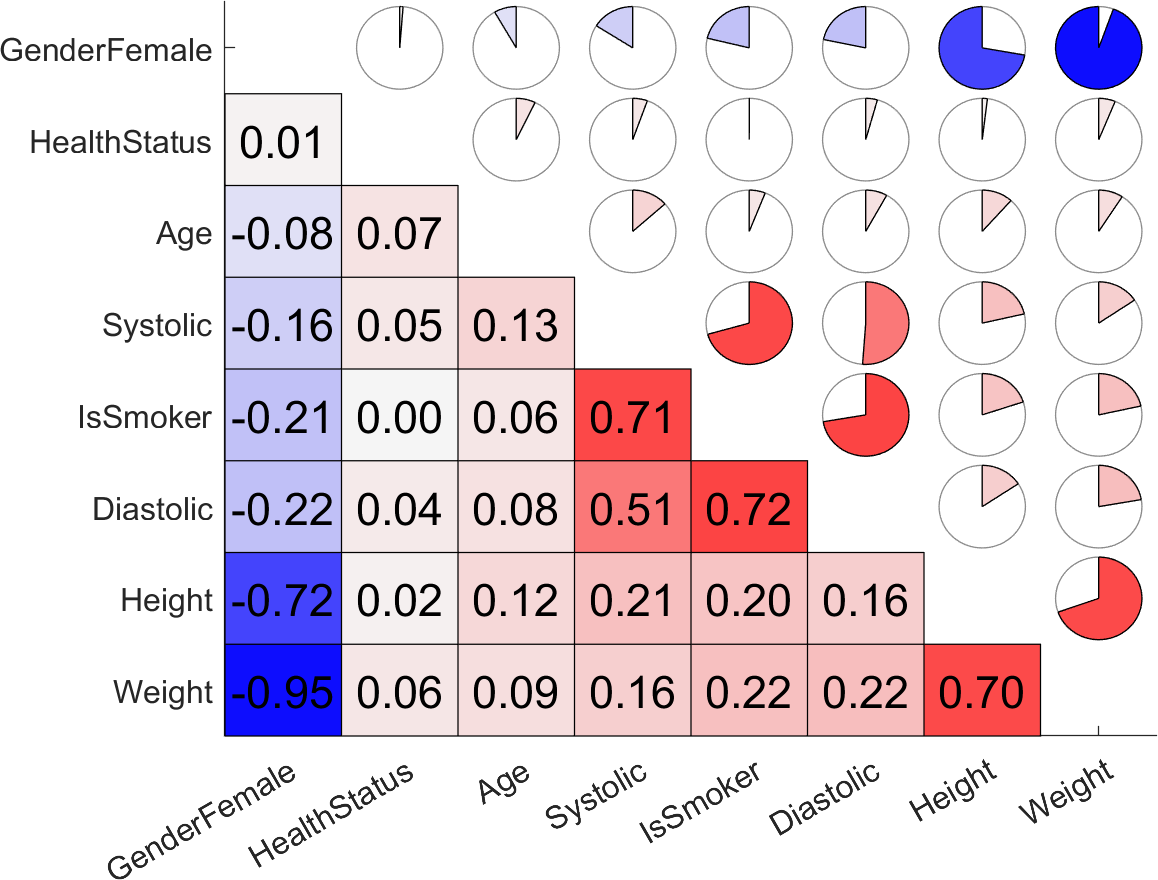
The correlogram function efficiently generates plots to visualize the correlation matrices. It displays correlation values as a heatmap in the bottom left, using color gradients to indicate the strength of association, and as pie charts in the top right, providing a quick overview. By default, sorting is enabled, arranging variables by performing an agglomerative hierarchical clustering with the linkage function. This function can help in quickly visualizing possible associations between variables, making data interpretation easier.
Example Usage:
% Load the example dataset and compute correlation matrix
D = load('accidents.mat');
C = corr(D.hwydata);
axislabels = D.hwyheaders;
% Prepare the figure and set the size
figure(1); clf();
set(gcf, 'Position', [0 0 1080 640]); movegui('center');
% Draw the correlogram
correlogram(C, 'AxisLabels', axislabels);
Use Original Ordering :
% Nodes as sorted by default, set 'Sorting' false to disable it
figure(2); clf();
set(gcf, 'Position', [0 0 1080 640]); movegui('center');
correlogram(C, 'AxisLabels', axislabels, 'Sorting', false);
Citar como
Serhan Yilmaz (2026). Correlogram (https://la.mathworks.com/matlabcentral/fileexchange/133812-correlogram), MATLAB Central File Exchange. Recuperado .
Información general
- Versión 1.0.1 (902 KB)
Compatibilidad con la versión de MATLAB
- Compatible con cualquier versión
Compatibilidad con las plataformas
- Windows
- macOS
- Linux
