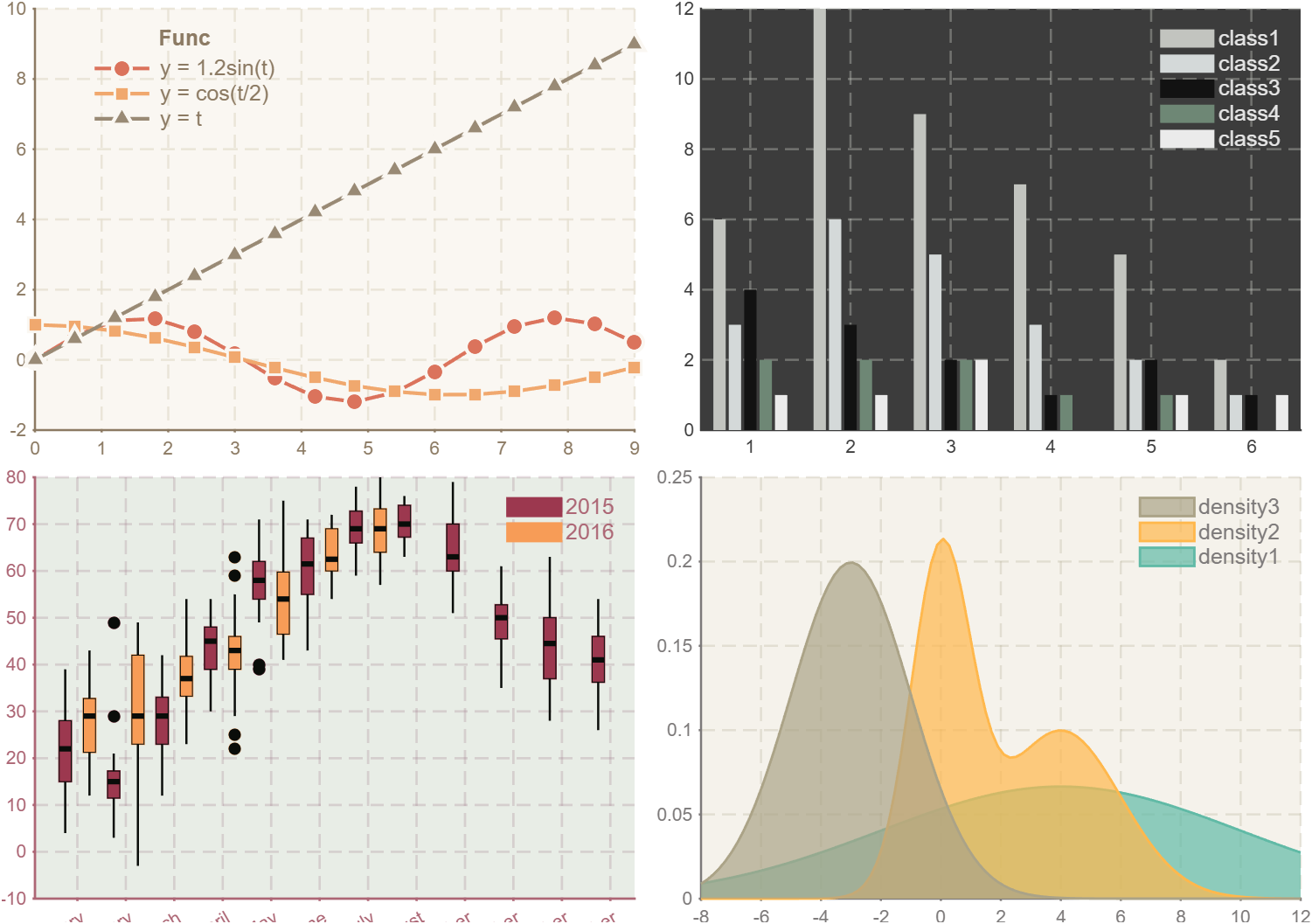
ggtheme for Common Plotting Functions

Apply professional theme styles to common MATLAB plotting functions (bar, line, area, box, violin). Inspired by R's ggthemr package.

Ahora está siguiendo esta publicación

Basic usage - boxchart
figure('Units','normalized', 'Position',[.1,.3,.45,.5])
% Read temperature dataset (built-in MATLAB sample data)
tbl = readtable('TemperatureData.csv');
% Define categorical month order (Jan to Dec)
monthOrder = {'January', 'February', 'March', 'April', 'May', 'June', 'July', ...
'August', 'September', 'October', 'November', 'December'};
tbl.Month = categorical(tbl.Month, monthOrder);
% Create grouped box chart
boxchart(tbl.Month,tbl.TemperatureF,'GroupByColor',tbl.Year, 'ColorGroupWidth',1)
ylabel('Temperature (F)')
legend()
exportgraphics(gcf, '_demoBox_ori.png')
%% Apply ggtheme styling to box chart
pause(.5)
ggThemeBox(gca,'camouflage');
exportgraphics(gcf, '_demoBox_gg.png')
Basic usage - bar
figure('Units','normalized', 'Position',[.1,.3,.7,.4])
% Sample data: 6 groups × 5 categories
y = [6 3 4 2 1; 12 6 3 2 1;
9 5 2 2 2; 7 3 1 1 0;
5 2 2 1 1; 2 1 1 0 1];
% Generate category labels: 'class-1' to 'class-5'
labels = compose('class-%d', 1:5);
% Left subplot: grouped bar chart
ax1 = subplot(1, 2, 1);
bar(y); legend(labels)
% Right subplot: stacked bar chart
ax2 = subplot(1, 2, 2);
bar(y, 'stacked'); legend(labels, 'Direction','normal')
exportgraphics(gcf, '_demoBar_ori.png')
%% Apply ggtheme styling to both subplots
pause(.5)
ggThemeBar(ax1, 'dust');
ggThemeBar(ax2, 'dust');
exportgraphics(gcf, '_demoBar_gg.png')
Basic usage - plot
% demoPlot
figure('Units','normalized', 'Position',[.1,.3,.4,.45])
t = 0:0.6:3*pi;
% Plot three curves with different styles
plot(t, sin(t) .* 1.2, 'LineWidth', 2, 'Marker', 'o');
hold on;
plot(t, cos(t ./ 2), 'LineWidth', 2, 'Marker', 's');
plot(t, t, 'LineWidth', 2, 'Marker', '^');
% Add legend with custom labels and position
lgd = legend(' y = 1.2·sin(t)', ' y = cos(t/2)', ' y = t');
lgd.Location = 'best';
title(lgd, 'Func');
exportgraphics(gcf, '_demoPlot_ori.png')
%% Apply ggtheme styling to line plot
pause(.5)
ggThemePlot(gca, 'flat_dark');
exportgraphics(gcf, '_demoPlot_gg.png')
Basic usage - area
figure('Units','normalized', 'Position',[.1,.3,.4,.45])
x = linspace(-8, 12, 100);
% Generate three probability density curves
y1 = normpdf(x, 4, 6);
y2 = normpdf(x, 0, 1) * 0.5 + normpdf(x, 4, 2) * 0.5;
y3 = normpdf(x, -3, 2);
% Plot area charts
hold on;
area(x, y1);
area(x, y2);
area(x, y3);
% Set axis limits
xlim([-8, 12]);
% Add legend
labels = compose('density-%d', 1:3);
legend(labels, 'Direction', 'normal');
exportgraphics(gcf, '_demoArea_ori.png')
pause(.5)
ggThemeArea(gca,'grape');
exportgraphics(gcf, '_demoArea_gg.png')
All theme
% Available themes:
% 'flat', 'flat_dark', 'camouflage', 'chalk', 'copper', 'dust',
% 'earth', 'fresh', 'grape', 'grass', 'greyscale', 'light',
% 'lilac', 'pale', 'sea', 'sky', 'solarized'
Acknowledgements:
The color palettes in this toolbox are adapted from the R package 'ggthemr'
(https://github.com/Mikata-Project/ggthemr), originally created by Ciaran Tobin
and maintained by the Mikata-Project team.

Citar como

Zhaoxu Liu / slandarer (2026). ggtheme for Common Plotting Functions (https://la.mathworks.com/matlabcentral/fileexchange/183863-ggtheme-for-common-plotting-functions), MATLAB Central File Exchange. Recuperado .

Información general

Compatibilidad con la versión de MATLAB

  • Compatible con cualquier versión

Compatibilidad con las plataformas

  • Windows
  • macOS
  • Linux
Versión Publicado Notas de la versión Action
1.0.0