Contenido principal

mapInport

R2026b

Map Simulink inport to AUTOSAR port

Description

mapInport(slMap,slPortName,arPortName,arDataElementName,arDataAccessMode) maps the Simulink® inport slPortName to the AUTOSAR data element arDataElementName at AUTOSAR receiver port arPortName. The AUTOSAR data access mode for the receiver port is set to arDataAccessMode.

example

Examples

collapse all

Set AUTOSAR mapping information for a model inport in the example model autosar_swc_expfcns. The model has an inport named RPort_DE1. This example changes the AUTOSAR data access mode for RPort_DE1 from ImplicitReceive to ExplicitReceive.

hModel = "autosar_swc_expfcns";
openExample(hModel);
slMap = autosar.api.getSimulinkMapping(hModel);
mapInport(slMap,"RPort_DE1","RPort","DE1","ExplicitReceive");
[arPortName,arDataElementName,arDataAccessMode] = getInport(slMap,"RPort_DE1")
arPortName =

    'RPort'


arDataElementName =

    'DE1'


arDataAccessMode =

    'ExplicitReceive'

Map bus element port elements to IsUpdated and ErrorStatus data access modes. For bus element ports, the port name of the bus also identifies the mapped AUTOSAR port, and the arDataElement argument specifies both the bus element port and the mapped AUTOSAR port element. The mapInport function requires the SlPortName data element that the QoS bus element port is associated with.

Open example model mMultitasking_4rates and add a status element port for RPort1.OneS by using the add_block function and specifying PortName and Element as RPort1 and OneS_status respectively.

hModel = "mMultitasking_4rates";
openExample(hModel);
add_block("mMultitasking_4rates/In Bus Element", ...
    "mMultitasking_4rates/In Bus Element_status", ...
    MakeNameUnique="on", ...
    Position=[-10 35 0 45], ...
    PortName="RPort1", ...
    Element="OneS_status");
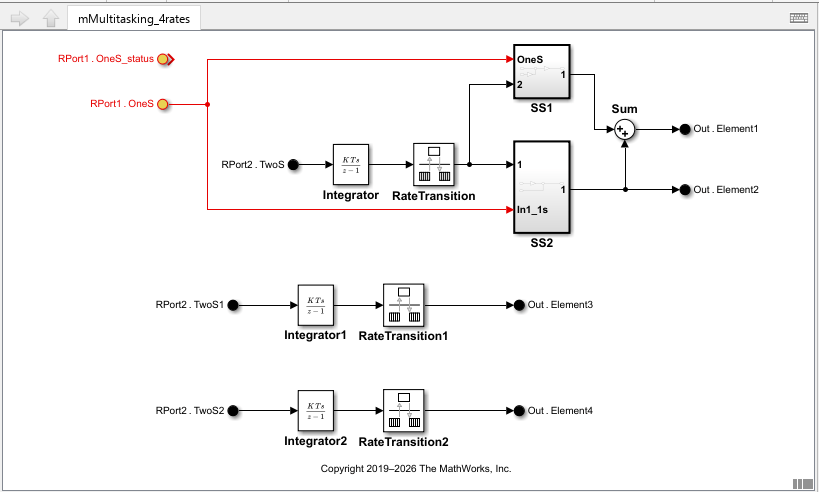
New bus element port RPort1.OneS_status is visible in the mMultitasking_4rates model.

Retrieve the Simulink to AUTOSAR mapping information in the model.

slMap = autosar.api.getSimulinkMapping(hModel);
[arPortName, arDataElementName, arDataAccessMode] = getInport(slMap,"In Bus Element")
arPortName =

    'RPort1'


arDataElementName =

    'OneS'


arDataAccessMode =

    'ImplicitReceive'

Retrieve the mapping information for the status bus element port. Then set the data access mode to ErrorStatus. When you use the mapInport function to set the data access bad for QoS ports you must specify the arDataElementName of the bus element port for which you are tracking the ErrorStatus or IsUpdated, in this case arDataElementName is "OneS".

mapInport(slMap,"In Bus Element_status",arPortName,arDataElementName,"ErrorStatus");
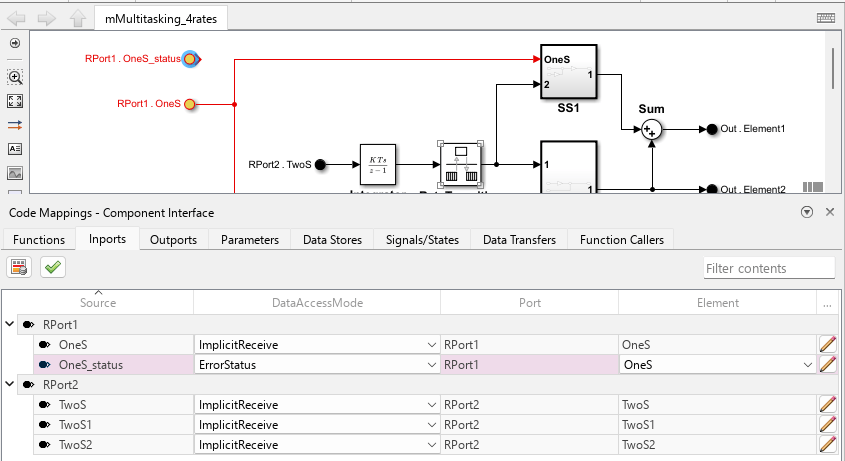
Bus element port RPort1.OneS_status is visible in the mMultitasking_4rates model and the Code Mappings editor is open. RPort1.OneS_status is selected in the Code Mappings Editor with DataAccessMode ErrorStatus.

Input Arguments

collapse all

Simulink to AUTOSAR mapping information for a model, previously returned by slMap = autosar.api.getSimulinkMapping(model). model is a handle, character vector, or string scalar representing the model name.

Example: slMap

Name of the model inport or bus element port for which to set AUTOSAR mapping information.

Example: "In Bus Element"

Name of the AUTOSAR port to which to map the specified Simulink inport.

Example: "RPort"

Name of the AUTOSAR data element to which to map the specified Simulink inport.

Example: "DataElement"

Value of the AUTOSAR data access mode to which to map the specified Simulink inport or bus element port. Model inports and bus element ports can be mapped to these data access modes.

  • ImplicitReceive — Receive data implicitly. The AUTOSAR Runtime Environment (RTE) provides a copy of the data to the runnable before it starts execution.

  • ExplicitReceive — Receive data explicitly by reference. The runnable calls an RTE API function to read data during execution.

  • QueuedExplicitReceive — Receive queued data explicitly. Multiple sent values are buffered in a first-in-first-out (FIFO) queue and received in order.

  • ErrorStatus — Receive the error status for an associated data element.

  • ModeReceive — Receive mode switch notifications from a mode switch interface.

  • IsUpdated — Receive the IsUpdated status that indicates whether an associated data element has been updated since the last time it was read.

  • EndToEndRead — Receive data with end-to-end (E2E) protection. The generated code includes E2E transformation calls that validate data integrity.

  • ExplicitReceiveByVal — Receive data explicitly by value. The runnable calls an RTE API function that returns data by value instead of by reference.

When you map a bus element port to IsUpdated or ErrorStatus, set arDataElementName to the data element whose status you want to track, not the name of the QoS port element itself. For example, if you add a QoS bus element port RPort.DE1_IsUpdated to track the IsUpdated status of data element RPort.DE1, specify "DE1" as the arDataElementName. The slPortName is the name of the In Bus Element block for the QoS port element.

mapInport(slMap,"In Bus Element_IsUpdated","RPort","DE1","IsUpdated");

Example: "ExplicitReceive"

Version History

Introduced in R2013b

expand all