Install Robot Operating System 2 on NVIDIA Jetson Hardware Boards
R2026bYou can use the Hardware Setup tool to install Robot Operating System (ROS) 2 on NVIDIA® Jetson™. ROS is a collection of software libraries, tools, and frameworks for robot software development. ROS contains services such as hardware abstraction, low-level device control, message-passing between processes, and package management. You can deploy C++ or CUDA® ROS 2 nodes to NVIDIA Jetson boards.
Use the Hardware Setup Tool
Before you run the Hardware Setup tool, you must set up the NVIDIA Jetson board by:
Installing Jetson Linux® on the NVIDIA Jetson. For more information, see Prerequisites for Generating Code for NVIDIA Boards.
Connecting the Jetson board to the internet.
Connecting the Jetson board and the host computer running MATLAB® to the same local network. Alternatively, connect the host computer and Jetson board by using an Ethernet crossover cable.
In MATLAB, open the Hardware Setup tool by using the
jetsonSetup
function.
jetsonSetup();
Follow the steps in the Hardware Setup tool until the Connect to NVIDIA Jetson page. On the Connect to NVIDIA Jetson page, enter the device address, username, and password for the Jetson board. Click Connect to Device.
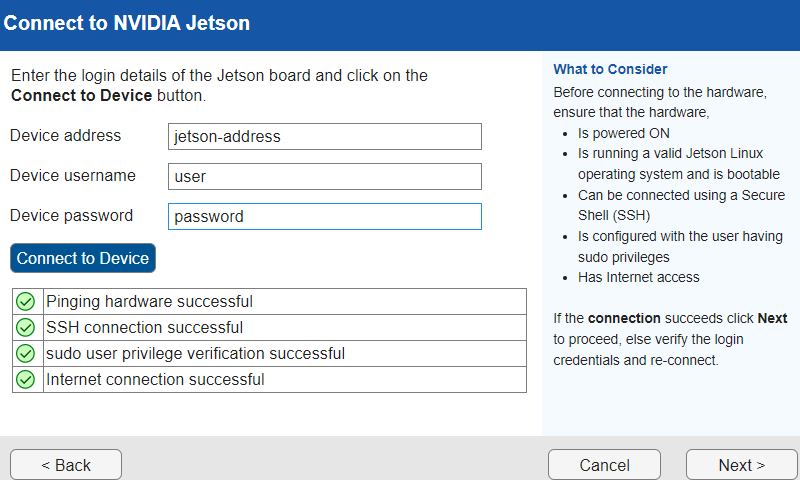
After the tool connects to the board, click Next. Install the minimum required libraries for the MATLAB Coder™ Support Package for NVIDIA Jetson and NVIDIA DRIVE® Platforms and optional libraries that your project requires. For more information, see Customize Installation of Third-Party Libraries for NVIDIA Hardware.
On the Install ROS2 page, select Yes, download and install ROS2. Click the Open Shell button to open a shell on the Jetson board.
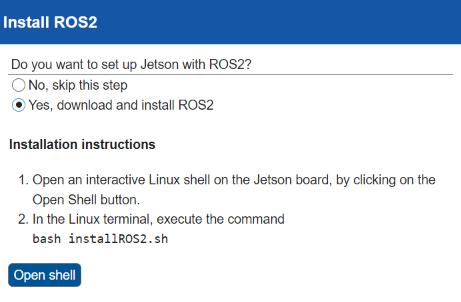
To install ROS 2, execute the installROS2.sh script on the
board. The tool installs ROS 2 Jazzy Jalisco on boards configured with NVIDIA JetPack™ version 7 or ROS 2 Humble Hawksbill on boards that use earlier
versions of NVIDIA JetPack.
bash installROS2.sh

