raypl
R2026bPath loss and phase change for RF propagation ray
Description
[
returns the path loss and phase shift for the specified RF propagation ray. The function
calculates the path loss and phase shift using free space loss and reflection loss derived
from the propagation path, reflection materials, and antenna polarizations.pl,phase] = raypl(ray)
By default, the raypl function assumes the antennas are
unpolarized. You can polarize the antennas by specifying the
TransmitterPolarization and ReceiverPolarization
name-value arguments.
The raypl function overrides the materials that are stored in
ray. By default, the function uses concrete materials. To specify
other materials, use the ReflectionMaterials argument.
For more information about the path loss computations, see Path Loss Computation.
[
specifies options using name-value arguments. For example,
pl,phase] = raypl(ray,Name=Value)ReflectionMaterials="brick" specifies the reflection material as
brick.
Examples
Change the reflection materials and frequency for a ray, and then reevaluate the path loss and phase shift.
Launch Site Viewer with buildings in Hong Kong. For more information about the OpenStreetMap® file, see [1].
viewer = siteviewer(Buildings="hongkong.osm");Create transmitter and receiver sites.
tx = txsite(Latitude=22.2789,Longitude=114.1625, ...
    AntennaHeight=10,TransmitterPower=5, ...
    TransmitterFrequency=28e9);
rx = rxsite(Latitude=22.2799,Longitude=114.1617, ...
    AntennaHeight=1);
Create a ray tracing propagation model, which MATLAB® represents using a RayTracing object. Configure the model to find paths with up to 2 surface reflections. Then, perform the ray tracing analysis.
pm = propagationModel("raytracing",MaxNumReflections=2);
rays = raytrace(tx,rx,pm);
Find the first ray with two path reflections. Then, display the properties of the ray object.
idx = find([rays{1}.NumInteractions] == 2,1);
ray = rays{1}(idx)
ray =
Ray with properties:
PathSpecification: 'Locations'
CoordinateSystem: 'Geographic'
TransmitterLocation: [3×1 double]
ReceiverLocation: [3×1 double]
LineOfSight: 0
Interactions: [1×2 struct]
Frequency: 2.8000e+10
PathLossSource: 'Custom'
PathLoss: 121.8592
PhaseShift: 4.5912
Read-only properties:
PropagationDelay: 8.3060e-07
PropagationDistance: 249.0069
AngleOfDeparture: [2×1 double]
AngleOfArrival: [2×1 double]
NumInteractions: 2
Display the ray in Site Viewer.
plot(ray)
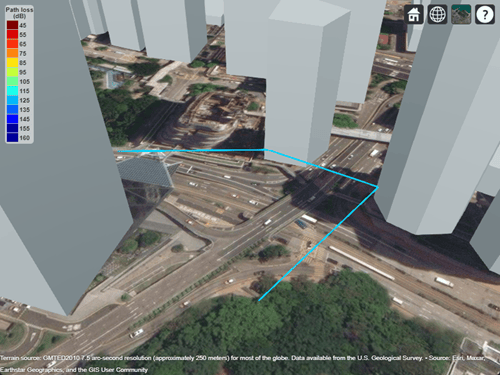
By default, the model uses concrete for the terrain material and uses building materials derived from the OpenStreetMap file. When the OpenStreetMap file does not specify materials, the model uses concrete. In this case, the ray encounters concrete as the material. You can find the interaction materials by querying the Interactions property of the ray object.
ray.Interactions.MaterialName
ans =
"concrete"
ans =
"concrete"
You can calculate the path loss for different materials by using the raypl function. For this example, use metal for the first reflection and glass for the second reflection.
[ray.PathLoss,ray.PhaseShift] = raypl(ray,ReflectionMaterials=["metal","glass"]);
ray
ray =
  Ray with properties:

      PathSpecification: 'Locations'
       CoordinateSystem: 'Geographic'
    TransmitterLocation: [3×1 double]
       ReceiverLocation: [3×1 double]
            LineOfSight: 0
           Interactions: [1×2 struct]
              Frequency: 2.8000e+10
         PathLossSource: 'Custom'
               PathLoss: 114.9541
             PhaseShift: 4.5912

   Read-only properties:
       PropagationDelay: 8.3060e-07
    PropagationDistance: 249.0069
       AngleOfDeparture: [2×1 double]
         AngleOfArrival: [2×1 double]
        NumInteractions: 2
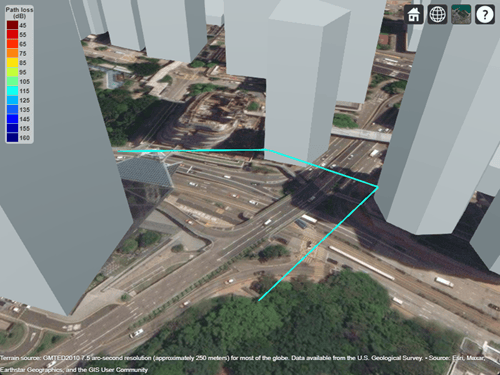
Display the recalculated ray. The slight change in color indicates the change in path loss.
plot(ray)
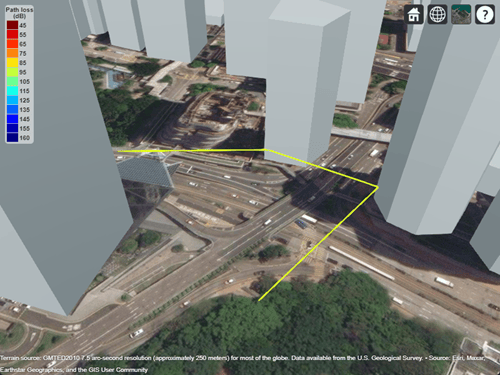
Change the frequency of the ray. Then, recalculate the path loss and phase shift. Display the ray again and observe the color change.
ray.Frequency = 2e9;
[ray.PathLoss,ray.PhaseShift] = raypl(ray,ReflectionMaterials=["metal","glass"]);
plot(ray)
Appendix
[1] The OpenStreetMap file is downloaded from https://www.openstreetmap.org, which provides access to crowd-sourced map data all over the world. The data is licensed under the Open Data Commons Open Database License (ODbL), https://opendatacommons.org/licenses/odbl/.
Calculate the path losses and phase shifts between co-polarized antennas and polarization-mismatched antennas, including cross-polarized antennas. For some polarization types, the phase shift calculated by the raypl function depends on the convention you use to specify the polarization.
Create a line-of-sight ray in an empty scene with Cartesian coordinates. Place the transmitter and receiver at locations along the x-axis.
ray = comm.Ray(TransmitterLocation=[0; 0; 0],ReceiverLocation=[10; 0; 0]);
Co-Polarized Antennas
Calculate the path losses and phase shifts for co-polarized antennas. When two antennas are co-polarized, the path loss includes zero loss that results from polarization mismatch.
Circular Polarization
When two antennas are both left-hand circular polarized (LHCP) or both right-hand circular polarized (RHCP), the antennas are co-polarized.
Calculate the path losses and phase shifts for co-polarized antennas with these polarization combinations:
Both antennas are left-hand circular polarized.
Both antennas are right-hand circular polarized.
[pl1,phase1] = raypl(ray,TransmitterPolarization="LHCP",ReceiverPolarization="LHCP")
pl1 =
58.0229
phase1 =
2.3699
[pl2,phase2] = raypl(ray,TransmitterPolarization="RHCP",ReceiverPolarization="RHCP")
pl2 =
58.0229
phase2 =
2.3699
Note that the path losses and phase shifts are equal.
Linear Polarization
When two linearly polarized antennas are aligned so that their polarization axes are parallel, the antennas are co-polarized. While the path loss includes zero loss that results from polarization mismatch, the phase shift depends on the convention you use to specify the polarization.
Calculate the path loss and phase shift for co-polarized antennas with these polarization combinations.
Both antennas are vertically polarized. The polarization type
"V" corresponds to the Jones vector[0; 1].Both antennas are horizontally polarized. The polarization type
"H" corresponds to the Jones vector[1; 0].
[pl3,phase3] = raypl(ray,TransmitterPolarization="V",ReceiverPolarization="V")
pl3 =
58.0229
phase3 =
2.3699
[pl4,phase4] = raypl(ray,TransmitterPolarization="H",ReceiverPolarization="H")
pl4 =
58.0229
phase4 =
5.5115
Note that the path losses are equal, but that the phase shifts differ by radians. The phase shifts are different because the raypl function expects you to define the polarization of the receive antenna as if it were transmitting. To follow this convention, rotate the horizontal component of the receiver polarization by radians. This combination is analogous to two parallel horizontal dipoles, which have a phase shift of radians unless you rotate the receiving horizontal dipole by radians.
Calculate the path loss and phase shift for the horizontally polarized antennas again, this time using the convention expected by raypl.
txPol5 = "H"; % corresponds to [1; 0]
rxPol5 = [-1; 0];
[pl5,phase5] = raypl(ray,TransmitterPolarization=txPol5,ReceiverPolarization=rxPol5)
pl5 =
58.0229
phase5 =
2.3699
Note that the phase shift now matches the phase shifts for the vertically polarized, LHCP, and RHCP antennas.
Slanted Dipoles
Calculate the path loss and phase shift for co-polarized slanted dipoles, where both the transmit antenna and the receive antenna are rotated by 45 degrees around the perpendicular axis through both antennas. Following the same polarization convention as for the horizontally polarized antennas, specify the horizontal component of the receiver polarization as radians relative to the transmitting polarization.
txPol6 = [1; 1]/sqrt(2);
rxPol6 = [-1; 1]/sqrt(2);
[pl6,phase6] = raypl(ray,TransmitterPolarization=txPol6,ReceiverPolarization=rxPol6)
pl6 =
58.0229
phase6 =
2.3699
Note that the phase shift matches the phase shifts for the vertically polarized, LHCP, and RHCP antennas.
Polarization-Mismatched Antennas
When two antennas have mismatched polarization, the path loss includes non-zero loss as a result of polarization mismatch.
Calculate the path loss for antennas with mismatched polarization, where the transmit antenna is horizontally polarized and the receive antenna is rotated by 45 degrees around the perpendicular axis through both antennas. The combination corresponds to a horizontal dipole and a slanted 45-degree dipole.
txPol7 = "H"; % corresponds to [1; 0]
rxPol7 = [1; 1]/sqrt(2);
pl7 = raypl(ray,TransmitterPolarization=txPol7,ReceiverPolarization=rxPol7)
pl7 =
61.0332
Note that the path loss is approximately 3 decibels more than the path loss for the co-polarized antennas. This difference is due to only half the power being received.
Cross-Polarized Antennas
When two polarized antennas are aligned so that their polarization axes are orthogonal, they are cross-polarized. When two antennas are cross-polarized, the path loss is theoretically infinite.
Calculate the path losses for cross-polarized antennas with these polarization combinations.
The transmit antenna is horizontally polarized. The receive antenna is vertically polarized.
The transmit antenna is right-hand circular polarized. The receive antenna is left-hand circular polarized.
The transmit antenna is left-hand circular polarized. The receive antenna is right-hand circular polarized.
The antennas are cross-polarized slanted dipoles. Note that, per the polarization convention, antennas are cross-polarized when both the transmitter and receiver are slanted dipoles with the same polarization in a direction toward each other.
pl8 = raypl(ray,TransmitterPolarization="H",ReceiverPolarization="V")
pl8 =
Inf
pl9 = raypl(ray,TransmitterPolarization="RHCP",ReceiverPolarization="LHCP")
pl9 =
Inf
pl10 = raypl(ray,TransmitterPolarization="LHCP",ReceiverPolarization="RHCP")
pl10 =
Inf
txPol11 = [1; 1]/sqrt(2);
rxPol11 = [1; 1]/sqrt(2);
pl11 = raypl(ray,TransmitterPolarization=txPol11,ReceiverPolarization=rxPol11)
pl11 =
Inf
Input Arguments
Name-Value Arguments
Output Arguments
More About
This image shows the orientation of the electromagnetic fields in the global coordinate system (GCS) and the local coordinate systems of the transmitter and receiver.
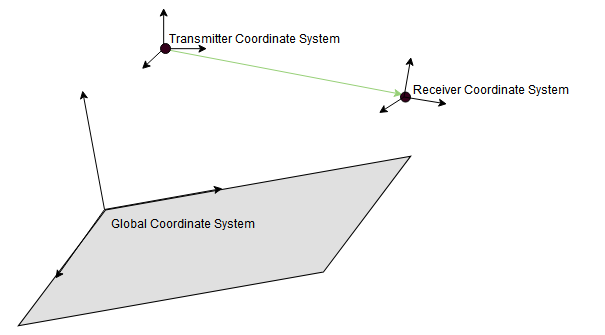
When the CoordinateSystem property of the comm.Ray is set to
"Geographic", the GCS orientation is the local East-North-Up (ENU)
coordinate system at observer. The path loss computation accounts for the round-earth
differences between ENU coordinates at the transmitter and receiver.
The ray tracing model used by the raypl function calculates
reflection losses by tracking the horizontal and vertical polarizations of signals through
the propagation path. Total power loss is the sum of free space loss and reflection
loss.
This image shows a reflection path from a transmitter site tx to a receiver site rx.

The model determines polarization and reflection loss using these steps.
Track the propagation of the ray in 3-D space by calculating the propagation matrix P. The matrix is a repeating product, where i is the number of reflection points.
For each reflection, calculate Pi by transforming the global coordinates of the incident electromagnetic field into the local coordinates of the reflection plane, multiplying the result by a reflection coefficient matrix, and transforming the coordinates back into the original global coordinate system [1]. The equations for Pi and P0 are:
where:
s, p, and k form a basis for the plane of incidence (the plane created by the incident ray and the surface normal of the reflection plane). s and p are perpendicular and parallel, respectively, to the plane of incidence.
kin and kout are the directions (in global coordinates) of the incident and exiting rays, respectively.
sin and sout are the directions (in global coordinates) of the horizontal polarizations for the incident and exiting rays, respectively.
pin and pout are the directions (in global coordinates) of the vertical polarizations for the incident and exiting rays, respectively.
RH and RV are the Fresnel reflection coefficients for the horizontal and vertical polarizations, respectively. α is the incident angle of the ray and εr is the complex relative permittivity of the material.
Project the propagation matrix P into a 2-by-2 polarization matrix R. The model rotates the coordinate systems for the transmitter and receiver so that they are in global coordinates.
where:
Hrx and Vrx are the directions (in global coordinates) of the horizontal (Eθ) and vertical (Eϕ) polarizations, respectively, for the receiver.
Hin and Vin are the directions (in global coordinates) of the propagated horizontal and vertical polarizations, respectively.
Vtx is the direction (in global coordinates) of the nominal vertical polarization for the ray departing the transmitter.
ktx is the direction (in global coordinates) of the ray departing the transmitter.
Specify the normalized horizontal and vertical polarizations of the electric field at the transmitter and receiver by using the 2-by-1 Jones polarization vectors Jtx and Jrx, respectively. If either the transmitter or receiver are unpolarized, then the model assumes and sets .
Rotate Jrx into the frame of the transmitter.
Calculate the polarization and reflection loss IL by combining R, Jtx, and Jrx.
References
[1] Chipman, Russell A., Garam Young, and Wai Sze Tiffany Lam. "Fresnel Equations." In Polarized Light and Optical Systems. Optical Sciences and Applications of Light. Boca Raton: Taylor & Francis, CRC Press, 2019.
[2] International Telecommunications Union Radiocommunication Sector. Effects of Building Materials and Structures on Radiowave Propagation Above About 100MHz. Recommendation P.2040. ITU-R, approved August 23, 2023. https://www.itu.int/rec/R-REC-P.2040/en.
[3] International Telecommunications Union Radiocommunication Sector. Electrical Characteristics of the Surface of the Earth. Recommendation P.527. ITU-R, approved September 27, 2021. https://www.itu.int/rec/R-REC-P.527/en.
[4] Mohr, Peter J., Eite Tiesinga, David B. Newell, and Barry N. Taylor. “Codata Internationally Recommended 2022 Values of the Fundamental Physical Constants.” NIST, May 8, 2024. https://www.nist.gov/publications/codata-internationally-recommended-2022-values-fundamental-physical-constants.
[5] "IEEE Standard Definitions of Terms for Antennas." IEEE Std 145-2013 (Revision of IEEE Std 145-1993), March 2014, 1–50. https://doi.org/10.1109/IEEESTD.2014.6758443.

