Acquire Data Continuously in Background Using NI Devices
R2026bThis example shows how to acquire analog input data using non-blocking commands. When you use non-blocking commands, MATLAB® acquires data in the background while you continue working in the MATLAB command window. In contrast, foreground acquisition causes MATLAB to wait for the entire acquisition to complete before you can execute your next command.
Create and Configure Interface to Acquisition Device
Create a DataAcquisition object and add an input channel using the daq and addinput functions. This example uses an NI 9205 module in a National Instruments™ CompactDAQ Chassis NI cDAQ-9178, which is module 1 in the chassis.
dq = daq("ni");
addinput(dq,"cDAQ1Mod1","ai0","Voltage");
Set the scan rate to 2000 samples per second.
dq.Rate = 2000;
Plot Live Data from Background Acquisition
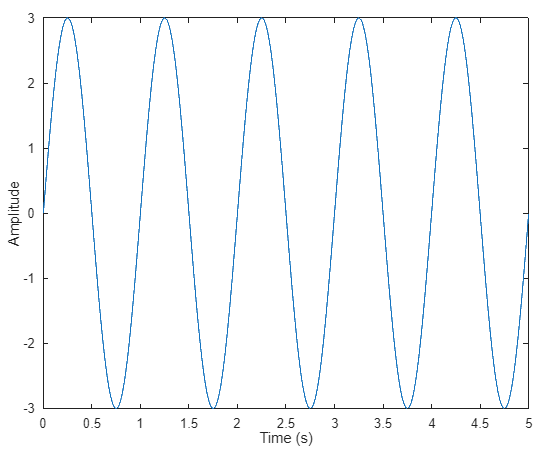
During background acquisition, you can specify how to handle incoming data by assigning a callback function to the ScansAvailableFcn property. This example uses a callback function that updates a live plot with the acquired data. The function is defined at the end of this example in the Callback Functions section.
dq.ScansAvailableFcn = @plotDataAvailable;
To control how often the callback is triggered, set a value for the ScansAvailableFcnCount property. This value specifies the number of scans that must be available before the callback executes. For example, to trigger the callback 10 times per second, set the value to Rate/10.
dq.ScansAvailableFcnCount = 200;
Create a live-updating line plot by using the animatedline command and assigning the resulting function handle to the UserData property of the DataAcquisition object. This allows the callback function to access and update the line plot dynamically during the background acquisition process.
figure;
xlabel("Time (s)");
ylabel("Amplitude");
dq.UserData = animatedline;
Acquire Data for Specified Time
Use the start function to begin the background acquisition. This example performs background data acquisition for a duration of 5 seconds.
start(dq,"Duration",seconds(5))
In this case, there are no other calculations to perform during acquisition. Therefore, you can use a while loop to display the number of acquired scans. Use pause to prevent the loop from becoming a tight polling loop.
while dq.Running
    pause(0.5)
    fprintf("Scans acquired = %d\n",dq.NumScansAcquired)
end

fprintf("Acquisition stopped after %d scans\n",dq.NumScansAcquired);
Scans acquired = 8000
    Scans acquired = 9000
    Scans acquired = 10000
    Acquisition stopped after 10000 scans
Acquire Data Until Specified Condition Occurs
Instead of stopping the acquisition at a specified time, you can specify a condition under which to stop. To do so, write a function that evaluates the condition and calls the stop command when the condition is met. For this example, use the function stopWhenEqualsOrExceedsOneV, which ends the acquisition when the acquired signal equals or exceeds one volt. The function is defined at the end of this example in the Callback Functions section.
dq.ScansAvailableFcn = @stopWhenEqualsOrExceedsOneV;
Again, create an animated line plot and store its handle in the UserData property of dq. This allows the callback function to access and update the line plot dynamically during the background acquisition process.
figure;
xlabel("Time (s)");
ylabel("Voltage");
dq.UserData = animatedline;
Start continuous background acquisition.
start(dq,"continuous");
Use a while loop with pause to display the number of acquired scans. Use pause to prevent the loop from becoming a tight polling loop.
while dq.Running
    pause(0.5)
    fprintf("Scans acquired = %d\n",dq.NumScansAcquired)
end

fprintf("Acquisition terminated after %d scans\n",dq.NumScansAcquired);
Scans acquired = 4000
Continuing to acquire data
Continuing to acquire data
Detected voltage exceeds 1V: stopping acquisition
Scans acquired = 4600
Acquisition terminated after 4600 scans
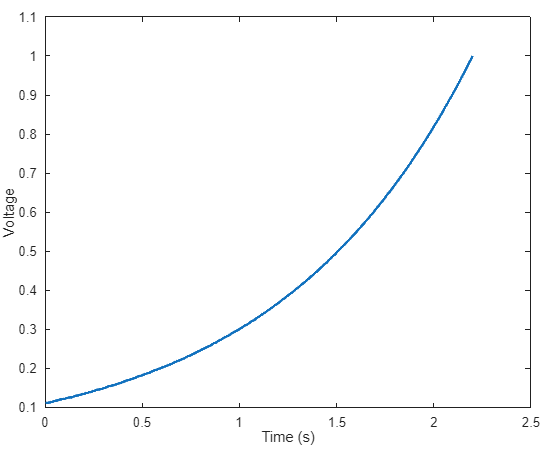
The acquisition continues until the signal reaches one volt.
Callback Functions
This callback function updates the live plot with the data acquired in the background.
function plotDataAvailable(src,~)
    [data,timestamps,~] = read(src,src.ScansAvailableFcnCount,OutputFormat="Matrix");
    addpoints(src.UserData,timestamps,data);
end
This callback function acquires data, adds points to the plot, and stops acquisition when the incoming value is greater than or equal to one volt.
function stopWhenEqualsOrExceedsOneV(src,~)
    [data,timestamps,~] = read(src,src.ScansAvailableFcnCount,OutputFormat="Matrix");
    addpoints(src.UserData,timestamps,data);
    if any(data >= 1.0)
        % stop continuous acquisitions explicitly
        src.stop()
        disp('Detected voltage exceeds 1V: stopping acquisition')
    else
        disp('Continuing to acquire data')
    end
end

