Leaky ReLU Layer
R2026bLeaky ReLU Layer block

To add a block to a model, double-click the canvas and start typing the block name. Then, select the block from the list.
Libraries:
Deep Learning Toolbox /
Deep Learning Layers /
Activation Layers
Description
The Leaky ReLU Layer block performs a threshold operation where any input value less than zero is multiplied by a fixed scalar.
This operation is equivalent to:
Because it applies an element-wise operation, this block supports input data of any format and outputs data that has the same dimensions and format as the input.
The exportNetworkToSimulink function generates this block to represent a leakyReluLayer
object.
Examples
Export a trained neural network to Simulink® as layer blocks.
For most workflows, you do not need to create neural networks in Simulink. Instead, import or train a neural network in MATLAB® and export it to Simulink.
Suppose that you have a trained neural network net specified as
a dlnetwork object. Export the network to Simulink using the exportNetworkToSimulink function.
mdlInfo = exportNetworkToSimulink(net)
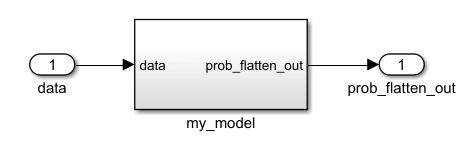
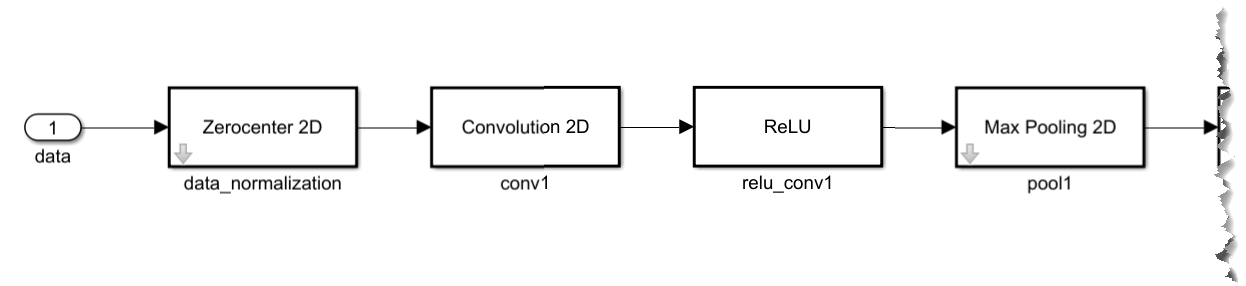
The exported Simulink model represents the neural network as a subsystem. To view the layer blocks, open the subsystem. This example shows the first few blocks of a neural network.
To view and edit the layer block parameters, open the corresponding layer block mask. This example shows the parameters for the ReLU block.
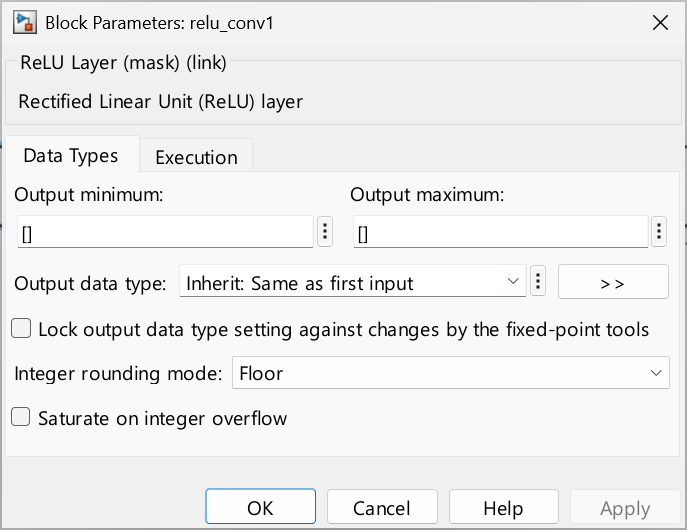
Using the layer block parameters, you can configure aspects like data types and execution options like sample times.
Ports
Input
The matrix on which to perform the threshold operation.
Data Types: single | double | int8 | int16 | int32 | int64 | uint8 | uint16 | uint32 | uint64 | fixed point
Output
The result of performing the threshold operation on the input matrix. Values less than zero in the input matrix are multiplied by the value of the Scale parameter.
Data Types: single | double | int8 | int16 | int32 | int64 | uint8 | uint16 | uint32 | uint64 | fixed point
Parameters
To edit block parameters interactively, use the Property Inspector. From the Simulink Toolstrip, on the Simulation tab, in the Prepare gallery, select Property Inspector.
Main
Scale factor for negative inputs, specified as a numeric scalar.
Programmatic Use
Block Parameter:
Scale
|
| Type: character vector |
| Values: numeric scalar |
Default:
'0.01'
|
Data Types
Minimum value of the output range that the software checks.
The software uses the minimum value to perform:
Parameter range checking for some blocks. For more information, see Specify Minimum and Maximum Values for Block Parameters (Simulink).
Simulation range checking. For more information, see Specify Signal Ranges (Simulink) and Enable Simulation Range Checking (Simulink).
Automatic scaling of fixed-point data types.
Optimization of the code that you generate from the model. This optimization can remove algorithmic code and affect the results of some simulation modes, such as SIL or external mode. For more information, see Optimize using the specified minimum and maximum values (Embedded Coder).
Tips
Output minimum does not saturate or clip the actual output signal. Use the Saturation (Simulink) block instead.
Programmatic Use
To set the block parameter value programmatically, use
the set_param (Simulink) function.
| Parameter: | OutMin |
| Values: | '[]' (default) | scalar in quotes |
Maximum value of the output range that the software checks.
The software uses the maximum value to perform:
Parameter range checking for some blocks. For more information, see Specify Minimum and Maximum Values for Block Parameters (Simulink).
Simulation range checking. For more information, see Specify Signal Ranges (Simulink) and Enable Simulation Range Checking (Simulink).
Automatic scaling of fixed-point data types.
Optimization of the code that you generate from the model. This optimization can remove algorithmic code and affect the results of some simulation modes, such as SIL or external mode. For more information, see Optimize using the specified minimum and maximum values (Embedded Coder).
Tips
Output maximum does not saturate or clip the actual output signal. Use the Saturation (Simulink) block instead.
Programmatic Use
To set the block parameter value programmatically, use
the set_param (Simulink) function.
| Parameter: | OutMax |
| Values: | '[]' (default) | scalar in quotes |
Choose the data type for the output. The type can be inherited, specified directly, or expressed as a data type object such as Simulink.NumericType. When you select Inherit: Inherit via internal rule, the
software chooses a data type to balance numerical accuracy, performance, and generated code
size, while taking into account the properties of the embedded target hardware.
Programmatic Use
To set the block parameter value programmatically, use
the set_param (Simulink) function.
| Parameter: | OutDataTypeStr |
| Values: | 'Inherit: Inherit via internal
rule' (default) | 'Inherit: Keep MSB' | 'Inherit: Keep LSB' | 'Inherit: Inherit via back propagation' | 'Inherit: Same as first input' | 'Inherit: Same as accumulator' | <data type expression> |
Select this parameter to prevent the fixed-point tools from overriding the data types you specify on this block. For more information, see Lock the Output Data Type Setting (Fixed-Point Designer).
Programmatic Use
To set the block parameter value programmatically, use
the set_param (Simulink) function.
Block Parameter: LockScale |
| Type: character vector |
Values: 'off' | 'on' |
Default: 'off' |
Specify the rounding mode for the output value of the block, generated by the final fixed-point cast operation. For the rounding mode for the other internal block operations, see Internal integer rounding mode. For more information, see Rounding Modes (Fixed-Point Designer).
Block parameters always round to the nearest representable value. To control the rounding of a block parameter, enter an expression using a MATLAB rounding function in the mask field.
Programmatic Use
To set the block parameter value programmatically, use
the set_param (Simulink) function.
| Parameter: | RndMeth |
| Values: | 'Floor' (default) | 'Ceiling' | 'Convergent' | 'Nearest' | 'Round' | 'Simplest' | 'Zero' |
Specify whether integer overflows saturate or wrap for the output value of the block, which is generated by the final fixed-point cast operation. For the method of overflow action of the internal block operations, see Internal saturate on integer overflow.
on— Overflows saturate to either the minimum or maximum value that the data type can represent.off— Overflows wrap according to the rules of the data type.
For example, the maximum value that the signed 8-bit integer int8
can represent is 127. Any block operation result greater than the maximum value causes
overflow of the 8-bit integer.
With this parameter selected, the block output saturates at 127. Similarly, the block output saturates at a minimum output value of –128.
With this parameter cleared, the software interprets the overflow-causing value as
int8, which can produce an unintended result. For example, a block result of 130 (binary 1000 0010) expressed asint8is –126.
Tips
Set this parameter to
onwhen your model has a possible overflow and you want explicit saturation protection in the generated code.To optimize the efficiency of your generated code, keep the default
offsetting for this parameter. Using the default setting also helps you avoid overspecifying how the block handles out-of-range signals. For more information, see Troubleshoot Signal Range Errors (Simulink).In general, the code generation process can detect when overflow is not possible. In this case, the code generator does not produce saturation code.
Programmatic Use
To set the block parameter value programmatically, use
the set_param (Simulink) function.
| Parameter: | SaturateOnIntegerOverflow |
| Values: | 'off' (default) | 'on' |
The block casts the value of the Scale parameter to this
data type. The type can be inherited, specified directly, or expressed as a data type object such as Simulink.NumericType.
Programmatic Use
To set the block parameter value programmatically, use
the set_param (Simulink) function.
| Parameter: | ScaleDataTypeStr |
| Values: | 'Inherit: Inherit via back
propagation' (default) | 'Inherit: Inherit from 'Constant value'' | <data type expression> |
Specify the rounding mode for internal fixed-point computations, except for the output operation. For the rounding mode of the output operation, see Output integer rounding mode. For more information, see Rounding Modes (Fixed-Point Designer).
Block parameters always round to the nearest representable value. To control the rounding of a block parameter, enter an expression using a MATLAB rounding function in the mask field.
Programmatic Use
To set the block parameter value programmatically, use
the set_param (Simulink) function.
| Parameter: | InternalRndMeth |
| Values: | 'Floor' (default) | 'Ceiling' | 'Convergent' | 'Nearest' | 'Round' | 'Simplest' | 'Zero' |
Specify whether integer overflows saturate or wrap for the internal operations of the block. For the method of overflow action of the block output, see Output saturate on integer overflow.
on— Overflows saturate to either the minimum or maximum value that the data type can represent.off— Overflows wrap according to the rules of the data type.
For example, the maximum value that the signed 8-bit integer int8
can represent is 127. Any block operation result greater than the maximum value causes
overflow of the 8-bit integer.
With this parameter selected, the block output saturates at 127. Similarly, the block output saturates at a minimum output value of –128.
With this parameter cleared, the software interprets the overflow-causing value as
int8, which can produce an unintended result. For example, a block result of 130 (binary 1000 0010) expressed asint8is –126.
Tips
Set this parameter to
onwhen your model has a possible overflow and you want explicit saturation protection in the generated code.To optimize the efficiency of your generated code, keep the default
offsetting for this parameter. Using the default setting also helps you avoid overspecifying how the block handles out-of-range signals. For more information, see Troubleshoot Signal Range Errors (Simulink).In general, the code generation process can detect when overflow is not possible. In this case, the code generator does not produce saturation code.
Programmatic Use
To set the block parameter value programmatically, use
the set_param (Simulink) function.
| Parameter: | InternalSaturateOnIntegerOverflow |
| Values: | 'off' (default) | 'on' |
Execution
Specify the discrete interval between sample time hits or specify another type of sample time, such as continuous (0) or inherited (-1). For more options, see Types of Sample Time (Simulink).
By default, the block inherits its sample time based on the context of the block within the model.
Programmatic Use
To set the block parameter value
programmatically, use the set_param (Simulink) function.
Parameter:
SampleTime |
Data Types:
char |
Values:
'-1' | scalar |
Default:
'-1' |
Extended Capabilities
C/C++ Code Generation
Generate C and C++ code using Simulink® Coder™.
Version History
Introduced in R2024bThe Integer rounding mode and Saturate integer overflow parameters are now split into output and internal versions of the parameters. Output integer rounding mode and Output saturate on integer overflow control the behavior of the final cast operation of the output of the block. Internal integer rounding mode and Internal saturate on integer overflow control the internal block operations.
MATLAB Command
You clicked a link that corresponds to this MATLAB command:
Run the command by entering it in the MATLAB Command Window. Web browsers do not support MATLAB commands.


Seleccione un país/idioma
Seleccione un país/idioma para obtener contenido traducido, si está disponible, y ver eventos y ofertas de productos y servicios locales. Según su ubicación geográfica, recomendamos que seleccione: .
También puede seleccionar uno de estos países/idiomas:
Cómo obtener el mejor rendimiento
Seleccione China (en idioma chino o inglés) para obtener el mejor rendimiento. Los sitios web de otros países no están optimizados para ser accedidos desde su ubicación geográfica.
América
- América Latina (Español)
- Canada (English)
- United States (English)
Europa
- Belgium (English)
- Denmark (English)
- Deutschland (Deutsch)
- España (Español)
- Finland (English)
- France (Français)
- Ireland (English)
- Italia (Italiano)
- Luxembourg (English)
- Netherlands (English)
- Norway (English)
- Österreich (Deutsch)
- Portugal (English)
- Sweden (English)
- Switzerland
- United Kingdom (English)