designBandstopIIR
R2026bSyntax
Description
[
designs a bandstop IIR filter with the filter order of 10, lower 3-dB cutoff frequency
of 0.25, and higher 3-dB cutoff frequency of 0.75. When you use this syntax, the
function designs the IIR filter using the B,A] = designBandstopIIR"default" window design
method and does not compute the scale values.
B and A are the fourth-order section matrices
of the size P-by-5, where P is the number of
filter sections.
The System object™ argument is false by default. To implement the filter,
assign the filter coefficients to a dsp.FourthOrderSectionFilter object.
[
specifies options using one or more name-value arguments.B,A] = designBandstopIIR(Name=Value)
For example, [
designs a bandstop IIR filter with the filter order of 30, lower 3-dB cutoff frequency
of 0.3, and higher 3-dB cutoff frequency of 0.8 by using the Chebyshev Type I window
design method.B,A] =
designBandstopIIR(FilterOrder=30,HalfPowerFrequency1=0.3,HalfPowerFrequency2=0.8,DesignMethod="cheby1",CascadeSectionsForm="sos")
B and A are the second-order section
matrices of the size P-by-3, where P is the number
of filter sections.
When you specify only a partial list of filter parameters, the function designs the filter by setting the other design parameters to their default values.
When you specify any of the numeric input arguments in single precision, the function
designs the filter coefficients in single precision. Alternatively, you can use the Datatype and
like arguments to control the coefficients data
type. (since R2024b)
The function supports the Butterworth, Chebyshev Type I, Chebyshev Type II, and the
elliptic design methods. Each design method supports a specific set of design
combinations. For more information, see DesignMethod.
[
also returns scale values when you specify the B,A,SV] = designBandstopIIR(Name=Value)HasScaleValues
argument. SV is a vector of 1s when you set the argument to
false and a vector of scale values when you set it to
true.
designs a bandstop IIR filter and implements a filtObj = designBandstopIIR(Name=Value)dsp.SOSFilter
object or a dsp.FourthOrderSectionFilter object.
This syntax applies when you set the SystemObject argument to
true.
Examples
Create a dsp.FourthOrderSectionFilter object.
fosFilt=dsp.FourthOrderSectionFilter
fosFilt =
FourthOrderSectionFilter with properties:
Numerator: [1 0.1000 0.2000 0.3000 0.4000]
Denominator: [1 0.1000 0.2000 0.3000 0.4000]
RoundingMethod: 'Floor'
OverflowAction: 'Wrap'
CoefficientsDataType: [1×1 embedded.numerictype]
AccumulatorDataType: 'Inherit: Inherit via internal rule'
OutputDataType: 'Inherit: Same as input'
Create a spectrumAnalyzer object to visualize the spectra of the input and output signals.
spectrumScope = spectrumAnalyzer(SampleRate=96000,PlotAsTwoSidedSpectrum=false,... ChannelNames=["Input Signal","Filtered Signal"]);
Create a dsp.DynamicFilterVisualizer object to visualize the magnitude response of the varying filter.
filterViz = dsp.DynamicFilterVisualizer(NormalizedFrequency=true,YLimits=[-1000 200]);
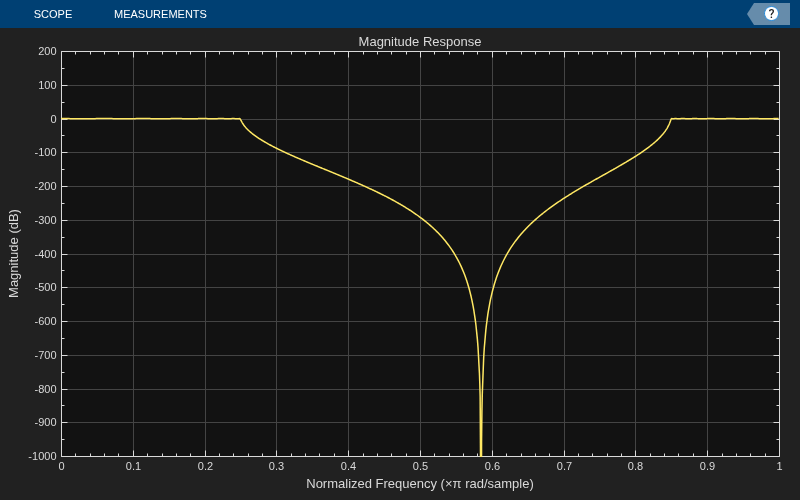
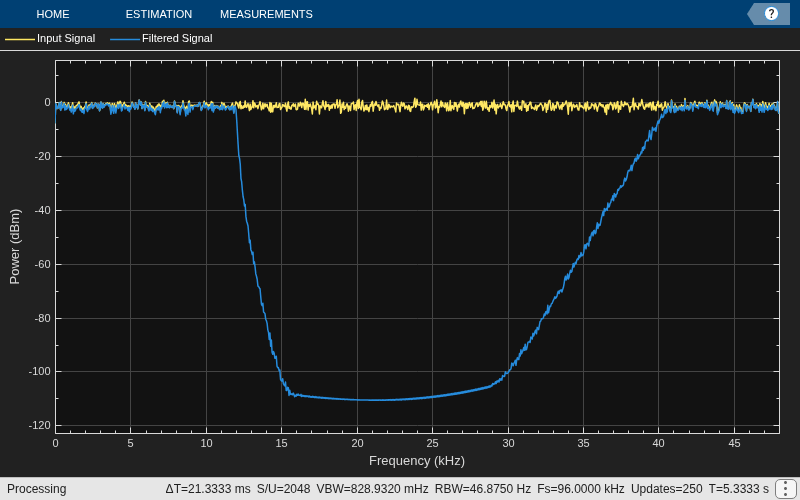
Stream in random data and filter the signal using the dsp.FourthOrderSectionFilter object. Use the designBandstopIIR function to design the filter coefficients. By default, this function returns a P-by-5 matrix of numerator coefficients and a P-by-5 matrix of denominator coefficients. Assign these coefficients to the dsp.FourthOrderSectionFilter object.
Vary the higher 3-dB cutoff frequency of the filter during simulation. The designBandstopIIR function recomputes the coefficients based on the updated filter specifications. Redesign the fourth-order section filter using these updated coefficients. Visualize the spectra of the input and filtered signals using the spectrum analyzer.
F3dB2 = 0.6; for idx = 1:500 [b,a] = designBandstopIIR(FilterOrder=30,CascadeSectionsForm="fos",... HalfPowerFrequency1=0.25,... HalfPowerFrequency2=F3dB2,DesignMethod="cheby1"); fosFilt.Numerator = b; fosFilt.Denominator = a; x = randn(1024,1); y = fosFilt(x); spectrumScope(x,y); filterViz(b,a); F3dB2 = F3dB2 + 0.0005; end

Create a dsp.SOSFilter object, and set the CoefficientSource property to 'Input port' so that you can vary the coefficients of the SOS filter during simulation.
sosFilt = dsp.SOSFilter(CoefficientSource="Input port")sosFilt =
dsp.SOSFilter with properties:
Structure: 'Direct form II transposed'
CoefficientSource: 'Input port'
HasScaleValues: false
Show all properties
Create a spectrumAnalyzer object to visualize the spectra of the input and output signals.
spectrumScope = spectrumAnalyzer(SampleRate=96000,PlotAsTwoSidedSpectrum=false,... ChannelNames=["Input Signal","Filtered Signal"]);
Create a dsp.DynamicFilterVisualizer object to visualize the magnitude response of the varying filter.
filterViz = dsp.DynamicFilterVisualizer(NormalizedFrequency=true,YLimits=[-1000,150]);
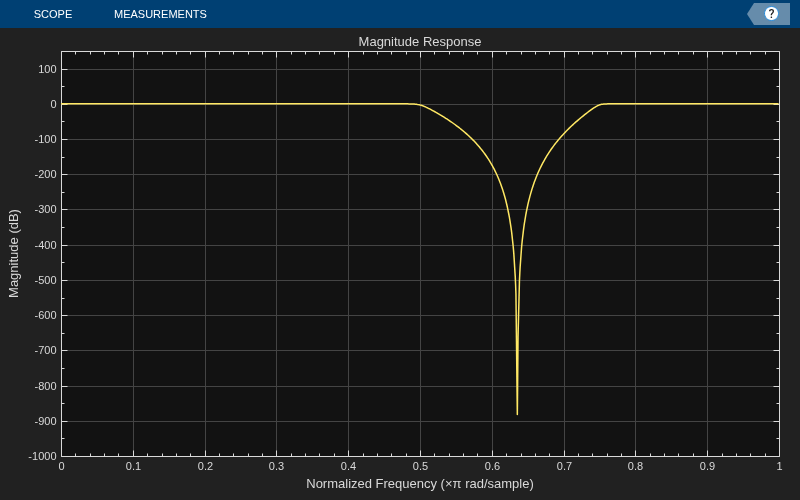
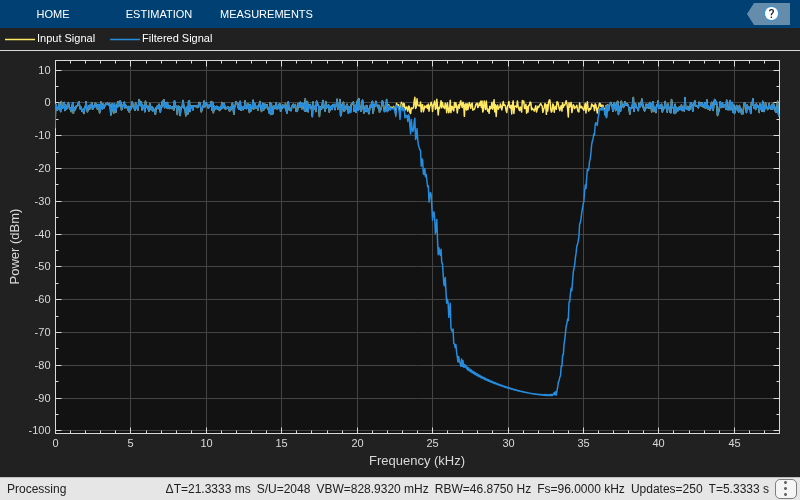
Stream in random data and filter the signal using the dsp.SOSFilter object. Use the designBandstopIIR function to design the filter coefficients. When you set CascadeSectionsForm to "sos", this function returns a P-by-3 matrix of numerator coefficients and a P-by-3 matrix of denominator coefficients. Assign these coefficients to the dsp.SOSFilter object.
Vary the lower 3-dB cutoff frequency of the filter during simulation. The designBandstopIIR function recomputes the coefficients based on the updated filter specifications. Redesign the SOS filter using these updated coefficients. Visualize the spectra of the input and filtered signals using the spectrum analyzer.
F3dB1 = 0.25; for idx = 1:500 [b,a] = designBandstopIIR(FilterOrder=30,CascadeSectionsForm="sos",... HalfPowerFrequency1=F3dB1,... HalfPowerFrequency2=0.75,DesignMethod="butter"); x = randn(1024,1); y = sosFilt(x,b,a); spectrumScope(x,y); filterViz(b,a); F3dB1 = F3dB1 + 0.0005; end

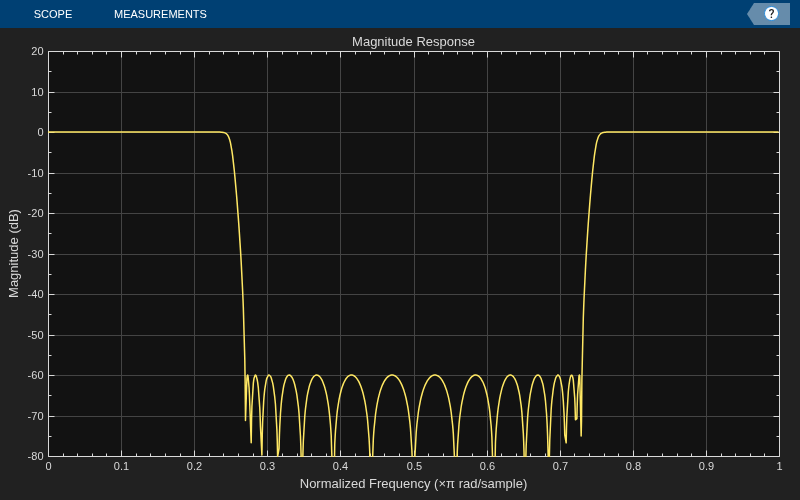
Design and implement a bandstop IIR filter object using the designBandstopIIR function. The function returns a dsp.FourthOrderSectionFilter object when you set the SystemObject argument to true. To design the filter in single-precision, use the Datatype or like argument. Alternatively, you can specify any of the numerical arguments in single-precision.
fosFilt = designBandstopIIR(FilterOrder=30,DesignMethod="cheby2",... Datatype="single",SystemObject=true)
fosFilt =
FourthOrderSectionFilter with properties:
Numerator: [8×5 single]
Denominator: [8×5 single]
RoundingMethod: 'Floor'
OverflowAction: 'Wrap'
CoefficientsDataType: [1×1 embedded.numerictype]
AccumulatorDataType: 'Inherit: Inherit via internal rule'
OutputDataType: 'Inherit: Same as input'
Create a dsp.DynamicFilterVisualizer object to visualize the magnitude response of the filter.
filterViz = dsp.DynamicFilterVisualizer(NormalizedFrequency=true,YLimits=[-80 20]); filterViz(fosFilt)
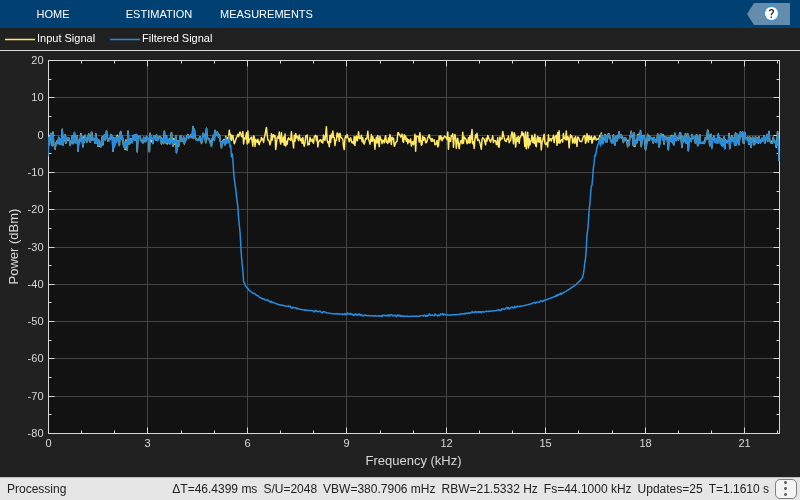
Create a spectrumAnalyzer object to visualize the spectra of the input and output signals.
spectrumScope = spectrumAnalyzer(SampleRate=44100,PlotAsTwoSidedSpectrum=false,... ChannelNames=["Input Signal","Filtered Signal"]);
Stream in random data and filter the signal using the dsp.FourthOrderSectionFilter object. Visualize the spectra of the input and filtered signals using the spectrum analyzer.
for idx = 1:50 x = randn(1024,1); y = fosFilt(x); spectrumScope(x,y); end
Name-Value Arguments
Specify optional pairs of arguments as
Name1=Value1,...,NameN=ValueN, where Name is
the argument name and Value is the corresponding value.
Name-value arguments must appear after other arguments, but the order of the
pairs does not matter.
Example:
designBandstopIIR(FilterOrder=30,HalfPowerFrequency1=0.3,HalfPowerFrequency2=0.7,SystemObject=true)
Order of the bandstop IIR filter, N, specified as an even nonnegative integer.
Data Types: single | double | int8 | int16 | int32 | int64 | uint8 | uint16 | uint32 | uint64
Lower 3-dB cutoff frequency of the bandstop IIR filter,
F3dB1, specified as a normalized scalar in the range
(0,1].
The value of HalfPowerFrequency1 must be less than the
value of HalfPowerFrequency2.
Data Types: single | double
Higher 3-dB cutoff frequency of the bandstop IIR filter,
F3dB2, specified as a normalized scalar in the range
(0,1].
The value of HalfPowerFrequency1 must be less than the
value of HalfPowerFrequency2.
Data Types: single | double
Window design method, specified as one of these options:
"default"–– The function designs the bandstop IIR filter using one of these methods:Chebyshev Type I method when you specify the
PassBandRipple(APASS) argumentChebyshev Type II method when you specify the
StopbandAttenuation(ASTOP) argumentButterworth method when you do not specify the
PassBandRipple(APASS) and theStopbandAttenuation(ASTOP) argumentsElliptic method when you specify the
PassBandRipple(APASS) and theStopbandAttenuation(ASTOP) arguments (since R2026b)
"butter"–– The function designs the bandstop IIR filter using the Butterworth design method. You can specify one of these filter design specification combinations:FilterOrder(N)FilterOrder(N) andHalfPowerFrequency1(F3dB1)FilterOrder(N) andHalfPowerFrequency2(F3dB2)FilterOrder(N),HalfPowerFrequency1(F3dB1), andHalfPowerFrequency2(F3dB2)
"cheby1"–– The function designs the bandstop IIR filter using the Chebyshev Type I design method. You can specify one of these filter design specification combinations:FilterOrder(N),HalfPowerFrequency1(F3dB1), andPassBandRipple(APASS)FilterOrder(N),HalfPowerFrequency2(F3dB2), andPassBandRipple(APASS)FilterOrder(N),HalfPowerFrequency1(F3dB1),HalfPowerFrequency2(F3dB2), andPassBandRipple(APASS)
"cheby2"–– The function designs the bandstop IIR filter using the Chebyshev Type II design method. You can specify one of these filter design specification combinations:FilterOrder(N),HalfPowerFrequency1(F3dB1), andStopbandAttenuation(ASTOP)FilterOrder(N),HalfPowerFrequency2(F3dB2), andStopbandAttenuation(ASTOP)FilterOrder(N),HalfPowerFrequency1(F3dB1),HalfPowerFrequency2(F3dB2), andStopbandAttenuation(ASTOP)
"ellip"–– The function designs the bandstop IIR filter using the elliptic design method. You can specify these filter design specification arguments:FilterOrder(N)HalfPowerFrequency1(F3dB1)HalfPowerFrequency2(F3dB2)PassBandRipple(APASS)StopbandAttenuation(ASTOP)
(since R2026b)
Data Types: char | string
Passband ripple of the IIR filter, APASS, specified as a positive scalar.
To specify the PassbandRipple argument, set
DesignMethod to "default",
"cheby1", or "ellip".
Data Types: single | double | int8 | int16 | int32 | int64 | uint8 | uint16 | uint32 | uint64
Stopband attenuation of the IIR filter, ASTOP, specified as a positive scalar.
To specify the StopbandAttenuation argument, set
DesignMethod to "default",
"cheby2", or "ellip".
Data Types: single | double | int8 | int16 | int32 | int64 | uint8 | uint16 | uint32 | uint64
Form of filter cascade sections, specified as one of these:
"fos"–– The function designs the filter using the fourth-order section form and outputs the filter coefficients as P-by-5 matrices."sos"–– The function designs the filter using the second-order section form and outputs the filter coefficients as P-by-3 matrices.
Data Types: char | string
Option to compute the scale values, SV, specified as
true or false.
To set the HasScaleValues argument, set
CascadeSectionsForm to "sos".
Data Types: logical
Since R2024b
Data type of the filter coefficients by type name, specified as
"double" or
"single".
You can use the Dataype or the
like argument to specify the
data type of the filter coefficients, but you cannot use both
arguments at the same time.
If you specify the data type of the filter coefficients using this argument, the function ignores the data types of the other numeric arguments.
Data Types: char | string
Since R2024b
Data type of the filter coefficients, specified as a prototype of a real floating-point value.
You can use the Dataype or the
like argument to specify the data type of filter
coefficients, but you cannot use both arguments at the same time.
If you specify the data type of the filter coefficients using this argument, the function ignores the data types of the other numeric arguments.
Example: B =
designBandstopIIR(FilterOrder=N,HalfPowerFrequency1=F3dB1,like=single(N))
Example: N = single(110); B =
designBandstopIIR(FilterOrder=N,HalfPowerFrequency1=F3dB1,like=N)
Data Types: single | double
Option to create System object, specified as one of these:
false–– The function returns second-order section matrices or fourth-order section matrices.true–– The function returns adsp.SOSFilterobject or adsp.FourthOrderSectionFilterobject.
Data Types: logical
Option to print the entire function call in MATLAB, specified as one of these:
false–– The function does not print the function call.true–– The function prints the entire function call including the default values of theName=Valuearguments that you did not specify when calling the function.Use this argument to view all the values used by the function to design and implement the filter.
Data Types: logical
Output Arguments
Numerator coefficients of the bandstop IIR filter in one of these forms:
Second-order section form ––
Bis a P-by-3 matrix, where P is the number of filter sections and equalsceil(FilterOrder/2).Fourth-order section form ––
Bis a P-by-5 matrix and P equalsceil(FilterOrder/4).
If you specify single-precision values in any of the input arguments, the function designs single-precision filter coefficients. (since R2024a)
If you specify the data type using the
Datatype or the like argument, the
function ignores the data types of the other numeric arguments. (since R2024b)
Data Types: single | double
Denominator coefficients of the bandstop IIR filter in one of these forms:
Second-order section form ––
Ais a P-by-3 matrix, where P is the number of filter sections and equalsceil(FilterOrder/2).Fourth-order section form ––
Ais a P-by-5 matrix and P equalsceil(FilterOrder/4).
The leading denominator coefficient is always 1.
If you specify single-precision values in any of the input arguments, the function designs single-precision filter coefficients. (since R2024a)
If you specify the data type using the
Datatype or the like argument, the
function ignores the data types of the other numeric arguments. (since R2024b)
Data Types: single | double
Scale values for each section, returned as a (P+1)-by-1
vector, where P is the number of filter sections and equals
ceil(FilterOrder/2).
If you set HasScaleValues to false,
SV is a vector of 1s of size
(P+1)-by-1.
If you specify single-precision values in any of the input arguments, the function outputs the scale values in single precision. (since R2024a)
If you specify the data type using the
Datatype or the like argument, the
function ignores the data types of the other numeric arguments. (since R2024b)
Dependencies
To enable this output argument, set CascadeSectionsForm
to "sos".
Data Types: single | double
Bandstop IIR filter object, returned as a:
dsp.FourthOrderSectionFilterobject ifCascadeSectionsFormis set to"fos".dsp.SOSFilterobject ifCascadeSectionsFormis set to"sos".
Extended Capabilities
When you set the SystemObject argument to
false, the function supports code generation with no
limitations.
When you set the SystemObject argument to
true, the inputs to the function must be constants when generating
code.
This function supports strict single precision
in generated code. If any of the input arguments are in single precision, or you use the Datatype and
like arguments to specify single-precision (since R2024b), the code
you generate uses strictly single-precision arithmetic. (since R2024a)
Version History
Introduced in R2023bYou can now design the bandstop IIR filter using the elliptic design method by
setting the DesignMethod argument to "ellip".
The elliptic design method accepts these filter design specification arguments:
FilterOrder(N)HalfPowerFrequency1(F3dB1)HalfPowerFrequency2(F3dB2)PassBandRipple(APASS)StopbandAttenuation(ASTOP)
You can now specify the data type of filter coefficients explicitly using the
Datatype and like arguments.
When you specify single-precision values in any of the input arguments, the function designs filter coefficients and scale values in single precision both in simulation and in generated code.
See Also
Functions
Objects
Blocks
MATLAB Command
You clicked a link that corresponds to this MATLAB command:
Run the command by entering it in the MATLAB Command Window. Web browsers do not support MATLAB commands.
Seleccione un país/idioma
Seleccione un país/idioma para obtener contenido traducido, si está disponible, y ver eventos y ofertas de productos y servicios locales. Según su ubicación geográfica, recomendamos que seleccione: .
También puede seleccionar uno de estos países/idiomas:
Cómo obtener el mejor rendimiento
Seleccione China (en idioma chino o inglés) para obtener el mejor rendimiento. Los sitios web de otros países no están optimizados para ser accedidos desde su ubicación geográfica.
América
- América Latina (Español)
- Canada (English)
- United States (English)
Europa
- Belgium (English)
- Denmark (English)
- Deutschland (Deutsch)
- España (Español)
- Finland (English)
- France (Français)
- Ireland (English)
- Italia (Italiano)
- Luxembourg (English)
- Netherlands (English)
- Norway (English)
- Österreich (Deutsch)
- Portugal (English)
- Sweden (English)
- Switzerland
- United Kingdom (English)