dsp.MedianFilter
R2026bMedian filter
Description
The dsp.MedianFilter
System object™ computes the moving median of the input signal along each channel, independently
over time. The object uses the sliding window method to compute the moving median. In this
method, a window of specified length is moved over each channel, sample by sample, and the
object computes the median of the data in the window.
You can make the window length tunable by setting
the EnableTunableWindowLength property to true. In
this mode, use the TunableWindowLength property to change the window
length even after you pass some data to the object and the object is locked. The
MaxWindowLength property specifies the maximum allowed window
length. (since R2026b)
For more details, see Algorithms.
The dsp.MedianFilter object and the movmedian function both compute the moving median of the input signal. However,
the object can process large streams of real-time data and handle system states automatically.
The function performs one-time computations on data that is readily available and cannot
handle system states. For a comparison between the two, see System Objects vs MATLAB Functions.
To compute the moving median of the input:
Create the
dsp.MedianFilterobject and set its properties.Call the object with arguments, as if it were a function.
To learn more about how System objects work, see What Are System Objects?
Creation
Syntax
Description
medFilt = dsp.MedianFiltermedFilt, using the default properties.
medFilt = dsp.MedianFilter(Len)WindowLength property to Len.
medFilt = dsp.MedianFilter(
sets properties using one or more name-value arguments. For example, to enable tunable
window length, set PropertyName=Value)EnableTunableWindowLength to
true and to specify a maximum window length of 30, set
MaxWindowLength to 30.
Properties
Usage
Syntax
Description
Input Arguments
Output Arguments
Object Functions
To use an object function, specify the
System object as the first input argument. For
example, to release system resources of a System object named obj, use
this syntax:
release(obj)
Examples
Filter high-frequency noise from a noisy sine wave signal using a median filter. Compare the performance of the median filter with an averaging filter.
Initialization
Set up a dsp.MedianFilter object, medFilt, and a dsp.MovingAverage object, movavgWin. These objects use the sliding window method with a window length of 7. Create a time scope for viewing the output.
Fs = 1000;
medFilt = dsp.MedianFilter(7);
movavgWin = dsp.MovingAverage(7);
scope  = timescope(SampleRate=Fs,...
    TimeSpanSource="Property",...
    TimeSpanOverrunAction="Scroll",...
    TimeSpan=1,ShowGrid=true,...
    YLimits=[-3 3],...
    LayoutDimensions=[3 1],...
    NumInputPorts=3);
scope.ActiveDisplay = 1;
scope.Title = "Signal + Noise";
scope.ActiveDisplay = 2;
scope.Title = "Moving Average Output (Window Length = 7)";
scope.ActiveDisplay = 3;
scope.Title = "Median Filter Output (Window Length = 7)";

FrameLength = 256;
count = 1;
sine = dsp.SineWave(SampleRate=Fs,Frequency=10,...
    SamplesPerFrame=FrameLength);
Filter the Noisy Sine Wave
Generate a noisy sine wave signal with a frequency of 10 Hz. Apply the median filter and the moving average object to the signal. View the output on the time scope.
for i = 1:500
    hfn = 3 * (rand(FrameLength,1) < 0.02);
    x = sine() + 1e-2 * randn(FrameLength,1) + hfn;
    y1 = movavgWin(x);
    y2 = medFilt(x);
    scope(x,y1,y2);
end
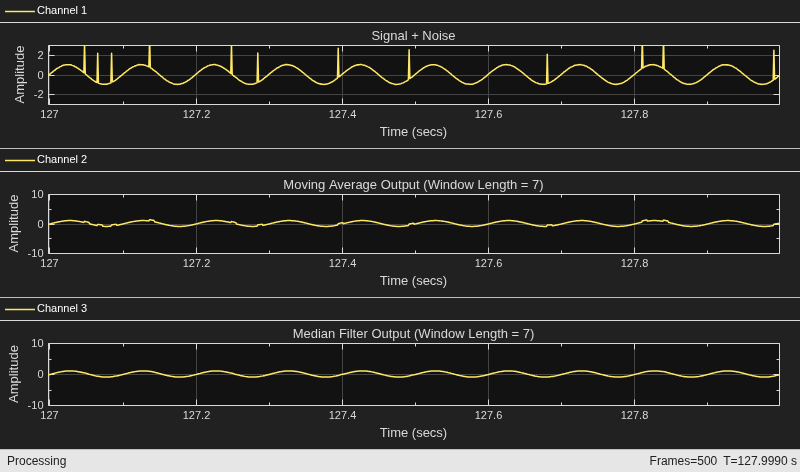
The median filter removes the high-frequency noise more effectively than the moving average object does.
This example shows how to remove the high-frequency outliers from a streaming signal using the dsp.MedianFilter System object.
Use the dsp.MatFileReader System object to read the gyroscope MAT file. The gyroscope MAT file contains 3 columns of data, with each column containing 7140 samples. The three columns represent the X-axis, Y-axis, and Z-axis data from the gyroscope motion sensor. Choose a frame size of 714 samples so that each column of the data contains 10 frames. The dsp.MedianFilter System object uses a window length of 10. Create a timescope object to view the filtered output.
reader = dsp.MatFileReader(SamplesPerFrame=714,...
    Filename="LSM9DS1gyroData73.mat",...
    VariableName="data");
medFilt = dsp.MedianFilter(10);
scope = timescope(NumInputPorts=1,...
    SampleRate=119,...
    YLimits=[-300 300],...
    ChannelNames={"Input","Filtered Output"},...
    TimeSpanSource="Property",...
    TimeSpan=60,ShowLegend=true);
Filter the gyroscope data using the dsp.MedianFilter System object. View the filtered Z-axis data in the time scope.
for i = 1:10
    gyroData = reader();
    filteredData = medFilt(gyroData);
    scope([gyroData(:,3),filteredData(:,3)]);
end
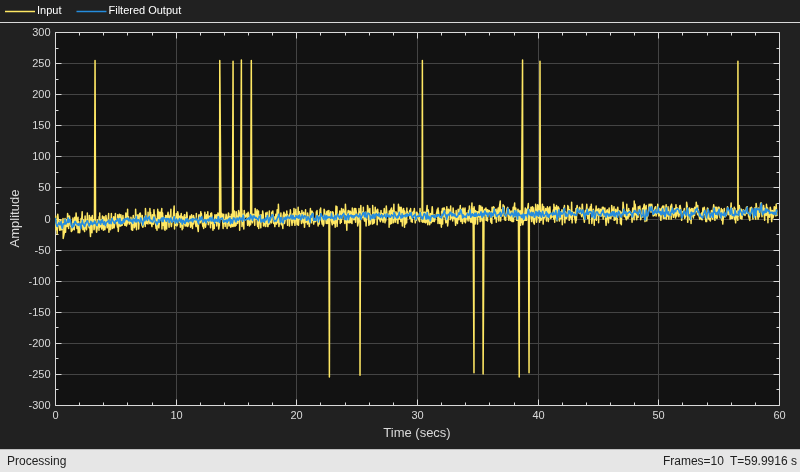
The original data contains several outliers. Zoom in on the data to confirm that the median filter removes all the outliers.
Since R2026b
Filter a noisy sinusoidal signal using a median filter and adapt the window length based on the noise level. Use a shorter window when the noise is light and a longer window when the noise is heavy.
Create Input Signal
Create a sine wave signal with a frequency of 5 Hz. Set the sampling rate to 1000 Hz and the frame size to 256 samples.
Fs = 1000;
frameSize = 256;
numFrames = 40;
sine = dsp.SineWave(Frequency=5,SampleRate=Fs,...
    SamplesPerFrame=frameSize)
sine =
dsp.SineWave with properties:
Amplitude: 1
Frequency: 5
PhaseOffset: 0
ComplexOutput: false
Method: 'Trigonometric function'
SamplesPerFrame: 256
SampleRate: 1000
OutputDataType: 'double'
Create Median Filter Object
Create a dsp.MedianFilter object with tunable window length enabled. Set the maximum window length to 31 and the initial tunable window length to 5. Enable auto-adjustment to handle edge cases.
medFilt = dsp.MedianFilter(EnableTunableWindowLength=true,...
    TunableWindowLength=5,...
    MaxWindowLength=31,...
    AutoAdjustInvalidWindowLength=true)
medFilt =
  dsp.MedianFilter with properties:

        EnableTunableWindowLength: true
              TunableWindowLength: 5
                  MaxWindowLength: 31
    AutoAdjustInvalidWindowLength: true
Create a timescope object to view the filtered output.
scope = timescope(SampleRate=Fs,...
    TimeSpanSource="property",TimeSpan=numFrames*frameSize/Fs,...
    TimeSpanOverrunAction="Scroll",...
    ShowGrid=true,YLimits=[-4 4],ChannelNames={"Input Noisy Signal","Filtered Output"},...
    LayoutDimensions=[2 1],NumInputPorts=2);
Apply Adaptive Median Filtering
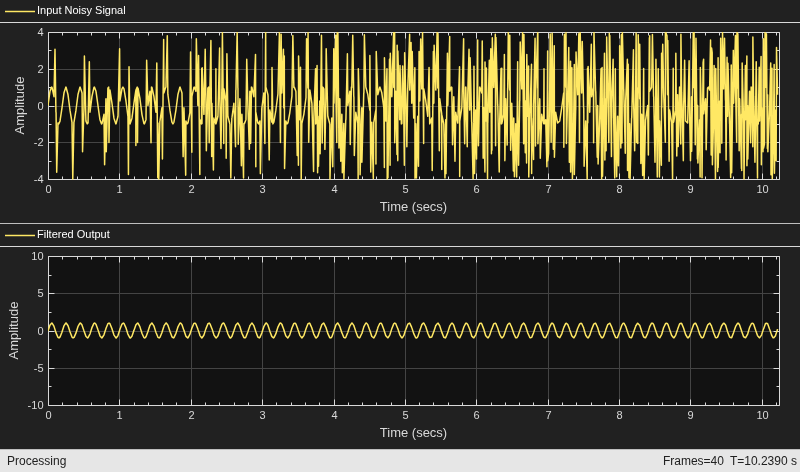
The intensity of noise increases over time. At each frame, add impulse noise whose density grows linearly. Adapt the window length proportionally to the noise density so that heavier noise is filtered with a longer window.
As the noise density increases over time, the adaptive median filter uses a progressively longer window to remove the impulse noise while preserving the underlying sine wave.
View the noisy signal and the filtered signal in the time scope.
for index = 1:numFrames
    x = sine();
    noiseDensity = 0.01 + 0.09*(index/numFrames);
    impulseNoise = 3*(rand(frameSize,1) < noiseDensity).*sign(randn(frameSize,1));
    noisySignal = x + impulseNoise;
    wl = round(5 + 26*(index/numFrames));
    medFilt.TunableWindowLength = wl;
    y = medFilt(noisySignal);
    scope(noisySignal,y)
end
Since R2026b
Generate C code for a median filter with a tunable window length parameter. Verify that the window length appears as a tunable parameter in the generated code.
Create Entry-Point Function
Create an entry-point function that instantiates a dsp.MedianFilter object with tunable window length enabled. The function accepts a data input and a tunable window length value.
type medianFilterTunableWL.mfunction y = medianFilterTunableWL(x,wl) %#codegen
%medianFilterTunableWL Median filter with tunable window length
% y = medianFilterTunableWL(x,wl) filters the input x using a median
% filter whose window length can be changed at runtime.
persistent medFilt
if isempty(medFilt)
medFilt = dsp.MedianFilter(EnableTunableWindowLength=true,...
MaxWindowLength=31,...
AutoAdjustInvalidWindowLength=true);
end
medFilt.TunableWindowLength = wl;
y = medFilt(x);
end
Generate C Code
Generate C code for the entry-point function using codegen. Specify the input data as a 256-by-1 column vector of doubles and the window length as a scalar double.
codegen medianFilterTunableWL -args {zeros(256,1),0} -config:lib -report
Code generation successful: View report
Verify Tunable Parameter in Generated Code
Inspect the generated code to verify that TunableWindowLength appears as a parameter that can be changed at runtime without regenerating code.
The generated code contains the TunableWindowLength field in the persistent object state, confirming that you can change the window length at runtime in the deployed code.
Algorithms
In the sliding window method, the output for each input sample is the median of the current sample and the Len−1 previous samples. Len is the length of the window in samples. To compute the first Len−1 outputs, when the window does not have enough data yet, the algorithm fills the window with zeros. As an example, to compute the median value when the second input sample comes in, the algorithm fills the window with Len−2 zeros. The data vector, x, is then the two data samples followed by Len−2 zeros. This object performs median filtering on the input data over time.
Consider an example of computing the moving median of a streaming input data using the sliding window method. The algorithm uses a window length of 4. With each input sample that comes in, the window of length 4 moves along the data.
![Sliding window method for moving median with window length 4 and input samples [−1, −2, 3, 2, 5, 2]. At each time step n=0 through n=5, the window fills with zeros until length 4 is reached, then moves along the data. Median filter computes output for each window position, producing values 0.00, −0.50, −0.50, 0.50, 2.50, 2.50 at n=5](movmed_slidewin.png)
References
[1] Bodenham, Dean. “Adaptive Filtering and Change Detection for Streaming Data.” PH.D. Thesis. Imperial College, London, 2012.
Extended Capabilities
Version History
Introduced in R2016bSee Also
Functions
Objects
dsp.MovingMaximum|dsp.MovingMinimum|dsp.MovingAverage|dsp.MovingRMS|dsp.MovingVariance|dsp.MovingStandardDeviation

