Create Fault-Embedded Models
R2026bWhen you add faults to models by using Simulink® Fault Analyzer™, the software stores the faults and behaviors in separate files. You can convert these models to fault-embedded models, which are models that embed the faults directly on the model canvas. Fault-embedded models replicate the faults in a fault model by using subsystems that duplicate the fault functionality. Use fault-embedded models to export models to Simulink versions earlier than R2023b, or to generate code from a model that has faults.
Export the Model
When you export a model to a fault-embedded model, Simulink copies the original model, converts the faults to subsystems, and stores the behavior in masked subsystems.
If a model element contains more than one fault, you can either export only the active faults or all of the faults. (since R2026b)
To create a fault-embedded model:
Open a model that contains faults.
Open the Fault Analyzer app. In the Apps tab, click Fault Analyzer.
In the Fault Table pane, activate the faults that you want to export. See Enable, Modify, and Select Active Faults.
In the Fault Analyzer tab, in the Share section, click Export Embedded Model. The Export Embedded Model window opens.

Enter the name of the model in Exported model and the path to the folder in Exported files folder. The specified folder must exist and be empty. To delete the files in the specified folder before exporting the model, select Delete existing folder content.
Click OK.
Alternatively, use the Simulink.fault.exportEmbeddedModel function.
Note
If the model contains Simscape™ blocks, the fault-embedded model contains the Simscape blocks and their faults, but does not convert the faults on those blocks to subsystems.
When you select the Embed all faults in variant subsystems property, the generated fault-embedded model represents all of the faults in the model by using variant subsystems. If you clear the parameter, the fault-embedded model represents only the active faults by using masked subsystems.
Exporting Only Active Faults
If you clear Embed all faults in variant subsystems, the fault-embedded model represents each active fault and its behavior in a masked subsystem and connects the subsystem to the same element it is assigned in the original model. Each masked subsystem uses the fault badge as the mask image.
For example, suppose that this model contains two faults, and the active fault adds noise to the output port of a Sine Wave block.
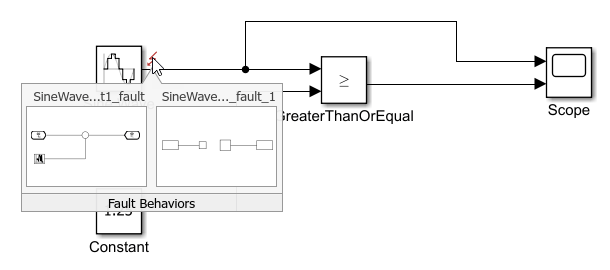
When you export the model and clear Embed all faults in variant subsystems, the fault-embedded model adds the active fault as a subsystem connected to the output port of the Sine Wave block. The model does not include the other faults.

To view the behavior, open the subsystem.
Exporting All Faults
Since R2026b
If you select Embed all faults in variant subsystems, the fault-embedded model adds a Variant Subsystem block to each model element that has at least one fault.
For example, suppose that this model contains two faults.
When you export the model and select Embed all faults in variant subsystems, the fault-embedded model adds a variant subsystem to the output port of the Sine Wave block.
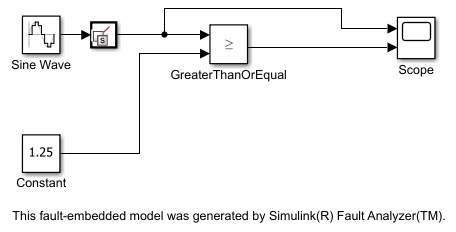
Open the variant subsystem to view the behaviors.
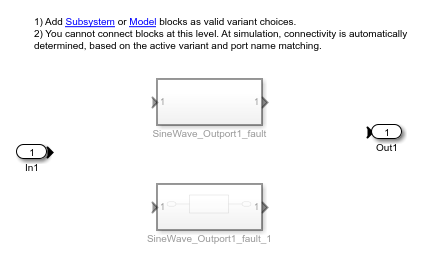
To specify the active fault, the fault-embedded model defines a workspace variable
for each variant subsystem. The model element determines the variable name. For
example, in the fault-embedded model above, the model element is the output port of
the Sine Wave block, and the variable name is
SineWave_Outport1_Fault.
To control which fault is active, each fault is assigned an integer value based on
the order that you added the faults to the original model. To activate a fault, set
the variable to the numerical value in the command window. The initial variable
value is 0.
For example, setting SineWave_Outport1_Fault to
0 deactivates the faults, setting
SineWave_Outport1_Fault to 1 activates the
SineWave_Outport1_fault fault, and setting
SineWave_Outport1_Fault to 2 activates the
SineWave_Outport1_fault_1 fault.
Create Fault-Embedded Models That Contain Referenced Models
If your model contains referenced models, Simulink Fault Analyzer creates fault-embedded models for each referenced model depending on these circumstances:
| Use of Model Reference | Fault-Embedded Model Result |
|---|---|
| The referenced model or other models in the referenced model hierarchy do not have active faults. | Simulink Fault Analyzer creates a fault-embedded model of the top model only, and does not create a copy of the referenced model. The top model references the referenced model in the original model folder. |
| The referenced model or other models in its hierarchy have active faults. | Simulink Fault Analyzer creates a fault-embedded model of the top model and creates a fault-embedded model version of each referenced model instance in the hierarchy that has faults. |
For more information on creating faults in referenced models, see Manage Faults in Referenced Models.
Model Trigger Types
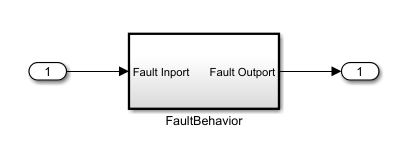
Each subsystem that represents the embedded fault contains another subsystem that
models the fault behavior, labeled FaultBehavior. Depending on the
trigger type of each active fault, the fault-embedded model attaches different blocks to
the behavior.
For more information on defining triggers and trigger types, see Define and Model Faults, Define Trigger Properties and Trigger type.
Always On Trigger
Faults with a trigger type of
Always On inject
at the start of the simulation. To represent this trigger type, the subsystem
connects to the Inport and Outport blocks that
correspond to the input and output of the masked subsystem.
Timed Trigger
Faults with a trigger type of Timed inject when the
simulation reaches a specified simulation time. To represent this trigger type, the
subsystem connects to a Switch block that switches when the
simulation time equals the value specified by the trigger time of the original
fault.

Manual Trigger
Faults with a trigger type of Manual inject by manually
setting the status in the Fault Dashboard pane. To represent
this trigger type in the fault-embedded model, the subsystem connects to a
Switch block connected to a Toggle Switch block.
Click the Toggle Switch block to toggle the status of the
fault.

Conditional Trigger
The way that the generated fault-embedded model represents conditional triggers depends on whether you clear Include conditional logic before generating the model.
If you clear Include conditional logic, the fault-embedded model converts the conditional trigger to a manual trigger. To view this configuration, see Manual Trigger.
If you select Include conditional logic, the fault-embedded model stores the conditionals in a masked subsystem labeled
GlobalConditionals(since R2026b). This subsystem stores the logic for each conditional in subsystems. The fault-embedded model recreates the conditional expressions for each conditional as an arrangement of Simulink blocks.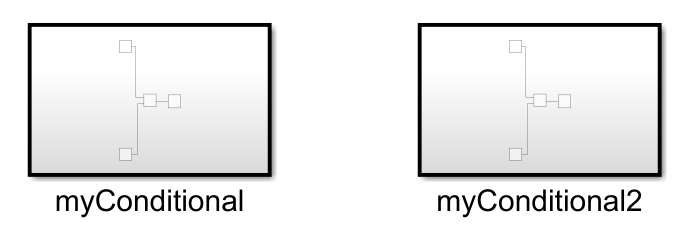
Each conditional outputs its status by using a Data Store Write block.
The fault retrieves the status of the conditional by using the output of a Data Store Read block as an input of a Switch block.
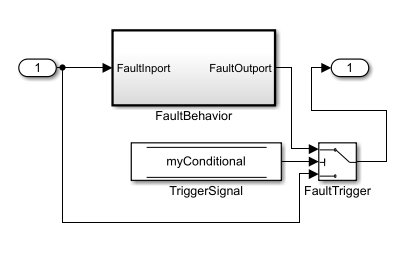
If the conditional expression takes data from a signal, the fault-embedded model retrieves the data from the signal by using a Data Store Read block, and a Data Store Write block retrieves the data from the signal.
Generate Code From Model
If you have Simulink Coder™ or Embedded Coder®, you can generate code from a fault-embedded model. For an example, see Generate Code from Fault-Embedded Models.
Note
To generate code from a fault-embedded model, you must configure the model to conform with MATLAB® and Simulink code standards and guidelines. See Code Interface Configuration (Simulink Coder).
Limitations
If a model has Requirements Toolbox™ links, the generated fault-embedded model does not have those links. If you need to establish traceability in the fault-embedded model, you must recreate the links.
You cannot export models with active faults that contain Fault Data Inport blocks in their behaviors.
See Also
Simulink.fault.exportEmbeddedModel

