HDL Counter
R2026bFree-running, count-limited, or modulo hardware counter
HDL Counter block

To add a block to a model, double-click the canvas and start typing the block name. Then, select the block from the list.
Libraries:
HDL Coder /
Sources
Description
The HDL Counter block models a free-running, count-limited, or modulo hardware counter. The block supports signed and unsigned integer and fixed-point data types and outputs the counter value at the current sample time.
You can set Counter type to one of these values:
Free running— The counter increments or decrements by the value of the Step value parameter until it wraps at the representable limit of the configured output data type.Count limited— The counter rolls over only when the counter value lands exactly on the value of the Count to value parameter. If the step value does not equal to the value of the Count to value parameter, the counter continues in the current direction until it reaches the representable limit of the configured output data type.Modulo— The counter wraps at the modulo boundary. If the value of the Step value parameter crosses the boundary, the block applies the remaining step distance after wrapping.
Use this block to create HDL-compatible counter logic in a Simulink model. You can configure the block to count up or down, reset or load the counter value, enable or disable counting, and detect when the counter reaches a configured limit.
You can input reset, load, enable, and direction data by enabling the optional rst, load, enb, and dir ports.
During simulation, the block does not report warnings or errors that result from wrap
on overflow. To report these warnings, see Simulink.restoreDiagnostic.
Examples
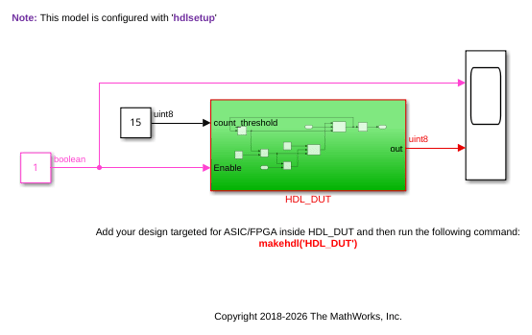
Simple Counter Model
This model counts up from zero to a threshold value of 15, then wraps back to zero. You can change the threshold value by changing the value of the Constant block connected to the count_threshold port. The Enable port specifies whether the counter counts upward or holds the previous value. You can change the counter action by changing the value of the Constant block connected to the Enable port. A value of 1 indicates that the counter counts upward. A value of 0 holds the previous count value.
Limitations
If the bit width of an input signal exceeds the data type limit, the generated HDL code can produce incorrect simulation results. To accommodate the larger bit width, use a larger data type.
The block supports only scalar inputs and outputs.
When Counter type is
Modulo, the load value must be in the range defined by the Count from and Count to value parameters to avoid simulation mismatches.
Ports
Input
Output
Parameters
Algorithms
When you set Counter type to Free running,
the counter increments or decrements by the value of the Step
value parameter until the value wraps at the representable limit of
the configured output data type. For an unsigned counter that counts up, the upper
limit is 2^(Word length) - 1.
This figure illustrates free-running counter operation. In this example, Word
length is 4, Initial value is
2, load_val is 7, and
Step value is 1. When
Enb is 1, the counter increments by one.
When rst is 1, the counter resets to the
initial value, 2. When dir is
0, the counter decrements from 4 to
3 at time step 11s. When
Load is 1, the counter loads the value
from the load_val port.

When Counter type is Count limited, the
counter rolls over when the count value is equal to the value of the Count
to value parameter. If the value of the Step
value parameter causes the counter to skip the value of the
Count to value parameter, the counter continues counting in
the current direction until it reaches the representable limit of the configured
output data type. To make the counter roll over at the value of the Count
to value parameter, configure the Initial value,
Step value, and Count to value
parameters so that the counter lands exactly on the value of the Count to
value parameter.
This behavior can be counterintuitive for down counters when Counter
type is Count limited and the configured
settings cause the counter to skip the value of the Count to
value parameter. For example, if the counter starts at
0, counts down, and Count to value is
3, the counter can alternate between 0 and
3 because it wraps through the representable range and lands
on the value of the Count to value parameter.
When Counter type is Modulo, the counter
wraps at the modulo boundary. When the value of the Step value
parameter causes the counter to cross the boundary, the block applies a wrapping
step value so that the counter preserves the remaining step distance after the
boundary crossing.
For an up counter, the wrapping step value is:
Step value - (Count to value + 1) + Count from value.
For a down counter, the wrapping step value is:
Count from value - Step value + (Count to value + 1).
Use the Count from parameter to specify the rollover start value. When
you set Count from to Initial value,
the counter uses Initial value as the rollover reference.
When you set Count from to Specify, the
counter uses the value of the Count from value parameter as the
rollover reference.
This table summarizes how the counter behaves when the count sequence does not land exactly on the value of the Count to value parameter.
| Counter Type Setting | Behavior When Step Skips Count to value | Rollover Behavior |
|---|---|---|
Count limited | The counter continues counting in the current direction until it reaches the representable data type limit. | The counter rolls over according to the configured count settings. |
Modulo | The counter wraps at the modulo boundary. | The counter applies the remaining step distance after wrapping. |
This figure illustrates how count-limited and modulo counters operate.
In this example, Word length is 4,
Initial value is 2, Step
value is 3, and Count to
value is 12.

When Counter type is Count limited, and the
count value reaches 11, the next count value is
14 because the counter does not land exactly on the value of
the Count to value parameter, 12. Because
the upper representable limit is 15, (2^4 -
1), the counter continues until it reaches that limit and then rolls over
according to the configured count settings.
When Counter type is set to Modulo and the
count value reaches 11, the counter wraps by applying the
remaining step distance after the modulo boundary crossing:
3 - (12 + 1) + 2 = -8
The next count value is:
11 + (-8) = 3
When the counter counts down and reaches 4, the counter wraps
up by using this wrapping step value:
2 - 3 + (12 + 1) = 12
The next count value is 12.
To avoid unexpected rollover behavior when Counter type is
Count limited, configure the Initial
value, Step value, and Count to
value parameters so that the counter lands exactly on the value of
the Count to value parameter. To wrap when the step crosses a
boundary, set Counter type to
Modulo.

