Map Persistent Variables to RAM for Histogram Equalization
R2026bThis example shows how to use the RAM mapping optimization in HDL Coder™ to map persistent matrix variables to block RAMs in hardware.
Introduction
In MATLAB®, you can easily create, access, modify, and manipulate matrices.
When processing MATLAB code, HDL Coder maps local temporary matrix variables to wires and persistent matrix variables to registers.
Mapping persistent matrices to registers is inefficient when the matrix size is large because the number of register resources available is limited. It also complicates synthesis, placement, and routing.
Modern FPGAs feature block RAMs that are designed to store large matrices. HDL Coder takes advantage of this feature and maps matrices to block RAMs to improve area efficiency. For certain designs, mapping these persistent matrices to RAMs is mandatory because synthesis tools cannot synthesize designs when large matrices are mapped to registers.
Algorithm
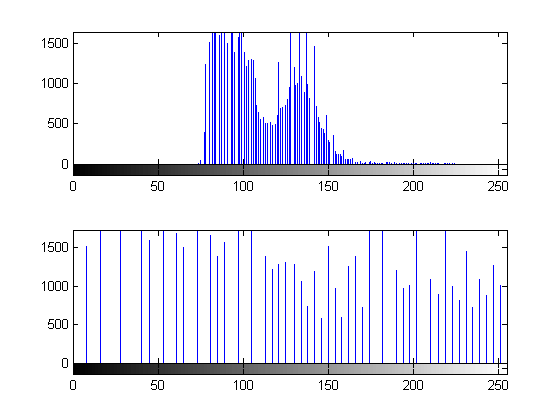
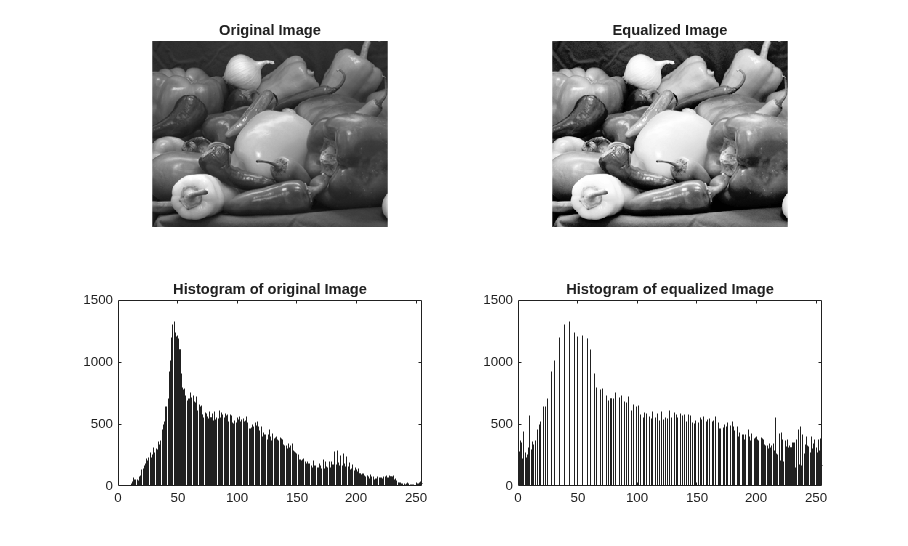
The Histogram Equalization algorithm enhances the contrast of images by transforming the values in an intensity image so that the histogram of the output image is approximately flat.
I = imread('pout.tif');
J = histeq(I);
subplot(2,2,1);
imshow( I );
subplot(2,2,2);
imhist(I)
subplot(2,2,3);
imshow( J );
subplot(2,2,4);
imhist(J)
MATLAB Design
This example implements a Histogram Equalization algorithm.
design_name = "mlhdlc_heq";
testbench_name = "mlhdlc_heq_tb";
To view the MATLAB function, enter:
open(design_name);
To view the test bench, enter:
open(testbench_name);
Simulate the Design
Simulate the design with the test bench before code generation to make sure there are no runtime errors.
mlhdlc_heq_tb
working on frame: 1
working on frame: 2
Generate HLS Code with RAM Mapping Optimization
At the MATLAB command line, set up the high-level synthesis (HLS) tool path for HLS code generation by using the function hdlsetuphlstoolpath.
Run this command to create the mlhdlc_heq_prj project and open the HDL Workflow Advisor:
coder -hdlcoder -new mlhdlc_heq_prj
Configure HDL Workflow Advisor for HLS code generation:
1. In HDL Workflow Advisor task, set Code Generation Workflow to MATLAB to HLS.
2. In the Define Input Types task, add the MATLAB design and test bench files. For MATLAB Function, click the Browse button and select mlhdlc_heq.m. For MATLAB Test Bench, click the + button and select mlhdlc_heq_tb.m.
3. Click the Run button to run the test bench and infer the input data types of the MATLAB design mlhdlc_heq.
4. In the Select Code Generation Target task, set Synthesis tool to Cadence Stratus HLS.
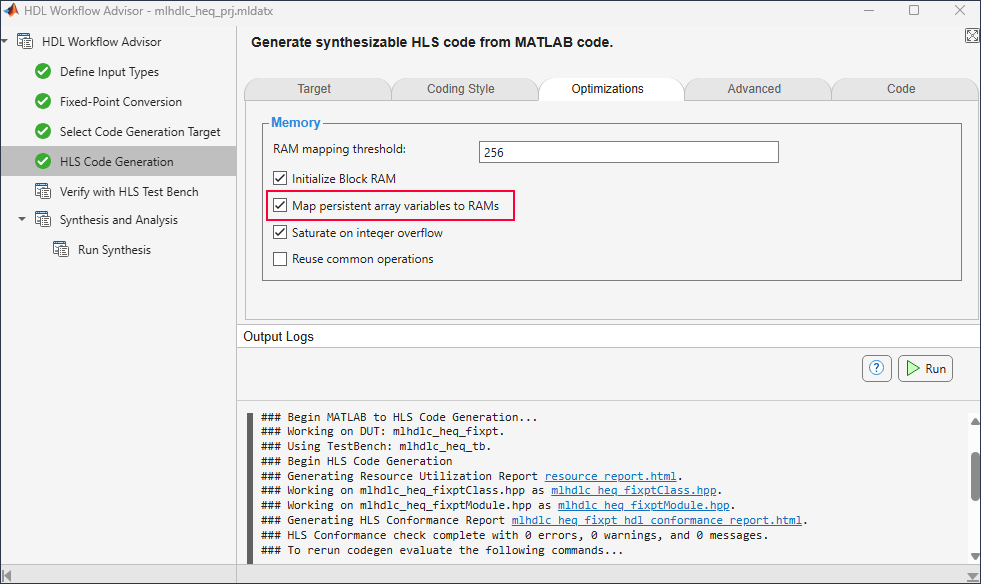
5. In the HLS Code Generation task, on the Optimizations tab, select Map persistent array variables to RAMs to map persistent variables to block RAMs in the generated code.
6. Right-click the HLS Code Generation task and select Run to selected task.
For more information, see Get Started with MATLAB to High-Level Synthesis Workflow Using the Command Line Interface or Get Started with MATLAB to High-Level Synthesis Workflow Using HDL Coder App.
Examine the generated HLS code by clicking the hyperlinks in the HLS Code Generation Output Logs. The messages in the log window show the RAM files generated with the design.
Examine the Resource Report
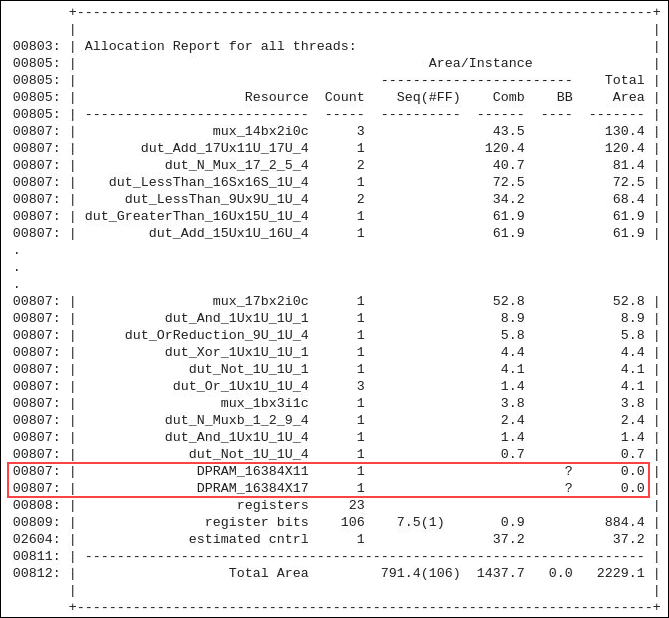
In the HDL Workflow Advisor, right-click the Run Synthesis task and select Run to selected task. Examine the generated resource report, which shows the number of RAMs inferred, by clicking the syn_log.txt link in the generated code window.
The Allocation Report highlights the variables mapped to RAM.
Additional Notes on RAM Mapping
MATLAB functions can have any number of RAM matrices.
HDL Coder maps all persistent matrix variables that meet the threshold criteria to RAMs.

