Contenido principal

Double-Acting Actuator (IL-PB)

R2026b

Position-based double-acting actuator in isothermal liquid systems

Since R2026a

Libraries:
Simscape / Fluids / Isothermal Liquid / Actuators

Description

The Double-Acting Actuator (IL-PB) block models the linear conversion of a pressure differential between two chambers to piston motion. The pressure differential that acts on the piston plate that separates the chambers controls the piston actuation. A hard stop limits the motion of the piston when it is near full extension or full retraction. You can model fluid compressibility in either piston chambers.

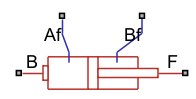
Ports Af and Bf are isothermal liquid inlets that control the pressure in both chambers. The block converts the pressure differential between the two chambers to a translation force at either port B or F. The Modeling option parameter controls whether port B or F connects to the piston.

Hard Stop Model

The block has three different options for the hard stop that you can use to model the extension limit of the actuator piston. For more information on the hard stop model options, see Translational Hard Stop (PB).

The block models the hard stop when the piston is at its upper or lower bound. Outside of this region, FHardStop=0.

Cushion

The block can model cushioning toward the extremes of the piston stroke. Select Enable cylinder Af end cushioning or Enable cylinder Bf end cushioning to slow the piston motion as it approaches the end cap. For more information on the functionality of a cylinder cushion, see the Cylinder Cushion (IL-PB) block.

Friction

The block can model friction against piston motion. When you select Enable cylinder friction effect, the friction is a combination of the Stribeck, Coulomb, and viscous effects. The block measures the pressure difference between the chamber pressure and the environment pressure. For more information on the friction model and its limitations, see the Cylinder Friction (IL-PB) block.

Numerically-Smoothed Area and Pressure

You can maintain numerical robustness in your simulation by adjusting the Smoothing factor parameter. If the Smoothing factor parameter is nonzero, the block smooths the cushion A and B orifice areas and the check valve pressure ranges. The orifice area is smoothly saturated between the cushion A and cushion B Leakage area between plunger and cushion sleeve and Cushion plunger cross-sectional area parameters while the valve pressure is saturated between the cushion A and cushion B Check valve cracking pressure differential and Check valve maximum pressure differential parameters. For more information, see Numerical Smoothing.

Block Sub-Components

The Single-Acting Actuator (IL-B) block is a composite component made from these Simscape Foundation and Fluids library blocks:

This figure shows the composite diagram when you set Modeling option to Port F connected to piston and you select Enable cylinder Af end cushioning, Enable cylinder Bf end cushioning, and Enable cylinder friction effect.
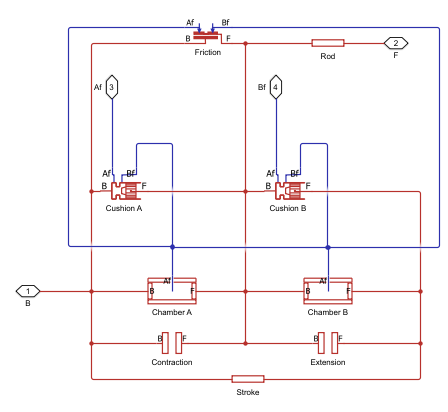
Diagram of composite component for block

Ports

Conserving

expand all

Isothermal liquid conserving port associated with chamber Af.

Programmatic Use

Port: Af_connector

Isothermal liquid conserving port associated with the inlet to chamber Bf.

Programmatic Use

Port: Bf_connector

Position-based translational conserving port that represents the base connection.

Programmatic Use

Port: B

Position-based translational conserving port that represents the follower connection. When the block has a nonzero length, port F has a more positive position than port B.

Programmatic Use

Port: F

Output

expand all

Physical signal port associated with the piston position, in m.

Dependencies

To enable this port, select Enable position output.

Programmatic Use

Port: p_out

Parameters

expand all

Whether port B or F connects to the piston.

Programmatic Use

Parameter: ComponentPath
Values: "fluids.isothermal_liquid.actuators.double_actuator_F_IL_PB" | "fluids.isothermal_liquid.actuators.double_actuator_B_IL_PB"

Actuator

Whether to model the same fluid in both actuator chambers. If you select this parameter, the actuator propagates fluid properties through both chambers. Clear this parameter to model each chamber as a different fluid, where each chamber is connected to an isolated fluid network.

Programmatic Use

Parameter: single_fluid
Values: "true" | "false"

Cross-sectional area of the piston rod on the chamber Af side.

Programmatic Use

Parameter: piston_area_Af

Cross-sectional area of the piston rod on the chamber Bf side.

Programmatic Use

Parameter: piston_area_Bf

Maximum piston travel distance.

Programmatic Use

Parameter: stroke

Length between ports B and F when the volume of chamber Af is equal to the value of the Dead volume in chamber Af parameter.

Programmatic Use

Parameter: rod_length

Volume of the liquid when the piston displacement is 0 in chamber Af. This value is the liquid volume when the piston is up against the actuator end cap.

Programmatic Use

Parameter: dead_volume_Af

Volume of the liquid when the piston displacement is 0 in chamber B. This value is the liquid volume when the piston is up against the actuator end cap.

Programmatic Use

Parameter: dead_volume_Bf

Environment reference pressure. When you set this parameter to Atmospheric pressure, the environmental pressure is 0.101325 MPa.

Programmatic Use

Parameter: pressure_spec
Values: "foundation.enum.pressure_spec.atmospheric" | "foundation.enum.pressure_spec.specified"

User-defined environmental pressure.

Dependencies

To enable this parameter, set Environment pressure specification to Specified pressure.

Programmatic Use

Parameter: environment_pressure

Option to output the piston position at port p.

Programmatic Use

Parameter: position_output
Values: "true" | "false"

Hard Stop

Select the hard stop model:

  • Stiffness and damping applied smoothly through transition region, damped rebound — Specify the transition region in which the force ramps up from zero. At the end of the transition region, the block applies the full stiffness and damping. This option applies damping on the rebound, but limits it to the value of the stiffness force. Therefore, damping can reduce or eliminate the force provided by the stiffness, but never exceed it. All equations are smooth and produce no zero crossings.

  • Full stiffness and damping applied at bounds, undamped rebound — This option applies full stiffness and damping with impact, and applies no damping on the rebound. The equations produce no zero crossings when velocity changes sign, but there are position-based zero crossings. This option uses nonlinear equations.

  • Full stiffness and damping applied at bounds, damped rebound — This model has full stiffness and damping applied with impact, with damping applied on the rebound as well. The equations are switched linear, but produce position-based zero crossings. Use this option if the simscape.findNonlinearBlocks function indicates that this block prevents the network from being switched linear.

Programmatic Use

Parameter: hardstop_model
Values: "simscape.enum.HardstopStiffness.Smooth" | "simscape.enum.HardstopStiffness.Fullundamped" | "simscape.enum.HardstopStiffness.Fulldamped"

Elastic property of the colliding bodies. The greater the value of this parameter, the less the bodies penetrate into each other and the more rigid the impact becomes. Setting this parameter to lesser values makes contact softer, but improves convergence and computational efficiency.

Programmatic Use

Parameter: stiff_coeff

Dissipating property of the colliding bodies. The greater the value of this parameter, the more energy dissipates during impact.

Programmatic Use

Parameter: damping_coeff

Region where the force ramps up from zero to the full value. At the end of the transition region, the block applies full stiffness and damping.

Dependencies

To enable this parameter, set Hard stop model to Stiffness and damping applied smoothly through transition region, damped rebound.

Programmatic Use

Parameter: transition

Cushion Af

Whether to model piston slowdown at the maximum extension. See the Cylinder Cushion (IL-PB) block for more information.

Programmatic Use

Parameter: cushion_Af_spec
Values: "true" | "false"

Area of the plunger inside the actuator cushion element.

Dependencies

To enable this parameter, select Enable cylinder Af end cushioning.

Programmatic Use

Parameter: area_plunger_Af

Length of the cushion plunger.

Dependencies

To enable this parameter, select Enable cylinder Af end cushioning.

Programmatic Use

Parameter: length_plunger_Af

Area of the orifice between the cushion chambers.

Dependencies

To enable this parameter, select Enable cylinder Af end cushioning.

Programmatic Use

Parameter: area_cushion_orifice_Af

Gap area between the cushion plunger and sleeve. This value contributes to numerical stability by maintaining continuity in the flow.

Dependencies

To enable this parameter, select Enable cylinder Af end cushioning.

Programmatic Use

Parameter: area_leak_plunger_Af

Pressure beyond which the valve operation triggers. When the pressure difference between port A and Penv meets or exceeds the value of this parameter, the cushion valve begins to open.

Dependencies

To enable this parameter, select Enable cylinder Af end cushioning.

Programmatic Use

Parameter: p_crack_differential_Af

Maximum cushion valve differential pressure. This parameter provides an upper limit to the pressure so that system pressures remain realistic.

Dependencies

To enable this parameter, select Enable cylinder Af end cushioning.

Programmatic Use

Parameter: press_max_differential_Af

Cross-sectional area of the cushion valve in the fully open position.

Dependencies

To enable this parameter, select Enable cylinder Af end cushioning.

Programmatic Use

Parameter: check_valve_area_max_Af

Sum of all gaps when the cushion check valve is in the fully closed position. Any area smaller than this value saturates to the specified leakage area. This value contributes to numerical stability by maintaining continuity in the flow.

Dependencies

To enable this parameter, select Enable cylinder Af end cushioning.

Programmatic Use

Parameter: check_valve_area_leak_Af

Continuous smoothing factor that introduces a layer of gradual change to the flow response when the variable orifice and check valve are in near-open or near-closed positions. Set this value to a nonzero value less than one to increase the stability of your simulation in these regimes.

Dependencies

To enable this parameter, select Enable cylinder Af end cushioning.

Programmatic Use

Parameter: smoothing_factor_Af

Cushion Bf

Whether to model piston slowdown at the maximum extension. See the Cylinder Cushion (IL-PB) block for more information.

Programmatic Use

Parameter: cushion_Bf_spec
Values: "true" | "false"

Area of the plunger inside the actuator cushion element.

Dependencies

To enable this parameter, select Enable cylinder Bf end cushioning.

Programmatic Use

Parameter: area_plunger_Bf

Length of the cushion plunger.

Dependencies

To enable this parameter, select Enable cylinder Bf end cushioning.

Programmatic Use

Parameter: length_plunger_Bf

Area of the orifice between the cushion chambers.

Dependencies

To enable this parameter, select Enable cylinder Bf end cushioning.

Programmatic Use

Parameter: area_cushion_orifice_Bf

Gap area between the cushion plunger and sleeve. This value contributes to numerical stability by maintaining continuity in the flow.

Dependencies

To enable this parameter, select Enable cylinder Bf end cushioning.

Programmatic Use

Parameter: area_leak_plunger_Bf

Pressure beyond which the valve operation triggers. When the pressure difference between port A and Penv meets or exceeds the value of this parameter, the cushion valve begins to open.

Dependencies

To enable this parameter, select Enable cylinder Bf end cushioning.

Programmatic Use

Parameter: p_crack_differential_Bf

Maximum cushion valve differential pressure. This parameter provides an upper limit to the pressure so that system pressures remain realistic.

Dependencies

To enable this parameter, select Enable cylinder Bf end cushioning.

Programmatic Use

Parameter: press_max_differential_Bf

Cross-sectional area of the cushion valve in the fully open position.

Dependencies

To enable this parameter, select Enable cylinder Bf end cushioning.

Programmatic Use

Parameter: check_valve_area_max_Bf

Sum of all gaps when the cushion check valve is in the fully closed position. Any area smaller than this value saturates to the specified leakage area. This value contributes to numerical stability by maintaining continuity in the flow.

Dependencies

To enable this parameter, select Enable cylinder Bf end cushioning.

Programmatic Use

Parameter: check_valve_area_leak_Bf

Continuous smoothing factor that introduces a layer of gradual change to the flow response when the variable orifice and check valve are in near-open or near-closed positions. Set this value to a nonzero value less than one to increase the stability of your simulation in these regimes.

Dependencies

To enable this parameter, select Enable cylinder Bf end cushioning.

Programmatic Use

Parameter: smoothing_factor_Bf

Friction

Whether to model friction against the piston motion. The block accounts for Coulomb, Stribeck, and viscous friction. See the Cylinder Friction (IL-PB) block for more information.

Programmatic Use

Parameter: friction_spec
Values: "true" | "false"

Ratio of the breakaway force to the Coulomb friction force.

Dependencies

To enable this parameter, select Enable cylinder friction effect.

Programmatic Use

Parameter: breakaway_Coulomb_ratio

Threshold velocity for the motion against the friction force to begin.

Dependencies

To enable this parameter, select Enable cylinder friction effect.

Programmatic Use

Parameter: breakaway_velocity

Force on the cylinder when it is in the neutral position.

Dependencies

To enable this parameter, select Enable cylinder friction effect.

Programmatic Use

Parameter: preload_force

Coulomb force coefficient of friction.

Dependencies

To enable this parameter, select Enable cylinder friction effect.

Programmatic Use

Parameter: Coulomb_coeff

Viscous friction coefficient.

Dependencies

To enable this parameter, select Enable cylinder friction effect.

Programmatic Use

Parameter: viscous_coeff

Initial Conditions

Whether to model change in fluid density due to fluid compressibility. When you select Enable dynamic compressibility, the block calculates the changes due to the mass flow rate into the block in addition to density changes due to changes in pressure. In the Isothermal Liquid Library, all blocks calculate density as a function of pressure.

Programmatic Use

Parameter: dynamic_compressibility
Values: "true" | "false"

Starting liquid pressure for compressible fluids.

Dependencies

To enable this parameter, select Enable dynamic compressibility.

Programmatic Use

Parameter: p_init_Af

Starting liquid pressure for compressible fluids.

Dependencies

To enable this parameter, select Enable dynamic compressibility.

Programmatic Use

Parameter: p_init_Bf

Liquid pressure at nominal operating conditions in chamber Af. The block uses this value to calculate the nominal density to use in the mass conservation equation when you disable dynamic compressibility.

Dependencies

To enable this parameter, clear the Enable dynamic compressibility check box.

Programmatic Use

Parameter: p_nominal_Af

Liquid pressure at nominal operating conditions in chamber Bf. The block uses this value to calculate the nominal density to use in the mass conservation equation when dynamic compressibility is disabled.

Dependencies

To enable this parameter, clear the Enable dynamic compressibility check box.

Programmatic Use

Parameter: p_nominal_Bf

Extended Capabilities

expand all

C/C++ Code Generation
Generate C and C++ code using Simulink® Coder™.

Version History

Introduced in R2026a