Create Lens Prescription Table for Optical System
Lens prescription tables are detailed specifications that describe the physical and optical properties of a lens or a lens system. These tables contain surface specifications such as the surface number and name, radius of curvature, lens thickness and spacing, and glass material properties such as the refractive index and Abbe number, which makes them crucial in the design and manufacturing of optical systems such as cameras, microscopes, and telescopes.
In this example, you create a lens prescription table for a circularly symmetric aspheric optical system, which includes semi-diameter and component type columns as additional specifications. You also create an aspherics table, and export both tables in usable format.
Load Optical System
Load an aspheric lens from a ZMX file into the workspace.
opsys = zmximport("LensWithAspherics.zmx");Display the optical system in 2-D using the view2d function.
hv = view2d(opsys);
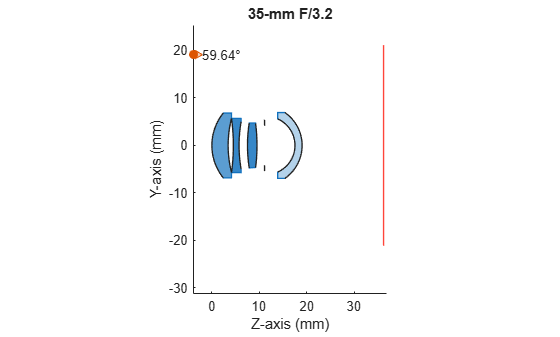
Display the surface information, which can be used to create a prescription table, stored in the SurfaceTable property of the opticalSystem object.
opsys.SurfaceTable(:,["Index","Radius","Position","MaterialName","NdVd","Shape","ComponentType"])
ans=10×7 table
     1     10.9212    0    0          0       "LAC8"    1.7130    53.9389     6.8273    "LensElement"
     2     23.2112    0    0     3.4200     "Vacuum"         1        Inf     5.6990    "LensElement"
     3    -41.8875    0    0     4.5200        "FD6"    1.8052    25.4652     5.6990    "LensElement"
     4     28.8922    0    0     5.7200     "Vacuum"         1        Inf     4.9896    "LensElement"
     5     30.9632    0    0     7.4956     "NBFD13"    1.8061    40.7344     4.7271    "LensElement"
     6    -36.6284    0    0     9.4956     "Vacuum"         1        Inf     4.6268    "LensElement"
     7           0    0    0    11.0956     "Vacuum"         1        Inf     4.1570      "Diaphragm"
     8     -6.1127    0    0    17.4932    "ACRYLIC"    1.4917    55.3102     5.5906    "LensElement"
     9     -8.4376    0    0    18.9932     "Vacuum"         1        Inf     6.9280    "LensElement"
    10           0    0    0    36.1429     "Vacuum"         1        Inf    21.1126     "ImagePlane"
Create Custom Prescription Table Columns
Construct the columns of the prescription table using the information stored in the SurfaceTable property.
Use the helper function extractSurfaceNum to extract the surface number information from the Index column and add an annotation, "a", to indicate aspheric surfaces.
surfaceNum = extractSurfaceNum(opsys);
Extract the radius of curvature from the Radius column.
radius = opsys.SurfaceTable.Radius;
Define the lens thickness, or distance to the next surface, along the optical *z-*axis using the Position column, which contains the global position of each lens component.
thickness = diff(opsys.SurfaceTable.Position(:,3));
thickness(end+1,:) = NaN;
Use the extractMaterialProperties helper function to extract glass catalog names from the MaterialName column. Alternatively, you can create the glass material column for the prescription table using the refractive indices and Abbe numbers by specifying the useCatalogName argument as false.
useCatalogName =  true;
matProp = extractMaterialProperties(opsys,useCatalogName);
true;
matProp = extractMaterialProperties(opsys,useCatalogName);Extract the semi-diameter values for circular surfaces using the Shape column.
semiDiameter = opsys.SurfaceTable.Shape;
Create the contents of the prescription table column containing the component names using the createComponentLabels helper function.
componentLabels = createComponentLabels(opsys);
Create Lens Prescription Table
Create a lens prescription table by combining all of the components into their corresponding columns and labels.
if ~isstruct(matProp)
    variableNames = ["Surface #","Radius","Thickness","Glass","SemiDiameter","Component"];
    prescriptionTable = table(surfaceNum,radius,thickness,matProp,semiDiameter,componentLabels,VariableNames=variableNames);
else % If you are using refractive index (Nd) and Abbe number (Vd) material values.
    variableNames = ["Surface #","Radius","Thickness","Nd","Vd","SemiDiameter", "Component"];
    prescriptionTable = table(surfaceNum,radius,thickness,matProp.Nd,matProp.Vd,semiDiameter,componentLabels,VariableNames=variableNames);
end
Display the prescription table using the disp function.
disp(prescriptionTable)
    Surface #    Radius     Thickness      Glass      SemiDiameter    Component
    _________    _______    _________    _________    ____________    _________

      "1"         10.921       3.42      "LAC8"          6.8273       "LENS 1"
      "2"         23.211        1.1      ""               5.699       ""
      "3"        -41.888        1.2      "FD6"            5.699       "LENS 2"
      "4"         28.892     1.7756      ""              4.9896       ""
      "5"         30.963          2      "NBFD13"        4.7271       "LENS 3"
      "6"        -36.628        1.6      ""              4.6268       ""
      "7"              0     6.3975      ""               4.157       "STOP"
      "8"        -6.1127        1.5      "ACRYLIC"       5.5906       "LENS 4"
      "9a"       -8.4376      17.15      ""               6.928       ""
      "10"             0        NaN      ""              21.113       "SENSOR"
Create Aspherics Table
Because the system contains aspheric components, create an aspheric table to accompany the prescription table using the createAsphericsTable helper function. This function creates a table where rows of even aspheric terms are listed for each aspheric surface.
asphericsTable = createAsphericsTable(opsys);
disp(asphericsTable)
              Surf9
           ___________

    A2      -7.863e-06
    A4       -8.71e-07
    A6      1.3555e-08
    A8     -5.4372e-10
    A10     9.7997e-12
    A12    -1.3835e-13
Export Prescription and Aspherics Tables
Export the prescription table to an XLSX file using the writetable function.
xlsFilename = "OpticalSystemPrescription.xlsx";
writetable(prescriptionTable,xlsFilename,Range="A1")
Export the aspherics table to the same XLSX file, including a buffer of three rows to create an empty row between tables.
asphericsRangeStart = "A"+(height(prescriptionTable)+3);
writetable(asphericsTable,xlsFilename,Range=asphericsRangeStart,WriteRowNames=true)
Helper Functions
extractSurfaceNum
The extractSurfaceNum helper function extracts an array of surface numbers for an optical system. If a surface has aspherics, the function adds the annotation "a" to the surface number.
function surfaceNum = extractSurfaceNum(opsys)
    % Extract surface numbers
    surfaceNum = string(opsys.SurfaceTable.Index);

    % Extract aspherics for all surfaces
    numAspherics = length(opsys.Surfaces(1).Aspherics);
    aspherics = reshape([opsys.Surfaces(:).Aspherics],numAspherics,[])';
    hasAsphericsIndex = find(any(aspherics,2));

    % Add aspherics indicator to applicable surfaces
    asphericsIndicator = "a";
    surfaceNum(hasAsphericsIndex) = hasAsphericsIndex+asphericsIndicator;
end
extractMaterialProperties
The extractMaterialProperties helper function extracts an array of material properties for each refractive component of an optical system. This can take the form of glass catalog name or Nd-Vd values.
function matProp = extractMaterialProperties(opsys,useCatalogName)
    st = opsys.SurfaceTable;
    if useCatalogName
        matProp = st{:,"MaterialName"};
        matProp(strcmp(matProp,"Vacuum"))="";
    else
        materialProps = st{:,"NdVd"};

        % Replace "vacuum" Nd-Vd numerics of [1 inf] with empty strings
        vacuumIndex = materialProps(:,1) == 1 & isinf(materialProps(:,2));
        materialProps = string(materialProps);
        materialProps(vacuumIndex,:) = repmat(strings(1,2),sum(vacuumIndex),1);

        % Return a struct with Nd and Vd fields
        matProp.Nd = materialProps(:,1);
        matProp.Vd = materialProps(:,2);
    end
end
createComponentLabels
The createComponentLabels helper function returns a column of component labels for components of type LensElement, Diaphragm, and ImagePlane.
function componentLabels = createComponentLabels(opsys)
    % Define component labels
    lensLabel = "LENS";
    diaphragmLabel = "STOP";
    imagePlaneLabel = "SENSOR";

    % Preallocate compLabels with the same size as the number of components
    st = opsys.SurfaceTable;
    componentLabels = strings(size(st.ComponentType));

    % Find indices for each component type
    [~, componentIndices] = unique(st.FlattenedComponentIndex);
    lensIndices = componentIndices(st.ComponentType(componentIndices) == "LensElement");
    diaphragmIndices = componentIndices(st.ComponentType(componentIndices) == "Diaphragm");
    imagePlaneIndices = componentIndices(st.ComponentType(componentIndices) == "ImagePlane");

    % Assign labels to each component type
    componentLabels(lensIndices) = lensLabel + " " + (1:length(lensIndices));
    componentLabels(diaphragmIndices) = diaphragmLabel;
    componentLabels(imagePlaneIndices) = imagePlaneLabel;
end
createAsphericsTable
The createAsphericsTable helper function creates a table of aspheric terms for each aspheric surface of an optical system.
function asphericsTable = createAsphericsTable(opsys)
    % Extract aspherics for all surfaces
    numAspherics = length(opsys.Surfaces(1).Aspherics);
    aspherics = reshape([opsys.Surfaces(:).Aspherics],numAspherics,[])';

    % Set desired row and variable labels
    asphericLabel = "A";
    surfaceLabel = "Surf";

    % Build row and variable names
    rowNames = asphericLabel+(1:numAspherics)';
    hasAsphericsIndex = find(any(aspherics,2));
    variableNames = surfaceLabel+hasAsphericsIndex;

    % Create aspherics table
    asphericsTable = array2table(aspherics(hasAsphericsIndex,:)',RowNames=rowNames,VariableNames=variableNames);

    % Simplify aspherics table to only contain non-zero, aspheric-term
    % surfaces.
    nonZeroRows = any(asphericsTable{:,:}, 2);
    asphericsTable = asphericsTable(nonZeroRows, :);
end
References
[1] Bass, Michael and Optical Society of America, eds. "Chapter 16: Camera Lenses." In Handbook of Optics, 2nd ed., Vol 2:16.6, Figure 3. New York: McGraw-Hill, 1995.

