Contenido principal

apply

R2026b

Process blocks of blocked image

Description

bimProc = apply(bim,fcn) processes the entire blocked image bim by applying the function handle fcn to each block. The function returns bimProc, a new blocked image containing the processed data.

example

[bimProc1,bimProc2,...] = apply(bim,fcn) returns multiple blocked images. The specified function handle, fcn, must point to a user function that returns the same number of output arguments.

[bimArrayProc1,bimArrayProc2,...] = apply(bimArray,fcn) processes the array of blocked images bimArray by applying the function handle fcn to each block of each blocked image. The function returns one or more arrays of blocked images containing the processed data. The specified function handle, fcn, must point to a user function that returns the same number of output arguments.

[___] = apply(___,Name=Value) modifies aspects of the block processing using name-value arguments.

Examples

collapse all

Create a blocked image.

bim = blockedImage("tumor_091R.tif");

Apply a smoothing filter to the blocks in the blocked image. The imguidedfilter function operates on a default neighborhood of 5-by-5 pixels. To avoid border artifacts along block boundaries, add a 5 pixel border when reading the blocks. The apply function automatically trims the border pixels from the output after applying the filter.

smoothing = 2000;
benh = apply(bim, ...
    @(bs)imguidedfilter(bs.Data,bs.Data,DegreeOfSmoothing=smoothing), ...
    BorderSize=[5 5]);

Display the original image and the enhanced image.

ha1 = subplot(1,2,1);
bigimageshow(bim,ResolutionLevel=1);
ha2 = subplot(1,2,2);
bigimageshow(benh);
linkaxes([ha1 ha2]);
xlim([2100 2600])
ylim([1800 2300])
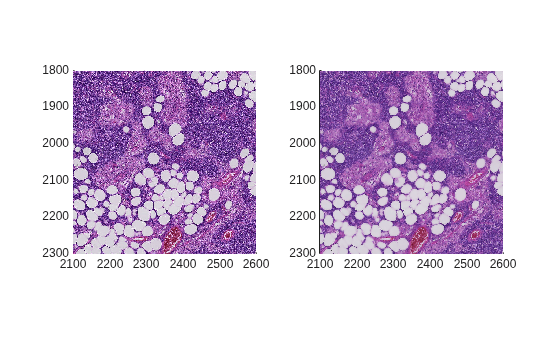
Figure contains 2 axes objects. Axes object 1 contains an object of type bigimageshow. Axes object 2 contains an object of type bigimageshow.

Create a blocked image.

bim = blockedImage("tumor_091R.tif");

Create a mask at the coarsest level and display it.

bmask = apply(bim, @(bs)im2gray(bs.Data)<80,Level=3);
figure
bigimageshow(bmask)
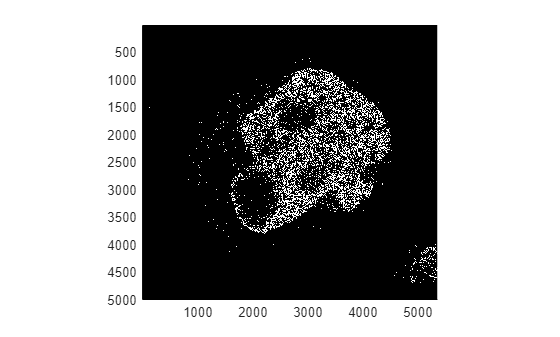
Figure contains an axes object. The axes object contains an object of type bigimageshow.

Use the mask to limit regions processed by the call to the apply object function.

bls = selectBlockLocations(bim,Mask=bmask,InclusionThreshold=0.005);
benh = apply(bim, @(bs)imguidedfilter(bs.Data,bs.Data,DegreeOfSmoothing=2000), ...
    BorderSize=[5 5],BlockLocationSet=bls); 

Display the original image and the enhanced image.

figure
ha1 = subplot(1,2,1);
bigimageshow(bim,ResolutionLevel=1);
ha2 = subplot(1,2,2);
bigimageshow(benh);
linkaxes([ha1, ha2]);      
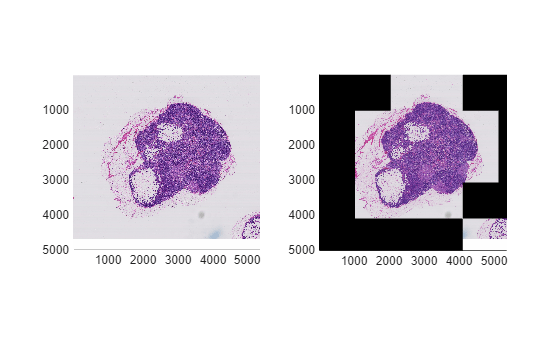
Figure contains 2 axes objects. Axes object 1 contains an object of type bigimageshow. Axes object 2 contains an object of type bigimageshow.

Create a file set of all the JPEG images in the toolbox sample images folder.

fs = matlab.io.datastore.FileSet( ...
    fullfile(matlabroot,"toolbox","images","imdata"), ...
    FileExtensions=".jpg");

Create an array of blocked images from the file set.

bims = blockedImage(fs);

Create an adapter that saves a blocked image to disk as a single image file.

outputFolder = tempname;
outputAdapter = images.blocked.GenericImage;
outputAdapter.Extension = "jpg";

Convert the images to binary images on disk.

bos = apply(bims, @(b)imbinarize(im2gray(b.Data)), ...
    OutputLocation=outputFolder,Adapter=outputAdapter);

View the contents of the output folder using the Image Browser app by running this command: imageBrowser(outputFolder)

Input Arguments

collapse all

Blocked image, specified as a blockedImage object.

Blocked images, specified as an array of blockedImage objects.

Processing function, specified as a function handle. For more information, see Create Function Handle. The processing function fcn must accept a bstruct as input. To pass additional arguments, specify fcn as an anonymous function. For more information, see Anonymous Functions.

bstruct is a struct with these fields:

FieldDescription
DataBlock of data from bim
StartSubscripts of the first element in the block. If BorderSize is specified, this subscript can be out-of-bounds for edge blocks.
EndSubscripts of the last element in the block. If BorderSize is specified, this subscript can be out-of-bounds for edge blocks.
BlockSubBlock subscripts of the current block
BorderSizeValue of the BorderSize argument.
BlockSizeValue of the BlockSize argument. Note: size(data) can be less than this value for border blocks when PadPartialValue is false.
BatchSizeValue of the BatchSize parameter
ImageNumberIndex into bim array for the current image.
LevelThe resolution level from which the data is being read.

The function fcn typically returns the results for one block. The results can be numeric, a struct, or categorical.

Name-Value Arguments

collapse all

Specify optional pairs of arguments as Name1=Value1,...,NameN=ValueN, where Name is the argument name and Value is the corresponding value. Name-value arguments must appear after other arguments, but the order of the pairs does not matter.

Example: bimProc = apply(bim,fcn,Level=3) processes the blocked image bim by applying the function fcn at the third resolution level.

Adapter used for writing blocked image data, specified as an adapter object. To specify different adapters for different outputs, use a cell array. Scalar values are expanded.

This table lists the adapters included with the toolbox that support writing.

AdapterDescription
BINBlocksStore each block as a binary file in a folder
GenericImage Store blocks in a single image
GenericImageBlocksStore each block as an image file in a folder
H5Store blocks in a single HDF5 image
H5BlocksStore each block as an HDF5 file in a folder
InMemoryStore blocks in a variable in main memory
JPEGBlocksStore each block as a JPEG file in a folder
MATBlocksStore each block as a MAT file in a folder
PNGBlocksStore each block as a PNG file in a folder
TIFFStore blocks in a single TIFF file

You can also specify a custom adapter that performs custom writing operations. For more information, see images.blocked.Adapter.

When you specify any adapter other than an InMemory adapter, you must also specify a value for the OutputLocation name-value argument.

Batch size, specified as a numeric scalar. BatchSize is the last dimension of input to fcn. All outputs of fcn must have the last dimension be the same as BatchSize.

The batch size is the maximum number of blocks supplied to the processing function fcn in each batch. On the first call to fcn, the apply function sends only one block. On subsequent calls, the apply function sends BatchSize blocks. On the last call to fcn, the apply function sends all remaining blocks, which can be fewer than BatchSize.

Set BatchSize greater than 1 to optimally load GPUs when applying deep learning inference calls. When BatchSize is greater than 1, PadPartialBlocks must be true.

Set of blocks to process, specified as a blockLocationSet object. The ImageNumber property of the blockLocationSet object indexes into the bimArray array. Specifying the blocks to process can improve efficiency by limiting the number of blocks processed. For example, use selectBlockLocations with a mask to limit applying the processing function to certain regions. Blocks contained must be on a regular grid.

You cannot specify the BlockLocationSet and BlockSize name-value arguments at the same time. When you specify BlockLocationSet, the apply function uses the block size defined by the blockLocationSet object.

Block size of data supplied as the input to the processing function fcn, specified as an integer-valued vector of length equal to the NumDimensions property of bim. If BlockSize contains fewer elements, then the apply function pads the missing dimensions with elements from the Size property.

You cannot specify the BlockSize and BlockLocationSet name-value arguments at the same time. When you specify BlockLocationSet, the apply function uses the block size defined by the blockLocationSet object.

Border size, specified as an integer-valued vector of length equal to the NumDimensions property of bim. Specifies additional data from neighboring region to be included in a block. For edge blocks, the apply function uses the PadMethod argument. If BorderSize contains fewer elements, the apply function pads the border with 0s.

Display wait bar, specified as a logical scalar. When set to true, the apply function displays a wait bar for long-running operations. If you cancel the wait bar, the apply function returns partial output, if available.

Data Types: logical

Additional inputs to fcn, specified as an array of blockedImage objects. Blocks from this array are provided to fcn as additional inputs after bstruct: __ = fcn(bstruct,extrablock1,...). The apply function extracts these blocks from the same world region as the main block from bim, represented in bstruct.

Resolution level, specified as a vector of integers of the same length as ExtraImages. Each value specifies the resolution level to use from the corresponding blockedImage object in ExtraImages.

Resolution level to use, specified as an integer scalar. For a multiresolution blockedImage object, this value determines the resolution level to use to obtain blocks for processing.

Location of output folder, specified as a string scalar or character vector. Use when you want apply to write each block to a specific directory as it processes. If there is a single output, the apply function writes it directly to this location. For multiple outputs, the apply function creates subfolders of the format output<N>/ for the Nth output. If the input is an array, the apply function derives the output name from the Source property of the corresponding element. If the input is in-memory, the apply function uses a numeric index.

When the UseParallel argument is "on" or "auto", OutputLocation should be a valid path on the client session. Use the AlternateFileSystemRoots property of the input blocked images to specify the required mapping for worker sessions. All output blocked images inherit this value.

Method used for padding incomplete blocks, specified as "replicate", "symmetric", or a numeric, logical, or categorical scalar. The pad method specifies how to obtain padding pixels to honor the BorderSize or the PadPartialBlocks arguments. The table defines each method and gives an example for padding a 3-by-3 pixel block with a border size of 2.

Value

Meaning

Example

numeric, logical, or categorical scalar

Pad array with elements of the specified value. The data type of PadMethod must match the ClassUnderlying property of the blocked image.

[314159265][3331444333144433314441115999222655522265552226555]

"replicate"

Pad by repeating border elements of the block.

[314159265][2222222222222222314222215922222652222222222222222]

"symmetric"

Pad with mirror reflections of pixels from within the same block.

[314159265][5115995133144113314415115995622655662265565115995]

Pad partial blocks, specified as logical scalar. Specifies if partial blocks that may exist on the edges need to be padded out to the specified block size. The apply object function uses the method specified in PadMethod to perform the padding operation.

  • When false, the processing function fcn operates on partial blocks without padding and can return blocks smaller than BlockSize.

  • When true, the apply function pads partial blocks using the specified PadMethod. The processing function fcn operates on and returns full-sized blocks.

When BatchSize is greater than 1, set PadPartialBlocks to true

Data Types: logical

Continue processing from where the previous run stopped, specified as a logical scalar. If true, and the specified OutputLocation has content from a previous run, the current run will continue processing from where the previous run stopped. This support depends on the output adapter used. If false, the apply function deletes the previous content.

Option to perform computations in parallel using a parallel pool of workers, specified as one of these values:

  • "off" — Run in serial on the MATLAB® client.

  • "auto" — Use a parallel pool if one is open or if MATLAB can automatically create one. If a parallel pool is not available, then run in serial on the MATLAB client.

  • "on" — Use a parallel pool if one is open or if MATLAB can automatically create one. If a parallel pool is not available, then throw an error.

Before R2026b: To run in parallel, set UseParallel to true (1).

If you do not have a parallel pool open and automatic pool creation is enabled, then MATLAB opens a pool using the default cluster profile. To use a parallel pool to run computations in MATLAB, you must have Parallel Computing Toolbox™. For more information, see Run MATLAB Functions with Automatic Parallel Support (Parallel Computing Toolbox).

The adapter specified by the Adapter argument must support parallel processing. You must specify OutputLocation as a valid path on the client session.

Data Types: char | string

Output Arguments

collapse all

New blocked image, returned as a blockedImage object.

Processed blocked images, returned as an array of blockedImage objects.

Tips

  • The apply function determines the output size by processing the first block. If processing the first block yields an output block of the same size as the input, then the final output size is set to match the input. Otherwise, the last block is processed to determine the final output size. The first block must not be a partial block.

  • The apply function sets the InitialValue property of the output based on the type of the output:

    • Numeric or logical outputs – InitialValue is set to 0.

    • Categorical outputs – InitialValue is set to the <undefined> value of the corresponding type.

    • struct outputs – InitialValue is derived from the first block's output. All fields are set to empty.

Extended Capabilities

expand all

Version History

Introduced in R2021a

expand all