Planificar el despliegue de la infraestructura Campus-Wide License
R2026bLa infraestructura Campus-Wide License ofrece un uso ilimitado de los productos de MATLAB® y Simulink® a todos los docentes, personal y estudiantes de su universidad, facultad u otra institución educativa. Esta licencia cubre a todos los usuarios y equipos, y permite el acceso a más de 100 productos. Cuando se lanzan las versiones generales, los nuevos productos se añaden automáticamente a la licencia. La licencia también proporciona acceso a MATLAB Online™, MATLAB Copilot, MATLAB Grader™ y formación online. Para obtener más detalles sobre los productos disponibles con esta licencia, consulte Acceso a MATLAB y Simulink con infraestructura Campus-Wide.
Visión general sobre las licencias
La infraestructura Campus-Wide License está organizada como una colección de licencias para productos específicos, que puede ver en el Centro de licencias. Estas licencias tienen Total Headcount en la columna Opción y Academic en la columna Uso.
Cada producto tiene un procedimiento diferente para obtener licencias, en función del tipo de licencia utilizado. La infraestructura Campus-Wide License admite tres tipos generales de licencia: Individual, Designated Computer y Concurrent.
Licencia Individual
Una licencia Individual autoriza a los usuarios designados a ejecutar el software de MathWorks®. Para la mayoría de productos con esta licencia, MathWorks configura las licencias cuando los usuarios inician sesión en sus cuentas de MathWorks. Este tipo de licencia es la más habitual y requiere el menor sobrecoste en TI.
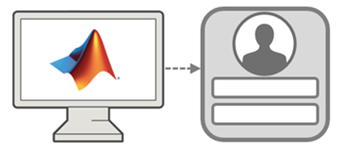
Los siguientes productos utilizan la licencia Individual:
MATLAB y Simulink, cuando los productos se instalan en equipos personales o en equipos de laboratorios y aulas en los que los usuarios inician sesión con sus credenciales de la universidad
Productos de Polyspace®
Productos de RoadRunner
Cualquier producto o servicio basado en la web que requiera iniciar sesión en una cuenta de MathWorks, como MATLAB Online, MATLAB Grader, MATLAB Copilot y Online Training Suite
Licencia Designated Computer
Una licencia Designated Computer autoriza a dispositivos específicos a ejecutar el software de MathWorks. Para configurar una licencia Designated Computer, descargue un archivo de licencia y colóquelo en cada uno de los dispositivos.
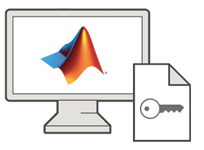
Una licencia Designated Computer proporciona acceso a productos de MATLAB y Simulink cuando los productos se instalan en equipos sin conexión de forma permanente, equipos de aulas y laboratorios en los que los estudiantes realizan exámenes sin conexión, o en equipos compartidos por varios usuarios y que utilizan nombres de usuario genéricos.
Licencia Concurrent
Una licencia Concurrent autoriza a los usuarios de su red a ejecutar el software de MathWorks sin necesidad de iniciar sesión en sus cuentas de MathWorks. Para configurar las licencias Concurrent, debe instalar el software del administrador de licencias en un servidor dedicado. Cuando los usuarios desean acceder a los productos de MathWorks disponibles a través de una licencia Concurrent, reservan las licencias desde el administrador de licencias.
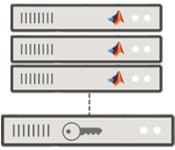
Una licencia Concurrent proporciona acceso a los siguientes productos:
Productos de MATLAB y Simulink, cuando los productos se instalan en centros de computación de alto rendimiento (HPC).
MATLAB Parallel Server™
MATLAB Production Server™
MATLAB Web App Server™
Introducción a MATLAB para usuarios
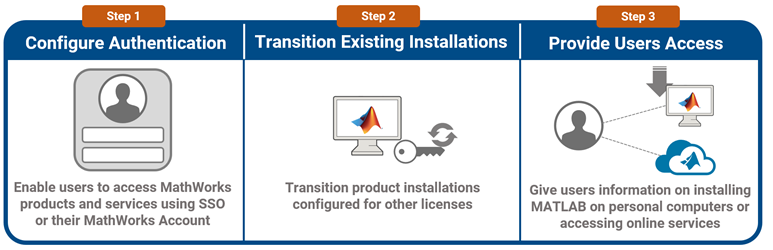
Cuando la universidad obtenga por primera vez una infraestructura Campus-Wide License, siga estos pasos únicos de configuración para iniciar a los usuarios en MATLAB y Simulink:
Configurar la autenticación: permita a los usuarios iniciar sesión en los productos y servicios de MathWorks con las credenciales de SSO de la universidad. Alternativamente, los usuarios pueden iniciar sesión en una cuenta de MathWorks existente asociada a su correo electrónico de la universidad. Para obtener detalles sobre cómo configurar cualquiera de las opciones de autenticación, consulte Configurar la autenticación para los usuarios de la infraestructura Campus-Wide License.
Cambiar la licencia de una instalación existente: cambie cualquier instalación de productos de MathWorks configurada para licencias anteriores al uso de la infraestructura Campus-Wide License. Además, si la universidad tiene alguna instalación que utilice la infraestructura Campus-Wide License más antigua, actualícela para que use la más reciente. Consulte Cambiar la licencia de una instalación existente a la infraestructura Campus-Wide License.
Proporcionar a los usuarios acceso a MATLAB: proporcione a los usuarios instrucciones para instalar MATLAB en sus equipos personales o acceder a los servicios online como MATLAB Online. Consulte Proporcionar acceso a productos de MathWorks para los usuarios de la infraestructura Campus-Wide License.
Instalar productos en equipos administrados por la universidad
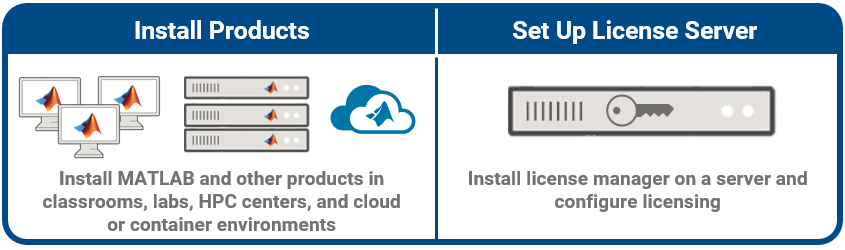
Una vez que los usuarios hayan comenzado a utilizar MATLAB, puede instalar MATLAB y otros productos en aulas, laboratorios, centros HPC y entornos en la nube y de contenedores. Para obtener más detalles, consulte Instalar productos en equipos administrados por la universidad: infraestructura Campus-Wide License.
Los productos disponibles a través de la licencia Concurrent requieren el uso de un servidor de licencias para gestionar las licencias. Para obtener más detalles sobre cómo instalar y configurar las licencias Concurrent, consulte Administrar licencias Concurrent y Network Named User.
Mantenimiento continuo
En su función como administrador de licencias, entre las tareas de mantenimiento continuo se incluye lo siguiente:
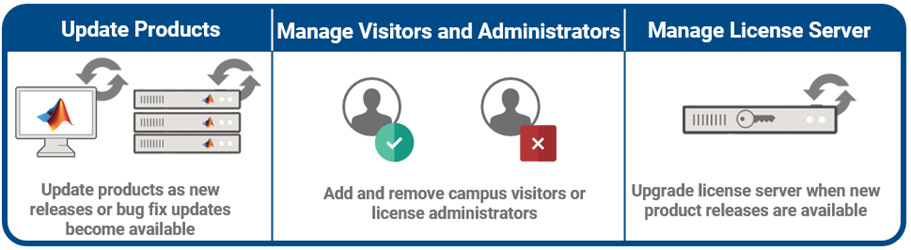
Actualizar los productos: actualice MATLAB y otros productos en aulas, laboratorios y otros entornos a medida que las nuevas versiones o actualizaciones de versiones estén disponibles. Consulte Instalar productos en equipos administrados por la universidad: infraestructura Campus-Wide License.
Administrar invitados y administradores: en la mayoría de los casos, no es necesario administrar los usuarios de forma manual. Por ejemplo, su configuración de SSO elimina automáticamente los privilegios de acceso de los estudiantes de su licencia de MATLAB cuando dejan la universidad. Sin embargo, debe añadir o eliminar a invitados del campus y administradores de licencias de forma manual. También debe añadir o eliminar a los usuarios de Polyspace, RoadRunner y productos de servidor. Para obtener más detalles, consulte Añadir o eliminar invitados en la infraestructura Campus-Wide License y Añadir o eliminar administradores de licencias.
Administrar el servidor de licencias: en la mayoría de los casos, la administración de la infraestructura Campus-Wide License es mínima. Por ejemplo, cuando la universidad renueva su licencia, MATLAB actualiza la licencia y los usuarios reciben una notificación la próxima vez que abren MATLAB. Sin embargo, para los productos disponibles a través de la licencia Concurrent, debe actualizar el servidor de licencias cuando haya nuevas versiones del producto disponibles. Para obtener más detalles sobre cómo administrar el servidor de licencias, consulte Administrar licencias Concurrent y Network Named User.