Contenido principal

interpm

Densify connected vertices in latitude-longitude coordinates

    Description

    [latout,lonout] = interpm(lat,lon,maxdist) densifies the connected vertices in latitude-longitude coordinates by inserting vertices where adjacent latitudes or longitudes are separated by more than the specified maximum spherical distance. By default, the function uses linear interpolation and assumes that the coordinates and distance are in degrees.

    This function is useful for densifying lines and polygons that are defined using latitude-longitude coordinate vectors.

    example

    [latout,lonout] = interpm(lat,lon,maxdist,method) specifies the interpolation method to use when inserting vertices.

    example

    [latout,lonout] = interpm(lat,lon,maxdist,method,units) specifies the angle units for the input coordinates and output coordinates.

    Examples

    collapse all

    Load a MAT file containing latitude-longitude coordinates for each conterminous US state. Extract the coordinates for Utah.

    load usastates.mat
    lat = usastates(42).Lat;
    lon = usastates(42).Lon;

    Specify the maximum spherical distance as 0.5 degrees. Then, densify the vertices. By default, the interpm function densifies the vertices using linear interpolation.

    maxdist = 0.5;
    [latout,lonout] = interpm(lat,lon,maxdist);

    Display the original and densified vertices on a map. Use circle markers for the original vertices and plus sign markers for the densified vertices.

    figure
    geoplot(lat,lon,"o",DisplayName="Original")
    hold on
    geoplot(latout,lonout,"+",DisplayName="Densified")
    legend

    Adjust the geographic limits.

    geolimits([36.06 42.42],[-116.50 -106.10])
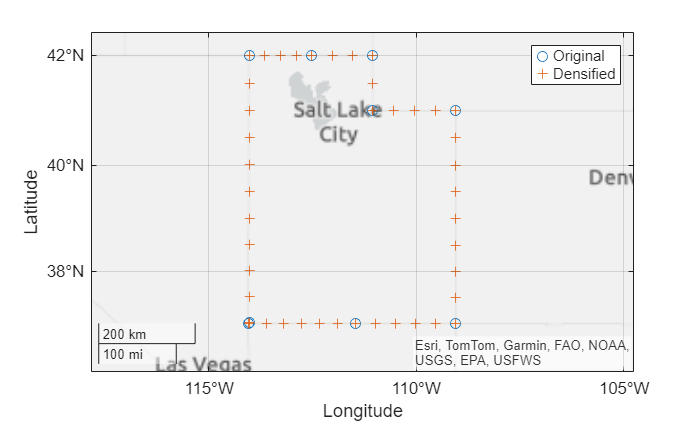
    Figure contains an axes object with type geoaxes. The geoaxes object contains 2 objects of type line. One or more of the lines displays its values using only markers These objects represent Original, Densified.

    Geocode the cities of Seattle, New York, and Paris. The geocode function stores the results in a geospatial table. Extract the latitude and longitude coordinates from the table.

    cities = geocode(["Seattle","New York","Paris"],"city");
    
    lat = cities.Shape.Latitude;
    lon = cities.Shape.Longitude;

    Specify a maximum spherical distance of 8 degrees. Then, densify the line that connects the cities. By default, the interpm function uses linear interpolation.

    maxdist = 8;
    [latout,lonout] = interpm(lat,lon,maxdist);

    Densify the line again, this time using great circle interpolation.

    [latoutGC,lonoutGC] = interpm(lat,lon,maxdist,"gc");

    Display the two lines on a map. Use cross markers for the vertices along linear paths. Use asterisk markers for the vertices along great circle paths.

    figure
    geoplot(latout,lonout,"x-",DisplayName="Linear Interpolation")
    hold on
    geoplot(latoutGC,lonoutGC,"*-",DisplayName="Great Circle Interpolation")
    legend
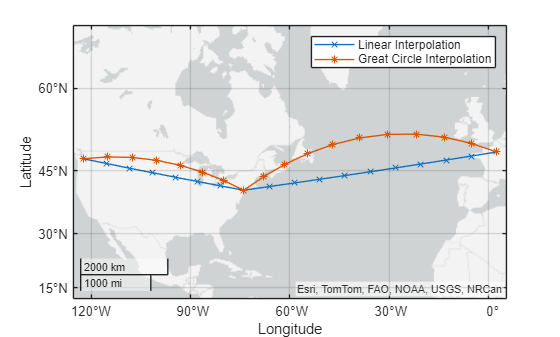
    Figure contains an axes object with type geoaxes. The geoaxes object contains 2 objects of type line. These objects represent Linear Interpolation, Great Circle Interpolation.

    Input Arguments

    collapse all

    Latitude coordinates, specified as a numeric vector. The vector can contain NaN values. The size of lat must match the size of lon.

    By default, the interpm function assumes that the coordinates are in degrees. To use coordinates in radians, specify the units argument as "radians".

    Longitude coordinates, specified as a numeric vector. The vector can contain NaN values. The size of lon must match the size of lat.

    By default, the interpm function assumes that the coordinates are in degrees. To use coordinates in radians, specify the units argument as "radians".

    Maximum spherical distance between latitudes and longitudes, specified as a scalar.

    By default, the interpm function assumes that the spherical distance is in degrees. To use a spherical distance in radians, specify the units argument as "radians".

    Data Types: double

    Interpolation method, specified as one of these options:

    • "lin" — Interpolate points along linear paths.

    • "gc" — Interpolate points along great circle paths.

    • "rh" — Interpolate points along rhumb line paths.

    For more information about rhumb lines and great circles, see Comparison of Rhumb Lines and Great Circles.

    Angle unit for the coordinates and maximum spherical distance, specified as one of these options:

    • "degrees" — Degrees

    • "radians" — Radians

    Output Arguments

    collapse all

    Densified latitude coordinates, returned as a vector.

    Densified longitude coordinates, returned as a vector.

    Version History

    Introduced before R2006a