Clean Missing Data
R2026bFind, fill, or remove missing data in the Live Editor
Description
The Clean Missing Data task lets you
interactively handle missing data values such as NaN or
<missing>. The task automatically generates MATLAB® code for your live script.
Using this task, you can:
Find, fill, or remove missing data in a workspace variable.
Customize the method for filling data.
Define nonstandard missing value indicators.
Visualize the missing data and the cleaned data.
For more information on Live Editor tasks, see Add Interactive Tasks to Live Scripts.
Related Functions
Clean Missing Data generates code that uses the
ismissing, standardizeMissing, fillmissing, and rmmissing functions.

Open the Task
To add the Clean Missing Data task to a live script in the MATLAB Editor:
On the Live Editor tab, select Task > Clean Missing Data.
In a code block in the script, type a relevant keyword, such as
missing,NaN,fill, orremove. SelectClean Missing Datafrom the suggested command completions. For some keywords, the task automatically updates one or more corresponding parameters.
Examples
Interactively fill missing values in nonuniformly sampled data.
Create a vector of nonuniform sample points, and evaluate the sine function over the points.
x = [-4*pi:0.1:0 0.1:0.2:4*pi];
A = sin(x);
Inject missing values into A.
A(A < 0.75 & A > 0.5) = missing;
Open the Clean Missing Data task in the Live Editor. To clean the data, select A as the input data and x as the x-axis coordinates of the data.
The Clean Missing Data task can fill or remove missing data. To fill the missing entries using linear interpolation of neighboring nonmissing values, use the Cleaning method field to select Fill missing and Linear interpolation.
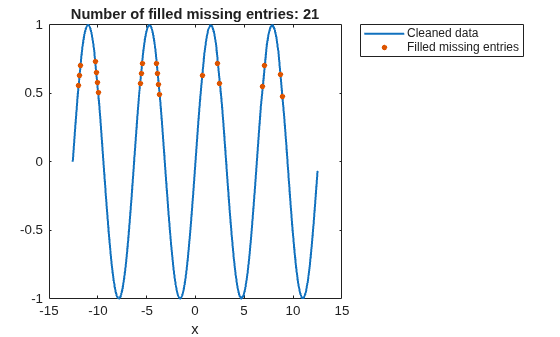
The task plots the cleaned data and indicates that the linear interpolation filled 21 missing entries in the input data.
Because the default legend location covers some filled missing entries, specify the legend location as the outside top-right corner of the axes.
legend("Location","northeastoutside")
Related Examples
Parameters
Version History
Introduced in R2019bSee Also
Functions
Live Editor Tasks
- Clean Outlier Data | Find Local Extrema | Smooth Data | Find and Remove Trends | Find Change Points | Normalize Data | Compute by Group

