SOGI PLL
R2026bEstimate phase angle and frequency of single-phase signal using second-order generalized integrator phase-locked loop
Since R2026b
SOGI PLL block
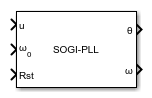
To add a block to a model, double-click the canvas and start typing the block name. Then, select the block from the list.
Libraries:
Power Converter Control with Motor Control Blockset /
Signal Management
Description
The SOGI PLL block estimates the phase angle and frequency of a single-phase input signal using a second-order generalized integrator (SOGI) based phase-locked loop. Use this block to synchronize with grid voltage in single-phase power electronics applications such as inverters and active rectifiers. You can configure the position output format, PI controller gains, and frequency/position units.
Examples
This example shows how to use the SOGI PLL block to track the phase angle of a single-phase grid voltage signal.
Ports
Input
Single-phase input signal to track, specified as a scalar. Connect the voltage or current signal whose phase and frequency you want to estimate.
Data Types: single | double
Initial angular frequency estimate, specified as a scalar in rad/s. Provide the expected nominal frequency of the input signal to help the PLL lock faster.
Dependencies
To enable this port, set Initial frequency to Input port (default).
Data Types: single | double
PLL reset trigger signal, specified as a scalar. A rising edge on this port resets the internal integrators of the SOGI PLL.
Data Types: single | double | Boolean
Output
Estimated phase angle of the input signal, returned as a scalar. The unit depends on the Position unit parameter setting.
Dependencies
To enable this port, set Position output to Angular position (default).
Data Types: single | double
Sine of the estimated phase angle, returned as a scalar.
Dependencies
To enable this port, set Position output to Sine and Cosine Position.
Data Types: single | double
Cosine of the estimated phase angle, returned as a scalar.
Dependencies
To enable this port, set Position output to Sine and Cosine Position.
Data Types: single | double
Estimated angular frequency of the input signal, returned as a scalar. The unit depends on the Frequency unit parameter setting.
Data Types: single | double
Parameters
To edit block parameters interactively, use the Property Inspector. From the Simulink® Toolstrip, on the Simulation tab, in the Prepare gallery, select Property Inspector.
Select the format of the position output signals. When you select Angular position, the block outputs the phase angle on a single port. When you select Sine and Cosine Position, the block outputs the sine and cosine of the phase angle on separate ports.
Programmatic Use
To set the block parameter value programmatically, use
the set_param function.
| Parameter: | PosOut |
| Values: | "Angular position" (default) | "Sine and Cosine Position" |
Example: set_param(gcb,"PosOut","Sine and Cosine Position")
Sample time for the block discrete integration, specified as a positive scalar in seconds. This value determines how often the PLL updates its phase and frequency estimates. Set this to match your model's fixed-step solver step size. A smaller value improves tracking accuracy but increases computational load.
Programmatic Use
To set the block parameter value programmatically, use
the set_param function.
| Parameter: | BlkSampleTime |
| Values: | "50e-6" (default) | positive scalar in quotes |
| Data Types: | char | string |
Example: set_param(gcb,"BlkSampleTime","100e-6")
Select the source of the initial frequency estimate. When you select Input port, the block accepts the initial frequency from the ω0 input port. When you select Specify via dialog, you specify the value using the Initial frequency value (Hz) parameter.
Programmatic Use
To set the block parameter value programmatically, use
the set_param function.
| Parameter: | InitialFreq |
| Values: | "Input port" (default) | "Specify via dialog" |
Example: set_param(gcb,"InitialFreq","Specify via dialog")
Initial frequency estimate for the PLL in Hz, specified as a positive scalar. This value seeds the SOGI filter for faster lock. Set this to the expected nominal grid frequency (50 or 60 Hz). A value closer to the actual signal frequency reduces the PLL settling time.
Dependencies
To enable this parameter, set Initial frequency to Specify via dialog.
Programmatic Use
To set the block parameter value programmatically, use
the set_param function.
| Parameter: | InitialFreqValue |
| Values: | "50" (default) | positive scalar in quotes |
| Data Types: | char | string |
Example: set_param(gcb,"InitialFreqValue","60")
Damping ratio of the SOGI filter, specified as a positive scalar. This value controls the bandwidth and selectivity of the quadrature signal generator. A smaller value provides better harmonic rejection but slower transient response. A larger value improves dynamic tracking but reduces filtering of harmonics and noise.
Programmatic Use
To set the block parameter value programmatically, use
the set_param function.
| Parameter: | K |
| Values: | "0.5" (default) | positive scalar in quotes |
| Data Types: | char | string |
Example: set_param(gcb,"K","0.707")
Proportional gain of the PI controller in the PLL loop, specified as a positive scalar. Increasing this value speeds up frequency tracking but can cause overshoot or oscillation. Decrease this value for smoother phase tracking with less noise sensitivity.
Programmatic Use
To set the block parameter value programmatically, use
the set_param function.
| Parameter: | Kp |
| Values: | "100" (default) | positive scalar in quotes |
| Data Types: | char | string |
Example: set_param(gcb,"Kp","200")
Integral gain of the PI controller in the PLL loop, specified as a positive scalar. This gain eliminates steady-state frequency tracking error. Increasing this value reduces the time to eliminate frequency offset but may increase oscillation during transients.
Programmatic Use
To set the block parameter value programmatically, use
the set_param function.
| Parameter: | Ki |
| Values: | "1000" (default) | positive scalar in quotes |
| Data Types: | char | string |
Example: set_param(gcb,"Ki","2000")
Number of data points in the sine/cosine lookup table, specified as a positive integer. Increasing this value improves the resolution of the angle-to-trigonometric conversion but uses more memory. Common values are 1024 or 2048 for a good balance between accuracy and memory usage on embedded targets.
Programmatic Use
To set the block parameter value programmatically, use
the set_param function.
| Parameter: | N_points |
| Values: | "1024" (default) | positive integer in quotes |
| Data Types: | char | string |
Example: set_param(gcb,"N_points","2048")
Unit for the position output signal. Select Degrees for 0 to 360 range, Radians for 0 to 2*pi range, or Per-unit for 0 to 1 range.
Programmatic Use
To set the block parameter value programmatically, use
the set_param function.
| Parameter: | PositionUnit |
| Values: | "Degrees" (default) | "Radians" | "Per-unit" |
Example: set_param(gcb,"PositionUnit","Radians")
Data type for the position output signal. Specify single for embedded targets with limited floating-point support, or double when higher precision is needed for the phase angle output.
Programmatic Use
To set the block parameter value programmatically, use
the set_param function.
| Parameter: | PositionDataType |
| Values: | "single" (default) |
| Data Types: | char | string |
Example: set_param(gcb,"PositionDataType","double")
Unit for the frequency output signal. Select Degrees/Sec for angular frequency in degrees per second, Radians/Sec for angular frequency in rad/s, or Hz for frequency in hertz.
Programmatic Use
To set the block parameter value programmatically, use
the set_param function.
| Parameter: | FrequencyUnit |
| Values: | "Degrees/Sec" (default) | "Radians/Sec" | "Hz" |
Example: set_param(gcb,"FrequencyUnit","Hz")
Data type for the frequency output signal. Specify single for embedded targets with limited floating-point support, or double when higher precision is needed for the frequency estimate.
Programmatic Use
To set the block parameter value programmatically, use
the set_param function.
| Parameter: | FrequencyDataType |
| Values: | "single" (default) |
| Data Types: | char | string |
Example: set_param(gcb,"FrequencyDataType","double")
Data type for the internal sine/cosine lookup table. Specify single to reduce memory usage on embedded targets, or double to minimize quantization error in the trigonometric computations.
Programmatic Use
To set the block parameter value programmatically, use
the set_param function.
| Parameter: | TableDataType |
| Values: | "single" (default) |
| Data Types: | char | string |
Example: set_param(gcb,"TableDataType","double")
Extended Capabilities
C/C++ Code Generation
Generate C and C++ code using Simulink® Coder™.
HDL Code Generation
Generate VHDL, Verilog and SystemVerilog code for FPGA and ASIC designs using HDL Coder™.
Fixed-Point Conversion
Design and simulate fixed-point systems using Fixed-Point Designer™.
Version History
Introduced in R2026b
MATLAB Command
You clicked a link that corresponds to this MATLAB command:
Run the command by entering it in the MATLAB Command Window. Web browsers do not support MATLAB commands.


Seleccione un país/idioma
Seleccione un país/idioma para obtener contenido traducido, si está disponible, y ver eventos y ofertas de productos y servicios locales. Según su ubicación geográfica, recomendamos que seleccione: .
También puede seleccionar uno de estos países/idiomas:
Cómo obtener el mejor rendimiento
Seleccione China (en idioma chino o inglés) para obtener el mejor rendimiento. Los sitios web de otros países no están optimizados para ser accedidos desde su ubicación geográfica.
América
- América Latina (Español)
- Canada (English)
- United States (English)
Europa
- Belgium (English)
- Denmark (English)
- Deutschland (Deutsch)
- España (Español)
- Finland (English)
- France (Français)
- Ireland (English)
- Italia (Italiano)
- Luxembourg (English)
- Netherlands (English)
- Norway (English)
- Österreich (Deutsch)
- Portugal (English)
- Sweden (English)
- Switzerland
- United Kingdom (English)