Contenido principal

adeDataReader

Read adeInfo object and extract metrics for visualization and analysis

Since R2024b

Description

Use the adeDataReader class to read an adeInfo object or a .mat file to extract metrics and waveform data to MATLAB® base workspace. You can then visualize and analyze the metrics and waveform data from MATLAB command prompt without launching the Mixed-Signal Analyzer app. The adeInfo object is created after launching MATLAB from the Cadence® ADE session. The .mat file is generated by the adeinfo2msa function. You can access data for multiple runs and multiple tests.

Creation

Description

data = adeDataReader reads the adeInfo object available in the base workspace when you launch MATLAB from the Cadence environment and extracts metrics and data for visualization and analyses from MATLAB command prompt.

data = adeDataReader(inputFile) reads the adeInfo object defined in inputFile and extracts metrics and data for visualization and analyses from MATLAB command prompt.

example

Input Arguments

expand all

Input file name, specified as a string. The file must be a .mat file. If the file in not in the present working directory, you can also specify the file path.

Data Types: char

Output Arguments

expand all

Processed metrics and waveform data from adeInfo object, returned as an adeDataReader object. The data object consists of a table containing the metrics data extracted from the input file, a list of variables you can use to plot the trend chart, and a cell array containing the available waveform details.

Properties

expand all

Path to the current input file, returned as a string.

Metrics data extracted from the input file, returned as a table.

Note

You can import the MetricInfo property to Mixed-Signal Analyzer app for further analysis by clicking Import > Workspace from the app toolstrip.

Note

If you are importing data for multiple runs and multiple test cases, you need to access the TestObjects object to view this property. For more information, see Access Data from Cadence for Multiple Test Cases.

A list of available variables to plot the trend chart extracted from the input file, returned as a cell array.

Note

If you are importing data for multiple runs and multiple test cases, you need to access the TestObjects object to view this property. For more information, see Access Data from Cadence for Multiple Test Cases.

The waveform details (analysis and signal names) extracted from the input file, returned as a cell array.

Note

If you are importing data for multiple runs and multiple test cases, you need to access the TestObjects object to view this property. For more information, see Access Data from Cadence for Multiple Test Cases.

Run and test case information from Cadence ADE session, specified as an array of objects. You can import data form multiple runs and multiple test cases. Each RunObject object corresponds to a specific run, containing properties such as Name to identify the run and an array of TestObject instances representing the test cases within that run.

Each TestObject instance corresponds to a specific test case, containing properties such as Name, MetricsInfo, TrendChartFields, and WaveInfo to provide detailed information and access to the test case data.

Example: waveInfo = multiRunReader.RunObjects(1).TestObjects(2).WaveInfo imports waveform data for the second test case in the first run in Cadence ADE session.

The Cadence simulation run name, specified as a string. You can find it in the Cadence interactive run results history as Interactive.<runNumber>.

Note

If you are importing data for multiple runs and multiple test cases, you need to access the RunObjects object to view this property. For more information, see Access Data from Cadence for Multiple Test Cases.

The test name as mentioned in Cadence ADE Maestro view, specified as a string.

Note

If you are importing data for multiple runs and multiple test cases, you need to access the TestObjects object to view this property. For more information, see Access Data from Cadence for Multiple Test Cases.

Object Functions

getWaveDataRetrieve waveform data from adeDataReader object

Examples

collapse all

Unzip the ldo_test_Interactive.244.zip file. Load the ldo_test_Interactive.244.mat file containing the adeInfo object data.

unzip('ldo_test_Interactive.244.zip')
data = adeDataReader('ldo_test_Interactive.244.mat');

Find the available waveform details.

data.WaveInfo
ans = 4×1 cell array
    "'stb, Loop Gain Phase'"
    "'stb, Loop Gain dB20'"
    "'tran, /I_load'"
    "'tran, /ldo_out'"

Get the information about the tran, ldo_out waveform.

wave = data.getWaveData(data.WaveInfo{4});

Plot the waveform.

for i=1:height(wave)
    plot(wave.XValues{i},wave.YValues{i});
    hold on;
end
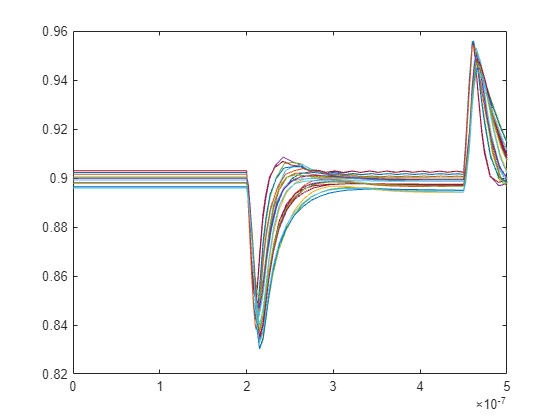
Figure contains an axes object. The axes object contains 48 objects of type line.

To access data for a single run and single test case, launch MATLAB from Cadence ADE session by clicking the M button in the toolbar.

From the Data View panel in Cadence, select the test Bash_Test.
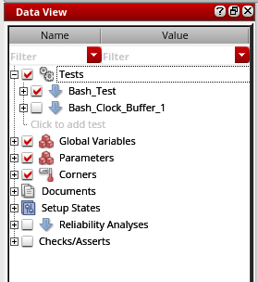
Data View panel with single test selected

In the MATLAB command window, type:

obj=adeDataReader

The objects extracts the simulation data for the Bash_Test test to MATLAB base workspace. You can then use getWaveData function to access the simulation data.
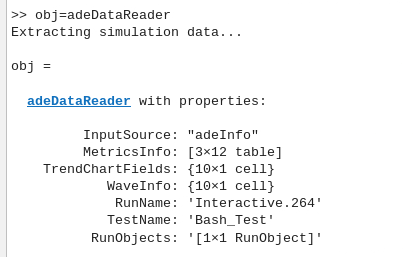
Extracted simulation data for single test

To access data for multiple test cases, launch MATLAB from Cadence ADE session by clicking the M button in the toolbar.

From the Data View panel, select the tests Bash_Test and Bash_Clock_Buffer_1.
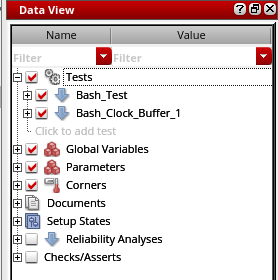
Data view panel with multiple tests selected.

In the MATLAB command window, type:

obj=adeDataReader

The objects extracts the simulation data for the selected tests to MATLAB base workspace.
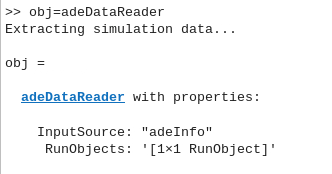
Extracting simulation data for multiple test cases.

To access the run name and the test objects, in the MATLAB command window, type:

obj.RunObjects
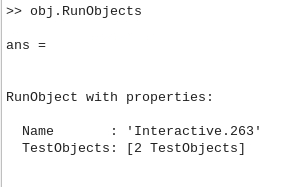
Accessing run name and test objects

To access the simulation data stored in the first test object corresponding to Bash_Clock_Buffer_1, in the MATLAB command window, type:

obj.RunObjects.TestObjects(1)
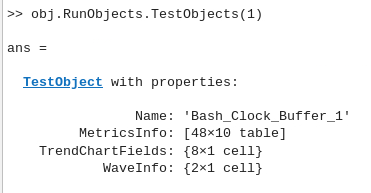
Accessing simulation data stored in test objects

You can then use getWaveData function to access waveform data from the simulation.

Version History

Introduced in R2024b