Contenido principal

displayImage

R2026b

Display an image on the Raspberry Pi hardware or on the LED Matrix of SenseHAT

Description

For Raspberry Pi: displayImage (mypi,img) displays the specified image on the Raspberry Pi® hardware. During simulation, this function displays the image on the computer.

example

For Raspberry Pi: displayImage (mypi,img,Name,Value) displays the specified image with a window title on the Raspberry Pi hardware. During simulation, this function displays the image on the computer.

example

For SenseHAT: displayImage (mysh,img) displays an image of 8 * 8 * 3 dimension on the LED Matrix of SenseHAT.

example

For SenseHAT: displayImage (mysh,img,orientation) displays an image of 8 * 8 * 3 dimension on the LED Matrix of SenseHAT with the specified orientation. The supported values for orientation are: 0, 90, 180, and 270 degrees.

The following image shows the orientations of the LED Matrix.
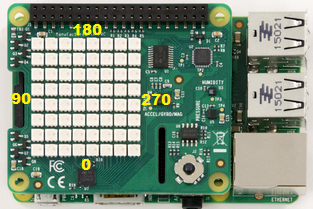
Orientation of LED matrix

Note

To generate C/C++ code for this function, you must have an Embedded Coder® license.

example

Examples

collapse all

Display image on the Raspberry Pi hardware

img=imread('edge_detection.png');
displayImage(mypi,img); 

Displays an image on the hardware.

Display image with the specified title on the image window of the Raspberry Pi hardware

img=imread('edge_detection.png');
displayImage(mypi,img,'Title','Edge Detection'); 

Displays an image with the title, Edge Detection, on the image window of the hardware.

Display image on the LED Matrix

img=imread('senseHAT_demo.png');
displayImage(mysh,img); 

Displays an image of 8 * 8 * 3 dimension on the LED Matrix.

Display image with orientation

img = imread('senseHAT_demo.png');
displayImage(mysh,img,90); 

Displays an image of 8 * 8 * 3 dimension on the LED Matrix with the specified orientation of 90 degrees.

Input Arguments

collapse all

Connection to the Raspberry Pi hardware board, specified as a raspi object.

Connection to a SenseHAT board, specified as a sensehat object.

The image object for display on the LED Matrix of 8 x 8 x 3 dimension or on the Raspberry Pi hardware.

The orientation to be applied for an image to be displayed. The supported values of orientation are 0, 90, 180, and 270.

Name-Value Arguments

collapse all

Specify optional pairs of arguments as Name1=Value1,...,NameN=ValueN, where Name is the argument name and Value is the corresponding value. Name-value arguments must appear after other arguments, but the order of the pairs does not matter.

Example: displayImage(mypi,inputImage,Title='Webcam Output')

Title of the image window displayed on the Raspberry Pi hardware, specified as the name-value argument consisting of Title and the title of the image window.

Example: displayImage(mypi,img,Title='Edge Detection');

Data Types: string

Extended Capabilities

expand all

Version History

Introduced in R2016b