show
Description
show( shows layerobj)layer
information in visual form.
show(
shows layerobj,Name=Value)layer information with optional name-values specified.
Examples
Use the show function to diplay a layer of a pcb
Read-in a pcb file
Use the pcbFileRead object to read in a file. Accepted file formats are:
ODB++
Allegro
Native
Here we are using a native format file
pfile = pcbFileRead('native_ExampleBoard_Allegro')pfile =
pcbFileRead with properties:
FileName: 'native_ExampleBoard_Allegro'
NumLayers: 5
MetalLayer: [1 3 5]
DielectricLayer: [2 4]
LayerHeight: [0.0184 0.0104 0.0092 0.0012 0]
NumCadnets: 7
NumPadStacks: 6
NumComponents: 8
NumParts: 5
Create a layer object
Crate a layer object of metal layer 1
layerobj = layer(pfile,1)
layerobj =
layer with properties:
pcBoard: [1×1 pcbFileRead]
LayerNumber: 1
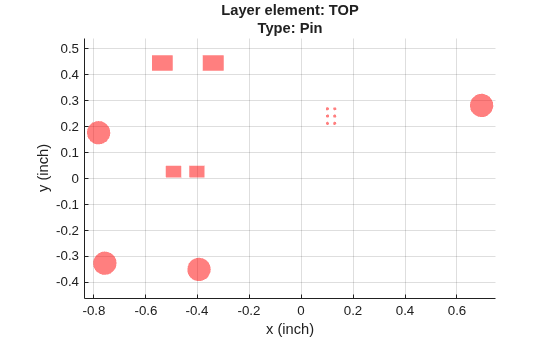
Type: 'Pin'
LayerHeight: 0.0184
NumSurfaces: 1
NumPins: 14
NumVias: 4
NumTraces: 21
EntityList: [1×1 struct]
Show the layer
Use the show function
show(layerobj)

Input Arguments
The layer object specified as a string.
Example: show(layerobjname)
Data Types: string
Name-Value Arguments
Specify optional pairs of arguments as
Name1=Value1,...,NameN=ValueN, where Name is
the argument name and Value is the corresponding value.
Name-value arguments must appear after other arguments, but the order of the
pairs does not matter.
Example: show(layerobjname,Color='red',LineWidth=1)
Use 'Color' to specify the color.
Example: Color='red'
Data Types: string
Use LineWidth to specify the line width.
Example: LineWidth = 1
Data Types: double
Use LineStyle to specify the line style.
Example: LineStyle = '-'
Data Types: char
Version History
Introduced in R2021a
MATLAB Command
You clicked a link that corresponds to this MATLAB command:
Run the command by entering it in the MATLAB Command Window. Web browsers do not support MATLAB commands.
Seleccione un país/idioma
Seleccione un país/idioma para obtener contenido traducido, si está disponible, y ver eventos y ofertas de productos y servicios locales. Según su ubicación geográfica, recomendamos que seleccione: .
También puede seleccionar uno de estos países/idiomas:
Cómo obtener el mejor rendimiento
Seleccione China (en idioma chino o inglés) para obtener el mejor rendimiento. Los sitios web de otros países no están optimizados para ser accedidos desde su ubicación geográfica.
América
- América Latina (Español)
- Canada (English)
- United States (English)
Europa
- Belgium (English)
- Denmark (English)
- Deutschland (Deutsch)
- España (Español)
- Finland (English)
- France (Français)
- Ireland (English)
- Italia (Italiano)
- Luxembourg (English)
- Netherlands (English)
- Norway (English)
- Österreich (Deutsch)
- Portugal (English)
- Sweden (English)
- Switzerland
- United Kingdom (English)