Create Shareable ROS 2 Custom Message Package
R2026bIn this example, you create a shareable ROS 2 custom message package in MATLAB®. You must have a ROS 2 package that contains the required msg file. This figure shows an example of an appropriate folder structure.
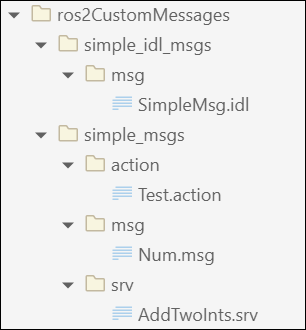
After you prepare your custom message package folder, you specify the path to the parent folder and call ros2genmsg with the specified path.
When generating custom messages on a Windows® machine, the build can fail if the folder path exceeds the Windows MAX_PATH limit. To avoid build failure, you choose one of these options:
Use a shorter folder path or map the longer path to a shorter network drive.
Use the
BuildRootname-value argument to specify an alternate short build path, such as
ros2genmsg(genDir, BuildRoot='C:/shortBuildPath')
This example shows how to generate custom messages at an alternate location with a shorter path.
Create a custom message package folder in a local directory.
genDir = fullfile(pwd, 'ros2CustomMessages');
packagePath = fullfile(genDir, 'simple_msgs');
mkdir(packagePath)
Create a folder named msg inside the custom message package folder.
mkdir(packagePath,'msg')Create a file named .msg inside the msg folder.
messageDefinition = {'int64 num'}messageDefinition = 1×1 cell array
{'int64 num'}
fileID = fopen(fullfile(packagePath,'msg', ...
               'Num.msg'),'w');
fprintf(fileID,'%s\n',messageDefinition{:});
fclose(fileID);
You can also generate custom ROS 2 message, service, and action types directly from ROS 2 IDL (.idl) files.
To create a custom ROS 2 message from .idl file, create another custom message package folder for the .idl files in the directory.
folderPath = fullfile(pwd,"ros2CustomMessages");
packagePath = fullfile(folderPath,"simple_idl_msgs");
mkdir(packagePath)
Create a folder msg inside the custom message package folder.
mkdir(packagePath, "msg")Create an .idl file inside the msg folder.
idlMsgDefinition = {
'module simple_idl_msgs {'
 'module msg {'
    'struct SimpleMsg {'
        'uint8 uint8_type;'
        'string string_type;'
    '};'
 '};'
'};'
}
idlMsgDefinition = 8×1 cell array
"'module simple_idl_msgs {'"
"'module msg {'"
"'struct SimpleMsg {'"
"'uint8 uint8_type;'"
"'string string_type;'"
"'};'"
"'};'"
"'};'"
fileID = fopen(fullfile(packagePath,'msg','SimpleMsg.idl'),'w');
fprintf(fileID,'%s\n',idlMsgDefinition{:});
fclose(fileID);
Now revert the custom message package folder path to simple_msgs and create a folder named srv inside it.
packagePath = fullfile(genDir, 'simple_msgs');
mkdir(packagePath,'srv')
Create a file named .srv inside the srv folder.
serviceDefinition = {'int64 a'
                     'int64 b'
                     '---'
                     'int64 sum'}
serviceDefinition = 4×1 cell array
"'int64 a'"
"'int64 b'"
"'---'"
"'int64 sum'"
fileID = fopen(fullfile(packagePath,'srv', ...
               'AddTwoInts.srv'),'w');
fprintf(fileID,'%s\n',serviceDefinition{:});
fclose(fileID);
Also, create a folder named action inside the custom message package folder.
mkdir(packagePath,'action')Create a file named .action inside the action folder.
actionDefinition = {'int64 goal'
                    '---'
                    'int64 result'
                    '---'
                    'int64 feedback'}
actionDefinition = 5×1 cell array
"'int64 goal'"
"'---'"
"'int64 result'"
"'---'"
"'int64 feedback'"
fileID = fopen(fullfile(packagePath,'action', ...
               'Test.action'),'w');
fprintf(fileID,'%s\n',actionDefinition{:});
fclose(fileID);
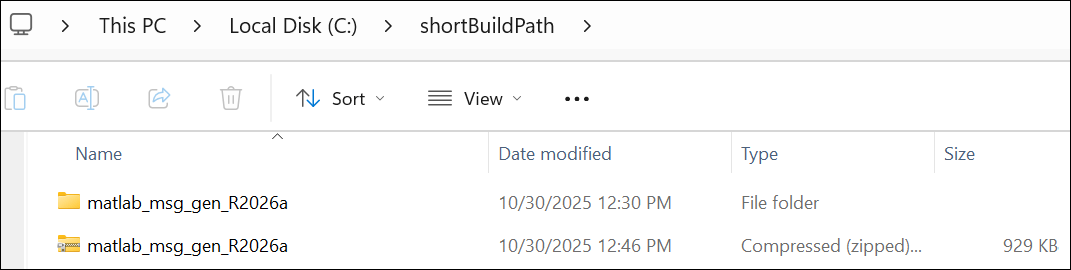
Generate custom messages from ROS 2 definitions in .msg, .srv and .action files. Use the CreateShareableFile name-value argument to create a shareable ZIP archive of the generated custom messages and BuildRoot name-value argument to specify an alternate shorter build path.
For information about how to use this ZIP archive to register the custom messages in another machine, see ros2RegisterMessages.
ros2genmsg(genDir, CreateShareableFile=true, BuildRoot='C:/shortBuildPath');Creating Python virtual environment for ros2.Done. Adding required Python packages to virtual environment.Done. Copying include folders.Done. Copying libraries.Done. Done. [2/2] Generating MATLAB interfaces for custom message packages... Done. Running colcon build in folder 'C:/shortBuildPath/matlab_msg_gen_R2026a/win64'. Build in progress. This may take several minutes... Build succeeded.build_log.Generating zip file in the folder 'C:/shortBuildPath'.Done.
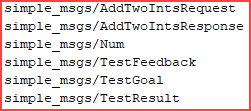
Verify creation of the new custom messages by entering ros2 msg list in the Command Window.